
In this article, we will demonstrate the use of color schemes intidyplots. We will explore the default color schemes that come withtidyplots and are ready to use for plotting. These include schemes fordiscrete, continuous and diverging variables. To conclude, we willdiscuss the creation of custom color schemes from hex values.
Default color schemes
tidyplots comes with a number of default color schemes. Many of themare adapted from theviridisLite andRColorBrewer packages. You access them by loading the thetidyplots library and start typingcolors_. Theauto-completion will guide you through a selection ofdiscrete,continuous anddiverging schemes.
Let’s have a look at the signature scheme of tidyplotscolors_discrete_friendly, which was designed to work wellfor people with color vision deficiency. When running the linecolors_discrete_friendly in the console or within a script,a preview of the scheme will be rendered to the Viewer pane in the lowerright of the RStudio Desktop interface.
In essence, tidyplots color schemes are just a character vector ofhex colors with a special print method that sends a preview to theRStudio viewer pane.
colors_discrete_friendly
A tidyplots color scheme with 6 colors.c(
"#0072B2","#56B4E9","#009E73","#F5C710","#E69F00","#D55E00")
Tip: You can copy individual hex colors directly from the previewto use them in your script.
Discrete
Discrete color schemes are meant for categorical variables. Thedefault schemes in tidyplots consist of 5–7 colors. However, if morecategories are present in the plot, tidyplots will automatically fill upthe gaps between colors to deliver exactly the number that is requiredfor the plot.
Similarly, when more colors are provided than needed, tidyplots willselect the required number of colors by attempting to evenly sample fromthe supplied color vector.
energy|>tidyplot(year,energy, color=energy_source)|>add_barstack_absolute()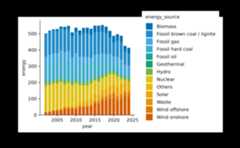
And here are some alternative color schemes.
energy|>tidyplot(year,energy, color=energy_source)|>add_barstack_absolute()|>adjust_colors(colors_discrete_seaside)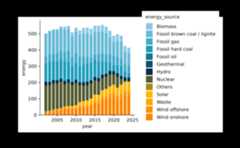
energy|>tidyplot(year,energy, color=energy_source)|>add_barstack_absolute()|>adjust_colors(colors_discrete_friendly_long)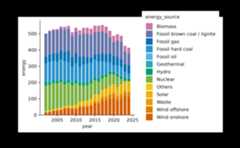
energy|>tidyplot(year,energy, color=energy_source)|>add_barstack_absolute()|>adjust_colors(colors_discrete_apple)
energy|>tidyplot(year,energy, color=energy_source)|>add_barstack_absolute()|>adjust_colors(colors_discrete_ibm)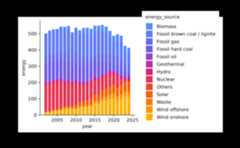
energy|>tidyplot(year,energy, color=energy_source)|>add_barstack_absolute()|>adjust_colors(colors_discrete_candy)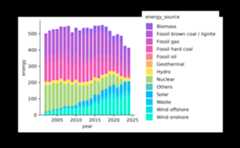
energy|>tidyplot(year,energy, color=energy_source)|>add_barstack_absolute()|>adjust_colors(colors_discrete_alger)
energy|>tidyplot(year,energy, color=energy_source)|>add_barstack_absolute()|>adjust_colors(colors_discrete_rainbow)
Continuous
Continuous color schemes are meant for continuous variables. Thedefault schemes in tidyplots usually consist of 265 colors.
colors_continuous_viridiscolors_continuous_viridis
A tidyplots color scheme with 265 colors, downsampled to 42 colors.c(
"#440154FF","#460A5DFF","#471264FF","#481B6DFF","#482374FF","#472C7AFF","#46337FFF","#443A83FF","#424186FF","#3F4889FF","#3C508BFF","#39568CFF","#365D8DFF","#33638DFF","#306A8EFF","#2D708EFF","#2B758EFF","#297B8EFF","#26818EFF","#24878EFF","#228D8DFF","#20928CFF","#1F988BFF","#1F9F88FF","#20A486FF","#24AA83FF","#29AF7FFF","#31B57BFF","#3BBB75FF","#45C06FFF","#53C569FF","#5EC962FF","#6ECE58FF","#7BD250FF","#8AD647FF","#9CD93CFF","#AADC32FF","#BDDF26FF","#CCE11EFF","#DEE318FF","#EDE51BFF","#FDE725FF")
Here is a use case for a continuous color scheme.
climate|>tidyplot(x=month, y=year, color=max_temperature)|>add_heatmap()
And here are some alternative color schemes.
climate|>tidyplot(x=month, y=year, color=max_temperature)|>add_heatmap()|>adjust_colors(new_colors=colors_continuous_inferno)
climate|>tidyplot(x=month, y=year, color=max_temperature)|>add_heatmap()|>adjust_colors(new_colors=colors_continuous_mako)
climate|>tidyplot(x=month, y=year, color=max_temperature)|>add_heatmap()|>adjust_colors(new_colors=colors_continuous_turbo)
climate|>tidyplot(x=month, y=year, color=max_temperature)|>add_heatmap()|>adjust_colors(new_colors=colors_continuous_rocket)
Diverging
Diverging color schemes are meant for continuous variables that havea central point in the middle. A classical example is the blue–white–redgradient used for gene expression heatmaps.
colors_diverging_blue2redcolors_diverging_blue2red
A tidyplots color scheme with 17 colors.c(
"#0000FF","#1F1FFF","#3F3FFF","#5F5FFF","#7F7FFF","#9F9FFF","#BFBFFF","#DFDFFF","#FFFFFF","#FFDFDF","#FFBFBF","#FF9F9F","#FF7F7F","#FF5F5F","#FF3F3F","#FF1F1F","#FF0000")
Here is a use case for a diverging color scheme.
gene_expression|>tidyplot(x=sample, y=external_gene_name, color=expression)|>add_heatmap(scale="row")|>sort_y_axis_labels(direction)|>adjust_size(height=100)
And here are some alternative color schemes.
gene_expression|>tidyplot(x=sample, y=external_gene_name, color=expression)|>add_heatmap(scale="row")|>sort_y_axis_labels(direction)|>adjust_size(height=100)|>adjust_colors(new_colors=colors_diverging_blue2brown)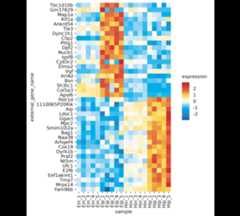
gene_expression|>tidyplot(x=sample, y=external_gene_name, color=expression)|>add_heatmap(scale="row")|>sort_y_axis_labels(direction)|>adjust_size(height=100)|>adjust_colors(new_colors=colors_diverging_spectral)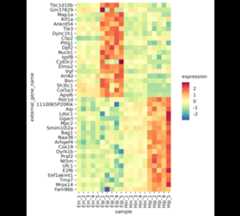
gene_expression|>tidyplot(x=sample, y=external_gene_name, color=expression)|>add_heatmap(scale="row")|>sort_y_axis_labels(direction)|>adjust_size(height=100)|>adjust_colors(new_colors=colors_diverging_icefire)
Custom color schemes
Of course you can also construct custom color schemes using thenew_color_scheme() function.
my_colors<-new_color_scheme(c("#ECA669","#E06681","#8087E2","#E2D269"), name="my_custom_color_scheme")my_colorsmy_custom_color_scheme
A tidyplots color scheme with 4 colors.c(
"#ECA669","#E06681","#8087E2","#E2D269")
Than you can use your scheme as input to theadjust_colors() function.
energy|>tidyplot(year,energy, color=energy_source)|>add_barstack_absolute()|>adjust_colors(new_colors=my_colors)
Besides creating new schemes, you can also subset and concatenateexisting schemes in the exact same way you would do with a regularcharacter string.
colors_discrete_metro[2]Untitled color scheme
A tidyplots color scheme with 1 colors.c(
"#4FAE62")
colors_discrete_metro[2:4]Untitled color scheme
A tidyplots color scheme with 3 colors.c(
"#4FAE62","#F6C54D","#E37D46")
c(colors_discrete_metro,colors_discrete_seaside)Untitled color scheme
A tidyplots color scheme with 10 colors.c(
"#4DACD6","#4FAE62","#F6C54D","#E37D46","#C02D45","#8ecae6","#219ebc","#023047","#ffb703","#fb8500")
What’s more?
To dive deeper into code-based plotting, here a couple ofresources.
tidyplots documentation
Packageindex
Overview of all tidyplots functionsGetstarted
Getting started guideVisualizingdata
Article with examples for common data visualizationsAdvancedplotting
Article about advanced plotting techniques and workflowsColorschemes
Article about the use of color schemes
Other resources
Hands-OnProgramming with R
Free online book by Garrett GrolemundR for Data Science
Free online book by Hadley WickhamFundamentals of DataVisualization
Free online book by Claus O. Wilke