 Try Jupyter Widgets
Jupyter Widgets#
Note
This documentation is foripywidgets 8. See thechangelog for what is new and theuser migration guide for suggestions about migrating fromipywidgets 7.
For custom widget authors, see theauthoring migration guide for suggestions about how to update custom widgets to supportipywidgets 8.
The documentation foripywidgets 7 is available atipywidgets 7 documentation.
Jupyter Widgets areinteractive browser controlsfor Jupyter notebooks. Examples include:
Basic form controls likesliders,checkboxes,text inputs
Container controls liketabs,accordions,horizontal andvertical layout boxes,grid layouts
Advanced controls likemaps,2d and3d visualizations,datagrids, and more
Notebooks come alive when interactive widgets are used. Users can visualize andmanipulate their data in intuitive and easy ways. Researchers can easily seehow changing inputs to a model impact the results. Scientists can shareinteractive results with graphical user interfaces that others can play withwithout seeing code. Exploring, learning, and sharing becomes a fun immersiveexperience.
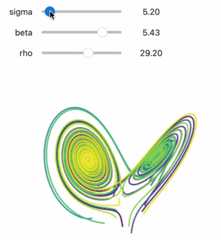
Try it online#
From theTry Jupyter Widgets Now sidebar, you can tryipywidgets in theJupyterLaborJupyter Notebook interfaces, provided byJupyterLite.
Learning Widgets#
This documentation contains a thorough description of the core Jupyter widgetspackage and several examples.
There is avideo tutorial that takes a more step-by-step approach. TheJupyter notebooks for that tutorial arealso available.
Core Jupyter Widgets#
Jupyter Widgets is primarily a framework to provide interactive controls (seeWidget Basics for more information).Theipywidgets packagealso provides a basic, lightweight set of core form controls thatuse thisframework. These included controls include a text area, text box, select andmultiselect controls, checkbox, sliders, tab panels, grid layout, etc.
The framework for building rich interactive objects is the foremost purpose ofthe Jupyter Widgets project, and the set of included core form controls ispurposefully kept small and self-contained. We encourage and support a robustecosystem of packages built on top of the Jupyter Widgets framework to providemore complicated interactive objects, such as maps, 2d and 3d visualizations, orother form control systems built on a variety of popular Javascript frameworkssuch as Material or Vue.
See theJupyter Widgets wiki pagefor more information about custom widget packages built on top of the Jupyter Widgetsframework.
Jupyter Widgets components#
The Jupyter Widgets framework has several components:
A package in thekernel to provide an interface for widgets. The
ipywidgetsPython package provides Jupyter Widgets for the IPythonkernel. Other kernels may also provide Jupyter Widgets support.An extension for the browser Jupyter frontend to manage Jupyter Widgets.Installing
ipywidgetsautomatically installs extensions for JupyterLaband Jupyter Notebook (thejupyterlab-widgetsandwidgetsnbextensionpackages). The Jupyter Widgets project also maintains a plain HTML interfacefor embedding Jupyter Widgets on a webpage, and many other frontends supportJupyter Widgets.
See theJupyter Widgets wiki page for moreinformation from the community about kernels and frontends that support Jupyter Widgets, as well assome custom widget packages built on top of the Jupyter Widgets framework.
- Tutorials
- How-to Guides
- Installation
- Simple Widget Introduction
- Widget List
- Output widgets: leveraging Jupyter’s display system
- Widget Events
- Styling of Jupyter widgets
- Layout of Jupyter widgets
- Using Layout Templates
- Using Interact
- Asynchronous Widgets
- Migrating user code
- Migrating custom widget libraries
- Embedding Jupyter Widgets in Other Contexts than the Notebook
- Developer Install
- Unit Tests
- Visual Regression Tests
- Develop and Build Documentation
- Contributing
- Developer Release Procedure
- Release Notes
- Explanation
- Reference