Module:lib.demo
Module for interactive demos using IPython.
This module implements a few classes for running Python scripts interactivelyin IPython for demonstrations. With very simple markup (a few tags incomments), you can control points where the script stops executing and returnscontrol to IPython.
Provided classes
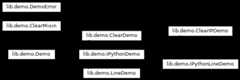
The classes are (see their docstrings for further details):
Demo: pure python demos
IPythonDemo: demos with input to be processed by IPython as if it had beentyped interactively (so magics work, as well as any other special syntax youmay have added via input prefilters).
LineDemo: single-line version of the Demo class. These demos are executedone line at a time, and require no markup.
IPythonLineDemo: IPython version of the LineDemo class (the demo isexecuted a line at a time, but processed via IPython).
ClearMixin: mixin to make Demo classes with less visual clutter. Itdeclares an empty marquee and a pre_cmd that clears the screen before eachblock (see Subclassing below).
ClearDemo, ClearIPDemo: mixin-enabled versions of the Demo and IPythonDemoclasses.
Inheritance diagram:
Subclassing
The classes here all include a few methods meant to make customization bysubclassing more convenient. Their docstrings below have some more details:
highlight(): format every block and optionally highlight comments anddocstring content.
marquee(): generates a marquee to provide visible on-screen markers at eachblock start and end.
pre_cmd(): run right before the execution of each block.
post_cmd(): run right after the execution of each block. If the blockraises an exception, this is NOT called.
Operation
The file is run in its own empty namespace (though you can pass it a string ofarguments as if in a command line environment, and it will see those assys.argv). But at each stop, the global IPython namespace is updated with thecurrent internal demo namespace, so you can work interactively with the dataaccumulated so far.
By default, each block of code is printed (with syntax highlighting) beforeexecuting it and you have to confirm execution. This is intended to show thecode to an audience first so you can discuss it, and only proceed withexecution once you agree. There are a few tags which allow you to modify thisbehavior.
The supported tags are:
# <demo> stop
Defines block boundaries, the points where IPython stops execution of thefile and returns to the interactive prompt.
You can optionally mark the stop tag with extra dashes before and after theword ‘stop’, to help visually distinguish the blocks in a text editor:
# <demo> — stop —
# <demo> silent
Make a block execute silently (and hence automatically). Typically used incases where you have some boilerplate or initialization code which you needexecuted but do not want to be seen in the demo.
# <demo> auto
Make a block execute automatically, but still being printed. Useful forsimple code which does not warrant discussion, since it avoids the extramanual confirmation.
# <demo> auto_all
This tag can _only_ be in the first block, and if given it overrides theindividual auto tags to make the whole demo fully automatic (no block asksfor confirmation). It can also be given at creation time (or the attributeset later) to override what’s in the file.
While _any_ python file can be run as a Demo instance, if there are no stoptags the whole file will run in a single block (no different that callingfirst %pycat and then %run). The minimal markup to make this useful is toplace a set of stop tags; the other tags are only there to let you fine-tunethe execution.
This is probably best explained with the simple example file below. You cancopy this into a file named ex_demo.py, and try running it via:
fromIPython.lib.demoimportDemod=Demo('ex_demo.py')d()
Each time you call the demo object, it runs the next block. The demo objecthas a few useful methods for navigation, like again(), edit(), jump(), seek()and back(). It can be reset for a new run via reset() or reloaded from disk(in case you’ve edited the source) via reload(). See their docstrings below.
Note: To make this simpler to explore, a file called “demo-exercizer.py” hasbeen added to the “docs/examples/core” directory. Just cd to this directory inan IPython session, and type:
%rundemo-exercizer.py
and then follow the directions.
Example
The following is a very simple example of a valid demo file.
#################### EXAMPLE DEMO <ex_demo.py> ###############################'''A simple interactive demo to illustrate the use of IPython's Demo class.'''print('Hello, welcome to an interactive IPython demo.')# The mark below defines a block boundary, which is a point where IPython will# stop execution and return to the interactive prompt. The dashes are actually# optional and used only as a visual aid to clearly separate blocks while# editing the demo code.# <demo> stopx=1y=2# <demo> stop# the mark below makes this block as silent# <demo> silentprint('This is a silent block, which gets executed but not printed.')# <demo> stop# <demo> autoprint('This is an automatic block.')print('It is executed without asking for confirmation, but printed.')z=x+yprint('z =',x)# <demo> stop# This is just another normal block.print('z is now:',z)print('bye!')################### END EXAMPLE DEMO <ex_demo.py> ############################
8 Classes
- classIPython.lib.demo.Demo(src,title='',arg_str='',auto_all=None,format_rst=False,formatter='terminal',style='default')
Bases:
object- __init__(src,title='',arg_str='',auto_all=None,format_rst=False,formatter='terminal',style='default')
Make a new demo object. To run the demo, simply call the object.
See the module docstring for full details and an example (you can useIPython.Demo? in IPython to see it).
Inputs:
- src is either a file, or file-like object, or a
string that can be resolved to a filename.
Optional inputs:
title: a string to use as the demo name. Of most use when the demoyou are making comes from an object that has no filename, or if youwant an alternate denotation distinct from the filename.
arg_str(‘’): a string of arguments, internally converted to a listjust like sys.argv, so the demo script can see a similarenvironment.
auto_all(None): global flag to run all blocks automatically withoutconfirmation. This attribute overrides the block-level tags andapplies to the whole demo. It is an attribute of the object, andcan be changed at runtime simply by reassigning it to a booleanvalue.
format_rst(False): a bool to enable comments and doc stringsformatting with pygments rst lexer
formatter(‘terminal’): a string of pygments formatter name to beused. Useful values for terminals: terminal, terminal256,terminal16m
style(‘default’): a string of pygments style name to be used.
- again()
Move the seek pointer back one block and re-execute.
- back(num=1)
Move the seek pointer back num blocks (default is 1).
- edit(index=None)
Edit a block.
If no number is given, use the last block executed.
This edits the in-memory copy of the demo, it does NOT modify theoriginal source file. If you want to do that, simply open the file inan editor and use reload() when you make changes to the file. Thismethod is meant to let you change a block during a demonstration forexplanatory purposes, without damaging your original script.
- fload()
Load file object.
- highlight(block)
Method called on each block to highlight it content
- jump(num=1)
Jump a given number of blocks relative to the current one.
The offset can be positive or negative, defaults to 1.
- marquee(txt='',width=78,mark='*')
Return the input string centered in a ‘marquee’.
- post_cmd()
Method called after executing each block.
- pre_cmd()
Method called before executing each block.
- reload()
Reload source from disk and initialize state.
- reset()
Reset the namespace and seek pointer to restart the demo
- run_cell(source)
Execute a string with one or more lines of code
- seek(index)
Move the current seek pointer to the given block.
You can use negative indices to seek from the end, with identicalsemantics to those of Python lists.
- show(index=None)
Show a single block on screen
- show_all()
Show entire demo on screen, block by block
- classIPython.lib.demo.IPythonDemo(src,title='',arg_str='',auto_all=None,format_rst=False,formatter='terminal',style='default')
Bases:
DemoClass for interactive demos with IPython’s input processing applied.
This subclasses Demo, but instead of executing each block by the Pythoninterpreter (via exec), it actually calls IPython on it, so that any inputfilters which may be in place are applied to the input block.
If you have an interactive environment which exposes special inputprocessing, you can use this class instead to write demo scripts whichoperate exactly as if you had typed them interactively. The default Democlass requires the input to be valid, pure Python code.
- run_cell(source)
Execute a string with one or more lines of code
- classIPython.lib.demo.LineDemo(src,title='',arg_str='',auto_all=None,format_rst=False,formatter='terminal',style='default')
Bases:
DemoDemo where each line is executed as a separate block.
The input script should be valid Python code.
This class doesn’t require any markup at all, and it’s meant for simplescripts (with no nesting or any kind of indentation) which consist ofmultiple lines of input to be executed, one at a time, as if they had beentyped in the interactive prompt.
Note: the input can not haveany indentation, which means that onlysingle-lines of input are accepted, not even function definitions arevalid.
- reload()
Reload source from disk and initialize state.
- classIPython.lib.demo.IPythonLineDemo(src,title='',arg_str='',auto_all=None,format_rst=False,formatter='terminal',style='default')
Bases:
IPythonDemo,LineDemoVariant of the LineDemo class whose input is processed by IPython.
- classIPython.lib.demo.ClearMixin
Bases:
objectUse this mixin to make Demo classes with less visual clutter.
Demos using this mixin will clear the screen before every block and useblank marquees.
Note that in order for the methods defined here to actually override thoseof the classes it’s mixed with, it must go /first/ in the inheritancetree. For example:
class ClearIPDemo(ClearMixin,IPythonDemo): pass
will provide an IPythonDemo class with the mixin’s features.
- marquee(txt='',width=78,mark='*')
Blank marquee that returns ‘’ no matter what the input.
- pre_cmd()
Method called before executing each block.
This one simply clears the screen.
- classIPython.lib.demo.ClearDemo(src,title='',arg_str='',auto_all=None,format_rst=False,formatter='terminal',style='default')
Bases:
ClearMixin,Demo
- classIPython.lib.demo.ClearIPDemo(src,title='',arg_str='',auto_all=None,format_rst=False,formatter='terminal',style='default')
Bases:
ClearMixin,IPythonDemo
2 Functions
- IPython.lib.demo.re_mark(mark)
- IPython.lib.demo.slide(file_path,noclear=False,format_rst=True,formatter='terminal',style='native',auto_all=False,delimiter='...')