この広告は、90日以上更新していないブログに表示しています。
GPT(GUID Partition Table) に関するメモ
2TB以上のディスクを扱うこととなり、ようやく GPT を使い始めた。調べた事をメモしておく。
GPTとMBRの概観
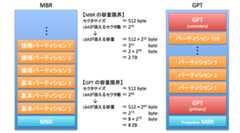
GPT の特徴は主に次の4点だと認識した。
- 扱えるディスクの容量は、MBR が 2TB であるのに対して GPT は 8ZB と大きく拡張される。
- GPT では標準で 128 個のパーティションエントリがあり、基本パーティション・論理パーティションといった考え方は不要になる。シンプルだ。
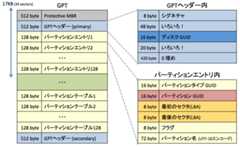
- GPT にはディスクおよび各パーティションごとにGUIDが定義されており、ファイルシステムやLVM PVを作成しなくても、生のディスクとパーティションを明確に識別できる。
- 72バイトのパーティション名が定義できる。
ほかの GPT の特徴で押さえておきたいと思った点は以下のとおり。
GUIDによるディスクとパーティションの認識
GPT の名前は GUID Partition Table である。パーティションテーブルにおいてわざわざ GUID という言葉を前面に出していることに最初違和感を感じた。調べていくうちに GUID は「udevを使用したディスクの固定化」で取り上げた WWID と同等のディスク固有の情報をベンダーに依存せず得られる素晴らしいものだと理解した。
GPTの動作を確認してみる
GPTの検証環境はCentOS 7.0 とし、コマンドは gdisk を使用する。理由は以下のとおり。
- GPTでフォーマットするには gdisk コマンドか parted コマンドを使用する。
- 標準で udev が GPT をサポートするのは RHEL7 から(のように見える)。
まずはフォーマット
空のディスクの状態を確認する。空なので GPT もMBR も not present となっている。
# gdisk -l /dev/sdbGPT fdisk (gdisk) version 0.8.6Partition table scan: MBR: not present BSD: not present APM: not present GPT: not presentCreating new GPT entries.Disk /dev/sdb: 2097152 sectors, 1024.0 MiBLogical sector size: 512 bytesDisk identifier (GUID): 04615B34-7548-4706-939A-254942CF6161Partition table holds up to 128 entriesFirst usable sector is 34, last usable sector is 2097118Partitions will be aligned on 2048-sector boundariesTotal free space is 2097085 sectors (1024.0 MiB)Number Start (sector) End (sector) Size Code Name
gdisk を起動して o (create a new empty GUID partition table (GPT)) にて GPT に初期化し、w で書き込みする。
# gdisk /dev/sdbGPT fdisk (gdisk) version 0.8.6Partition table scan: MBR: not present BSD: not present APM: not present GPT: not presentCreating new GPT entries.Command (? for help): mbback up GPT data to a filecchange a partition's nameddelete a partitionishow detailed information on a partitionllist known partition typesnadd a new partitionocreate a new empty GUID partition table (GPT)pprint the partition tableqquit without saving changesrrecovery and transformation options (experts only)ssort partitionstchange a partition's type codevverify diskwwrite table to disk and exitxextra functionality (experts only)?print this menuCommand (? for help): oThis option deletes all partitions and creates a new protective MBR.Proceed? (Y/N): YCommand (? for help): pDisk /dev/sdb: 2097152 sectors, 1024.0 MiBLogical sector size: 512 bytesDisk identifier (GUID): 7DA9D54E-B5B9-4485-8EFC-63DD310FA98BPartition table holds up to 128 entriesFirst usable sector is 34, last usable sector is 2097118Partitions will be aligned on 2048-sector boundariesTotal free space is 2097085 sectors (1024.0 MiB)Number Start (sector) End (sector) Size Code NameCommand (? for help): wFinal checks complete. About to write GPT data. THIS WILL OVERWRITE EXISTINGPARTITIONS!!Do you want to proceed? (Y/N): YOK; writing new GUID partition table (GPT) to /dev/sdb.The operation has completed successfully.
再びディスクの内容を確認すると、MBR が protective、GPT が present となりフォーマットされている。
また、ディスクGUIDは「7DA9D54E-B5B9-4485-8EFC-63DD310FA98B」が生成された。
# gdisk -l /dev/sdbGPT fdisk (gdisk) version 0.8.6Partition table scan: MBR: protective BSD: not present APM: not present GPT: presentFound valid GPT with protective MBR; using GPT.Disk /dev/sdb: 2097152 sectors, 1024.0 MiBLogical sector size: 512 bytesDisk identifier (GUID): 7DA9D54E-B5B9-4485-8EFC-63DD310FA98BPartition table holds up to 128 entriesFirst usable sector is 34, last usable sector is 2097118Partitions will be aligned on 2048-sector boundariesTotal free space is 2097085 sectors (1024.0 MiB)Number Start (sector) End (sector) Size Code Name
パーティション作成
再び gdisk を起動し、fdisk と同様に n を入力して 100MiB のパーティションを 2 個作成する。
# gdisk /dev/sdbGPT fdisk (gdisk) version 0.8.6Partition table scan: MBR: protective BSD: not present APM: not present GPT: presentFound valid GPT with protective MBR; using GPT.Command (? for help): nPartition number (1-128, default 1): 1First sector (34-2097118, default = 2048) or {+-}size{KMGTP}: Last sector (2048-2097118, default = 2097118) or {+-}size{KMGTP}: +100MCurrent type is 'Linux filesystem'Hex code or GUID (L to show codes, Enter = 8300): 8300Changed type of partition to 'Linux filesystem'Command (? for help): nPartition number (2-128, default 2): 2First sector (34-2097118, default = 206848) or {+-}size{KMGTP}: Last sector (206848-2097118, default = 2097118) or {+-}size{KMGTP}: +100MCurrent type is 'Linux filesystem'Hex code or GUID (L to show codes, Enter = 8300): 8300Changed type of partition to 'Linux filesystem'GPT固有のものとして、パーティション名を c (change a partition's name) にて設定する。
名前はOracle Database 用を想像してoracle.instance01.data01 とoracle.instance01.redo01 とする。
Command (? for help): cPartition number (1-2): 1Enter name: oracle.instance01.data01Command (? for help): cPartition number (1-2): 2Enter name: oracle.instance01.redo01
パーティションの詳細情報を i (show detailed information on a partition) にて表示すると、パーティションタイプGUID(Partition GUID code)、パーティションGUID(Partition unique GUID)、パーティション名(Partition name)が確認できる。確認後は w で書き込みする。
Command (? for help): iPartition number (1-2): 1Partition GUID code: 0FC63DAF-8483-4772-8E79-3D69D8477DE4 (Linux filesystem)Partition unique GUID: 47255B90-B0C3-4FDD-B747-1A03F09D6241First sector: 2048 (at 1024.0 KiB)Last sector: 206847 (at 101.0 MiB)Partition size: 204800 sectors (100.0 MiB)Attribute flags: 0000000000000000Partition name: 'oracle.instance01.data01'Command (? for help): iPartition number (1-2): 2Partition GUID code: 0FC63DAF-8483-4772-8E79-3D69D8477DE4 (Linux filesystem)Partition unique GUID: DB304E5C-6A1A-4943-9271-C9EDE8816569First sector: 206848 (at 101.0 MiB)Last sector: 411647 (at 201.0 MiB)Partition size: 204800 sectors (100.0 MiB)Attribute flags: 0000000000000000Partition name: 'oracle.instance01.redo01'Command (? for help): pDisk /dev/sdb: 2097152 sectors, 1024.0 MiBLogical sector size: 512 bytesDisk identifier (GUID): 7DA9D54E-B5B9-4485-8EFC-63DD310FA98BPartition table holds up to 128 entriesFirst usable sector is 34, last usable sector is 2097118Partitions will be aligned on 2048-sector boundariesTotal free space is 1687485 sectors (824.0 MiB)Number Start (sector) End (sector) Size Code Name 1 2048 206847 100.0 MiB 8300 oracle.instance01.data0 2 206848 411647 100.0 MiB 8300 oracle.instance01.redo0Command (? for help): wFinal checks complete. About to write GPT data. THIS WILL OVERWRITE EXISTINGPARTITIONS!!Do you want to proceed? (Y/N): YOK; writing new GUID partition table (GPT) to /dev/sdb.The operation has completed successfully.
ディスクの内容を確認すると、定義したパーティションが設定したパーティション名とともに表示されている。
# gdisk -l /dev/sdbGPT fdisk (gdisk) version 0.8.6Partition table scan: MBR: protective BSD: not present APM: not present GPT: presentFound valid GPT with protective MBR; using GPT.Disk /dev/sdb: 2097152 sectors, 1024.0 MiBLogical sector size: 512 bytesDisk identifier (GUID): 7DA9D54E-B5B9-4485-8EFC-63DD310FA98BPartition table holds up to 128 entriesFirst usable sector is 34, last usable sector is 2097118Partitions will be aligned on 2048-sector boundariesTotal free space is 1687485 sectors (824.0 MiB)Number Start (sector) End (sector) Size Code Name 1 2048 206847 100.0 MiB 8300 oracle.instance01.data0 2 206848 411647 100.0 MiB 8300 oracle.instance01.redo0
このパーティション定義が完了した時点で、RHEL7 (CentOS 7) では udev により、/dev/disk の by-partuuid 下と by-partlabel 下に永続的なデバイスファイル(シンボリックリンク)が作成される。by-partuuid 下には先ほど gdisk の i にて確認したパーティションGUIDでデバイスファイルが、by-partlabel 下にはパーティション名でデバイスファイルが作成される。これらはディスクの接続位置や認識順に影響を受ける事はない。
# ls -l /dev/disk/by-partuuid/total 0lrwxrwxrwx. 1 root root 10 Feb 1 05:36 47255b90-b0c3-4fdd-b747-1a03f09d6241 -> ../../sdb1lrwxrwxrwx. 1 root root 10 Feb 1 05:36 db304e5c-6a1a-4943-9271-c9ede8816569 -> ../../sdb2# ls -l /dev/disk/by-partlabel/total 0lrwxrwxrwx. 1 root root 10 Feb 1 05:36 oracle.instance01.data01 -> ../../sdb1lrwxrwxrwx. 1 root root 10 Feb 1 05:36 oracle.instance01.redo01 -> ../../sdb2
/dev/disk/by-uuid の下には何も作成されない。また、ディスクGUIDに対応するデバイスファイル(シンボリックリンク)は作成されない。
# ls -l /dev/disk/by-uuid/total 0lrwxrwxrwx. 1 root root 10 Feb 1 04:54 0c5d7a5f-df44-4059-964a-816fdc66885f -> ../../sda1lrwxrwxrwx. 1 root root 9 Feb 1 04:54 2014-07-06-17-32-07-00 -> ../../sr0lrwxrwxrwx. 1 root root 10 Feb 1 04:54 73b76f8e-7374-4a63-b07e-4b83e9aaec5a -> ../../dm-1lrwxrwxrwx. 1 root root 10 Feb 1 04:54 e81d7bcd-cf44-4b07-a55f-f115320b1f95 -> ../../dm-0
fstabに書いてみる
ファイルシステムを作成。
# mkfs.xfs /dev/disk/by-partlabel/oracle.instance01.data01meta-data=/dev/disk/by-partlabel/oracle.instance01.data01 isize=256 agcount=4, agsize=6400 blks = sectsz=512 attr=2, projid32bit=1 = crc=0data = bsize=4096 blocks=25600, imaxpct=25 = sunit=0 swidth=0 blksnaming =version 2 bsize=4096 ascii-ci=0 ftype=0log =internal log bsize=4096 blocks=853, version=2 = sectsz=512 sunit=0 blks, lazy-count=1realtime =none extsz=4096 blocks=0, rtextents=0# mkfs.xfs /dev/disk/by-partlabel/oracle.instance01.redo01meta-data=/dev/disk/by-partlabel/oracle.instance01.redo01 isize=256 agcount=4, agsize=6400 blks = sectsz=512 attr=2, projid32bit=1 = crc=0data = bsize=4096 blocks=25600, imaxpct=25 = sunit=0 swidth=0 blksnaming =version 2 bsize=4096 ascii-ci=0 ftype=0log =internal log bsize=4096 blocks=853, version=2 = sectsz=512 sunit=0 blks, lazy-count=1realtime =none extsz=4096 blocks=0, rtextents=0
マウントポイントを作成し、fstabに追記する。/oracle/instance01/data01 は by-partlabel で、redo01 は by-partuuid でトライ。
# mkdir -p /oracle/instance01/data01# mkdir -p /oracle/instance01/redo01# echo "/dev/disk/by-partlabel/oracle.instance01.data01 /oracle/instance01/data01 xfs defaults 0 0" >> /etc/fstab# echo "/dev/disk/by-partuuid/db304e5c-6a1a-4943-9271-c9ede8816569 /oracle/instance01/redo01 xfs defaults 0 0" >> /etc/fstab# cat /etc/fstab | grep oracle/dev/disk/by-partlabel/oracle.instance01.data01 /oracle/instance01/data01 xfs defaults 0 0/dev/disk/by-partuuid/db304e5c-6a1a-4943-9271-c9ede8816569 /oracle/instance01/redo01 xfs defaults 0 0
マウント!
# mount | grep oracle# mount -a# mount | grep oracle/dev/sdb1 on /oracle/instance01/data01 type xfs (rw,relatime,seclabel,attr2,inode64,noquota)/dev/sdb2 on /oracle/instance01/redo01 type xfs (rw,relatime,seclabel,attr2,inode64,noquota)
ディスクGUIDとパーティションGUIDを書き換える
ディスクGUIDやパーティションGUIDは gdisk のエキスパートモードに入る事で変更することができる。
もちろんGUIDの趣旨からすれば、変更することはなかなかないはずだが、ディスク上にGUIDを書き込んでいるという感覚を持つために書き換えはぜひともやってみたい行為だ。
上記の検証で、2番目のパーティションについては fstab に by-partuuid 下のデバイス名を使用して設定しているため、パーティションGUIDは1番目のパーティションについて変更する。ディスクGUIDはどこにも使用されていないので気にせず変更する。
gdisk を起動し、変更前のディスクGUID(7DA9D54E-B5B9-4485-8EFC-63DD310FA98B)とパーティションGUID(47255B90-B0C3-4FDD-B747-1A03F09D6241)を確認する。
# gdisk /dev/sdbGPT fdisk (gdisk) version 0.8.6Partition table scan: MBR: protective BSD: not present APM: not present GPT: presentFound valid GPT with protective MBR; using GPT.Command (? for help): pDisk /dev/sdb: 2097152 sectors, 1024.0 MiBLogical sector size: 512 bytesDisk identifier (GUID): 7DA9D54E-B5B9-4485-8EFC-63DD310FA98BPartition table holds up to 128 entriesFirst usable sector is 34, last usable sector is 2097118Partitions will be aligned on 2048-sector boundariesTotal free space is 1687485 sectors (824.0 MiB)Number Start (sector) End (sector) Size Code Name 1 2048 206847 100.0 MiB 8300 oracle.instance01.data0 2 206848 411647 100.0 MiB 8300 oracle.instance01.redo0Command (? for help): iPartition number (1-2): 1Partition GUID code: 0FC63DAF-8483-4772-8E79-3D69D8477DE4 (Linux filesystem)Partition unique GUID: 47255B90-B0C3-4FDD-B747-1A03F09D6241First sector: 2048 (at 1024.0 KiB)Last sector: 206847 (at 101.0 MiB)Partition size: 204800 sectors (100.0 MiB)Attribute flags: 0000000000000000Partition name: 'oracle.instance01.data01'
x を入力してエキスパートモードに移行する。
Command (? for help): ?bback up GPT data to a filecchange a partition's nameddelete a partitionishow detailed information on a partitionllist known partition typesnadd a new partitionocreate a new empty GUID partition table (GPT)pprint the partition tableqquit without saving changesrrecovery and transformation options (experts only)ssort partitionstchange a partition's type codevverify diskwwrite table to disk and exitxextra functionality (experts only)?print this menuCommand (? for help): xExpert command (? for help): ?aset attributescchange partition GUIDddisplay the sector alignment valueerelocate backup data structures to the end of the diskgchange disk GUIDhrecompute CHS values in protective/hybrid MBRishow detailed information on a partitionlset the sector alignment valuemreturn to main menuncreate a new protective MBRoprint protective MBR datapprint the partition tableqquit without saving changesrrecovery and transformation options (experts only)sresize partition tablettranspose two partition table entriesuReplicate partition table on new devicevverify diskwwrite table to disk and exitzzap (destroy) GPT data structures and exit?print this menu
g (change disk GUID) と c (change partition GUID) でそれぞれディスクGUID、パーティションGUIDを変更する。単に R と入力すれば自動生成されたものになるため、ここでは自動生成した。
Expert command (? for help): gEnter the disk's unique GUID ('R' to randomize): RThe new disk GUID is 3B408CEA-E7E2-4E6E-95F9-ED491BC1418FExpert command (? for help): cPartition number (1-2): 1Enter the partition's new unique GUID ('R' to randomize): RNew GUID is 31D7AFA7-6AAE-4849-9BC3-8E1EBAEC0643ディスクGUIDとパーティションGUIDが(メモリ上で)変更されていることを確認し、w で書き込む。
Expert command (? for help): pDisk /dev/sdb: 2097152 sectors, 1024.0 MiBLogical sector size: 512 bytesDisk identifier (GUID): 3B408CEA-E7E2-4E6E-95F9-ED491BC1418FPartition table holds up to 128 entriesFirst usable sector is 34, last usable sector is 2097118Partitions will be aligned on 2048-sector boundariesTotal free space is 1687485 sectors (824.0 MiB)Number Start (sector) End (sector) Size Code Name 1 2048 206847 100.0 MiB 8300 oracle.instance01.data0 2 206848 411647 100.0 MiB 8300 oracle.instance01.redo0Expert command (? for help): iPartition number (1-2): 1Partition GUID code: 0FC63DAF-8483-4772-8E79-3D69D8477DE4 (Linux filesystem)Partition unique GUID: 31D7AFA7-6AAE-4849-9BC3-8E1EBAEC0643First sector: 2048 (at 1024.0 KiB)Last sector: 206847 (at 101.0 MiB)Partition size: 204800 sectors (100.0 MiB)Attribute flags: 0000000000000000Partition name: 'oracle.instance01.data01'Expert command (? for help): wFinal checks complete. About to write GPT data. THIS WILL OVERWRITE EXISTINGPARTITIONS!!Do you want to proceed? (Y/N): YOK; writing new GUID partition table (GPT) to /dev/sdb.Warning: The kernel is still using the old partition table.The new table will be used at the next reboot.The operation has completed successfully.
/dev/disk/by-partuuid 下の状態にはすぐには反映されなかった。
# ls -l /dev/disk/by-partuuid/total 0lrwxrwxrwx. 1 root root 10 Feb 1 06:47 47255b90-b0c3-4fdd-b747-1a03f09d6241 -> ../../sdb1lrwxrwxrwx. 1 root root 10 Feb 1 06:47 db304e5c-6a1a-4943-9271-c9ede8816569 -> ../../sdb2
再起動してみるとさすがに反映された。fstab に基づく自動マウントも特に問題無し。
# ls -l /dev/disk/by-partuuid/total 0lrwxrwxrwx. 1 root root 10 Feb 1 09:15 31d7afa7-6aae-4849-9bc3-8e1ebaec0643 -> ../../sdb1lrwxrwxrwx. 1 root root 10 Feb 1 09:15 db304e5c-6a1a-4943-9271-c9ede8816569 -> ../../sdb2# mount | grep oracle/dev/sdb1 on /oracle/instance01/data01 type xfs (rw,relatime,seclabel,attr2,inode64,noquota)/dev/sdb2 on /oracle/instance01/redo01 type xfs (rw,relatime,seclabel,attr2,inode64,noquota)
/dev 直下にパーティション名のデバイスファイル(シンボリックリンク)を作成する
パーティション名に基づき /dev/disk/by-partlabel 下にデバイスファイル(シンボリックリンク)が作成されるのは便利なのだが、ややパスが長いので /dev 直下に欲しい。というわけで udev のルールを定義。
ルール作成のための情報収集
カーネルの認識上 sdb1 (または sdb2) となっているブロックデバイスのルール作成に使用できるネタは udevadm コマンドの info サブコマンドで収集できる。なお、--path には /sysファイルシステム内のパスを指定する。
# udevadm info --query=all --path=/sys/class/block/sdb1P: /block/sdb/sdb1N: sdb1S: disk/by-partlabel/oracle.instance01.data01S: disk/by-partuuid/31d7afa7-6aae-4849-9bc3-8e1ebaec0643S: disk/by-path/pci-0000:03:00.0-scsi-0:0:1:0-part1S: disk/by-uuid/bfa18ee8-a643-4eb5-9472-c0cd6d381b5aE: DEVLINKS=/dev/disk/by-partlabel/oracle.instance01.data01 /dev/disk/by-partuuid/31d7afa7-6aae-4849-9bc3-8e1ebaec0643 /dev/disk/by-path/pci-0000:03:00.0-scsi-0:0:1:0-part1 /dev/disk/by-uuid/bfa18ee8-a643-4eb5-9472-c0cd6d381b5aE: DEVNAME=/dev/sdb1E: DEVPATH=/block/sdb/sdb1E: DEVTYPE=partitionE: ID_BUS=scsiE: ID_FS_TYPE=xfsE: ID_FS_USAGE=filesystemE: ID_FS_UUID=bfa18ee8-a643-4eb5-9472-c0cd6d381b5aE: ID_FS_UUID_ENC=bfa18ee8-a643-4eb5-9472-c0cd6d381b5aE: ID_MODEL=Virtual_diskE: ID_MODEL_ENC=Virtual\x20disk\x20\x20\x20\x20E: ID_PART_ENTRY_DISK=8:16E: ID_PART_ENTRY_NAME=oracle.instance01.data01E: ID_PART_ENTRY_NUMBER=1E: ID_PART_ENTRY_OFFSET=2048E: ID_PART_ENTRY_SCHEME=gptE: ID_PART_ENTRY_SIZE=204800E: ID_PART_ENTRY_TYPE=0fc63daf-8483-4772-8e79-3d69d8477de4E: ID_PART_ENTRY_UUID=31d7afa7-6aae-4849-9bc3-8e1ebaec0643E: ID_PART_TABLE_TYPE=gptE: ID_PATH=pci-0000:03:00.0-scsi-0:0:1:0E: ID_PATH_TAG=pci-0000_03_00_0-scsi-0_0_1_0E: ID_REVISION=1.0E: ID_SCSI=1E: ID_TYPE=diskE: ID_VENDOR=VMwareE: ID_VENDOR_ENC=VMware\x20\x20E: MAJOR=8E: MINOR=17E: SUBSYSTEM=blockE: TAGS=:systemd:E: USEC_INITIALIZED=46923
使えそうなエントリは以下のとおり。
- ID_PART_TABLE_TYPE=gpt
- ID_PART_ENTRY_NAME=oracle.instance01.data01
ルール作成
/etc/udev/rules.d/70-persistent-by-partlabel.rules を作成する。
# vi /etc/udev/rules.d/70-persistent-by-partlabel.rules# cat /etc/udev/rules.d/70-persistent-by-partlabel.rules KERNEL=="sd*", ENV{ID_PART_TABLE_TYPE}=="gpt", ENV{ID_PART_ENTRY_NAME}!="", SYMLINK+="$env{ID_PART_ENTRY_NAME}"C言語風の書き方をすれば、上記はこんなところである。sd* の名前を持ち、GTPのパーティションでパーティション名があるのなら、シンボリックリンクをパーティション名で追加する。
if ( カーネル内の認識名=="sd*" ) if ( ENV{ID_PART_TABLE_TYPE}=="gpt" ) if ( ENV{ID_PART_ENTRY_NAME}!="" ) SYMLINK+="$env{ID_PART_ENTRY_NAME}"ルール適用
udevadm コマンドで設定をリロードし、sdb に関するルールを再適用してみると、期待通りに /dev/oracle.instance01.data01 などのシンボリックリンクが作成された。念のため再起動してみてもうまく動作していた。
# udevadm control --reload# udevadm trigger --parent-match=/sys/class/block/sdb# ls -l /dev/oracle*lrwxrwxrwx. 1 root root 4 Feb 1 10:36 /dev/oracle.instance01.data01 -> sdb1lrwxrwxrwx. 1 root root 4 Feb 1 10:36 /dev/oracle.instance01.redo01 -> sdb2

