Help
The following shows how to operate (especially, how to search) and each screen display.
1. Search from front page
There are three ways to search for authority data as shown in Figure 1, i.e.1-1. Search by Keyword,1-2. Search by Classification Numbers and1-3. Search by Identifier.
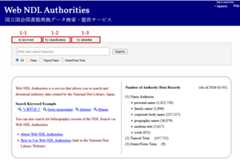
Figure 1: Web NDL Authorities Front Page (Keyword Search) Screen
1-1. Search by Keyword
Click the “by keyword” tab shown in 1-1 to enter the search keyword in the input field and start searching.
Users may select the “All”, “Name”, or “Topical Name”, or “Genre/Form Term” radio button beneath the input field. After selecting “Name”, users can search by Personal Name, Family Name, Corporate Body Name, Geographic Name, Uniform Title and Work. After selecting “Topical Name”, users can search by Topical Term and Subdivision. After selecting Genre/Form Term, users can search by Genre/Form Term.
1-1-1. Search Object
Search objects include Names/Titles, Variant Names/Titles as well as katakana form and romanized form of them.
If you search for personal names and cannot find any results, be sure to insert a space between the family name and given name, especially for names with three or more words.
Search results are affected by spaces between words. If your search does not find any items of interest by using katakana form or romanized form, be sure to separate each word with a space.
Example(ID: 00054222):Name/Title “夏目, 漱石, 1867-1916 (ナツメ, ソウセキ, 1867-1916)”
Both the word with spaces “ナツメ ソウセキ”, and the word without spaces “ナツメソウセキ” find items of interest.
Example (ID: 00440510):Name/Title “García Márquez, Gabriel, 1927-2014”Variant Name(s) / Title(s) “ガルシア・マルケス, ガブリエル”
The word with spaces “ガルシア マルケス ガブリエル” finds items of interest.
The word without spaces “ガルシアマルケスガブリエル” does not find items of interest.
1-1-2. Normalization of Characters
Characters shown below are normalized and are considered identical in searches. Thus, a user may input either form and get the same search results.
- Hiragana/Katakana, Alphabet (Upper/Lower cases, Full-/Half- width), Numbers (Full-/Half- width), Basic Latin/Extended Latin
- Upper case “ツ”, “ヤ”, “ユ”, “ヨ”, “ア”, “イ”, “ウ”, “エ”, “オ”, “ワ” and lower case “ッ”, “ャ”, “ュ”, “ョ”, “ァ”, “ィ”, “ゥ”, “ェ”, “ォ”, “ヮ” are recognized as the same letter (same for hiragana).
Examples:
Searching for “ギリシャ” also finds “ギリシヤ”.
Searching for “カッテ” also finds “カツテ”. - Voiced sound mark (゛)/ Semi-voiced sound mark (゜)/No voiced sound mark・No semi-voiced sound mark
Example:
Searching for “パリ” finds both “パリ” and “バリ”. - “ヴァ”, “ヴィ”, “ヴ”, “ヴェ”, “ヴォ” / “バ”, “ビ”, “ブ”, “ベ”, “ボ”
Example:
Searching for “ヴァイオリン” also finds “バイオリン”. - Variants of Kanji
Example:
Searching for “渡辺” finds “渡邉” and “渡邊” as well.
The following codes are not recognized.
- Half-width apostrophes (‘), plus signs (+), periods (.), grave accents (`), or hyphens (-)
All half-width and full-width punctuations or symbols other than the above are handled as spaces. An AND search is conducted for character strings before and after a space.
Example(ID: 00276855):Name/Title “AT&Tベル研究所”
You can also get the same results by searching for “AT△Tベル研究所”, where the △ indicates a space. Searching for “ATTベル研究所” does not find any items of interest.
Example (ID: 034358228):Name/Title “装束--保存・修復”
You can also get the same results by searching for the word “装束–保存・修復” and “装束–保存△修復”, where the △ indicates a space.
Searching for “装束–保存修復” does not find any items of interest.
As of October 2025, the full-width middle dot “・” was changed from a character that is not recognized to one that is treated in the same way as a space.
1-1-3. Prefix Search
Adding either a half-width asterisk (*) or full-width asterisk (*) to the end of a search string conducts a prefix search.
Example: Searching for “日本歴史*” finds the Names/Titles that start with “日本歴史”, including “日本歴史学会” and “日本–歴史–1945–1952”.
1-1-4. Restriction
Due to system restrictions, a keyword that contains only a single kanji in combination with other characters will often fail to find meaningful hits from the authority data.
Examples: Searching for “さいたま市” does not find “さいたま市立中央図書館”, because the search index contains “さいたま” and “市立” as separate words.
Alternatively, searching for “さいたま” or “さいたま市立” does find “さいたま市立中央図書館”.
1-2. Search by Classification Numbers
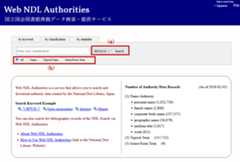
The Classification Number Search allows users to search for authority data for Geographic Name, Uniform Title, Work, and Topical Term by representative classification numbers from the Nippon Decimal Classification (NDC) 9th Revised Edition, NDC 10th Revised Edition orthe National Diet Library Classification (NDLC), which are assigned to the authority data. Users can choose either from a dropdown list ((a) in Figure 2) to search. In addition to searching for exact matches, users can do a prefix search by adding either a half-width asterisk (*) or full-width asterisk (*) at the end of the search string.
Example: Searching for ME352 will find Names/Titles with a representative classification of ME352, such as “阿賀川”, etc.
Example: Searching for ME* will find Names/Titles with a representative classification that starts with ME, such as “雨” (representative classification of ME129) or “阿賀川” (representative classification of ME352).
Users may select “All”, “Name”, or “Topical Name”, or “Genre/Form Term” radio button in the search window ((b) in Figure 2.). Users can search Geographic Name, Uniform Title and Work by selecting the “Name” button, and can search Topical Term by selecting the “Topical Name” button. However, the Classification Number is not added to Genre/Form Term, so users cannot search Genre/Form Term by representative classification numbers.
1-3. Search by Identifier
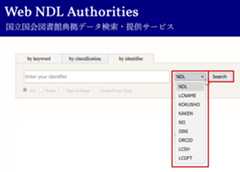
With Identifier Search, you can search authority data not only by National Diet Library (NDL)’s authority IDs, but also by identifiers from external databases that are displayed as related links onDetailed Information Screen.
Enter an identifier in the search box, then select the corresponding identifier type or issuing organization from the drop-down list on the right before starting the search.
The system will retrieve authority data that contains the selected identifier value. Please note that if the identifier type or issuing organization of the entered identifier does not match the value selected in the drop-down list, the search will not return any results.
Searches are performed using exact matching; however, spaces entered in the search term are ignored. In addition, for ISNI and ORCID, you can obtain the same results whether you enter half-width hyphens between every group of four digits or do not enter any hyphens at all.
The identifiers available for searching are listed in Table 1 below.
| Displaying the drop-down list | Identifier | Item names and display examples on Detailed Information Screen |
|---|---|---|
| NDL | A unique identifier assigned to authority records by the National Diet Library (NDL) | ID:00288347 |
| Name authority | ||
| LCNAME | Control number for records in the Library of Congress Name Authority File (NAF) | Related Links:n79100628 (LCNAME) |
| KOKUSHO | Work ID and Author ID for theUnion Catalogue Database of Japanese Texts, National Institute of Japanese Literature | Related Links:2357 (KOKUSHO) Related Links:523091 (KOKUSHO) |
| KAKEN | Researcher Number for theGrants-in-Aid for Scientific Research Database, National Institute of Informatics | Related Links:00126351 (KAKEN) |
| NII | Author ID for theCiNii Books, National Institute of Informatics | Related Links:DA01817005 (NII) |
| ISNI | International Standard Name Identifier | Related Links:000000043360592X (ISNI) |
| ORCID | Open Researcher and Contributor ID | Related Links:0000-0002-8486-2438 (ORCID) |
| Topical Term | ||
| LCSH | Control number for records in theLibrary of Congress Subject Headings | Related Links:sh85076723 (LCSH) |
| Genre/Form Term | ||
| LCGFT | Control number for records in theThe Library of Congress Genre/Form Terms for Library and Archival Materials | Related Links:gf2014026266 (LCGFT) |
2. Search Result Screen
2-1. Search Result List Screen
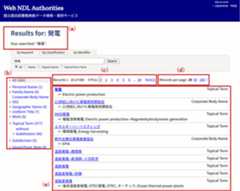
Results of search are displayed in a list, as shown in Figure 4 below. The screen comprises the following parts: (a) Search conditions, (b) Search refinement (Type of Authority), (c) Page feed, (d) Records per page and (e) Search results. The description of each part is as follows.
| No. | Item Name | Description |
|---|---|---|
| (a) | Search conditions | The recent search result is shown. If a user refines the search results by Type of Authority, the Type of Authority and any keywords are displayed under “Your searched:”. |
| (b) | Search refinement(Type of Authority) | Users can refine search results by Type of Authority, such as Personal name, Family Name, Corporate Body Name, Geographic Name, Uniform Title, Work, Topical Term, Subdivision and Genre/Form Term. Select the “All” to clear all filters. |
| Search refinement (without subdivision) | Users can refine search results of Topical Terms. By clicking “without subdivision” button, Topical Terms with subdivision and Topical Terms in the form of “main heading (Geographic Name)” will be excluded on search results. However, some Topical Terms with period subdivision and Topical Terms with special subdivision, included in the scope of the National Diet Library Subject Headings (NDLSH) are displayed. | |
| (c) | Page feed | Numbers refer to page numbers. Click a number to go to the page. Click “<<Prev” or “Next>>” link to go to the previous or next page. |
| (d) | Records per page | The number of records displayed per page on the Search Results Screen can be chosen from 20, 50, or 100 records. |
| (e) | Search results | The Name/Title exactly matched with the query is shown at the top of the search results. Other search results are sorted in order of transcription of the Name/Title. Search results are shown in the following format: Authorized Heading Type of Authority創作者: Creator(s)家族構成員: Member(s) of Family→: Related Name(s) (Another Name), Related Work(s)← Variant Name(s) / Title(s) The Creator(s) of Works will be displayed in Work authority data with the label “創作者:”. The Member(s) of Family will be displayed in Family authority data with the label “家族構成員:”. Related Name(s) (Another Name) and Related Work(s) will be displayed in the Personal name, Corporate Body Name and Works authority data with the label “→:”. All of these will only be displayed if a value is available. |
2-2. Detailed Information Screen
This shows detailed individual authority data from search results. This screen is divided into 4 parts as shown in Figure 5: (a) Detailed Information of the authority data, (b) Thesaurus Map, (c) Search Box, and (d) Search bibliographic data via NDL Search. The description of each part is as follows.
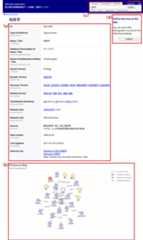
2-2(a). Detailed Information of the authority data
Data items shown in the Detailed Information tab are shown below. Each item is explained in the following table.
| Item Number | Item Name | Contents |
|---|---|---|
| 1 | ID | Unique ID number for the for the National Diet Library (NDL)’s authority data. |
| 2 | Type of authority | Type of the authority data, such as Personal Name, Family Name, Corporate Body Name, Geographic Name, Uniform Title, Work, Topical Term, Genre/Form Term, Form Subdivision, and Topical Subdivision. |
| 3 | Name/Title | Authorized Name/Title of the authority data. It is equivalent to “authorized access point” in NCR2018 and “heading” in NCR1987. In order to distinguish different data with the same Name/Title, identifiers such as date of birth/death of a person, date of establishment of a corporate body and other information are added to some authority data. Subdivisions are connected with main headings by two hyphens. |
| 4 | Katakana Transcription of Name/Title | Transcription in katakana of Name / Title. |
| 5 | Roman Transliteration of Name/Title | The Roman transliteration of the authorized Name/Title transcribed in katakana. It is only available when “Katakana Transcription of Name/Title” exists (Item No.4). Some authority data for authors of materials in Asian languages have pinyin transcriptions of Name/Title. |
| 6 | Variant Name(s) / Title(s) | Linked to the Variant Name(s) / Title(s) for Personal Name, Family Name, Corporate Body Name, Geographic Name, Uniform Title and Work. It is equivalent to “variant access point” in NCR2018 and “See” reference in NCR1987. Transcription bykatakana is shown as ruby characters (format will vary by web browser). When the type of name (Previous Name, Later Name, Abbreviated Name, Real Name, etc.) is recorded in the authority data for either Personal Name or Corporate Body Name, it is shown in parentheses, such as 「森, 林太郎(本名)」. |
| 7 | Variant Term(s) (synonym) | Linked to Variant Name(s) / Title(s) for Topical Term, Genre/Form Tem or Subdivision. Transcription is shown as ruby characters (format will vary by web browser). |
| 8 | Related Name(s) (another name) | Linked to Related Name(s) (another name) for Personal Name, Corporate Body Name, and Uniform Title. It is equivalent to “relationship” in NCR2018 and “See Also” reference in NCR1987. When the type of name is “Later Name(新称)”, “Previous Name(旧称)”, “Real Name(本名)”, “Pseudonym(筆名)”or “Art Name(号)”, it is shown in parentheses in Japanese following the Related Name. |
| 9 | Work(s) | Work(s) created by a person or corporate body recorded in authority data . |
| 10 | Creator(s) | Creator(s) of work recorded in Work authority data. |
| 11 | Family | A family of whom a person is a member. |
| 12 | Member(s) of Family | A person who is a member of a family. |
| 13 | Related Work(s) (Contained in) | Click the Work to access the superordinate work in a hierarchical relation. |
| 14 | Related Work(s) (Container of) | Click the Work to access the subordinate works in a hierarchical relation. |
| 15 | Broader Term | Click the term for the Geographic Name or Topical Term to access the superordinate term in a hierarchical relation. |
| 16 | Narrower Term | Click the term for the Geographic Name or Topical Term to access the subordinate terms in a hierarchical relation. |
| 17 | Related Term | Click the term for the Geographic Name or Topical Term to access the semantically related terms. |
| 18 | Each Heading (rdfs: seeAlso) | When a subdivision which is also used as a main heading (e.g.“年鑑”) is included in the subject heading with subdivisions(e.g. “eマーケティング–年鑑”)、the subject heading with subdivisions will be divided into a main heading and subdivisions and links to authority data for each will be shown. (Note that if the divided authority data is Geographic Name or the Uniform Title or Geographic Name with Subdivisions (e.g.“万葉集–植物”, “イギリス–人口–歴史”), they are not linked. |
| 19 | Date of Birth | The birthdate recorded in Personal Name authority data. |
| 20 | Date of Death | The death date recorded in Personal Name authority data. |
| 21 | Field of Activity | The field of activity recorded in Personal Name authority data. |
| 22 | Biographical Information ( rda:biographicalInformation) | The biographical information recorded in Personal Name authority data. |
| 23 | Biographical Information ( rda:professionOrOccupation) | The profession or occupation recorded in Personal Name authority data. |
| 24 | Date of Establishment | The date of establishment of the corporate body recorded in Corporate Body Name authority data. |
| 25 | Date of Termination | The date of termination of the corporate body recorded in Corporate Body Name authority data. |
| 26 | Period of Duration | The active period of the corporate body, which was reorganized after being dissolved. |
| 27 | Corporate History | Histories of the corporate body recorded in Corporate Body Name authority data. |
| 28 | Family History | Histories of the family recorded in Family Name authority data. |
| 29 | Place(s) | Related place(s) of the corporate body recorded in Corporate Body Name authority data. |
| 30 | Other Information | Other information of the person, corporate body or work recorded in authority data. |
| 31 | Date of Work | The date of work recorded in Work authority data. |
| 32 | Form of Work | The form of work recorded in Work authority data. |
| 33 | Classification Number | Representative Classification assigned to Geographic Name, Uniform Title, Work, or Topical Terms. By clicking the classification number of “NDC10”, “NDC9” or “NDLC” (each classification scheme is shown in parentheses after the classification number), users can access the List Screen of authority data with the same representative classification number. |
| 34 | Related Links ( skos:closeMatch) |
These will be shown in the form “sh92002816 (LCSH)”, “n86126369 (LCNAME)” or “gf2014026266 (LCGFT)” and will link to the LC Linked Data Service.
|
| 35 | Sources ( dct:source) | Titles of materials in which the Name/Title appeared first and reference materials or identifiers which formed a basis for establishing the Authorized Name/Title. Database name of identifier may differ from item number 32 and 34. |
| 36 | Related Links(skos:exactMatch) | as “NDL|00054222” (VIAF) In principle, links to the VIAF are generated for all name authority records (Personal name, Family Name, Corporate Body Name, Geographic Name, Uniform Title and Work), except for Name Authority for materials in Asian languages. These links are URLs that search VIAF using the NDL authority IDs. Because VIAF clusters are created automatically and subject to change, the National Diet Library does not record VIAF cluster identifiers in its authority records, and these links do not guarantee the accuracy of the VIAF clusters to which they lead. Name Authority with Subdivisions such as 「万葉集–評釈」 and new authority data which has not been registered with the VIAF. In these case, the links to the VIAF are not available, though the links are shown.
Name authority records (Personal name, Family Name, Corporate Body Name, Geographic Name, Uniform Title and Work), for which the identifier has been entered, you can refer to each database record from the links.
When the form of the authorized heading matches with that of the BSH, the ID numbers of the BSH will be displayed. The BSH is not available on the Japan Library Association’s website, thus, links to the BSH are not shown. |
| 37 | History Note | Information on revision of the Name/Title. |
| 38 | Cataloger’s Note | Cataloger’s Note (including instructions of Related Name(s) (Another Name) and availability of geographic subdivision, etc.). For the authority data used as Author Heading, the value “機械抽出典拠” is assigned to data extracted automatically, while the value “遡及入力典拠” is assigned to authority data cataloged retrospectively. For the authority data for materials in Asian languages, the value “アジア言語資料典拠” is assigned. For the authority data used as Subject Heading, the value “和図書不使用” is assigned to authority data which is not used in the bibliographic records of Japanese books. |
| 39 | Date Created | Date when the authority data was created, described inW3CDTF format. |
| 40 | Last Updated | Date when the authority data was last updated, described inW3CDTFformat. |
| 41 | Links to external websites |
In the case of the Authorities of Personal Name, Family Name and Corporate Body Name except for the Subdivision combination, links to the search results of pages which contain the same character strings in Japanese Wikipedia are displayed.
For the Authorities of Geographic Name, Uniform Title, Work, Topical Term, and Genre/Form Term, links to pages in Japanese Wikipedia are displayed only when the same character strings as the authorized headings are included in the article title of the Japanese Wikipedia.
Matching of character strings and creating links are done automatically; thus, the NDL does not guarantee the credibility of the information contained in Wikipedia. |



2-2(b). Thesaurus Map
When the authority data being displayed in Detailed Information includes Broader Terms, Narrower Terms, or Related Terms, Thesaurus Map is shown. In this Map, the Current Term (i.e., the Term whose Detailed Information is being displayed) is at the center, with connections to other Terms represented as follows: Broader Terms are connected with solid arrows, Narrower Terms with dashed arrows, and Related Terms with dotted arrows. If Broader or Narrower Terms themselves have additional Broader or Narrower Terms, those are connected and displayed as well; however, when it comes to Related Terms, only terms related to the Current Term are displayed.
At the top left of the Thesaurus Map display, the number of displayed Terms and depth is indicated as “Total xxx nodes (depth n).” If more than 100 terms are included, only the depth up to the 100th Term are shown, and the top left will display a message such as “Total xxx nodes (depth n), of which displaying yyy (depth m) (Show all).” Clicking the “Show all” link will display all Broader and Narrower Terms, although this may take some time.
C licking on a term within the Map will navigate to the Detailed Information page for that term.
2-2(c). Search Box
Similar to the search box on the front page, this search box is used to start a new search. The Authorized Names/Titles of the authority data is shown in the Detailed Information Screen.
2-2(d). Search bibliographic data via NDL Search
By clicking link buttons shown in the Detailed Information Screen, users can access the search results of the bibliographic data in theNDL Search via the ID of the authority data. There are four types of link buttons shown in the following table. If there is no bibliographic data linked to the authority, the search results will be 0. However, for Subdivision, users will move to the top page of the NDL Search even though the button is available.
For more information about the search by clicking link buttons, please refer to ”Searching Materials Using Authority data: Web NDL Authorities Guide“ (link to NDL website).
| Link Button | Search for | Types of Authority Data with the Link Button |
|---|---|---|
| Author | Materials whose author is the person or corporate body recorded in that the authority data | Personal Name, Corporate Body Name, Geographic Name and Family Name |
| Subject | Materials whose theme is the person, corporate body or thing recorded in the authority data | Personal Name, Family Name, Corporate Body Name, Geographic Name, Uniform Title, Work and Topical Term |
| Work | Materials that embody the work (the idea of the work) recorded in the authority data | Work |
| Genre | Materials that are classified into the genre/form recorded in that the authority data | Genre/Form Term |