Active Record Associations
This guide covers the association features of Active Record.
After reading this guide, you will know how to:
- Understand the various types of associations.
- Declare associations between Active Record models.
- Choose the right association type for your models.
- Use Single Table Inheritance.
- Setting up and using Delegated Types.
1. Associations Overview
Active Record associations allow you to define relationships between models.Associations are implemented as special macro style calls that make it easy totell Rails how your models relate to each other, which helps you manage yourdata more effectively, and makes common operations simpler and easier to read.
A macro-style call is a method that generates or modifies other methods atruntime, allowing for concise and expressive declarations of functionality, suchas defining model associations in Rails. For example,has_many :comments.
When you set up an association, Rails helps define and manage thePrimaryKey andForeignKey relationships between instancesof the two models, while the database ensures that your data stays consistentand properly linked.
This makes it easy to keep track of which records are related. It also addsuseful methods to your models so you can work with related data more easily.
Consider a simple Rails application with models for authors and books.
1.1. Without Associations
Without associations, creating and deleting books for that author would requirea tedious and manual process. Here's what that would look like:
classCreateAuthors<ActiveRecord::Migration[8.1]defchangecreate_table:authorsdo|t|t.string:namet.timestampsendcreate_table:booksdo|t|t.references:authort.datetime:published_att.timestampsendendendclassAuthor<ApplicationRecordendclassBook<ApplicationRecordendTo add a new book for an existing author, you'd need to provide theauthor_idvalue when creating the book.
@book=Book.create(author_id:@author.id,published_at:Time.now)To delete an author and ensure all their books are also deleted, you'd need toretrieve all the author'sbooks, loop through eachbook to destroy it, andthen destroy the author.
@books=Book.where(author_id:@author.id)@books.eachdo|book|book.destroyend@author.destroy1.2. Using Associations
However, with associations, we can streamline these operations, as well asothers, by explicitly informing Rails about the relationship between the twomodels. Here's the revised code for setting up authors and books usingassociations:
classAuthor<ApplicationRecordhas_many:books,dependent: :destroyendclassBook<ApplicationRecordbelongs_to:authorendWith this change, creating a new book for a particular author is simpler:
@book=@author.books.create(published_at:Time.now)Deleting an author and all of its books is much easier:
@author.destroyWhen you set up an association in Rails, you still need to create amigration to ensure that the database isproperly configured to handle the association. This migration will need to addthe necessary foreign key columns to your database tables.
For example, if you set up abelongs_to :author association in theBookmodel, you would create a migration to add theauthor_id column to thebookstable:
rails generate migration AddAuthorToBooks author:referencesThis migration will add theauthor_id column and set up the foreign keyrelationship in the database, ensuring that your models and database stay insync.
To learn more about the different types of associations, you can read the nextsection of this guide. Following that, you'll find some tips and tricks forworking with associations. Finally, there's a complete reference to the methodsand options for associations in Rails.
2. Types of Associations
Rails supports six types of associations, each with a particular use-case inmind.
Here is a list of all of the supported types with a link to their API docs formore detailed information on how to use them, their method parameters, etc.
In the remainder of this guide, you'll learn how to declare and use the variousforms of associations. First, let's take a quick look at the situations whereeach association type is appropriate.
2.1.belongs_to
Abelongs_to association sets up a relationship with another model, suchthat each instance of the declaring model "belongs to" one instance of the othermodel. For example, if your application includes authors and books, and eachbook can be assigned to exactly one author, you'd declare the book model thisway:
classBook<ApplicationRecordbelongs_to:authorend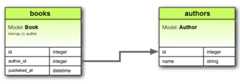
Abelongs_to associationmust use the singular term. If you use theplural form, likebelongs_to :authors in theBook model, and try to create abook withBook.create(authors: @author), Rails will give you an "uninitializedconstant Book::Authors" error. This happens because Rails automatically infersthe class name from the association name. If the association name is:authors,Rails will look for a class namedAuthors instead ofAuthor.
The corresponding migration might look like this:
classCreateBooks<ActiveRecord::Migration[8.1]defchangecreate_table:authorsdo|t|t.string:namet.timestampsendcreate_table:booksdo|t|t.belongs_to:authort.datetime:published_att.timestampsendendendIn database terms, thebelongs_to association says that this model's tablecontains a column which represents a reference to another table. This can beused to set up one-to-one or one-to-many relations, depending on the setup. Ifthe tableof the other class contains the reference in a one-to-one relation,then you should usehas_one instead.
When used alone,belongs_to produces a one-directional one-to-onerelationship. Therefore each book in the above example "knows" its author, butthe authors don't know about their books. To set up abi-directionalassociation - usebelongs_to in combinationwith ahas_one orhas_many on the other model, in this case the Authormodel.
By defaultbelongs_to validates the presence of the associated record toguarantee reference consistency.
Ifoptional is set to true in themodel, thenbelongs_to does not guarantee reference consistency. This meansthat the foreign key in one table might not reliably point to a valid primarykey in the referenced table.
classBook<ApplicationRecordbelongs_to:author,optional:trueendHence, depending on the use case, you might also need to add a database-levelforeign key constraint on the reference column, like this:
create_table:booksdo|t|t.belongs_to:author,foreign_key:true# ...endThis ensures that even thoughoptional: true allowsauthor_id to be NULL,when it's not NULL, it must still reference a valid record in the authors table.
2.1.1. Methods Added bybelongs_to
When you declare abelongs_to association, the declaring class automaticallygains numerous methods related to the association. Some of these are:
association=(associate)build_association(attributes = {})create_association(attributes = {})create_association!(attributes = {})reload_associationreset_associationassociation_changed?association_previously_changed?
We'll discuss some of the common methods, but you can find an exhaustive list intheActiveRecord AssociationsAPI.
In all of the above methods,association is replaced with the symbol passed asthe first argument tobelongs_to. For example, given the declaration:
# app/models/book.rbclassBook<ApplicationRecordbelongs_to:authorend# app/models/author.rbclassAuthor<ApplicationRecordhas_many:booksvalidates:name,presence:trueendAn instance of theBook model will have the following methods:
authorauthor=build_authorcreate_authorcreate_author!reload_authorreset_authorauthor_changed?author_previously_changed?
When initializing a newhas_one orbelongs_to association you must usethebuild_ prefix to build the association, rather than theassociation.build method that would be used forhas_many orhas_and_belongs_to_many associations. To create one, use thecreate_ prefix.
2.1.1.1. Retrieving the association
Theassociation method returns the associated object, if any. If no associatedobject is found, it returnsnil.
@author=@book.authorIf the associated object has already been retrieved from the database for thisobject, the cached version will be returned. To override this behavior (andforce a database read), call#reload_association on the parent object.
@author=@book.reload_authorTo unload the cached version of the associated object—causing the next access,if any, to query it from the database—call#reset_association on the parentobject.
@book.reset_author2.1.1.2. Assigning the Association
Theassociation= method assigns an associated object to this object. Behindthe scenes, this means extracting the primary key from the associated object andsetting this object's foreign key to the same value.
@book.author=@authorThebuild_association method returns a new object of the associated type. Thisobject will be instantiated from the passed attributes, and the link throughthis object's foreign key will be set, but the associated object willnot yetbe saved.
@author=@book.build_author(author_number:123,author_name:"John Doe")Thecreate_association method takes it a step further and also saves theassociated object once it passes all of the validations specified on theassociated model.
@author=@book.create_author(author_number:123,author_name:"John Doe")Finally,create_association! does the same, but raisesActiveRecord::RecordInvalid if the record is invalid.
# This will raise ActiveRecord::RecordInvalid because the name is blankbegin@book.create_author!(author_number:123,name:"")rescueActiveRecord::RecordInvalid=>eputse.messageendirb>raise_validation_error:Validationfailed:Namecan'tbeblank(ActiveRecord::RecordInvalid)2.1.1.3. Checking for Association Changes
Theassociation_changed? method returns true if a new associated object hasbeen assigned and the foreign key will be updated in the next save.
Theassociation_previously_changed? method returns true if the previous saveupdated the association to reference a new associate object.
@book.author# => #<Author author_number: 123, author_name: "John Doe">@book.author_changed?# => false@book.author_previously_changed?# => false@book.author=Author.second# => #<Author author_number: 456, author_name: "Jane Smith">@book.author_changed?# => true@book.save!@book.author_changed?# => false@book.author_previously_changed?# => trueDo not confusemodel.association_changed? withmodel.association.changed?. The former checks if the association has beenreplaced with a new record, while the latter tracks changes to the attributes ofthe association.
2.1.1.4. Checking for Existing Associations
You can see if any associated objects exist by using theassociation.nil?method:
if@book.author.nil?@msg="No author found for this book"end2.1.1.5. Saving Behavior of Associated Objects
Assigning an object to abelongs_to association doesnot automatically saveeither the current object or the associated object. However, when you save thecurrent object, the association is saved as well.
2.2.has_one
Ahas_one association indicates that one other model has a reference tothis model. That model can be fetched through this association.
For example, if each supplier in your application has only one account, you'ddeclare the supplier model like this:
classSupplier<ApplicationRecordhas_one:accountendThe main difference frombelongs_to is that the link column (in this casesupplier_id) is located in the other table, not the table where thehas_oneis declared.
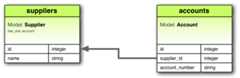
The corresponding migration might look like this:
classCreateSuppliers<ActiveRecord::Migration[8.1]defchangecreate_table:suppliersdo|t|t.string:namet.timestampsendcreate_table:accountsdo|t|t.belongs_to:suppliert.string:account_numbert.timestampsendendendThehas_one association creates a one-to-one match with another model. Indatabase terms, this association says that the other class contains the foreignkey. If this class contains the foreign key, then you should usebelongs_toinstead.
Depending on the use case, you might also need to create a unique index and/or aforeign key constraint on the supplier column for the accounts table. The uniqueindex ensures that each supplier is associated with only one account and allowsyou to query in an efficient manner, while the foreign key constraint ensuresthat thesupplier_id in theaccounts table refers to a validsupplier inthesuppliers table. This enforces the association at the database level.
create_table:accountsdo|t|t.belongs_to:supplier,index:{unique:true},foreign_key:true# ...endThis relation can bebi-directional when used incombination withbelongs_to on the other model.
2.2.1. Methods Added byhas_one
When you declare ahas_one association, the declaring class automaticallygains numerous methods related to the association. Some of these are:
associationassociation=(associate)build_association(attributes = {})create_association(attributes = {})create_association!(attributes = {})reload_associationreset_association
We'll discuss some of the common methods, but you can find an exhaustive list intheActiveRecord AssociationsAPI.
Like with thebelongs_to references, in all ofthese methods,association is replaced with the symbol passed as the firstargument tohas_one. For example, given the declaration:
# app/models/supplier.rbclassSupplier<ApplicationRecordhas_one:accountend# app/models/account.rbclassAccount<ApplicationRecordvalidates:terms,presence:truebelongs_to:supplierendEach instance of theSupplier model will have these methods:
accountaccount=build_accountcreate_accountcreate_account!reload_accountreset_account
When initializing a newhas_one orbelongs_to association you must usethebuild_ prefix to build the association, rather than theassociation.build method that would be used forhas_many orhas_and_belongs_to_many associations. To create one, use thecreate_ prefix.
2.2.1.1. Retrieving the association
Theassociation method returns the associated object, if any. If no associatedobject is found, it returnsnil.
@account=@supplier.accountIf the associated object has already been retrieved from the database for thisobject, the cached version will be returned. To override this behavior (andforce a database read), call#reload_association on the parent object.
@account=@supplier.reload_accountTo unload the cached version of the associated object—forcing the next access,if any, to query it from the database—call#reset_association on the parentobject.
@supplier.reset_account2.2.1.2. Assigning the Association
Theassociation= method assigns an associated object to this object. Behindthe scenes, this means extracting the primary key from this object and settingthe associated object's foreign key to the same value.
@supplier.account=@accountThebuild_association method returns a new object of the associated type. Thisobject will be instantiated from the passed attributes, and the link throughthis object's foreign key will be set, but the associated object willnot yetbe saved.
@account=@supplier.build_account(terms:"Net 30")Thecreate_association method takes it a step further and also saves theassociated object once it passes all of the validations specified on theassociated model.
@account=@supplier.create_account(terms:"Net 30")Finally,create_association! does the same ascreate_association above,but raisesActiveRecord::RecordInvalid if the record is invalid.
# This will raise ActiveRecord::RecordInvalid because the terms is blankbegin@supplier.create_account!(terms:"")rescueActiveRecord::RecordInvalid=>eputse.messageendirb>raise_validation_error:Validationfailed:Termscan'tbeblank(ActiveRecord::RecordInvalid)2.2.1.3. Checking for Existing Associations
You can see if any associated objects exist by using theassociation.nil?method:
if@supplier.account.nil?@msg="No account found for this supplier"end2.2.1.4. Saving Behavior of Associated Objects
When you assign an object to ahas_one association, that object isautomatically saved to update its foreign key. Additionally, any object beingreplaced is also automatically saved, as its foreign key will change too.
If either of these saves fails due to validation errors, the assignmentstatement returnsfalse, and the assignment itself is canceled.
If the parent object (the one declaring thehas_one association) is unsaved(that is,new_record? returnstrue) then the child objects are not savedimmediately. They will be automatically saved when the parent object is saved.
If you want to assign an object to ahas_one association without saving theobject, use thebuild_association method. This method creates a new, unsavedinstance of the associated object, allowing you to work with it before decidingto save it.
Useautosave: false when you want to control the saving behavior of theassociated objects for the model. This setting prevents the associated objectfrom being saved automatically when the parent object is saved. In contrast, usebuild_association when you need to work with an unsaved associated object anddelay its persistence until you're ready.
2.3.has_many
Ahas_many association is similar tohas_one, but indicates aone-to-many relationship with another model. You'll often find this associationon the "other side" of abelongs_to association. This association indicatesthat each instance of the model has zero or more instances of another model. Forexample, in an application containing authors and books, the author model couldbe declared like this:
classAuthor<ApplicationRecordhas_many:booksendhas_many establishes a one-to-many relationship between models, allowing eachinstance of the declaring model (Author) to have multiple instances of theassociated model (Book).
Unlike ahas_one andbelongs_to association, the name of the othermodel is pluralized when declaring ahas_many association.
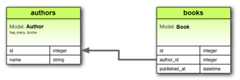
The corresponding migration might look like this:
classCreateAuthors<ActiveRecord::Migration[8.1]defchangecreate_table:authorsdo|t|t.string:namet.timestampsendcreate_table:booksdo|t|t.belongs_to:authort.datetime:published_att.timestampsendendendThehas_many association creates a one-to-many relationship with anothermodel. In database terms, this association says that the other class will have aforeign key that refers to instances of this class.
In this migration, theauthors table is created with aname column to storethe names of authors. Thebooks table is also created, and it includes abelongs_to :author association. This association establishes a foreign keyrelationship between thebooks andauthors tables. Specifically, theauthor_id column in thebooks table acts as a foreign key, referencing theid column in theauthors table. By including thisbelongs_to :authorassociation in thebooks table, we ensure that each book is associated with asingle author, enabling ahas_many association from theAuthor model. Thissetup allows each author to have multiple associated books.
Depending on the use case, it's usually a good idea to create a non-unique indexand optionally a foreign key constraint on the author column for the bookstable. Adding an index on theauthor_id column improves query performance whenretrieving books associated with a specific author.
If you wish to enforcereferentialintegrity at the databaselevel, add theforeign_key: trueoption to thereference column declarations above. This will ensure that theauthor_id in the books table must correspond to a validid in theauthorstable,
create_table:booksdo|t|t.belongs_to:author,index:true,foreign_key:true# ...endThis relation can bebi-directional when used incombination withbelongs_to on the other model.
2.3.1. Methods Added byhas_many
When you declare ahas_many association, the declaring class gains numerousmethods related to the association. Some of these are:
collectioncollection<<(object, ...)collection.delete(object, ...)collection.destroy(object, ...)collection=(objects)collection_singular_idscollection_singular_ids=(ids)collection.clearcollection.empty?collection.sizecollection.find(...)collection.where(...)collection.exists?(...)collection.build(attributes = {})collection.create(attributes = {})collection.create!(attributes = {})collection.reload
We'll discuss some of the common methods, but you can find an exhaustive list intheActiveRecord AssociationsAPI.
In all of these methods,collection is replaced with the symbol passed as thefirst argument tohas_many, andcollection_singular is replaced with thesingularized version of that symbol. For example, given the declaration:
classAuthor<ApplicationRecordhas_many:booksendAn instance of theAuthor model can have the following methods:
booksbooks<<(object, ...)books.delete(object, ...)books.destroy(object, ...)books=(objects)book_idsbook_ids=(ids)books.clearbooks.empty?books.sizebooks.find(...)books.where(...)books.exists?(...)books.build(attributes = {}, ...)books.create(attributes = {})books.create!(attributes = {})books.reload2.3.1.1. Managing the Collection
Thecollection method returns a Relation of all of the associated objects. Ifthere are no associated objects, it returns an empty Relation.
@books=@author.booksThecollection.delete method removes one or more objects from thecollection by setting their foreign keys toNULL.
@author.books.delete(@book1)Additionally, objects will be destroyed if they're associated withdependent: :destroy, and deleted if they're associated withdependent::delete_all.
Thecollection.destroy method removes one or more objects from thecollection by runningdestroy on each object.
@author.books.destroy(@book1)Objects willalways be removed from the database, ignoring the:dependent option.
Thecollection.clear method removes all objects from the collectionaccording to the strategy specified by thedependent option. If no option isgiven, it follows the default strategy. The default strategy forhas_many:through associations isdelete_all, and forhas_many associations is toset the foreign keys toNULL.
@author.books.clearObjects will be deleted if they're associated withdependent::destroy ordependent: :destroy_async, just likedependent: :delete_all.
Thecollection.reload method returns a Relation of all of the associatedobjects, forcing a database read. If there are no associated objects, it returnsan empty Relation.
@books=@author.books.reload2.3.1.2. Assigning the Collection
Thecollection=(objects) method makes the collection contain only the suppliedobjects, by adding and deleting as appropriate. The changes are persisted to thedatabase.
Thecollection_singular_ids=(ids) method makes the collection contain only theobjects identified by the supplied primary key values, by adding and deleting asappropriate. The changes are persisted to the database.
2.3.1.3. Querying the Collection
Thecollection_singular_ids method returns an array of the ids of the objectsin the collection.
@book_ids=@author.book_idsThecollection.empty? method returnstrue if the collection does notcontain any associated objects.
<%if@author.books.empty?%> No Books Found<%end%>Thecollection.size method returns the number of objects in thecollection.
@book_count=@author.books.sizeThecollection.find method finds objects within the collection's table.
@available_book=@author.books.find(1)Thecollection.where method finds objects within the collection based onthe conditions supplied but the objects are loaded lazily meaning that thedatabase is queried only when the object(s) are accessed.
@available_books=@author.books.where(available:true)# No query yet@available_book=@available_books.first# Now the database will be queriedThecollection.exists? method checks whether an object meeting thesupplied conditions exists in the collection's table.
2.3.1.4. Building and Creating Associated Objects
Thecollection.build method returns a single or array of new objects ofthe associated type. The object(s) will be instantiated from the passedattributes, and the link through their foreign key will be created, but theassociated objects willnot yet be saved.
@book=@author.books.build(published_at:Time.now,book_number:"A12345")@books=@author.books.build([{published_at:Time.now,book_number:"A12346"},{published_at:Time.now,book_number:"A12347"}])Thecollection.create method returns a single or array of new objects ofthe associated type. The object(s) will be instantiated from the passedattributes, the link through its foreign key will be created, and, once itpasses all of the validations specified on the associated model, the associatedobjectwill be saved.
@book=@author.books.create(published_at:Time.now,book_number:"A12345")@books=@author.books.create([{published_at:Time.now,book_number:"A12346"},{published_at:Time.now,book_number:"A12347"}])collection.create! does the same ascollection.create, but raisesActiveRecord::RecordInvalid if the record is invalid.
2.3.1.5. When are Objects Saved?
When you assign an object to ahas_many association, that object isautomatically saved (in order to update its foreign key). If you assign multipleobjects in one statement, then they are all saved.
If any of these saves fails due to validation errors, then the assignmentstatement returnsfalse and the assignment itself is cancelled.
If the parent object (the one declaring thehas_many association) is unsaved(that is,new_record? returnstrue) then the child objects are not savedwhen they are added. All unsaved members of the association will automaticallybe saved when the parent is saved.
If you want to assign an object to ahas_many association without saving theobject, use thecollection.build method.
2.4.has_many :through
Ahas_many :through association is often used to set up amany-to-many relationship with another model. This association indicates thatthe declaring model can be matched with zero or more instances of another modelby proceedingthrough an intermediate "join" model.
For example, consider a medical practice where patients make appointments to seephysicians. The relevant association declarations could look like this:
classPhysician<ApplicationRecordhas_many:appointmentshas_many:patients,through: :appointmentsendclassAppointment<ApplicationRecordbelongs_to:physicianbelongs_to:patientendclassPatient<ApplicationRecordhas_many:appointmentshas_many:physicians,through: :appointmentsendhas_many :through establishes a many-to-many relationship between models,allowing instances of one model (Physician) to be associated with multipleinstances of another model (Patient) through a third "join" model (Appointment).
We callPhysician.appointments andAppointment.patient thethrough andsource associations ofPhysician.patients, respectively.
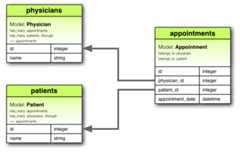
The corresponding migration might look like this:
classCreateAppointments<ActiveRecord::Migration[8.1]defchangecreate_table:physiciansdo|t|t.string:namet.timestampsendcreate_table:patientsdo|t|t.string:namet.timestampsendcreate_table:appointmentsdo|t|t.belongs_to:physiciant.belongs_to:patientt.datetime:appointment_datet.timestampsendendendIn this migration thephysicians andpatients tables are created with aname column. Theappointments table, which acts as the join table, iscreated withphysician_id andpatient_id columns, establishing themany-to-many relationship betweenphysicians andpatients.
The through association can be any type of association, including otherthrough associations, but it cannot bepolymorphic.Source associations can be polymorphic as long as you provide a source type.
You could also consider using acomposite primarykey for the join table in thehas_many :through relationship like below:
classCreateAppointments<ActiveRecord::Migration[8.1]defchange# ...create_table:appointments,primary_key:[:physician_id,:patient_id]do|t|t.belongs_to:physiciant.belongs_to:patientt.datetime:appointment_datet.timestampsendendendThe collection of join models in ahas_many :through association can bemanaged using standardhas_many associationmethods. For example, if you assign a list ofpatients to a physician like this:
physician.patients=patientsRails will automatically create new join models for any patients in the new listthat were not previously associated with the physician. Additionally, if anypatients that were previously associated with the physician are not included inthe new list, their join records will be automatically deleted. This simplifiesmanaging many-to-many relationships by handling the creation and deletion of thejoin models for you.
Automatic deletion of join models is direct, no destroy callbacks aretriggered. You can read more about callbacks in theActive Record CallbacksGuide.
Thehas_many :through association is also useful for setting up "shortcuts"through nestedhas_many associations. This is particularly beneficial when youneed to access a collection of related records through an intermediaryassociation.
For example, if a document has many sections, and each section has manyparagraphs, you may sometimes want to get a simple collection of all paragraphsin the document without having to manually traverse through each section.
You can set this up with ahas_many :through association as follows:
classDocument<ApplicationRecordhas_many:sectionshas_many:paragraphs,through: :sectionsendclassSection<ApplicationRecordbelongs_to:documenthas_many:paragraphsendclassParagraph<ApplicationRecordbelongs_to:sectionendWiththrough: :sections specified, Rails will now understand:
@document.paragraphsWhereas, if you had not set up ahas_many :through association, you would haveneeded to do something like this to get paragraphs in a document:
paragraphs=[]@document.sections.eachdo|section|paragraphs.concat(section.paragraphs)end2.5.has_one :through
Ahas_one :through association sets up a one-to-one relationshipwith another model through an intermediary model. This association indicatesthat the declaring model can be matched with one instance of another model byproceedingthrough a third model.
For example, if each supplier has one account, and each account is associatedwith one account history, then the supplier model could look like this:
classSupplier<ApplicationRecordhas_one:accounthas_one:account_history,through: :accountendclassAccount<ApplicationRecordbelongs_to:supplierhas_one:account_historyendclassAccountHistory<ApplicationRecordbelongs_to:accountendThis setup allows asupplier to directly access itsaccount_history throughitsaccount.
We callSupplier.account andAccount.account_history thethrough andsource associations ofSupplier.account_history, respectively.
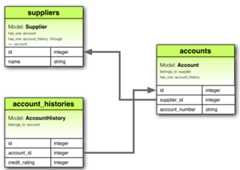
The corresponding migration to set up these associations might look like this:
classCreateAccountHistories<ActiveRecord::Migration[8.1]defchangecreate_table:suppliersdo|t|t.string:namet.timestampsendcreate_table:accountsdo|t|t.belongs_to:suppliert.string:account_numbert.timestampsendcreate_table:account_historiesdo|t|t.belongs_to:accountt.integer:credit_ratingt.timestampsendendendThe through association must be ahas_one,has_one :through, ornon-polymorphicbelongs_to. That is, a non-polymorphic singular association.On the other hand, source associations can be polymorphic as long as you providea source type.
2.6.has_and_belongs_to_many
Ahas_and_belongs_to_many association creates a direct many-to-manyrelationship with another model, with no intervening model. This associationindicates that each instance of the declaring model refers to zero or moreinstances of another model.
For example, consider an application withAssembly andPart models, whereeach assembly can contain many parts, and each part can be used in manyassemblies. You can set up the models as follows:
classAssembly<ApplicationRecordhas_and_belongs_to_many:partsendclassPart<ApplicationRecordhas_and_belongs_to_many:assembliesend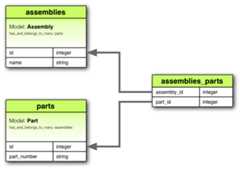
Even though ahas_and_belongs_to_many does not require an intervening model,it does require a separate table to establish the many-to-many relationshipbetween the two models involved. This intervening table serves to store therelated data, mapping the associations between instances of the two models. Thetable does not necessarily need a primary key since its purpose is solely tomanage the relationship between the associated records. The correspondingmigration might look like this:
classCreateAssembliesAndParts<ActiveRecord::Migration[8.1]defchangecreate_table:assembliesdo|t|t.string:namet.timestampsendcreate_table:partsdo|t|t.string:part_numbert.timestampsend# Create a join table to establish the many-to-many relationship between assemblies and parts.# `id: false` indicates that the table does not need a primary key of its owncreate_table:assemblies_parts,id:falsedo|t|# creates foreign keys linking the join table to the `assemblies` and `parts` tablest.belongs_to:assemblyt.belongs_to:partendendendThehas_and_belongs_to_many association creates a many-to-many relationshipwith another model. In database terms, this associates two classes via anintermediate join table that includes foreign keys referring to each of theclasses.
If the join table for ahas_and_belongs_to_many association has additionalcolumns beyond the two foreign keys, these columns will be added as attributesto records retrieved via that association. Records returned with additionalattributes will always be read-only, because Rails cannot save changes to thoseattributes.
The use of extra attributes on the join table in ahas_and_belongs_to_many association is deprecated. If you require this sort ofcomplex behavior on the table that joins two models in a many-to-manyrelationship, you should use ahas_many :through association instead ofhas_and_belongs_to_many.
2.6.1. Methods Added byhas_and_belongs_to_many
When you declare ahas_and_belongs_to_many association, the declaring classgains numerous methods related to the association. Some of these are:
collectioncollection<<(object, ...)collection.delete(object, ...)collection.destroy(object, ...)collection=(objects)collection_singular_idscollection_singular_ids=(ids)collection.clearcollection.empty?collection.sizecollection.find(...)collection.where(...)collection.exists?(...)collection.build(attributes = {})collection.create(attributes = {})collection.create!(attributes = {})collection.reload
We'll discuss some of the common methods, but you can find an exhaustive list intheActiveRecord AssociationsAPI.
In all of these methods,collection is replaced with the symbol passed as thefirst argument tohas_and_belongs_to_many, andcollection_singular isreplaced with the singularized version of that symbol. For example, given thedeclaration:
classPart<ApplicationRecordhas_and_belongs_to_many:assembliesendAn instance of thePart model can have the following methods:
assembliesassemblies<<(object, ...)assemblies.delete(object, ...)assemblies.destroy(object, ...)assemblies=(objects)assembly_idsassembly_ids=(ids)assemblies.clearassemblies.empty?assemblies.sizeassemblies.find(...)assemblies.where(...)assemblies.exists?(...)assemblies.build(attributes = {}, ...)assemblies.create(attributes = {})assemblies.create!(attributes = {})assemblies.reload2.6.1.1. Managing the Collection
Thecollection method returns a Relation of all of the associated objects. Ifthere are no associated objects, it returns an empty Relation.
@assemblies=@part.assembliesThecollection<< method adds one or more objects to the collection bycreating records in the join table.
@part.assemblies<<@assembly1This method is aliased ascollection.concat andcollection.push.
Thecollection.delete method removes one or more objects from thecollection by deleting records in the join table. This does not destroy theobjects.
@part.assemblies.delete(@assembly1)Thecollection.destroy method removes one or more objects from thecollection by deleting records in the join table. This does not destroy theobjects.
@part.assemblies.destroy(@assembly1)Thecollection.clear method removes every object from the collection bydeleting the rows from the joining table. This does not destroy the associatedobjects.
2.6.1.2. Assigning the Collection
Thecollection= method makes the collection contain only the supplied objects,by adding and deleting as appropriate. The changes are persisted to thedatabase.
Thecollection_singular_ids= method makes the collection contain only theobjects identified by the supplied primary key values, by adding and deleting asappropriate. The changes are persisted to the database.
2.6.1.3. Querying the Collection
Thecollection_singular_ids method returns an array of the ids of the objectsin the collection.
@assembly_ids=@part.assembly_idsThecollection.empty? method returnstrue if the collection does notcontain any associated objects.
<%if@part.assemblies.empty?%> This part is not used in any assemblies<%end%>Thecollection.size method returns the number of objects in thecollection.
@assembly_count=@part.assemblies.sizeThecollection.find method finds objects within the collection's table.
@assembly=@part.assemblies.find(1)Thecollection.where method finds objects within the collection based onthe conditions supplied but the objects are loaded lazily meaning that thedatabase is queried only when the object(s) are accessed.
@new_assemblies=@part.assemblies.where("created_at > ?",2.days.ago)Thecollection.exists? method checks whether an object meeting thesupplied conditions exists in the collection's table.
2.6.1.4. Building and Creating Associated Objects
Thecollection.build method returns a new object of the associated type.This object will be instantiated from the passed attributes, and the linkthrough the join table will be created, but the associated object willnot yetbe saved.
@assembly=@part.assemblies.build({assembly_name:"Transmission housing"})Thecollection.create method returns a new object of the associated type.This object will be instantiated from the passed attributes, the link throughthe join table will be created, and, once it passes all of the validationsspecified on the associated model, the associated objectwill be saved.
@assembly=@part.assemblies.create({assembly_name:"Transmission housing"})collection.create! does the same ascollection.create, but raisesActiveRecord::RecordInvalid if the record is invalid.
Thecollection.reload method returns a Relation of all of the associatedobjects, forcing a database read. If there are no associated objects, it returnsan empty Relation.
@assemblies=@part.assemblies.reload2.6.1.5. When are Objects Saved?
When you assign an object to ahas_and_belongs_to_many association, thatobject is automatically saved (in order to update the join table). If you assignmultiple objects in one statement, then they are all saved.
If any of these saves fails due to validation errors, then the assignmentstatement returnsfalse and the assignment itself is cancelled.
If the parent object (the one declaring thehas_and_belongs_to_manyassociation) is unsaved (that is,new_record? returnstrue) then the childobjects are not saved when they are added. All unsaved members of theassociation will automatically be saved when the parent is saved.
If you want to assign an object to ahas_and_belongs_to_many associationwithout saving the object, use thecollection.build method.
3. Choosing an Association
3.1.belongs_to vshas_one
If you want to set up a one-to-one relationship between two models, you canchoose between abelongs_to and ahas_one association. How do you know whichone to choose?
The distinction lies in the placement of the foreign key, which goes on thetable of the class declaring thebelongs_to association. However, it’sessential to understand the semantics to determine the correct associations:
belongs_to: This association indicates that the current model contains theforeign key and is a child in the relationship. It references another model,implying that each instance of this model is linked to one instance of theother model.has_one: This association indicates that the current model is the parent inthe relationship, and it owns one instance of the other model.
For example, consider a scenario with suppliers and their accounts. It makesmore sense to say that a supplier has/owns an account (where the supplier is theparent) rather than an account has/owns a supplier. Therefore, the correctassociations would be:
- A supplier has one account.
- An account belongs to one supplier.
Here is how you can define these associations in Rails:
classSupplier<ApplicationRecordhas_one:accountendclassAccount<ApplicationRecordbelongs_to:supplierendTo implement these associations, you'll need to create the correspondingdatabase tables and set up the foreign key. Here's an example migration:
classCreateSuppliers<ActiveRecord::Migration[8.1]defchangecreate_table:suppliersdo|t|t.string:namet.timestampsendcreate_table:accountsdo|t|t.belongs_to:supplier_idt.string:account_numbert.timestampsendadd_index:accounts,:supplier_idendendRemember that the foreign key goes on the table of the class declaring thebelongs_to association. In this case theaccount table.
3.2.has_many :through vshas_and_belongs_to_many
Rails offers two different ways to declare a many-to-many relationship betweenmodels:has_many :through andhas_and_belongs_to_many. Understanding thedifferences and use cases for each can help you choose the best approach foryour application's needs.
Thehas_many :through association sets up a many-to-many relationship throughan intermediary model (also known as a join model). This approach is moreflexible and allows you to add validations, callbacks, and extra attributes tothe join model. The join table needs aprimary_key (or acomposite primarykey).
classAssembly<ApplicationRecordhas_many:manifestshas_many:parts,through: :manifestsendclassManifest<ApplicationRecordbelongs_to:assemblybelongs_to:partendclassPart<ApplicationRecordhas_many:manifestshas_many:assemblies,through: :manifestsendYou'd usehas_many :through when:
- You need to add extra attributes or methods to the join table.
- You requirevalidations orcallbacks on the join model.
- The join table should be treated as an independent entity with its ownbehavior.
Thehas_and_belongs_to_many association allows you to create a many-to-manyrelationship directly between two models without needing an intermediary model.This method is straightforward and is suitable for simple associations where noadditional attributes or behaviors are required on the join table. Forhas_and_belongs_to_many associations, you'll need to create a join tablewithout a primary key.
classAssembly<ApplicationRecordhas_and_belongs_to_many:partsendclassPart<ApplicationRecordhas_and_belongs_to_many:assembliesendYou'd usehas_and_belongs_to_many when:
- The association is simple and does not require additional attributes orbehaviors on the join table.
- You do not need validations, callbacks, or extra methods on the join table.
4. Advanced Associations
4.1. Polymorphic Associations
A slightly more advanced twist on associations is thepolymorphic association.Polymorphic associations in Rails allow a model to belong to multiple othermodels through a single association. This can be particularly useful when youhave a model that needs to be linked to different types of models.
For instance, imagine you have aPicture model that can belong toeitheranEmployee or aProduct, because each of these can have a profile picture.Here's how this could be declared:
classPicture<ApplicationRecordbelongs_to:imageable,polymorphic:trueendclassEmployee<ApplicationRecordhas_many:pictures,as: :imageableendclassProduct<ApplicationRecordhas_many:pictures,as: :imageableend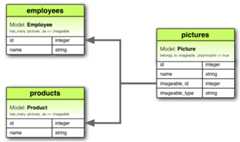
In the context above,imageable is a name chosen for the association. It's asymbolic name that represents the polymorphic association between thePicturemodel and other models such asEmployee andProduct. The important thing isto use the same name (imageable) consistently across all associated models toestablish the polymorphic association correctly.
When you declarebelongs_to :imageable, polymorphic: true in thePicturemodel, you're saying that aPicture can belong to any model (likeEmployeeorProduct) through this association.
You can think of a polymorphicbelongs_to declaration as setting up aninterface that any other model can use. This allows you to retrieve a collectionof pictures from an instance of theEmployee model using@employee.pictures.Similarly, you can retrieve a collection of pictures from an instance of theProduct model using@product.pictures.
Additionally, if you have an instance of thePicture model, you can get itsparent via@picture.imageable, which could be anEmployee or aProduct.
To set up a polymorphic association manually you would need to declare both aforeign key column (imageable_id) and a type column (imageable_type) in themodel:
classCreatePictures<ActiveRecord::Migration[8.1]defchangecreate_table:picturesdo|t|t.string:namet.bigint:imageable_idt.string:imageable_typet.timestampsendadd_index:pictures,[:imageable_type,:imageable_id]endendIn our example,imageable_id could be the ID of either anEmployee or aProduct, andimageable_type is the name of the associated model's class, soeitherEmployee orProduct.
While creating the polymorphic association manually is acceptable, it is insteadrecommended to uset.references or its aliast.belongs_to and specifypolymorphic: true so that Rails knows that the association is polymorphic, andit automatically adds both the foreign key and type columns to the table.
classCreatePictures<ActiveRecord::Migration[8.1]defchangecreate_table:picturesdo|t|t.string:namet.belongs_to:imageable,polymorphic:truet.timestampsendendendSince polymorphic associations rely on storing class names in thedatabase, that data must remain synchronized with the class name used by theRuby code. When renaming a class, make sure to update the data in thepolymorphic type column.
For example, if you change the class name fromProduct toItem then you'dneed to run a migration script to update theimageable_type column in thepictures table (or whichever table is affected) with the new class name.Additionally, you'll need to update any other references to the class namethroughout your application code to reflect the change.
4.2. Models with Composite Primary Keys
Rails can often infer primary key-foreign key relationships between associatedmodels, but when dealing with composite primary keys, Rails typically defaultsto using only part of the composite key, often the id column, unless explicitlyinstructed otherwise.
If you're working with composite primary keys in your Rails models and need toensure the correct handling of associations, please refer to theAssociationssection of the Composite Primary Keysguide.This section provides comprehensive guidance on setting up and usingassociations with composite primary keys in Rails, including how to specifycomposite foreign keys when necessary.
4.3. Self Joins
A self-join is a regular join, but the table is joined with itself. This isuseful in situations where there is a hierarchical relationship within a singletable. A common example is an employee management system where an employee canhave a manager, and that manager is also an employee.
Consider an organization where employees can be managers of other employees. Wewant to track this relationship using a singleemployees table.
In your Rails model, you define theEmployee class to reflect theserelationships:
classEmployee<ApplicationRecord# an employee can have many subordinates.has_many:subordinates,class_name:"Employee",foreign_key:"manager_id"# an employee can have one manager.belongs_to:manager,class_name:"Employee",optional:trueendhas_many :subordinates sets up a one-to-many relationship where an employeecan have many subordinates. Here, we specify that the related model is alsoEmployee (class_name: "Employee") and the foreign key used to identify themanager ismanager_id.
belongs_to :manager sets up a one-to-one relationship where an employee canbelong to one manager. Again, we specify the related model asEmployee.
To support this relationship, we need to add amanager_id column to theemployees table. This column references theid of another employee (themanager).
classCreateEmployees<ActiveRecord::Migration[8.1]defchangecreate_table:employeesdo|t|# Add a belongs_to reference to the manager, which is an employee.t.belongs_to:manager,foreign_key:{to_table: :employees}t.timestampsendendendt.belongs_to :manageradds amanager_idcolumn to theemployeestable.foreign_key: { to_table: :employees }ensures that themanager_idcolumnreferences theidcolumn of theemployeestable.
Theto_table option passed toforeign_key and more are explained inSchemaStatements#add_reference.
With this setup, you can easily access an employee's subordinates and manager inyour Rails application.
To get an employee's subordinates:
employee=Employee.find(1)subordinates=employee.subordinatesTo get an employee's manager:
manager=employee.manager5. Single Table Inheritance (STI)
Single Table Inheritance (STI) is a pattern in Rails that allows multiple modelsto be stored in a single database table. This is useful when you have differenttypes of entities that share common attributes and behavior but also havespecific behaviors.
For example, suppose we haveCar,Motorcycle, andBicycle models. Thesemodels will share fields likecolor andprice, but each will have uniquebehaviors. They will also each have their own controller.
5.1. Generating the Base Vehicle Model
First, we generate the baseVehicle model with shared fields:
$bin/railsgenerate model vehicletype:string color:string price:decimal{10.2}Here, thetype field is crucial for STI as it stores the model name (Car,Motorcycle, orBicycle). STI requires this field to differentiate betweenthe different models stored in the same table.
5.2. Generating Child Models
Next, we generate theCar,Motorcycle, andBicycle models that inheritfrom Vehicle. These models won't have their own tables; instead, they will usethevehicles table.
To generate theCar model:
$bin/railsgenerate model car--parent=VehicleFor this, we can use the--parent=PARENT option, which will generate a modelthat inherits from the specified parent and without equivalent migration (sincethe table already exists).
This generates aCar model that inherits fromVehicle:
classCar<VehicleendThis means that all behavior added to Vehicle is available for Car too, asassociations, public methods, etc. Creating a car will save it in thevehiclestable with "Car" as thetype field:
Repeat the same process forMotorcycle andBicycle.
5.3. Creating Records
Creating a record forCar:
Car.create(color:"Red",price:10000)This will generate the following SQL:
INSERTINTO"vehicles"("type","color","price")VALUES('Car','Red',10000)5.4. Querying Records
Querying car records will search only for vehicles that are cars:
Car.allwill run a query like:
SELECT"vehicles".*FROM"vehicles"WHERE"vehicles"."type"IN('Car')5.5. Adding Specific Behavior
You can add specific behavior or methods to the child models. For example,adding a method to theCar model:
classCar<Vehicledefhonk"Beep Beep"endendNow you can call thehonk method on aCar instance:
car=Car.firstcar.honk# => 'Beep Beep'5.6. Controllers
Each model can have its own controller. For example, theCarsController:
# app/controllers/cars_controller.rbclassCarsController<ApplicationControllerdefindex@cars=Car.allendend5.7. Overriding the inheritance column
There may be cases (like when working with a legacy database) where you need tooverride the name of the inheritance column. This can be achieved with theinheritance_column method.
# Schema: vehicles[ id, kind, created_at, updated_at ]classVehicle<ApplicationRecordself.inheritance_column="kind"endclassCar<VehicleendCar.create(color:"Red",price:10000)# => #<Car kind: "Car", color: "Red", price: 10000>In this setup, Rails will use thekind column to store the model type,allowing STI to function correctly with the custom column name.
5.8. Disabling the inheritance column
There may be cases (like when working with a legacy database) where you need todisable Single Table Inheritance altogether. If you don't disable STI properly,you might encounter anActiveRecord::SubclassNotFound error.
To disable STI, you can set theinheritance_column tonil.
# Schema: vehicles[ id, type, created_at, updated_at ]classVehicle<ApplicationRecordself.inheritance_column=nilendVehicle.create!(type:"Car",color:"Red",price:10000)# => #<Vehicle type: "Car", color: "Red", price: 10000>In this configuration, Rails will treat the type column as a normal attributeand will not use it for STI purposes. This is useful if you need to work with alegacy schema that does not follow the STI pattern.
These adjustments provide flexibility when integrating Rails with existingdatabases or when specific customization is required for your models.
5.9. Considerations
Single Table Inheritance (STI) works bestwhen there is little difference between subclasses and their attributes, but itincludes all attributes of all subclasses in a single table.
A disadvantage of this approach is that it can result in table bloat, as thetable will include attributes specific to each subclass, even if they aren'tused by others. This can be solved by usingDelegated Types.
Additionally, if you’re usingpolymorphicassociations, where a model can belong to more thanone other model via a type and an ID, it could become complex to maintainreferential integrity because the association logic must handle different typescorrectly.
Finally, if you have specific data integrity checks or validations that differbetween subclasses, you need to ensure these are correctly handled by Rails orthe database, especially when setting up foreign key constraints.
6. Delegated Types
Delegated types solves theSingle Table Inheritance(STI) problem of table bloat viadelegated_type. This approach allows us to store shared attributes in asuperclass table and have separate tables for subclass-specific attributes.
6.1. Setting up Delegated Types
To use delegated types, we need to model our data as follows:
- There is a superclass that stores shared attributes among all subclasses inits table.
- Each subclass must inherit from the superclass, and will have a separate tablefor any additional attributes specific to it.
This eliminates the need to define attributes in a single table that areunintentionally shared among all subclasses.
6.2. Generating Models
In order to apply this to our example above, we need to regenerate our models.
First, let's generate the baseEntry model which will act as our superclass:
$bin/railsgenerate model entry entryable_type:string entryable_id:integerThen, we will generate newMessage andComment models for delegation:
$bin/railsgenerate model message subject:string body:string$bin/railsgenerate model comment content:stringIf you don't specify a type for a field (e.g.,subject instead ofsubject:string), Rails will default to typestring.
After running the generators, our models should look like this:
# Schema: entries[ id, entryable_type, entryable_id, created_at, updated_at ]classEntry<ApplicationRecordend# Schema: messages[ id, subject, body, created_at, updated_at ]classMessage<ApplicationRecordend# Schema: comments[ id, content, created_at, updated_at ]classComment<ApplicationRecordend6.3. Declaringdelegated_type
First, declare adelegated_type in the superclassEntry.
classEntry<ApplicationRecorddelegated_type:entryable,types:%w[ Message Comment ],dependent: :destroyendTheentryable parameter specifies the field to use for delegation, and includethe typesMessage andComment as the delegate classes. Theentryable_typeandentryable_id fields store the subclass name and the record ID of thedelegate subclass, respectively.
6.4. Defining theEntryable Module
Next, define a module to implement those delegated types by declaring theas::entryable parameter in thehas_one association.
moduleEntryableextendActiveSupport::Concernincludeddohas_one:entry,as: :entryable,touch:trueendendInclude the created module in your subclass:
classMessage<ApplicationRecordincludeEntryableendclassComment<ApplicationRecordincludeEntryableendWith this definition complete, ourEntry delegator now provides the followingmethods:
| Method | Return |
|---|---|
Entry.entryable_types | ["Message", "Comment"] |
Entry#entryable_class | Message or Comment |
Entry#entryable_name | "message" or "comment" |
Entry.messages | Entry.where(entryable_type: "Message") |
Entry#message? | Returns true whenentryable_type == "Message" |
Entry#message | Returns the message record, whenentryable_type == "Message", otherwisenil |
Entry#message_id | Returnsentryable_id, whenentryable_type == "Message", otherwisenil |
Entry.comments | Entry.where(entryable_type: "Comment") |
Entry#comment? | Returns true whenentryable_type == "Comment" |
Entry#comment | Returns the comment record, whenentryable_type == "Comment", otherwisenil |
Entry#comment_id | Returns entryable_id, whenentryable_type == "Comment", otherwisenil |
6.5. Object creation
When creating a newEntry object, we can specify theentryable subclass atthe same time.
Entry.create!entryable:Message.new(subject:"hello!")6.6. Adding further delegation
We can enhance ourEntry delegator by definingdelegate and usingpolymorphism on the subclasses. For example, to delegate thetitle method fromEntry to its subclasses:
classEntry<ApplicationRecorddelegated_type:entryable,types:%w[ Message Comment ]delegate:title,to: :entryableendclassMessage<ApplicationRecordincludeEntryabledeftitlesubjectendendclassComment<ApplicationRecordincludeEntryabledeftitlecontent.truncate(20)endendThis setup allowsEntry to delegate thetitle method to its subclasses,whereMessage usessubject andComment uses a truncated version ofcontent.
7. Tips, Tricks, and Warnings
Here are a few things you should know to make efficient use of Active Recordassociations in your Rails applications:
- Controlling caching
- Avoiding name collisions
- Updating the schema
- Controlling association scope
- Bi-directional associations
7.1. Controlling Association Caching
All of the association methods are built around caching, which keeps the resultof loaded associations for further operations. The cache is even shared acrossmethods. For example:
# retrieves books from the databaseauthor.books.load# uses the cached copy of booksauthor.books.size# uses the cached copy of booksauthor.books.empty?When we useauthor.books, the data is not immediately loaded from thedatabase. Instead, it sets up a query that will be executed when you actuallytry to use the data, for example, by calling methods that require data likeeach, size, empty?, etc. By callingauthor.books.load, before calling othermethods which use the data, you explicitly trigger the query to load the datafrom the database immediately. This is useful if you know you will need the dataand want to avoid the potential performance overhead of multiple queries beingtriggered as you work with the association.
But what if you want to reload the cache, because data might have been changedby some other part of the application? Just callreloadon the association:
# retrieves books from the databaseauthor.books.load# uses the cached copy of booksauthor.books.size# discards the cached copy of books and goes back to the databaseauthor.books.reload.empty?7.2. Avoiding Name Collisions
When creating associations in Ruby on Rails models, it's important to avoidusing names that are already used for instance methods ofActiveRecord::Base.This is because creating an association with a name that clashes with anexisting method could lead to unintended consequences, such as overriding thebase method and causing issues with functionality. For example, using names likeattributes orconnection for associations would be problematic.
7.3. Updating the Schema
Associations are extremely useful, they are responsible for defining therelationships between models but they do not update your database schema. Youare responsible for maintaining your database schema to match your associations.This usually involves two main tasks: creating foreign keys forbelongs_toassociations and setting up the correct join table forhas_many:through andhas_and_belongs_to_many associations. You can readmore about when to use ahas_many :through vs has_and_belongs_to_manyin thehas many through vs has and belongs to manysection.
7.3.1. Creating Foreign Keys forbelongs_to Associations
When you declare abelongs_to association, you need to createforeign keys as appropriate. For example, consider this model:
classBook<ApplicationRecordbelongs_to:authorendThis declaration needs to be backed up by a corresponding foreign key column inthe books table. For a brand new table, the migration might look something likethis:
classCreateBooks<ActiveRecord::Migration[8.1]defchangecreate_table:booksdo|t|t.datetime:published_att.string:book_numbert.belongs_to:authorendendendWhereas for an existing table, it might look like this:
classAddAuthorToBooks<ActiveRecord::Migration[8.1]defchangeadd_reference:books,:authorendend7.3.2. Creating Join Tables forhas_and_belongs_to_many Associations
If you create ahas_and_belongs_to_many association, you need to explicitlycreate the join table. Unless the name of the join table is explicitly specifiedby using the:join_table option, Active Record creates the name by using thelexical order of the class names. So a join between author and book models willgive the default join table name of "authors_books" because "a" outranks "b" inlexical ordering.
Whatever the name, you must manually generate the join table with an appropriatemigration. For example, consider these associations:
classAssembly<ApplicationRecordhas_and_belongs_to_many:partsendclassPart<ApplicationRecordhas_and_belongs_to_many:assembliesendThese need to be backed up by a migration to create theassemblies_partstable.
$bin/railsgenerate migration CreateAssembliesPartsJoinTable assemblies partsYou can then fill out the migration and ensure that the table is created withouta primary key.
classCreateAssembliesPartsJoinTable<ActiveRecord::Migration[8.1]defchangecreate_table:assemblies_parts,id:falsedo|t|t.bigint:assembly_idt.bigint:part_idendadd_index:assemblies_parts,:assembly_idadd_index:assemblies_parts,:part_idendendWe passid: false tocreate_table because the join table does not representa model. If you observe any strange behavior in ahas_and_belongs_to_manyassociation like mangled model IDs, or exceptions about conflicting IDs, chancesare you forgot to setid: false when creating your migration.
For simplicity, you can also use the methodcreate_join_table:
classCreateAssembliesPartsJoinTable<ActiveRecord::Migration[8.1]defchangecreate_join_table:assemblies,:partsdo|t|t.index:assembly_idt.index:part_idendendendYou can read more about thecreate_join_table method in theActive RecordMigration Guides
7.3.3. Creating Join Tables forhas_many :through Associations
The main difference in schema implementation between creating a join table forhas_many :through vshas_and_belongs_to_many is that the join table for ahas_many :through requires anid.
classCreateAppointments<ActiveRecord::Migration[8.1]defchangecreate_table:appointmentsdo|t|t.belongs_to:physiciant.belongs_to:patientt.datetime:appointment_datet.timestampsendendend7.4. Controlling Association Scope
By default, associations look for objects only within the current module'sscope. This feature is particularly useful when declaring Active Record modelsinside a module, as it keeps the associations scoped properly. For example:
moduleMyApplicationmoduleBusinessclassSupplier<ApplicationRecordhas_one:accountendclassAccount<ApplicationRecordbelongs_to:supplierendendendIn this example, both theSupplier andAccount classes are defined withinthe same module (MyApplication::Business). This organization allows you tostructure your models into folders based on their scope without needing toexplicitly specify the scope in every association:
# app/models/my_application/business/supplier.rbmoduleMyApplicationmoduleBusinessclassSupplier<ApplicationRecordhas_one:accountendendend# app/models/my_application/business/account.rbmoduleMyApplicationmoduleBusinessclassAccount<ApplicationRecordbelongs_to:supplierendendendIt is important to note that while model scoping helps organize your code, itdoes not change the naming convention for your database tables. For instance, ifyou have aMyApplication::Business::Supplier model, the corresponding databasetable should still follow the naming convention and be namedmy_application_business_suppliers.
However, if theSupplier andAccount models are defined in different scopes,the associations will not work by default:
moduleMyApplicationmoduleBusinessclassSupplier<ApplicationRecordhas_one:accountendendmoduleBillingclassAccount<ApplicationRecordbelongs_to:supplierendendendTo associate a model with a model in a different namespace, you must specify thecomplete class name in your association declaration:
moduleMyApplicationmoduleBusinessclassSupplier<ApplicationRecordhas_one:account,class_name:"MyApplication::Billing::Account"endendmoduleBillingclassAccount<ApplicationRecordbelongs_to:supplier,class_name:"MyApplication::Business::Supplier"endendendBy explicitly declaring theclass_name option, you can create associationsacross different namespaces, ensuring the correct models are linked regardlessof their module scope.
7.5. Bi-directional Associations
In Rails, it's common for associations between models to be bi-directional,meaning they need to be declared in both related models. Consider the followingexample:
classAuthor<ApplicationRecordhas_many:booksendclassBook<ApplicationRecordbelongs_to:authorendActive Record will attempt to automatically identify that these two models sharea bi-directional association based on the association name. This informationallows Active Record to:
Prevent needless queries for already-loaded data:
Active Record avoids additional database queries for already-loaded data.
irb>author=Author.firstirb>author.books.all?do|book|irb>book.author.equal?(author)# No additional queries executed hereirb>end=>truePrevent inconsistent data
Since only one copy of the
Authorobject is loaded, it helps to preventinconsistencies.irb>author=Author.firstirb>book=author.books.firstirb>author.name==book.author.name=>trueirb>author.name="Changed Name"irb>author.name==book.author.name=>trueAutomatic saving of associations in more cases:
irb>author=Author.newirb>book=author.books.newirb>book.save!irb>book.persisted?=>trueirb>author.persisted?=>trueValidate thepresence andabsence of associations in morecases:
irb>book=Book.newirb>book.valid?=>falseirb>book.errors.full_messages=>["Author must exist"]irb>author=Author.newirb>book=author.books.newirb>book.valid?=>true
Sometimes, you might need to customize the association with options like:foreign_key or:class_name. When you do this, Rails might not automaticallyrecognize the bi-directional association involving:through or:foreign_keyoptions.
Custom scopes on the opposite association also prevent automatic identification,as do custom scopes on the association itself unlessconfig.active_record.automatic_scope_inversing is set to true.
For example, consider the following model declarations with a custom foreignkey:
classAuthor<ApplicationRecordhas_many:booksendclassBook<ApplicationRecordbelongs_to:writer,class_name:"Author",foreign_key:"author_id"endDue to the:foreign_key option, Active Record will not automatically recognizethe bi-directional association, which can lead to several issues:
Execute needless queries for the same data (in this example causing N+1queries):
irb>author=Author.firstirb>author.books.any?do|book|irb>book.writer.equal?(author)# This executes an author query for every bookirb>end=>falseReference multiple copies of a model with inconsistent data:
irb>author=Author.firstirb>book=author.books.firstirb>author.name==book.writer.name=>trueirb>author.name="Changed Name"irb>author.name==book.writer.name=>falseFail to autosave associations:
irb>author=Author.newirb>book=author.books.newirb>book.save!irb>book.persisted?=>trueirb>author.persisted?=>falseFail to validate presence or absence:
irb>author=Author.newirb>book=author.books.newirb>book.valid?=>falseirb>book.errors.full_messages=>["Author must exist"]
To resolve these issues, you can explicitly declare bi-directional associationsusing the:inverse_of option:
classAuthor<ApplicationRecordhas_many:books,inverse_of:"writer"endclassBook<ApplicationRecordbelongs_to:writer,class_name:"Author",foreign_key:"author_id"endBy including the:inverse_of option in thehas_many association declaration,Active Record will recognize the bi-directional association and behave asdescribed in the initial examples above.
8. Association References
8.1. Options
While Rails uses intelligent defaults that will work well in most situations,there may be times when you want to customize the behavior of the associationreferences. Such customizations can be accomplished by passing options blockswhen you create the association. For example, this association uses two suchoptions:
classBook<ApplicationRecordbelongs_to:author,touch: :books_updated_at,counter_cache:trueendEach association supports numerous options which you can read more about inOptions section of each association in the ActiveRecord AssociationsAPI.We'll discuss some of the common use cases below.
8.1.1.:class_name
If the name of the other model cannot be derived from the association name, youcan use the:class_name option to supply the model name. For example, if abook belongs to an author, but the actual name of the model containing authorsisPatron, you'd set things up this way:
classBook<ApplicationRecordbelongs_to:author,class_name:"Patron"endThis option is not supported in polymorphic associations, since in that case theclass name of the associated record is stored in the type column.
8.1.2.:dependent
Controls what happens to the associated object when its owner is destroyed:
:destroy, when the object is destroyed,destroywill be called on itsassociated objects. This method not only removes the associated records fromthe database but also ensures that any defined callbacks (likebefore_destroyandafter_destroy) are executed. This is useful forperforming custom logic during the deletion process, such as logging orcleaning up related data.:delete, when the object is destroyed, all its associated objects will bedeleted directly from the database without calling theirdestroymethod.This method performs a direct deletion and bypasses any callbacks orvalidations in the associated models, making it more efficient but potentiallyleading to data integrity issues if important cleanup tasks are skipped. Usedeletewhen you need to remove records quickly and are confident that noadditional actions are required for the associated records.:destroy_async: when the object is destroyed, anActiveRecord::DestroyAssociationAsyncJobjob is enqueued which will calldestroy on its associated objects. Active Job must be set up for this to work.Do not use this option if the association is backed by foreign key constraintsin your database. The foreign key constraint actions will occur inside thesame transaction that deletes its owner.:nullifycauses the foreign key to be set toNULL. Polymorphic typecolumn is also nullified on polymorphic associations. Callbacks are notexecuted.:restrict_with_exceptioncauses anActiveRecord::DeleteRestrictionErrorexception to be raised if there is an associated record:restrict_with_errorcauses an error to be added to the owner if there isan associated object
You should not specify this option on abelongs_to association thatis connected with ahas_many association on the other class. Doing so can leadto orphaned records in your database because destroying the parent object mayattempt to destroy its children, which in turn may attempt to destroy the parentagain, causing inconsistencies.
Do not leave the:nullify option for associations withNOT NULL databaseconstraints. Settingdependent to:destroy is essential; otherwise, theforeign key of the associated object may be set toNULL, preventing changes toit.
The:dependent option is ignored with the:through option. When using:through, the join model must have abelongs_to association, and thedeletion affects only the join records, not the associated records.
When usingdependent: :destroy on a scoped association, only the scopedobjects are destroyed. For example, in aPost model defined ashas_many:comments, -> { where published: true }, dependent: :destroy, calling destroyon a post will only delete published comments, leaving unpublished commentsintact with a foreign key pointing to the deleted post.
You cannot use the:dependent option directly on ahas_and_belongs_to_manyassociation. To manage deletions of join table records, handle them manually orswitch to ahas_many :through association, which provides more flexibility andsupports the:dependent option.
8.1.3.:foreign_key
By convention, Rails assumes that the column used to hold the foreign key onthis model is the name of the association with the suffix_id added. The:foreign_key option lets you set the name of the foreign key directly:
classSupplier<ApplicationRecordhas_one:account,foreign_key:"supp_id"endRails does not create foreign key columns for you. You need to explicitlydefine them in your migrations.
8.1.4.:primary_key
By default, Rails uses theid column as the primary key for its tables. The:primary_key option allows you to specify a different column as the primarykey.
For example, if theusers table usesguid as the primary key instead ofid, and you want thetodos table to referenceguid as a foreign key(user_id), you can configure it like this:
classUser<ApplicationRecordself.primary_key="guid"# Sets the primary key to guid instead of idendclassTodo<ApplicationRecordbelongs_to:user,primary_key:"guid"# References the guid column in users tableendWhen you execute@user.todos.create, the@todo record will have itsuser_id value set to theguid value of@user.
has_and_belongs_to_many does not support the:primary_key option. For thistype of association, you can achieve similar functionality by using a join tablewith has_many:through association, which gives more flexibility and supportsthe:primary_key option. You can read more about this in thehas_many :through section.
8.1.5.:touch
If you set the:touch option totrue, then theupdated_at orupdated_ontimestamp on the associated object will be set to the current time whenever thisobject is saved or destroyed:
classBook<ApplicationRecordbelongs_to:author,touch:trueendclassAuthor<ApplicationRecordhas_many:booksendIn this case, saving or destroying a book will update the timestamp on theassociated author. You can also specify a particular timestamp attribute toupdate:
classBook<ApplicationRecordbelongs_to:author,touch: :books_updated_atendhas_and_belongs_to_many does not support the:touch option. For this type ofassociation, you can achieve similar functionality by using a join table withhas_many :through association. You can read more about this in thehas_many :through section.
8.1.6.:validate
If you set the:validate option totrue, then new associated objects will bevalidated whenever you save this object. By default, this isfalse: newassociated objects will not be validated when this object is saved.
has_and_belongs_to_many does not support the:validate option. For this typeof association, you can achieve similar functionality by using a join table withhas_many:through association. You can read more about this in thehas_many :through section.
8.1.7.:inverse_of
The:inverse_of option specifies the name of thebelongs_to association thatis the inverse of this association. See thebi-directionalassociation section for more details.
classSupplier<ApplicationRecordhas_one:account,inverse_of: :supplierendclassAccount<ApplicationRecordbelongs_to:supplier,inverse_of: :accountend8.1.8.:source_type
The:source_type option specifies the source association type for ahas_many:through association that proceeds through apolymorphicassociation.
classAuthor<ApplicationRecordhas_many:bookshas_many:paperbacks,through: :books,source: :format,source_type:"Paperback"endclassBook<ApplicationRecordbelongs_to:format,polymorphic:trueendclassHardback<ApplicationRecord;endclassPaperback<ApplicationRecord;end8.1.9.:strict_loading
Enforces strict loading every time an associated record is loaded through thisassociation.
8.1.10.:association_foreign_key
The:association_foreign_key can be found on ahas_and_belongs_to_manyrelationship. By convention, Rails assumes that the column in the join tableused to hold the foreign key pointing to the other model is the name of thatmodel with the suffix_id added. The:association_foreign_key option letsyou set the name of the foreign key directly. For example:
classUser<ApplicationRecordhas_and_belongs_to_many:friends,class_name:"User",foreign_key:"this_user_id",association_foreign_key:"other_user_id"endThe:foreign_key and:association_foreign_key options are useful whensetting up a many-to-many self-join.
8.1.11.:join_table
The:join_table can be found on ahas_and_belongs_to_many relationship. Ifthe default name of the join table, based on lexical ordering, is not what youwant, you can use the:join_table option to override the default.
8.1.12.:deprecated
If true, Active Record warns every time the association is used.
Three reporting modes are supported (:warn,:raise, and:notify), andbacktraces can be enabled or disabled. Defaults are:warn mode and disabledbacktraces.
Please, check the documentation ofActiveRecord::Associations::ClassMethodsfor further details.
8.2. Scopes
Scopes allow you to specify common queries that can be referenced as methodcalls on the association objects. This is useful for defining custom queriesthat are reused in multiple places in your application. For example:
classParts<ApplicationRecordhas_and_belongs_to_many:assemblies,->{whereactive:true}end8.2.1. General Scopes
You can use any of the standardquerying methodsinside the scope block. The following ones are discussed below:
whereincludesreadonlyselect
8.2.1.1.where
Thewhere method lets you specify the conditions that the associated objectmust meet.
classParts<ApplicationRecordhas_and_belongs_to_many:assemblies,->{where"factory = 'Seattle'"}endYou can also set conditions via a hash:
classParts<ApplicationRecordhas_and_belongs_to_many:assemblies,->{wherefactory:"Seattle"}endIf you use a hash-stylewhere, then record creation via this association willbe automatically scoped using the hash. In this case, using@parts.assemblies.create or@parts.assemblies.build will create assemblieswhere thefactory column has the value "Seattle".
8.2.1.2.includes
You can use theincludes method to specify second-order associations thatshould be eager-loaded when this association is used. For example, considerthese models:
classSupplier<ApplicationRecordhas_one:accountendclassAccount<ApplicationRecordbelongs_to:supplierbelongs_to:representativeendclassRepresentative<ApplicationRecordhas_many:accountsendIf you frequently retrieve representatives directly from suppliers(@supplier.account.representative), then you can make your code somewhat moreefficient by including representatives in the association from suppliers toaccounts:
classSupplier<ApplicationRecordhas_one:account,->{includes:representative}endclassAccount<ApplicationRecordbelongs_to:supplierbelongs_to:representativeendclassRepresentative<ApplicationRecordhas_many:accountsendThere's no need to useincludes for immediate associations - that is, ifyou haveBook belongs_to :author, then the author is eager-loadedautomatically when it's needed.
8.2.1.3.readonly
If you usereadonly, then the associated object will be read-only whenretrieved via the association.
classBook<ApplicationRecordbelongs_to:author,->{readonly}endThis is useful when you want to prevent the associated object from beingmodified through the association. For example, if you have aBook model thatbelongs_to :author, you can usereadonly to prevent the author from beingmodified through the book:
@book.author=Author.first@book.author.save!# This will raise an ActiveRecord::ReadOnlyRecord error8.2.1.4.select
Theselect method lets you override the SQLSELECT clause used to retrievedata about the associated object. By default, Rails retrieves all columns.
For example, if you have anAuthor model with manyBooks, but you only wantto retrieve thetitle of each book:
classAuthor<ApplicationRecordhas_many:books,->{select(:id,:title)}# Only select id and title columnsendclassBook<ApplicationRecordbelongs_to:authorendNow, when you access an author's books, only theid andtitle columns willbe retrieved from thebooks table.
If you use theselect method on abelongs_to association, you shouldalso set the:foreign_key option to guarantee correct results. For example:
classBook<ApplicationRecordbelongs_to:author,->{select(:id,:name)},foreign_key:"author_id"# Only select id and name columnsendclassAuthor<ApplicationRecordhas_many:booksendIn this case, when you access a book's author, only theid andname columnswill be retrieved from theauthors table.
8.2.2. Collection Scopes
has_many andhas_and_belongs_to_many are associations that deal withcollections of records, so you can use additional methods likegroup,limit,order,select, anddistinct to customize the query used by theassociation.
8.2.2.1.group
Thegroup method supplies an attribute name to group the result set by, usingaGROUP BY clause in the finder SQL.
classParts<ApplicationRecordhas_and_belongs_to_many:assemblies,->{group"factory"}end8.2.2.2.limit
Thelimit method lets you restrict the total number of objects that will befetched through an association.
classParts<ApplicationRecordhas_and_belongs_to_many:assemblies,->{order("created_at DESC").limit(50)}end8.2.2.3.order
Theorder method dictates the order in which associated objects will bereceived (in the syntax used by an SQLORDER BY clause).
classAuthor<ApplicationRecordhas_many:books,->{order"date_confirmed DESC"}end8.2.2.4.select
Theselect method lets you override the SQLSELECT clause that is used toretrieve data about the associated objects. By default, Rails retrieves allcolumns.
If you specify your ownselect, be sure to include the primary keyand foreign key columns of the associated model. If you do not, Rails will throwan error.
8.2.2.5.distinct
Use thedistinct method to keep the collection free of duplicates. This ismostly useful together with the:through option.
classPerson<ApplicationRecordhas_many:readingshas_many:articles,through: :readingsendirb>person=Person.create(name:'John')irb>article=Article.create(name:'a1')irb>person.articles<<articleirb>person.articles<<articleirb>person.articles.to_a=> [#<Article id: 5, name: "a1">,#<Article id: 5, name: "a1">]irb>Reading.all.to_a=>[#<Readingid:12,person_id:5,article_id:5>,#<Readingid:13,person_id:5,article_id:5>]In the above case there are two readings andperson.articles brings out bothof them even though these records are pointing to the same article.
Now let's setdistinct:
classPersonhas_many:readingshas_many:articles,->{distinct},through: :readingsendirb>person=Person.create(name:'Honda')irb>article=Article.create(name:'a1')irb>person.articles<<articleirb>person.articles<<articleirb>person.articles.to_a=> [#<Article id: 7, name: "a1">]irb>Reading.all.to_a=>[#<Readingid:16,person_id:7,article_id:7>,#<Readingid:17,person_id:7,article_id:7>]In the above case there are still two readings. Howeverperson.articles showsonly one article because the collection loads only unique records.
If you want to make sure that, upon insertion, all of the records in thepersisted association are distinct (so that you can be sure that when youinspect the association that you will never find duplicate records), you shouldadd a unique index on the table itself. For example, if you have a table namedreadings and you want to make sure the articles can only be added to a persononce, you could add the following in a migration:
add_index:readings,[:person_id,:article_id],unique:trueOnce you have this unique index, attempting to add the article to a person twicewill raise anActiveRecord::RecordNotUnique error:
irb>person=Person.create(name:'Honda')irb>article=Article.create(name:'a1')irb>person.articles<<articleirb>person.articles<<articleActiveRecord::RecordNotUniqueNote that checking for uniqueness using something likeinclude? is subject torace conditions. Do not attempt to useinclude? to enforce distinctness in anassociation. For instance, using the article example from above, the followingcode would be racy because multiple users could be attempting this at the sametime:
person.articles<<articleunlessperson.articles.include?(article)8.2.3. Using the Association Owner
You can pass the owner of the association as a single argument to the scopeblock for even more control over the association scope. However, be aware thatdoing this will make preloading the association impossible.
For example:
classSupplier<ApplicationRecordhas_one:account,->(supplier){whereactive:supplier.active?}endIn this example, theaccount association of theSupplier model is scopedbased on theactive status of the supplier.
By utilizing association extensions and scoping with the association owner, youcan create more dynamic and context-aware associations in your Railsapplications.
8.3. Counter Cache
The:counter_cache option in Rails helps improve the efficiency of finding thenumber of associated objects. Consider the following models:
classBook<ApplicationRecordbelongs_to:authorendclassAuthor<ApplicationRecordhas_many:booksendBy default, queryingauthor.books.size results in a database call to perform aCOUNT(*) query. To optimize this, you can add a counter cache to thebelonging model (in this case,Book). This way, Rails can return the countdirectly from the cache without querying the database.
classBook<ApplicationRecordbelongs_to:author,counter_cache:trueendclassAuthor<ApplicationRecordhas_many:booksendWith this declaration, Rails will keep the cache value up to date, and thenreturn that value in response to thesize method, avoiding the database call.
Although the:counter_cache option is specified on the model with thebelongs_to declaration, the actual column must be added to theassociated(in this casehas_many) model. In this example, you need to add abooks_count column to theAuthor model:
classAddBooksCountToAuthors<ActiveRecord::Migration[8.1]defchangeadd_column:authors,:books_count,:integer,default:0,null:falseendendYou can specify a custom column name in thecounter_cache declaration insteadof using the defaultbooks_count. For example, to usecount_of_books:
classBook<ApplicationRecordbelongs_to:author,counter_cache: :count_of_booksendclassAuthor<ApplicationRecordhas_many:booksendYou only need to specify the:counter_cache option on thebelongs_toside of the association.
Using counter caches on existing large tables can be troublesome. To avoidlocking the table for too long, the column values must be backfilled separatelyfrom the column addition. This backfill must also happen before using:counter_cache; otherwise, methods likesize,any?, etc., which rely oncounter caches, may return incorrect results.
To backfill values safely while keeping counter cache columns updated with childrecord creation/removal and ensuring methods always get results from thedatabase (avoiding potentially incorrect counter cache values), usecounter_cache: { active: false }. This setting ensures that methods alwaysfetch results from the database, avoiding incorrect values from an uninitializedcounter cache. If you need to specify a custom column name, usecounter_cache:{ active: false, column: :my_custom_counter }.
If for some reason you change the value of an owner model's primary key, and donot also update the foreign keys of the counted models, then the counter cachemay have stale data. In other words, any orphaned models will still counttowards the counter. To fix a stale counter cache, usereset_counters.
8.4. Callbacks
Normal callbacks hook into the life cycle ofActive Record objects, allowing you to work with those objects at variouspoints. For example, you can use a:before_save callback to cause something tohappen just before an object is saved.
Association callbacks are similar to normal callbacks, but they are triggered byevents in the life cycle of a collection associated with an Active Recordobject. There are four available association callbacks:
before_addafter_addbefore_removeafter_remove
You define association callbacks by adding options to the associationdeclaration. For example:
classAuthor<ApplicationRecordhas_many:books,before_add: :check_credit_limitdefcheck_credit_limit(book)throw(:abort)iflimit_reached?endendIn this example, theAuthor model has ahas_many association withbooks.Thebefore_add callbackcheck_credit_limit is triggered before a book isadded to the collection. If thelimit_reached? method returnstrue, the bookis not added to the collection.
By using these association callbacks, you can customize the behavior of yourassociations, ensuring that specific actions are taken at key points in the lifecycle of your collections.
Read more about association callbacks in theActive Record CallbacksGuide
8.5. Extensions
Rails provides the ability to extend the functionality of association proxyobjects, which manage associations, by adding new finders, creators, or othermethods through anonymous modules. This feature allows you to customizeassociations to meet the specific needs of your application.
You can extend ahas_many association with custom methods directly within themodel definition. For example:
classAuthor<ApplicationRecordhas_many:booksdodeffind_by_book_prefix(book_number)find_by(category_id:book_number[0..2])endendendIn this example, thefind_by_book_prefix method is added to thebooksassociation of theAuthor model. This custom method allows you to findbooksbased on a specific prefix of thebook_number.
If you have an extension that should be shared by multiple associations, you canuse a named extension module. For example:
moduleFindRecentExtensiondeffind_recentwhere("created_at > ?",5.days.ago)endendclassAuthor<ApplicationRecordhas_many:books,->{extendingFindRecentExtension}endclassSupplier<ApplicationRecordhas_many:deliveries,->{extendingFindRecentExtension}endIn this case, theFindRecentExtension module is used to add afind_recentmethod to both thebooks association in theAuthor model and thedeliveries association in theSupplier model. This method retrieves recordscreated within the last five days.
Extensions can interact with the internals of the association proxy using theproxy_association accessor. Theproxy_association provides three importantattributes:
proxy_association.ownerreturns the object that the association is a partof.proxy_association.reflectionreturns the reflection object that describesthe association.proxy_association.targetreturns the associated object forbelongs_toorhas_one, or the collection of associated objects forhas_manyorhas_and_belongs_to_many.
These attributes allow extensions to access and manipulate the associationproxy's internal state and behavior.
Here's an advanced example demonstrating how to use these attributes in anextension:
moduleAdvancedExtensiondeffind_and_log(query)results=where(query)proxy_association.owner.logger.info("Querying#{proxy_association.reflection.name} with#{query}")resultsendendclassAuthor<ApplicationRecordhas_many:books,->{extendingAdvancedExtension}endIn this example, thefind_and_log method performs a query on the associationand logs the query details using the owner's logger. The method accesses theowner's logger viaproxy_association.owner and the association's name viaproxy_association.reflection.name.