Active Record Query Interface
This guide covers different ways to retrieve data from the database using Active Record.
After reading this guide, you will know:
- How to find records using a variety of methods and conditions.
- How to specify the order, retrieved attributes, grouping, and other properties of the found records.
- How to use eager loading to reduce the number of database queries needed for data retrieval.
- How to use dynamic finder methods.
- How to use method chaining to use multiple Active Record methods together.
- How to check for the existence of particular records.
- How to perform various calculations on Active Record models.
- How to run EXPLAIN on relations.
1. What is the Active Record Query Interface?
If you're used to using raw SQL to find database records, then you will generally find that there are better ways to carry out the same operations in Rails. Active Record insulates you from the need to use SQL in most cases.
Active Record will perform queries on the database for you and is compatible with most database systems, including MySQL, MariaDB, PostgreSQL, and SQLite. Regardless of which database system you're using, the Active Record method format will always be the same.
Code examples throughout this guide will refer to one or more of the following models:
All of the following models useid as the primary key, unless specified otherwise.
classAuthor<ApplicationRecordhas_many:books,->{order(year_published: :desc)}endclassBook<ApplicationRecordbelongs_to:supplierbelongs_to:authorhas_many:reviewshas_and_belongs_to_many:orders,join_table:"books_orders"scope:in_print,->{where(out_of_print:false)}scope:out_of_print,->{where(out_of_print:true)}scope:old,->{where(year_published:...50.years.ago.year)}scope:out_of_print_and_expensive,->{out_of_print.where("price > 500")}scope:costs_more_than,->(amount){where("price > ?",amount)}endclassCustomer<ApplicationRecordhas_many:ordershas_many:reviewsendclassOrder<ApplicationRecordbelongs_to:customerhas_and_belongs_to_many:books,join_table:"books_orders"enum:status,[:shipped,:being_packed,:complete,:cancelled]scope:created_before,->(time){where(created_at:...time)}endclassReview<ApplicationRecordbelongs_to:customerbelongs_to:bookenum:state,[:not_reviewed,:published,:hidden]endclassSupplier<ApplicationRecordhas_many:bookshas_many:authors,through: :booksend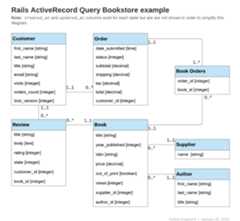
2. Retrieving Objects from the Database
To retrieve objects from the database, Active Record provides several finder methods. Each finder method allows you to pass arguments into it to perform certain queries on your database without writing raw SQL.
The methods are:
annotatefindcreate_withdistincteager_loadextendingextract_associatedfromgrouphavingincludesjoinsleft_outer_joinslimitlocknoneoffsetoptimizer_hintsorderpreloadreadonlyreferencesreorderreselectregroupreverse_orderselectwhere
Finder methods that return a collection, such aswhere andgroup, return an instance ofActiveRecord::Relation. Methods that find a single entity, such asfind andfirst, return a single instance of the model.
The primary operation ofModel.find(options) can be summarized as:
- Convert the supplied options to an equivalent SQL query.
- Fire the SQL query and retrieve the corresponding results from the database.
- Instantiate the equivalent Ruby object of the appropriate model for every resulting row.
- Run
after_findand thenafter_initializecallbacks, if any.
2.1. Retrieving a Single Object
Active Record provides several different ways of retrieving a single object.
2.1.1.find
Using thefind method, you can retrieve the object corresponding to the specifiedprimary key that matches any supplied options. For example:
# Find the customer with primary key (id) 10.irb>customer=Customer.find(10)=> #<Customer id: 10, first_name: "Ryan">The SQL equivalent of the above is:
SELECT*FROMcustomersWHERE(customers.id=10)LIMIT1Thefind method will raise anActiveRecord::RecordNotFound exception if no matching record is found.
You can also use this method to query for multiple objects. Call thefind method and pass in an array of primary keys. The return will be an array containing all of the matching records for the suppliedprimary keys. For example:
# Find the customers with primary keys 1 and 10.irb>customers=Customer.find([1,10])# OR Customer.find(1, 10)=> [#<Customer id: 1, first_name: "Lifo">,#<Customer id: 10, first_name: "Ryan">]The SQL equivalent of the above is:
SELECT*FROMcustomersWHERE(customers.idIN(1,10))Thefind method will raise anActiveRecord::RecordNotFound exception unless a matching record is found forall of the supplied primary keys.
If your table uses a composite primary key, you'll need to pass in an array to find a single item. For instance, if customers were defined with[:store_id, :id] as a primary key:
# Find the customer with store_id 3 and id 17irb>customers=Customer.find([3,17])=> #<Customer store_id: 3, id: 17, first_name: "Magda">The SQL equivalent of the above is:
SELECT*FROMcustomersWHEREstore_id=3ANDid=17To find multiple customers with composite IDs, you would pass an array of arrays:
# Find the customers with primary keys [1, 8] and [7, 15].irb>customers=Customer.find([[1,8],[7,15]])# OR Customer.find([1, 8], [7, 15])=> [#<Customer store_id: 1, id: 8, first_name: "Pat">,#<Customer store_id: 7, id: 15, first_name: "Chris">]The SQL equivalent of the above is:
SELECT*FROMcustomersWHERE(store_id=1ANDid=8ORstore_id=7ANDid=15)2.1.2.take
Thetake method retrieves a record without any implicit ordering. For example:
irb>customer=Customer.take=> #<Customer id: 1, first_name: "Lifo">The SQL equivalent of the above is:
SELECT*FROMcustomersLIMIT1Thetake method returnsnil if no record is found and no exception will be raised.
You can pass in a numerical argument to thetake method to return up to that number of results. For example:
irb>customers=Customer.take(2)=> [#<Customer id: 1, first_name: "Lifo">,#<Customer id: 220, first_name: "Sara">]The SQL equivalent of the above is:
SELECT*FROMcustomersLIMIT2Thetake! method behaves exactly liketake, except that it will raiseActiveRecord::RecordNotFound if no matching record is found.
The retrieved record may vary depending on the database engine.
2.1.3.first
Thefirst method finds the first record ordered by primary key (default). For example:
irb>customer=Customer.first=> #<Customer id: 1, first_name: "Lifo">The SQL equivalent of the above is:
SELECT*FROMcustomersORDERBYcustomers.idASCLIMIT1Thefirst method returnsnil if no matching record is found and no exception will be raised.
If yourdefault scope contains an order method,first will return the first record according to this ordering.
You can pass in a numerical argument to thefirst method to return up to that number of results. For example:
irb>customers=Customer.first(3)=> [#<Customer id: 1, first_name: "Lifo">,#<Customer id: 2, first_name: "Fifo">, #<Customer id: 3, first_name: "Filo">]The SQL equivalent of the above is:
SELECT*FROMcustomersORDERBYcustomers.idASCLIMIT3Models with composite primary keys will use the full composite primary key for ordering.For instance, if customers were defined with[:store_id, :id] as a primary key:
irb>customer=Customer.first=> #<Customer id: 2, store_id: 1, first_name: "Lifo">The SQL equivalent of the above is:
SELECT*FROMcustomersORDERBYcustomers.store_idASC,customers.idASCLIMIT1On a collection that is ordered usingorder,first will return the first record ordered by the specified attribute fororder.
irb>customer=Customer.order(:first_name).first=> #<Customer id: 2, first_name: "Fifo">The SQL equivalent of the above is:
SELECT*FROMcustomersORDERBYcustomers.first_nameASCLIMIT1Thefirst! method behaves exactly likefirst, except that it will raiseActiveRecord::RecordNotFound if no matching record is found.
2.1.4.last
Thelast method finds the last record ordered by primary key (default). For example:
irb>customer=Customer.last=> #<Customer id: 221, first_name: "Russel">The SQL equivalent of the above is:
SELECT*FROMcustomersORDERBYcustomers.idDESCLIMIT1Thelast method returnsnil if no matching record is found and no exception will be raised.
Models with composite primary keys will use the full composite primary key for ordering.For instance, if customers were defined with[:store_id, :id] as a primary key:
irb>customer=Customer.last=> #<Customer id: 221, store_id: 1, first_name: "Lifo">The SQL equivalent of the above is:
SELECT*FROMcustomersORDERBYcustomers.store_idDESC,customers.idDESCLIMIT1If yourdefault scope contains an order method,last will return the last record according to this ordering.
You can pass in a numerical argument to thelast method to return up to that number of results. For example:
irb>customers=Customer.last(3)=> [#<Customer id: 219, first_name: "James">,#<Customer id: 220, first_name: "Sara">, #<Customer id: 221, first_name: "Russel">]The SQL equivalent of the above is:
SELECT*FROMcustomersORDERBYcustomers.idDESCLIMIT3On a collection that is ordered usingorder,last will return the last record ordered by the specified attribute fororder.
irb>customer=Customer.order(:first_name).last=> #<Customer id: 220, first_name: "Sara">The SQL equivalent of the above is:
SELECT*FROMcustomersORDERBYcustomers.first_nameDESCLIMIT1Thelast! method behaves exactly likelast, except that it will raiseActiveRecord::RecordNotFound if no matching record is found.
2.1.5.find_by
Thefind_by method finds the first record matching some conditions. For example:
irb>Customer.find_byfirst_name:'Lifo'=> #<Customer id: 1, first_name: "Lifo">irb>Customer.find_byfirst_name:'Jon'=>nilIt is equivalent to writing:
Customer.where(first_name:"Lifo").takeThe SQL equivalent of the above is:
SELECT*FROMcustomersWHERE(customers.first_name='Lifo')LIMIT1Note that there is noORDER BY in the above SQL. If yourfind_by conditions can match multiple records, you shouldapply an order to guarantee a deterministic result.
Thefind_by! method behaves exactly likefind_by, except that it will raiseActiveRecord::RecordNotFound if no matching record is found. For example:
irb>Customer.find_by!first_name:'does not exist'ActiveRecord::RecordNotFoundThis is equivalent to writing:
Customer.where(first_name:"does not exist").take!2.1.5.1. Conditions with:id
When specifying conditions on methods likefind_by andwhere, the use ofid will match againstan:id attribute on the model. This is different fromfind, where the ID passed in should be a primary key value.
Take caution when usingfind_by(id:) on models where:id is not the primary key, such as composite primary key models.For example, if customers were defined with[:store_id, :id] as a primary key:
irb>customer=Customer.last=> #<Customer id: 10, store_id: 5, first_name: "Joe">irb>Customer.find_by(id:customer.id)# Customer.find_by(id: [5, 10])=> #<Customer id: 5, store_id: 3, first_name: "Bob">Here, we might intend to search for a single record with the composite primary key[5, 10], but Active Record willsearch for a record with an:id column ofeither 5 or 10, and may return the wrong record.
Theid_value method can be used to fetch the value of the:id column for a record, for use in findermethods such asfind_by andwhere. See example below:
irb>customer=Customer.last=> #<Customer id: 10, store_id: 5, first_name: "Joe">irb>Customer.find_by(id:customer.id_value)# Customer.find_by(id: 10)=> #<Customer id: 10, store_id: 5, first_name: "Joe">2.2. Retrieving Multiple Objects in Batches
We often need to iterate over a large set of records, as when we send a newsletter to a large set of customers, or when we export data.
This may appear straightforward:
# This may consume too much memory if the table is big.Customer.all.eachdo|customer|NewsMailer.weekly(customer).deliver_nowendBut this approach becomes increasingly impractical as the table size increases, sinceCustomer.all.each instructs Active Record to fetchthe entire table in a single pass, build a model object per row, and then keep the entire array of model objects in memory. Indeed, if we have a large number of records, the entire collection may exceed the amount of memory available.
Rails provides two methods that address this problem by dividing records into memory-friendly batches for processing. The first method,find_each, retrieves a batch of records and then yieldseach record to the block individually as a model. The second method,find_in_batches, retrieves a batch of records and then yieldsthe entire batch to the block as an array of models.
Thefind_each andfind_in_batches methods are intended for use in the batch processing of a large number of records that wouldn't fit in memory all at once. If you just need to loop over a thousand records the regular find methods are the preferred option.
2.2.1.find_each
Thefind_each method retrieves records in batches and then yieldseach one to the block. In the following example,find_each retrieves customers in batches of 1000 and yields them to the block one by one:
Customer.find_eachdo|customer|NewsMailer.weekly(customer).deliver_nowendThis process is repeated, fetching more batches as needed, until all of the records have been processed.
find_each works on model classes, as seen above, and also on relations:
Customer.where(weekly_subscriber:true).find_eachdo|customer|NewsMailer.weekly(customer).deliver_nowendas long as they have no ordering, since the method needs to force an orderinternally to iterate.
If an order is present in the receiver the behavior depends on the flagconfig.active_record.error_on_ignored_order. If true,ArgumentError israised, otherwise the order is ignored and a warning issued, which is thedefault. This can be overridden with the option:error_on_ignore, explainedbelow.
2.2.1.1. Options forfind_each
:batch_size
The:batch_size option allows you to specify the number of records to be retrieved in each batch, before being passed individually to the block. For example, to retrieve records in batches of 5000:
Customer.find_each(batch_size:5000)do|customer|NewsMailer.weekly(customer).deliver_nowend:start
By default, records are fetched in ascending order of the primary key. The:start option allows you to configure the first ID of the sequence whenever the lowest ID is not the one you need. This would be useful, for example, if you wanted to resume an interrupted batch process, provided you saved the last processed ID as a checkpoint.
For example, to send newsletters only to customers with the primary key starting from 2000:
Customer.find_each(start:2000)do|customer|NewsMailer.weekly(customer).deliver_nowend:finish
Similar to the:start option,:finish allows you to configure the last ID of the sequence whenever the highest ID is not the one you need.This would be useful, for example, if you wanted to run a batch process using a subset of records based on:start and:finish.
For example, to send newsletters only to customers with the primary key starting from 2000 up to 10000:
Customer.find_each(start:2000,finish:10000)do|customer|NewsMailer.weekly(customer).deliver_nowendAnother example would be if you wanted multiple workers handling the sameprocessing queue. You could have each worker handle 10000 records by setting theappropriate:start and:finish options on each worker.
:error_on_ignore
Overrides the application config to specify if an error should be raised when anorder is present in the relation.
:order
Specifies the primary key order (can be:asc or:desc). Defaults to:asc.
Customer.find_each(order: :desc)do|customer|NewsMailer.weekly(customer).deliver_nowend2.2.2.find_in_batches
Thefind_in_batches method is similar tofind_each, since both retrieve batches of records. The difference is thatfind_in_batches yieldsbatches to the block as an array of models, instead of individually. The following example will yield to the supplied block an array of up to 1000 customers at a time, with the final block containing any remaining customers:
# Give add_customers an array of 1000 customers at a time.Customer.find_in_batchesdo|customers|export.add_customers(customers)endfind_in_batches works on model classes, as seen above, and also on relations:
# Give add_customers an array of 1000 recently active customers at a time.Customer.recently_active.find_in_batchesdo|customers|export.add_customers(customers)endas long as they have no ordering, since the method needs to force an orderinternally to iterate.
2.2.2.1. Options forfind_in_batches
Thefind_in_batches method accepts the same options asfind_each:
:batch_size
Just like forfind_each,batch_size establishes how many records will be retrieved in each group. For example, retrieving batches of 2500 records can be specified as:
Customer.find_in_batches(batch_size:2500)do|customers|export.add_customers(customers)end:start
Thestart option allows specifying the beginning ID from where records will be selected. As mentioned before, by default records are fetched in ascending order of the primary key. For example, to retrieve customers starting on ID: 5000 in batches of 2500 records, the following code can be used:
Customer.find_in_batches(batch_size:2500,start:5000)do|customers|export.add_customers(customers)end:finish
Thefinish option allows specifying the ending ID of the records to be retrieved. The code below shows the case of retrieving customers in batches, up to the customer with ID: 7000:
Customer.find_in_batches(finish:7000)do|customers|export.add_customers(customers)end:error_on_ignore
Theerror_on_ignore option overrides the application config to specify if an error should be raised when a specific order is present in the relation.
3. Conditions
Thewhere method allows you to specify conditions to limit the records returned, representing theWHERE-part of the SQL statement. Conditions can either be specified as a string, array, or hash.
3.1. Pure String Conditions
If you'd like to add conditions to your find, you could just specify them in there, just likeBook.where("title = 'Introduction to Algorithms'"). This will find all books where thetitle field value is 'Introduction to Algorithms'.
Building your own conditions as pure strings can leave you vulnerable to SQL injection exploits. For example,Book.where("title LIKE '%#{params[:title]}%'") is not safe. See the next section for the preferred way to handle conditions using an array.
3.2. Array Conditions
Now what if that title could vary, say as an argument from somewhere? The find would then take the form:
Book.where("title = ?",params[:title])Active Record will take the first argument as the conditions string and any additional arguments will replace the question marks(?) in it.
If you want to specify multiple conditions:
Book.where("title = ? AND out_of_print = ?",params[:title],false)In this example, the first question mark will be replaced with the value inparams[:title] and the second will be replaced with the SQL representation offalse, which depends on the adapter.
This code is highly preferable:
Book.where("title = ?",params[:title])to this code:
Book.where("title =#{params[:title]}")because of argument safety. Putting the variable directly into the conditions string will pass the variable to the databaseas-is. This means that it will be an unescaped variable directly from a user who may have malicious intent. If you do this, you put your entire database at risk because once a user finds out they can exploit your database they can do just about anything to it. Never ever put your arguments directly inside the conditions string.
For more information on the dangers of SQL injection, see theRuby on Rails Security Guide.
3.2.1. Placeholder Conditions
Similar to the(?) replacement style of params, you can also specify keys in your conditions string along with a corresponding keys/values hash:
Book.where("created_at >= :start_date AND created_at <= :end_date",{start_date:params[:start_date],end_date:params[:end_date]})This makes for clearer readability if you have a large number of variable conditions.
3.2.2. Conditions That UseLIKE
Although condition arguments are automatically escaped to prevent SQL injection, SQLLIKE wildcards (i.e.,% and_) arenot escaped. This may cause unexpected behavior if an unsanitized value is used in an argument. For example:
Book.where("title LIKE ?",params[:title]+"%")In the above code, the intent is to match titles that start with a user-specified string. However, any occurrences of% or_ inparams[:title] will be treated as wildcards, leading to surprising query results. In some circumstances, this may also prevent the database from using an intended index, leading to a much slower query.
To avoid these problems, usesanitize_sql_like to escape wildcard characters in the relevant portion of the argument:
Book.where("title LIKE ?",Book.sanitize_sql_like(params[:title])+"%")3.3. Hash Conditions
Active Record also allows you to pass in hash conditions which can increase the readability of your conditions syntax. With hash conditions, you pass in a hash with keys of the fields you want qualified and the values of how you want to qualify them:
Only equality, range, and subset checking are possible with Hash conditions.
3.3.1. Equality Conditions
Book.where(out_of_print:true)This will generate SQL like this:
SELECT*FROMbooksWHERE(books.out_of_print=1)The field name can also be a string:
Book.where("out_of_print"=>true)In the case of a belongs_to relationship, an association key can be used to specify the model if an Active Record object is used as the value. This method works with polymorphic relationships as well.
author=Author.firstBook.where(author:author)Author.joins(:books).where(books:{author:author})Hash conditions may also be specified in a tuple-like syntax, where the key is an array of columns and the value isan array of tuples:
Book.where([:author_id,:id]=>[[15,1],[15,2]])This syntax can be useful for querying relations where the table uses a composite primary key:
classBook<ApplicationRecordself.primary_key=[:author_id,:id]endBook.where(Book.primary_key=>[[2,1],[3,1]])3.3.2. Range Conditions
Book.where(created_at:(Time.now.midnight-1.day)..Time.now.midnight)This will find all books created yesterday by using aBETWEEN SQL statement:
SELECT*FROMbooksWHERE(books.created_atBETWEEN'2008-12-21 00:00:00'AND'2008-12-22 00:00:00')This demonstrates a shorter syntax for the examples inArray Conditions
Beginless and endless ranges are supported and can be used to build less/greater than conditions.
Book.where(created_at:(Time.now.midnight-1.day)..)This would generate SQL like:
SELECT*FROMbooksWHEREbooks.created_at>='2008-12-21 00:00:00'3.3.3. Subset Conditions
If you want to find records using theIN expression you can pass an array to the conditions hash:
Customer.where(orders_count:[1,3,5])This code will generate SQL like this:
SELECT*FROMcustomersWHERE(customers.orders_countIN(1,3,5))3.4. NOT Conditions
NOT SQL queries can be built bywhere.not:
Customer.where.not(orders_count:[1,3,5])In other words, this query can be generated by callingwhere with no argument, then immediately chain withnot passingwhere conditions. This will generate SQL like this:
SELECT*FROMcustomersWHERE(customers.orders_countNOTIN(1,3,5))If a query has a hash condition with non-nil values on a nullable column, the records that havenil values on the nullable column won't be returned. For example:
Customer.create!(nullable_country:nil)Customer.where.not(nullable_country:"UK")# => []# ButCustomer.create!(nullable_country:"UK")Customer.where.not(nullable_country:nil)# => [#<Customer id: 2, nullable_country: "UK">]3.5. OR Conditions
OR conditions between two relations can be built by callingor on the firstrelation, and passing the second one as an argument.
Customer.where(last_name:"Smith").or(Customer.where(orders_count:[1,3,5]))SELECT*FROMcustomersWHERE(customers.last_name='Smith'ORcustomers.orders_countIN(1,3,5))3.6. AND Conditions
AND conditions can be built by chainingwhere conditions.
Customer.where(last_name:"Smith").where(orders_count:[1,3,5])SELECT*FROMcustomersWHEREcustomers.last_name='Smith'ANDcustomers.orders_countIN(1,3,5)AND conditions for the logical intersection between relations can be built bycallingand on the first relation, and passing the second one as anargument.
Customer.where(id:[1,2]).and(Customer.where(id:[2,3]))SELECT*FROMcustomersWHERE(customers.idIN(1,2)ANDcustomers.idIN(2,3))4. Ordering
To retrieve records from the database in a specific order, you can use theorder method.
For example, if you're getting a set of records and want to order them in ascending order by thecreated_at field in your table:
Book.order(:created_at)# ORBook.order("created_at")You could specifyASC orDESC as well:
Book.order(created_at: :desc)# ORBook.order(created_at: :asc)# ORBook.order("created_at DESC")# ORBook.order("created_at ASC")Or ordering by multiple fields:
Book.order(title: :asc,created_at: :desc)# ORBook.order(:title,created_at: :desc)# ORBook.order("title ASC, created_at DESC")# ORBook.order("title ASC","created_at DESC")If you want to callorder multiple times, subsequent orders will be appended to the first:
irb>Book.order("title ASC").order("created_at DESC")SELECT * FROM books ORDER BY title ASC, created_at DESCYou can also order from a joined table
Book.includes(:author).order(books:{print_year: :desc},authors:{name: :asc})# ORBook.includes(:author).order("books.print_year desc","authors.name asc")In most database systems, on selecting fields withdistinct from a result set using methods likeselect,pluck andids; theorder method will raise anActiveRecord::StatementInvalid exception unless the field(s) used inorder clause are included in the select list. See the next section for selecting fields from the result set.
5. Selecting Specific Fields
By default,Model.find selects all the fields from the result set usingselect *.
To select only a subset of fields from the result set, you can specify the subset via theselect method.
For example, to select onlyisbn andout_of_print columns:
Book.select(:isbn,:out_of_print)# ORBook.select("isbn, out_of_print")The SQL query used by this find call will be somewhat like:
SELECTisbn,out_of_printFROMbooksBe careful because this also means you're initializing a model object with only the fields that you've selected. If you attempt to access a field that is not in the initialized record you'll receive:
ActiveModel::MissingAttributeError: missing attribute '<attribute>' for BookWhere<attribute> is the attribute you asked for. Theid method will not raise theActiveRecord::MissingAttributeError, so just be careful when working with associations because they need theid method to function properly.
If you would like to only grab a single record per unique value in a certain field, you can usedistinct:
Customer.select(:last_name).distinctThis would generate SQL like:
SELECTDISTINCTlast_nameFROMcustomersYou can also remove the uniqueness constraint:
# Returns unique last_namesquery=Customer.select(:last_name).distinct# Returns all last_names, even if there are duplicatesquery.distinct(false)6. Limit and Offset
To applyLIMIT to the SQL fired by theModel.find, you can specify theLIMIT usinglimit andoffset methods on the relation.
You can uselimit to specify the number of records to be retrieved, and useoffset to specify the number of records to skip before starting to return the records. For example:
Customer.limit(5)will return a maximum of 5 customers and because it specifies no offset it will return the first 5 in the table. The SQL it executes looks like this:
SELECT*FROMcustomersLIMIT5Addingoffset to that
Customer.limit(5).offset(30)will return instead a maximum of 5 customers beginning with the 31st. The SQL looks like:
SELECT*FROMcustomersLIMIT5OFFSET307. Grouping
To apply aGROUP BY clause to the SQL fired by the finder, you can use thegroup method.
For example, if you want to find a collection of the dates on which orders were created:
Order.select("created_at").group("created_at")And this will give you a singleOrder object for each date where there are orders in the database.
The SQL that would be executed would be something like this:
SELECTcreated_atFROMordersGROUPBYcreated_at7.1. Total of Grouped Items
To get the total of grouped items on a single query, callcount after thegroup.
irb>Order.group(:status).count=>{"being_packed"=>7,"shipped"=>12}The SQL that would be executed would be something like this:
SELECTCOUNT(*)AScount_all,statusASstatusFROMordersGROUPBYstatus7.2. HAVING Conditions
SQL uses theHAVING clause to specify conditions on theGROUP BY fields. You can add theHAVING clause to the SQL fired by theModel.find by adding thehaving method to the find.
For example:
Order.select("created_at as ordered_date, sum(total) as total_price").group("created_at").having("sum(total) > ?",200)The SQL that would be executed would be something like this:
SELECTcreated_atasordered_date,sum(total)astotal_priceFROMordersGROUPBYcreated_atHAVINGsum(total)>200This returns the date and total price for each order object, grouped by the day they were ordered and where the total is more than $200.
You would access thetotal_price for each order object returned like this:
big_orders=Order.select("created_at, sum(total) as total_price").group("created_at").having("sum(total) > ?",200)big_orders[0].total_price# Returns the total price for the first Order object8. Overriding Conditions
8.1.unscope
You can specify certain conditions to be removed using theunscope method. For example:
Book.where("id > 100").limit(20).order("id desc").unscope(:order)The SQL that would be executed:
SELECT*FROMbooksWHEREid>100LIMIT20-- Original query without `unscope`SELECT*FROMbooksWHEREid>100ORDERBYiddescLIMIT20You can also unscope specificwhere clauses. For example, this will removeid condition from the where clause:
Book.where(id:10,out_of_print:false).unscope(where: :id)# SELECT books.* FROM books WHERE out_of_print = 0A relation which has usedunscope will affect any relation into which it is merged:
Book.order("id desc").merge(Book.unscope(:order))# SELECT books.* FROM books8.2.only
You can also override conditions using theonly method. For example:
Book.where("id > 10").limit(20).order("id desc").only(:order,:where)The SQL that would be executed:
SELECT*FROMbooksWHEREid>10ORDERBYidDESC-- Original query without `only`SELECT*FROMbooksWHEREid>10ORDERBYidDESCLIMIT208.3.reselect
Thereselect method overrides an existing select statement. For example:
Book.select(:title,:isbn).reselect(:created_at)The SQL that would be executed:
SELECTbooks.created_atFROMbooksCompare this to the case where thereselect clause is not used:
Book.select(:title,:isbn).select(:created_at)The SQL executed would be:
SELECTbooks.title,books.isbn,books.created_atFROMbooks8.4.reorder
Thereorder method overrides the default scope order. For example, if the class definition includes this:
classAuthor<ApplicationRecordhas_many:books,->{order(year_published: :desc)}endAnd you execute this:
Author.find(10).booksThe SQL that would be executed:
SELECT*FROMauthorsWHEREid=10LIMIT1SELECT*FROMbooksWHEREauthor_id=10ORDERBYyear_publishedDESCYou can using thereorder clause to specify a different way to order the books:
Author.find(10).books.reorder("year_published ASC")The SQL that would be executed:
SELECT*FROMauthorsWHEREid=10LIMIT1SELECT*FROMbooksWHEREauthor_id=10ORDERBYyear_publishedASC8.5.reverse_order
Thereverse_order method reverses the ordering clause if specified.
Book.where("author_id > 10").order(:year_published).reverse_orderThe SQL that would be executed:
SELECT*FROMbooksWHEREauthor_id>10ORDERBYyear_publishedDESCIf no ordering clause is specified in the query, thereverse_order orders by the primary key in reverse order.
Book.where("author_id > 10").reverse_orderThe SQL that would be executed:
SELECT*FROMbooksWHEREauthor_id>10ORDERBYbooks.idDESCThereverse_order method acceptsno arguments.
8.6.rewhere
Therewhere method overrides an existing, namedwhere condition. For example:
Book.where(out_of_print:true).rewhere(out_of_print:false)The SQL that would be executed:
SELECT*FROMbooksWHEREout_of_print=0If therewhere clause is not used, the where clauses are ANDed together:
Book.where(out_of_print:true).where(out_of_print:false)The SQL executed would be:
SELECT*FROMbooksWHEREout_of_print=1ANDout_of_print=08.7.regroup
Theregroup method overrides an existing, namedgroup condition. For example:
Book.group(:author).regroup(:id)The SQL that would be executed:
SELECT*FROMbooksGROUPBYidIf theregroup clause is not used, the group clauses are combined together:
Book.group(:author).group(:id)The SQL executed would be:
SELECT*FROMbooksGROUPBYauthor,id9. Null Relation
Thenone method returns a chainable relation with no records. Any subsequent conditions chained to the returned relation will continue generating empty relations. This is useful in scenarios where you need a chainable response to a method or a scope that could return zero results.
Book.none# returns an empty Relation and fires no queries.# The highlighted_reviews method below is expected to always return a Relation.Book.first.highlighted_reviews.average(:rating)# => Returns average rating of a bookclassBook# Returns reviews if there are at least 5,# else consider this as non-reviewed bookdefhighlighted_reviewsifreviews.count>=5reviewselseReview.none# Does not meet minimum threshold yetendendend10. Readonly Objects
Active Record provides thereadonly method on a relation to explicitly disallow modification of any of the returned objects. Any attempt to alter a readonly record will not succeed, raising anActiveRecord::ReadOnlyRecord exception.
customer=Customer.readonly.firstcustomer.visits+=1customer.save# Raises an ActiveRecord::ReadOnlyRecordAscustomer is explicitly set to be a readonly object, the above code will raise anActiveRecord::ReadOnlyRecord exception when callingcustomer.save with an updated value ofvisits.
11. Locking Records for Update
Locking is helpful for preventing race conditions when updating records in the database and ensuring atomic updates.
Active Record provides two locking mechanisms:
- Optimistic Locking
- Pessimistic Locking
11.1. Optimistic Locking
Optimistic locking allows multiple users to access the same record for edits, and assumes a minimum of conflicts with the data. It does this by checking whether another process has made changes to a record since it was opened. AnActiveRecord::StaleObjectError exception is thrown if that has occurred and the update is ignored.
Optimistic locking column
In order to use optimistic locking, the table needs to have a column calledlock_version of type integer. Each time the record is updated, Active Record increments thelock_version column. If an update request is made with a lower value in thelock_version field than is currently in thelock_version column in the database, the update request will fail with anActiveRecord::StaleObjectError.
For example:
c1=Customer.find(1)c2=Customer.find(1)c1.first_name="Sandra"c1.savec2.first_name="Michael"c2.save# Raises an ActiveRecord::StaleObjectErrorYou're then responsible for dealing with the conflict by rescuing the exception and either rolling back, merging, or otherwise apply the business logic needed to resolve the conflict.
This behavior can be turned off by settingActiveRecord::Base.lock_optimistically = false.
To override the name of thelock_version column,ActiveRecord::Base provides a class attribute calledlocking_column:
classCustomer<ApplicationRecordself.locking_column=:lock_customer_columnend11.2. Pessimistic Locking
Pessimistic locking uses a locking mechanism provided by the underlying database. Usinglock when building a relation obtains an exclusive lock on the selected rows. Relations usinglock are usually wrapped inside a transaction for preventing deadlock conditions.
For example:
Book.transactiondobook=Book.lock.firstbook.title="Algorithms, second edition"book.save!endThe above session produces the following SQL for a MySQL backend:
SQL(0.2ms)BEGINBookLoad(0.3ms)SELECT*FROMbooksLIMIT1FORUPDATEBookUpdate(0.4ms)UPDATEbooksSETupdated_at='2009-02-07 18:05:56',title='Algorithms, second edition'WHEREid=1SQL(0.8ms)COMMITYou can also pass raw SQL to thelock method for allowing different types of locks. For example, MySQL has an expression calledLOCK IN SHARE MODE where you can lock a record but still allow other queries to read it. To specify this expression just pass it in as the lock option:
Book.transactiondobook=Book.lock("LOCK IN SHARE MODE").find(1)book.increment!(:views)endNote that your database must support the raw SQL, that you pass in to thelock method.
If you already have an instance of your model, you can start a transaction and acquire the lock in one go using the following code:
book=Book.firstbook.with_lockdo# This block is called within a transaction,# book is already locked.book.increment!(:views)end12. Joining Tables
Active Record provides two finder methods for specifyingJOIN clauses on theresulting SQL:joins andleft_outer_joins.Whilejoins should be used forINNER JOIN or custom queries,left_outer_joins is used for queries usingLEFT OUTER JOIN.
12.1.joins
There are multiple ways to use thejoins method.
12.1.1. Using a String SQL Fragment
You can just supply the raw SQL specifying theJOIN clause tojoins:
Author.joins("INNER JOIN books ON books.author_id = authors.id AND books.out_of_print = FALSE")This will result in the following SQL:
SELECTauthors.*FROMauthorsINNERJOINbooksONbooks.author_id=authors.idANDbooks.out_of_print=FALSE12.1.2. Using Array/Hash of Named Associations
Active Record lets you use the names of theassociations defined on the model as a shortcut for specifyingJOIN clauses for those associations when using thejoins method.
All of the following will produce the expected join queries usingINNER JOIN:
12.1.2.1. Joining a Single Association
Book.joins(:reviews)This produces:
SELECTbooks.*FROMbooksINNERJOINreviewsONreviews.book_id=books.idOr, in English: "return a Book object for all books with reviews". Note that you will see duplicate books if a book has more than one review. If you want unique books, you can useBook.joins(:reviews).distinct.
12.1.3. Joining Multiple Associations
Book.joins(:author,:reviews)This produces:
SELECTbooks.*FROMbooksINNERJOINauthorsONauthors.id=books.author_idINNERJOINreviewsONreviews.book_id=books.idOr, in English: "return all books that have an author and at least one review". Note again that books with multiple reviews will show up multiple times.
12.1.3.1. Joining Nested Associations (Single Level)
Book.joins(reviews: :customer)This produces:
SELECTbooks.*FROMbooksINNERJOINreviewsONreviews.book_id=books.idINNERJOINcustomersONcustomers.id=reviews.customer_idOr, in English: "return all books that have a review by a customer."
12.1.3.2. Joining Nested Associations (Multiple Level)
Author.joins(books:[{reviews:{customer: :orders}},:supplier])This produces:
SELECTauthors.*FROMauthorsINNERJOINbooksONbooks.author_id=authors.idINNERJOINreviewsONreviews.book_id=books.idINNERJOINcustomersONcustomers.id=reviews.customer_idINNERJOINordersONorders.customer_id=customers.idINNERJOINsuppliersONsuppliers.id=books.supplier_idOr, in English: "return all authors that have books with reviewsand have been ordered by a customer, and the suppliers for those books."
12.1.4. Specifying Conditions on the Joined Tables
You can specify conditions on the joined tables using the regularArray andString conditions.Hash conditions provide a special syntax for specifying conditions for the joined tables:
time_range=(Time.now.midnight-1.day)..Time.now.midnightCustomer.joins(:orders).where("orders.created_at"=>time_range).distinctThis will find all customers who have orders that were created yesterday, using aBETWEEN SQL expression to comparecreated_at.
An alternative and cleaner syntax is to nest the hash conditions:
time_range=(Time.now.midnight-1.day)..Time.now.midnightCustomer.joins(:orders).where(orders:{created_at:time_range}).distinctFor more advanced conditions or to reuse an existing named scope,merge may be used. First, let's add a new named scope to theOrder model:
classOrder<ApplicationRecordbelongs_to:customerscope:created_in_time_range,->(time_range){where(created_at:time_range)}endNow we can usemerge to merge in thecreated_in_time_range scope:
time_range=(Time.now.midnight-1.day)..Time.now.midnightCustomer.joins(:orders).merge(Order.created_in_time_range(time_range)).distinctThis will find all customers who have orders that were created yesterday, again using aBETWEEN SQL expression.
12.2.left_outer_joins
If you want to select a set of records whether or not they have associatedrecords you can use theleft_outer_joins method.
Customer.left_outer_joins(:reviews).distinct.select("customers.*, COUNT(reviews.*) AS reviews_count").group("customers.id")Which produces:
SELECTDISTINCTcustomers.*,COUNT(reviews.*)ASreviews_countFROMcustomersLEFTOUTERJOINreviewsONreviews.customer_id=customers.idGROUPBYcustomers.idWhich means: "return all customers with their count of reviews, whether or not theyhave any reviews at all"
12.3.where.associated andwhere.missing
Theassociated andmissing query methods let you select a set of recordsbased on the presence or absence of an association.
To usewhere.associated:
Customer.where.associated(:reviews)Produces:
SELECTcustomers.*FROMcustomersINNERJOINreviewsONreviews.customer_id=customers.idWHEREreviews.idISNOTNULLWhich means "return all customers that have made at least one review".
To usewhere.missing:
Customer.where.missing(:reviews)Produces:
SELECTcustomers.*FROMcustomersLEFTOUTERJOINreviewsONreviews.customer_id=customers.idWHEREreviews.idISNULLWhich means "return all customers that have not made any reviews".
13. Eager Loading Associations
Eager loading is the mechanism for loading the associated records of the objects returned byModel.find using as few queries as possible.
13.1. N + 1 Queries Problem
Consider the following code, which finds 10 books and prints their authors' last_name:
books=Book.limit(10)books.eachdo|book|putsbook.author.last_nameendThis code looks fine at the first sight. But the problem lies within the total number of queries executed. The above code executes 1 (to find 10 books) + 10 (one per each book to load the author) =11 queries in total.
13.1.1. Solution to N + 1 Queries Problem
Active Record lets you specify in advance all the associations that are going to be loaded.
The methods are:
13.2.includes
Withincludes, Active Record ensures that all of the specified associations are loaded using the minimum possible number of queries.
Revisiting the above case using theincludes method, we could rewriteBook.limit(10) to eager load authors:
books=Book.includes(:author).limit(10)books.eachdo|book|putsbook.author.last_nameendThe above code will execute just2 queries, as opposed to the11 queries from the original case:
SELECTbooks.*FROMbooksLIMIT10SELECTauthors.*FROMauthorsWHEREauthors.idIN(1,2,3,4,5,6,7,8,9,10)13.2.1. Eager Loading Multiple Associations
Active Record lets you eager load any number of associations with a singleModel.find call by using an array, hash, or a nested hash of array/hash with theincludes method.
13.2.1.1. Array of Multiple Associations
Customer.includes(:orders,:reviews)This loads all the customers and the associated orders and reviews for each.
13.2.1.2. Nested Associations Hash
Customer.includes(orders:{books:[:supplier,:author]}).find(1)This will find the customer with id 1 and eager load all of the associated orders for it, the books for all of the orders, and the author and supplier for each of the books.
13.2.2. Specifying Conditions on Eager Loaded Associations
Even though Active Record lets you specify conditions on the eager loaded associations just likejoins, the recommended way is to usejoins instead.
However if you must do this, you may usewhere as you would normally.
Author.includes(:books).where(books:{out_of_print:true})This would generate a query which contains aLEFT OUTER JOIN whereas thejoins method would generate one using theINNER JOIN function instead.
SELECTauthors.idASt0_r0,...books.updated_atASt1_r5FROMauthorsLEFTOUTERJOINbooksONbooks.author_id=authors.idWHERE(books.out_of_print=1)If there was nowhere condition, this would generate the normal set of two queries.
Usingwhere like this will only work when you pass it a Hash. ForSQL-fragments you need to usereferences to force joined tables:
Author.includes(:books).where("books.out_of_print = true").references(:books)If, in the case of thisincludes query, there were no books for anyauthors, all the authors would still be loaded. By usingjoins (an INNERJOIN), the join conditionsmust match, otherwise no records will bereturned.
If an association is eager loaded as part of a join, any fields from a custom select clause will not be present on the loaded models.This is because it is ambiguous whether they should appear on the parent record, or the child.
13.3.preload
Withpreload, Active Record loads each specified association using one query per association.
Revisiting the N + 1 queries problem, we could rewriteBook.limit(10) to preload authors:
books=Book.preload(:author).limit(10)books.eachdo|book|putsbook.author.last_nameendThe above code will execute just2 queries, as opposed to the11 queries from the original case:
SELECTbooks.*FROMbooksLIMIT10SELECTauthors.*FROMauthorsWHEREauthors.idIN(1,2,3,4,5,6,7,8,9,10)Thepreload method uses an array, hash, or a nested hash of array/hash in the same way as theincludes method to load any number of associations with a singleModel.find call. However, unlike theincludes method, it is not possible to specify conditions for preloaded associations.
13.4.eager_load
Witheager_load, Active Record loads all specified associations using aLEFT OUTER JOIN.
Revisiting the case where N + 1 was occurred using theeager_load method, we could rewriteBook.limit(10) to eager load authors:
books=Book.eager_load(:author).limit(10)books.eachdo|book|putsbook.author.last_nameendThe above code will execute just1 query, as opposed to the11 queries from the original case:
SELECT"books"."id"ASt0_r0,"books"."title"ASt0_r1,...FROM"books"LEFTOUTERJOIN"authors"ON"authors"."id"="books"."author_id"LIMIT10Theeager_load method uses an array, hash, or a nested hash of array/hash in the same way as theincludes method to load any number of associations with a singleModel.find call. Also, like theincludes method, you can specify conditions for eager loaded associations.
13.5.strict_loading
Eager loading can prevent N + 1 queries but you might still be lazy loadingsome associations. To make sure no associations are lazy loaded you can enablestrict_loading.
By enabling strict loading mode on a relation, anActiveRecord::StrictLoadingViolationError will be raised if the record triesto lazily load any association:
user=User.strict_loading.firstuser.address.city# raises an ActiveRecord::StrictLoadingViolationErroruser.comments.to_a# raises an ActiveRecord::StrictLoadingViolationErrorTo enable for all relations, change theconfig.active_record.strict_loading_by_default flag totrue.
To send violations to the logger instead, changeconfig.active_record.action_on_strict_loading_violation to:log.
13.6.strict_loading!
We can also enable strict loading on the record itself by callingstrict_loading!:
user=User.firstuser.strict_loading!user.address.city# raises an ActiveRecord::StrictLoadingViolationErroruser.comments.to_a# raises an ActiveRecord::StrictLoadingViolationErrorstrict_loading! also takes a:mode argument. Setting it to:n_plus_one_onlywill only raise an error if an association that will lead to an N + 1 query islazily loaded:
user.strict_loading!(mode: :n_plus_one_only)user.address.city# => "Tatooine"user.comments.to_a# => [#<Comment:0x00...]user.comments.first.likes.to_a# raises an ActiveRecord::StrictLoadingViolationError13.7.strict_loading option on an association
We can also enable strict loading for a single association by providing thestrict_loading option:
classAuthor<ApplicationRecordhas_many:books,strict_loading:trueend14. Scopes
Scoping allows you to specify commonly-used queries which can be referenced as method calls on the association objects or models. With these scopes, you can use every method previously covered such aswhere,joins andincludes. All scope bodies should return anActiveRecord::Relation ornil to allow for further methods (such as other scopes) to be called on it.
To define a simple scope, we use thescope method inside the class, passing the query that we'd like to run when this scope is called:
classBook<ApplicationRecordscope:out_of_print,->{where(out_of_print:true)}endTo call thisout_of_print scope we can call it on either the class:
irb>Book.out_of_print=>#<ActiveRecord::Relation># all out of print booksOr on an association consisting ofBook objects:
irb>author=Author.firstirb>author.books.out_of_print=>#<ActiveRecord::Relation># all out of print books by `author`Scopes are also chainable within scopes:
classBook<ApplicationRecordscope:out_of_print,->{where(out_of_print:true)}scope:out_of_print_and_expensive,->{out_of_print.where("price > 500")}end14.1. Passing in Arguments
Your scope can take arguments:
classBook<ApplicationRecordscope:costs_more_than,->(amount){where("price > ?",amount)}endCall the scope as if it were a class method:
irb>Book.costs_more_than(100.10)However, this is just duplicating the functionality that would be provided to you by a class method.
classBook<ApplicationRecorddefself.costs_more_than(amount)where("price > ?",amount)endendThese methods will still be accessible on the association objects:
irb>author.books.costs_more_than(100.10)14.2. Using Conditionals
Your scope can utilize conditionals:
classOrder<ApplicationRecordscope:created_before,->(time){where(created_at:...time)iftime.present?}endLike the other examples, this will behave similarly to a class method.
classOrder<ApplicationRecorddefself.created_before(time)where(created_at:...time)iftime.present?endendHowever, there is one important caveat: A scope will always return anActiveRecord::Relation object, even if the conditional evaluates tofalse, whereas a class method, will returnnil. This can causeNoMethodError when chaining class methods with conditionals, if any of the conditionals returnfalse.
14.3. Applying a Default Scope
If we wish for a scope to be applied across all queries to the model we can use thedefault_scope method within the model itself.
classBook<ApplicationRecorddefault_scope{where(out_of_print:false)}endWhen queries are executed on this model, the SQL query will now look something likethis:
SELECT*FROMbooksWHERE(out_of_print=false)If you need to do more complex things with a default scope, you can alternativelydefine it as a class method:
classBook<ApplicationRecorddefself.default_scope# Should return an ActiveRecord::Relation.endendThedefault_scope is also applied while creating/building a recordwhen the scope arguments are given as aHash. It is not applied whileupdating a record. E.g.:
classBook<ApplicationRecorddefault_scope{where(out_of_print:false)}endirb>Book.new=>#<Bookid:nil,out_of_print:false>irb>Book.unscoped.new=>#<Bookid:nil,out_of_print:nil>Be aware that, when given in theArray format,default_scope query argumentscannot be converted to aHash for default attribute assignment. E.g.:
classBook<ApplicationRecorddefault_scope{where("out_of_print = ?",false)}endirb>Book.new=>#<Bookid:nil,out_of_print:nil>14.4. Merging of Scopes
Just likewhere clauses, scopes are merged usingAND conditions.
classBook<ApplicationRecordscope:in_print,->{where(out_of_print:false)}scope:out_of_print,->{where(out_of_print:true)}scope:recent,->{where(year_published:50.years.ago.year..)}scope:old,->{where(year_published:...50.years.ago.year)}endirb>Book.out_of_print.oldSELECT books.* FROM books WHERE books.out_of_print = 'true' AND books.year_published < 1969We can mix and matchscope andwhere conditions and the final SQLwill have all conditions joined withAND.
irb>Book.in_print.where(price:...100)SELECT books.* FROM books WHERE books.out_of_print = 'false' AND books.price < 100If we do want the lastwhere clause to win thenmerge canbe used.
irb>Book.in_print.merge(Book.out_of_print)SELECT books.* FROM books WHERE books.out_of_print = trueOne important caveat is thatdefault_scope will be prepended inscope andwhere conditions.
classBook<ApplicationRecorddefault_scope{where(year_published:50.years.ago.year..)}scope:in_print,->{where(out_of_print:false)}scope:out_of_print,->{where(out_of_print:true)}endirb>Book.allSELECT books.* FROM books WHERE (year_published >= 1969)irb>Book.in_printSELECT books.* FROM books WHERE (year_published >= 1969) AND books.out_of_print = falseirb>Book.where('price > 50')SELECT books.* FROM books WHERE (year_published >= 1969) AND (price > 50)As you can see above thedefault_scope is being merged in bothscope andwhere conditions.
14.5. Removing All Scoping
If we wish to remove scoping for any reason we can use theunscoped method. This isespecially useful if adefault_scope is specified in the model and should not beapplied for this particular query.
Book.unscoped.loadThis method removes all scoping and will do a normal query on the table.
irb>Book.unscoped.allSELECT books.* FROM booksirb>Book.where(out_of_print:true).unscoped.allSELECT books.* FROM booksunscoped can also accept a block:
irb>Book.unscoped{Book.out_of_print}SELECT books.* FROM books WHERE books.out_of_print = true15. Dynamic Finders
For every field (also known as an attribute) you define in your table,Active Record provides a finder method. If you have a field calledfirst_name on yourCustomer model for example,you get the instance methodfind_by_first_name for free from Active Record.If you also have alocked field on theCustomer model, you also getfind_by_locked method.
You can specify an exclamation point (!) on the end of the dynamic findersto get them to raise anActiveRecord::RecordNotFound error if they do not return any records, likeCustomer.find_by_first_name!("Ryan")
If you want to find both byfirst_name andorders_count, you can chain these finders together by simply typing "and" between the fields.For example,Customer.find_by_first_name_and_orders_count("Ryan", 5).
16. Enums
An enum lets you define an Array of values for an attribute and refer to them by name. The actual value stored in the database is an integer that has been mapped to one of the values.
Declaring an enum will:
- Create scopes that can be used to find all objects that have or do not have one of the enum values
- Create an instance method that can be used to determine if an object has a particular value for the enum
- Create an instance method that can be used to change the enum value of an object
for all possible values of an enum.
For example, given thisenum declaration:
classOrder<ApplicationRecordenum:status,[:shipped,:being_packaged,:complete,:cancelled]endThesescopes are created automatically and can be used to find all objects with or without a particular value forstatus:
irb>Order.shipped=>#<ActiveRecord::Relation># all orders with status == :shippedirb>Order.not_shipped=>#<ActiveRecord::Relation># all orders with status != :shippedThese instance methods are created automatically and query whether the model has that value for thestatus enum:
irb>order=Order.shipped.firstirb>order.shipped?=>trueirb>order.complete?=>falseThese instance methods are created automatically and will first update the value ofstatus to the named valueand then query whether or not the status has been successfully set to the value:
irb>order=Order.firstirb>order.shipped!UPDATE "orders" SET "status" = ?, "updated_at" = ? WHERE "orders"."id" = ? [["status", 0], ["updated_at", "2019-01-24 07:13:08.524320"], ["id", 1]]=>trueFull documentation about enums can be foundhere.
17. Understanding Method Chaining
The Active Record pattern implementsMethod Chaining,which allows us to use multiple Active Record methods together in a simple and straightforward way.
You can chain methods in a statement when the previous method called returns anActiveRecord::Relation, likeall,where, andjoins. Methods that returna single object (seeRetrieving a Single Object Section)have to be at the end of the statement.
There are some examples below. This guide won't cover all the possibilities, just a few as examples.When an Active Record method is called, the query is not immediately generated and sent to the database.The query is sent only when the data is actually needed. So each example below generates a single query.
17.1. Retrieving Filtered Data from Multiple Tables
Customer.select("customers.id, customers.last_name, reviews.body").joins(:reviews).where("reviews.created_at > ?",1.week.ago)The result should be something like this:
SELECTcustomers.id,customers.last_name,reviews.bodyFROMcustomersINNERJOINreviewsONreviews.customer_id=customers.idWHERE(reviews.created_at>'2019-01-08')17.2. Retrieving Specific Data from Multiple Tables
Book.select("books.id, books.title, authors.first_name").joins(:author).find_by(title:"Abstraction and Specification in Program Development")The above should generate:
SELECTbooks.id,books.title,authors.first_nameFROMbooksINNERJOINauthorsONauthors.id=books.author_idWHEREbooks.title=$1[["title","Abstraction and Specification in Program Development"]]LIMIT1Note that if a query matches multiple records,find_by willfetch only the first one and ignore the others (see theLIMIT 1statement above).
18. Find or Build a New Object
It's common that you need to find a record or create it if it doesn't exist. You can do that with thefind_or_create_by andfind_or_create_by! methods.
18.1.find_or_create_by
Thefind_or_create_by method checks whether a record with the specified attributes exists. If it doesn't, thencreate is called. Let's see an example.
Suppose you want to find a customer named "Andy", and if there's none, create one. You can do so by running:
irb>Customer.find_or_create_by(first_name:'Andy')=> #<Customer id: 5, first_name: "Andy", last_name: nil, title: nil, visits: 0, orders_count: nil, lock_version: 0, created_at: "2019-01-17 07:06:45", updated_at: "2019-01-17 07:06:45">The SQL generated by this method looks like this:
SELECT*FROMcustomersWHERE(customers.first_name='Andy')LIMIT1BEGININSERTINTOcustomers(created_at,first_name,locked,orders_count,updated_at)VALUES('2011-08-30 05:22:57','Andy',1,NULL,'2011-08-30 05:22:57')COMMITfind_or_create_by returns either the record that already exists or the new record. In our case, we didn't already have a customer named Andy so the record is created and returned.
The new record might not be saved to the database; that depends on whether validations passed or not (just likecreate).
Suppose we want to set the 'locked' attribute tofalse if we'recreating a new record, but we don't want to include it in the query. Sowe want to find the customer named "Andy", or if that customer doesn'texist, create a customer named "Andy" which is not locked.
We can achieve this in two ways. The first is to usecreate_with:
Customer.create_with(locked:false).find_or_create_by(first_name:"Andy")The second way is using a block:
Customer.find_or_create_by(first_name:"Andy")do|c|c.locked=falseendThe block will only be executed if the customer is being created. Thesecond time we run this code, the block will be ignored.
18.2.find_or_create_by!
You can also usefind_or_create_by! to raise an exception if the new record is invalid. Validations are not covered on this guide, but let's assume for a moment that you temporarily add
validates:orders_count,presence:trueto yourCustomer model. If you try to create a newCustomer without passing anorders_count, the record will be invalid and an exception will be raised:
irb>Customer.find_or_create_by!(first_name:'Andy')ActiveRecord::RecordInvalid: Validation failed: Orders count can't be blank18.3.find_or_initialize_by
Thefind_or_initialize_by method will work just likefind_or_create_by but it will callnew instead ofcreate. Thismeans that a new model instance will be created in memory but won't besaved to the database. Continuing with thefind_or_create_by example, wenow want the customer named 'Nina':
irb>nina=Customer.find_or_initialize_by(first_name:'Nina')=> #<Customer id: nil, first_name: "Nina", orders_count: 0, locked: true, created_at: "2011-08-30 06:09:27", updated_at: "2011-08-30 06:09:27">irb>nina.persisted?=>falseirb>nina.new_record?=>trueBecause the object is not yet stored in the database, the SQL generated looks like this:
SELECT*FROMcustomersWHERE(customers.first_name='Nina')LIMIT1When you want to save it to the database, just callsave:
irb>nina.save=>true19. Finding by SQL
If you'd like to use your own SQL to find records in a table you can usefind_by_sql. Thefind_by_sql method will return an array of objects even if the underlying query returns just a single record. For example, you could run this query:
irb>Customer.find_by_sql("SELECT * FROM customers INNER JOIN orders ON customers.id = orders.customer_id ORDER BY customers.created_at desc")=>[#<Customerid:1,first_name:"Lucas"...>,#<Customerid:2,first_name:"Jan"...>,...]find_by_sql provides you with a simple way of making custom calls to the database and retrieving instantiated objects.
19.1.select_all
find_by_sql has a close relative calledlease_connection.select_all.select_all will retrieveobjects from the database using custom SQL just likefind_by_sql but will not instantiate them.This method will return an instance ofActiveRecord::Result class and callingto_a on thisobject would return you an array of hashes where each hash indicates a record.
irb>Customer.lease_connection.select_all("SELECT first_name, created_at FROM customers WHERE id = '1'").to_a=>[{"first_name"=>"Rafael","created_at"=>"2012-11-10 23:23:45.281189"},{"first_name"=>"Eileen","created_at"=>"2013-12-09 11:22:35.221282"}]19.2.pluck
pluck can be used to pick the value(s) from the named column(s) in the current relation. It accepts a list of column names as an argument and returns an array of values of the specified columns with the corresponding data type.
irb>Book.where(out_of_print:true).pluck(:id)SELECT id FROM books WHERE out_of_print = true=>[1,2,3]irb>Order.distinct.pluck(:status)SELECT DISTINCT status FROM orders=>["shipped","being_packed","cancelled"]irb>Customer.pluck(:id,:first_name)SELECT customers.id, customers.first_name FROM customers=>[[1,"David"],[2,"Fran"],[3,"Jose"]]pluck makes it possible to replace code like:
Customer.select(:id).map{|c|c.id}# orCustomer.select(:id).map(&:id)# orCustomer.select(:id,:first_name).map{|c|[c.id,c.first_name]}with:
Customer.pluck(:id)# orCustomer.pluck(:id,:first_name)Unlikeselect,pluck directly converts a database result into a RubyArray,without constructingActiveRecord objects. This can mean better performance fora large or frequently-run query. However, any model method overrides willnot be available. For example:
classCustomer<ApplicationRecorddefname"I am#{first_name}"endendirb>Customer.select(:first_name).map&:name=>["I am David","I am Jeremy","I am Jose"]irb>Customer.pluck(:first_name)=>["David","Jeremy","Jose"]You are not limited to querying fields from a single table, you can query multiple tables as well.
irb>Order.joins(:customer,:books).pluck("orders.created_at, customers.email, books.title")Furthermore, unlikeselect and otherRelation scopes,pluck triggers an immediatequery, and thus cannot be chained with any further scopes, although it can work withscopes already constructed earlier:
irb>Customer.pluck(:first_name).limit(1)NoMethodError: undefined method `limit' for #<Array:0x007ff34d3ad6d8>irb>Customer.limit(1).pluck(:first_name)=>["David"]You should also know that usingpluck will trigger eager loading if the relation object contains include values, even if the eager loading is not necessary for the query. For example:
irb>assoc=Customer.includes(:reviews)irb>assoc.pluck(:id)SELECT "customers"."id" FROM "customers" LEFT OUTER JOIN "reviews" ON "reviews"."id" = "customers"."review_id"One way to avoid this is tounscope the includes:
irb>assoc.unscope(:includes).pluck(:id)19.3.pick
pick can be used to pick the value(s) from the named column(s) in the current relation. It accepts a list of column names as an argument and returns the first row of the specified column values with corresponding data type.pick is a short-hand forrelation.limit(1).pluck(*column_names).first, which is primarily useful when you already have a relation that is limited to one row.
pick makes it possible to replace code like:
Customer.where(id:1).pluck(:id).firstwith:
Customer.where(id:1).pick(:id)19.4.ids
ids can be used to pluck all the IDs for the relation using the table's primary key.
irb>Customer.idsSELECT id FROM customersclassCustomer<ApplicationRecordself.primary_key="customer_id"endirb>Customer.idsSELECT customer_id FROM customers20. Existence of Objects
If you simply want to check for the existence of the object there's a method calledexists?.This method will query the database using the same query asfind, but instead of returning anobject or collection of objects it will return eithertrue orfalse.
Customer.exists?(1)Theexists? method also takes multiple values, but the catch is that it will returntrue if anyone of those records exists.
Customer.exists?(id:[1,2,3])# orCustomer.exists?(first_name:["Jane","Sergei"])It's even possible to useexists? without any arguments on a model or a relation.
Customer.where(first_name:"Ryan").exists?The above returnstrue if there is at least one customer with thefirst_name 'Ryan' andfalseotherwise.
Customer.exists?The above returnsfalse if thecustomers table is empty andtrue otherwise.
You can also useany? andmany? to check for existence on a model or relation.many? will use SQLcount to determine if the item exists.
# via a modelOrder.any?# SELECT 1 FROM orders LIMIT 1Order.many?# SELECT COUNT(*) FROM (SELECT 1 FROM orders LIMIT 2)# via a named scopeOrder.shipped.any?# SELECT 1 FROM orders WHERE orders.status = 0 LIMIT 1Order.shipped.many?# SELECT COUNT(*) FROM (SELECT 1 FROM orders WHERE orders.status = 0 LIMIT 2)# via a relationBook.where(out_of_print:true).any?Book.where(out_of_print:true).many?# via an associationCustomer.first.orders.any?Customer.first.orders.many?21. Calculations
This section usescount as an example method in this preamble, but the options described apply to all sub-sections.
All calculation methods work directly on a model:
irb>Customer.countSELECT COUNT(*) FROM customersOr on a relation:
irb>Customer.where(first_name:'Ryan').countSELECT COUNT(*) FROM customers WHERE (first_name = 'Ryan')You can also use various finder methods on a relation for performing complex calculations:
irb>Customer.includes("orders").where(first_name:'Ryan',orders:{status:'shipped'}).countWhich will execute:
SELECTCOUNT(DISTINCTcustomers.id)FROMcustomersLEFTOUTERJOINordersONorders.customer_id=customers.idWHERE(customers.first_name='Ryan'ANDorders.status=0)assuming that Order hasenum status: [ :shipped, :being_packed, :cancelled ].
21.1.count
If you want to see how many records are in your model's table you could callCustomer.count and that will return the number.If you want to be more specific and find all the customers with a title present in the database you can useCustomer.count(:title).
For options, please see the parent section,Calculations.
21.2.average
If you want to see the average of a certain number in one of your tables you can call theaverage method on the class that relates to the table. This method call will look something like this:
Order.average("subtotal")This will return a number (possibly a floating-point number such as 3.14159265) representing the average value in the field.
For options, please see the parent section,Calculations.
21.3.minimum
If you want to find the minimum value of a field in your table you can call theminimum method on the class that relates to the table. This method call will look something like this:
Order.minimum("subtotal")For options, please see the parent section,Calculations.
21.4.maximum
If you want to find the maximum value of a field in your table you can call themaximum method on the class that relates to the table. This method call will look something like this:
Order.maximum("subtotal")For options, please see the parent section,Calculations.
21.5.sum
If you want to find the sum of a field for all records in your table you can call thesum method on the class that relates to the table. This method call will look something like this:
Order.sum("subtotal")For options, please see the parent section,Calculations.
22. Running EXPLAIN
You can runexplain on a relation. EXPLAIN output varies for each database.
For example, running:
Customer.where(id:1).joins(:orders).explainmay yield this for MySQL and MariaDB:
EXPLAINSELECT`customers`.*FROM`customers`INNERJOIN`orders`ON`orders`.`customer_id`=`customers`.`id`WHERE`customers`.`id`=1+----+-------------+------------+-------+---------------+|id|select_type|table|type|possible_keys|+----+-------------+------------+-------+---------------+|1|SIMPLE|customers|const|PRIMARY||1|SIMPLE|orders|ALL|NULL|+----+-------------+------------+-------+---------------++---------+---------+-------+------+-------------+|key|key_len|ref|rows|Extra|+---------+---------+-------+------+-------------+|PRIMARY|4|const|1|||NULL|NULL|NULL|1|Usingwhere|+---------+---------+-------+------+-------------+2rowsinset(0.00sec)Active Record performs pretty printing that emulates the output ofthe corresponding database shell. So, the same query run with thePostgreSQL adapter would instead yield:
EXPLAINSELECT"customers".*FROM"customers"INNERJOIN"orders"ON"orders"."customer_id"="customers"."id"WHERE"customers"."id"=$1[["id",1]]QUERYPLAN------------------------------------------------------------------------------NestedLoop(cost=4.33..20.85rows=4width=164)->IndexScanusingcustomers_pkeyoncustomers(cost=0.15..8.17rows=1width=164)IndexCond:(id='1'::bigint)->BitmapHeapScanonorders(cost=4.18..12.64rows=4width=8)RecheckCond:(customer_id='1'::bigint)->BitmapIndexScanonindex_orders_on_customer_id(cost=0.00..4.18rows=4width=0)IndexCond:(customer_id='1'::bigint)(7rows)Eager loading may trigger more than one query under the hood, and some queriesmay need the results of previous ones. Because of that,explain actuallyexecutes the query, and then asks for the query plans. For example, running:
Customer.where(id:1).includes(:orders).explainmay yield this for MySQL and MariaDB:
EXPLAINSELECT`customers`.*FROM`customers`WHERE`customers`.`id`=1+----+-------------+-----------+-------+---------------+|id|select_type|table|type|possible_keys|+----+-------------+-----------+-------+---------------+|1|SIMPLE|customers|const|PRIMARY|+----+-------------+-----------+-------+---------------++---------+---------+-------+------+-------+|key|key_len|ref|rows|Extra|+---------+---------+-------+------+-------+|PRIMARY|4|const|1||+---------+---------+-------+------+-------+1rowinset(0.00sec)EXPLAINSELECT`orders`.*FROM`orders`WHERE`orders`.`customer_id`IN(1)+----+-------------+--------+------+---------------+|id|select_type|table|type|possible_keys|+----+-------------+--------+------+---------------+|1|SIMPLE|orders|ALL|NULL|+----+-------------+--------+------+---------------++------+---------+------+------+-------------+|key|key_len|ref|rows|Extra|+------+---------+------+------+-------------+|NULL|NULL|NULL|1|Usingwhere|+------+---------+------+------+-------------+1rowinset(0.00sec)and may yield this for PostgreSQL:
CustomerLoad(0.3ms)SELECT"customers".*FROM"customers"WHERE"customers"."id"=$1[["id",1]]OrderLoad(0.3ms)SELECT"orders".*FROM"orders"WHERE"orders"."customer_id"=$1[["customer_id",1]]=>EXPLAINSELECT"customers".*FROM"customers"WHERE"customers"."id"=$1[["id",1]]QUERYPLAN----------------------------------------------------------------------------------IndexScanusingcustomers_pkeyoncustomers(cost=0.15..8.17rows=1width=164)IndexCond:(id='1'::bigint)(2rows)22.1. Explain Options
For databases and adapters which support them (currently PostgreSQL, MySQL, and MariaDB), options can be passed to provide deeper analysis.
Using PostgreSQL, the following:
Customer.where(id:1).joins(:orders).explain(:analyze,:verbose)yields:
EXPLAIN(ANALYZE,VERBOSE)SELECT"shop_accounts".*FROM"shop_accounts"INNERJOIN"customers"ON"customers"."id"="shop_accounts"."customer_id"WHERE"shop_accounts"."id"=$1[["id",1]]QUERYPLAN------------------------------------------------------------------------------------------------------------------------------------------------NestedLoop(cost=0.30..16.37rows=1width=24)(actualtime=0.003..0.004rows=0loops=1)Output:shop_accounts.id,shop_accounts.customer_id,shop_accounts.customer_carrier_idInnerUnique:true->IndexScanusingshop_accounts_pkeyonpublic.shop_accounts(cost=0.15..8.17rows=1width=24)(actualtime=0.003..0.003rows=0loops=1)Output:shop_accounts.id,shop_accounts.customer_id,shop_accounts.customer_carrier_idIndexCond:(shop_accounts.id='1'::bigint)->IndexOnlyScanusingcustomers_pkeyonpublic.customers(cost=0.15..8.17rows=1width=8)(neverexecuted)Output:customers.idIndexCond:(customers.id=shop_accounts.customer_id)HeapFetches:0PlanningTime:0.063msExecutionTime:0.011ms(12rows)Using MySQL or MariaDB, the following:
Customer.where(id:1).joins(:orders).explain(:analyze)yields:
ANALYZESELECT`shop_accounts`.*FROM`shop_accounts`INNERJOIN`customers`ON`customers`.`id`=`shop_accounts`.`customer_id`WHERE`shop_accounts`.`id`=1+----+-------------+-------+------+---------------+------+---------+------+------+--------+----------+------------+--------------------------------+|id|select_type|table|type|possible_keys|key|key_len|ref|rows|r_rows|filtered|r_filtered|Extra|+----+-------------+-------+------+---------------+------+---------+------+------+--------+----------+------------+--------------------------------+|1|SIMPLE|NULL|NULL|NULL|NULL|NULL|NULL|NULL|NULL|NULL|NULL|nomatchingrowinconsttable|+----+-------------+-------+------+---------------+------+---------+------+------+--------+----------+------------+--------------------------------+1rowinset(0.00sec)22.2. Interpreting EXPLAIN
Interpretation of the output of EXPLAIN is beyond the scope of this guide. Thefollowing pointers may be helpful:
SQLite3:EXPLAIN QUERY PLAN
MySQL:EXPLAIN Output Format
MariaDB:EXPLAIN
PostgreSQL:Using EXPLAIN