Uh oh!
There was an error while loading.Please reload this page.
- Notifications
You must be signed in to change notification settings - Fork1.4k
⚡ A Fast, Extensible Progress Bar for Python and CLI
License
tqdm/tqdm
Folders and files
| Name | Name | Last commit message | Last commit date | |
|---|---|---|---|---|
Repository files navigation


tqdm derives from the Arabic wordtaqaddum (تقدّم) which can mean "progress,"and is an abbreviation for "I love you so much" in Spanish (te quiero demasiado).
Instantly make your loops show a smart progress meter - just wrap anyiterable withtqdm(iterable), and you're done!
fromtqdmimporttqdmforiintqdm(range(10000)): ...
76%|████████████████████████ | 7568/10000 [00:33<00:10, 229.00it/s]
trange(N) can be also used as a convenient shortcut fortqdm(range(N)).



It can also be executed as a module with pipes:
$ seq 9999999| tqdm --bytes| wc -l75.2MB [00:00, 217MB/s]9999999$ tar -zcf - docs/| tqdm --bytes --total`du -sb docs/| cut -f1` \> backup.tgz 32%|██████████▍| 8.89G/27.9G [00:42<01:31, 223MB/s]
Overhead is low -- about 60ns per iteration (80ns withtqdm.gui), and isunit tested against performance regression.By comparison, the well-establishedProgressBar hasan 800ns/iter overhead.
In addition to its low overhead,tqdm uses smart algorithms to predictthe remaining time and to skip unnecessary iteration displays, which allowsfor a negligible overhead in most cases.
tqdm works on any platform(Linux, Windows, Mac, FreeBSD, NetBSD, Solaris/SunOS),in any console or in a GUI, and is also friendly with IPython/Jupyter notebooks.
tqdm does not require any dependencies (not evencurses!), justPython and an environment supportingcarriage return \r andline feed \n control characters.
Table of contents

pip install tqdm


Pull and install pre-releasedevel branch:
pip install"git+https://github.com/tqdm/tqdm.git@devel#egg=tqdm"conda install -c conda-forge tqdm
There are 3 channels to choose from:
snap install tqdm# implies --stable, i.e. latest tagged releasesnap install tqdm --candidate# master branchsnap install tqdm --edge# devel branch
Note thatsnap binaries are purely for CLI use (notimport-able), andautomatically set upbash tab-completion.
docker pull tqdm/tqdmdocker run -i --rm tqdm/tqdm --help
There are other (unofficial) places wheretqdm may be downloaded, particularly for CLI use:

The list of all changes is available either on GitHub's Releases:
tqdm is very versatile and can be used in a number of ways.The three main ones are given below.
Wraptqdm() around any iterable:
fromtqdmimporttqdmfromtimeimportsleeptext=""forcharintqdm(["a","b","c","d"]):sleep(0.25)text=text+char
trange(i) is a special optimised instance oftqdm(range(i)):
fromtqdmimporttrangeforiintrange(100):sleep(0.01)
Instantiation outside of the loop allows for manual control overtqdm():
pbar=tqdm(["a","b","c","d"])forcharinpbar:sleep(0.25)pbar.set_description("Processing %s"%char)
Manual control oftqdm() updates using awith statement:
withtqdm(total=100)aspbar:foriinrange(10):sleep(0.1)pbar.update(10)
If the optional variabletotal (or an iterable withlen()) isprovided, predictive stats are displayed.
with is also optional (you can just assigntqdm() to a variable,but in this case don't forget todel orclose() at the end:
pbar=tqdm(total=100)foriinrange(10):sleep(0.1)pbar.update(10)pbar.close()
Perhaps the most wonderful use oftqdm is in a script or on the commandline. Simply insertingtqdm (orpython -m tqdm) between pipes will passthrough allstdin tostdout while printing progress tostderr.
The example below demonstrate counting the number of lines in all Python filesin the current directory, with timing information included.
$time find. -name'*.py' -type f -exec cat\{}\;| wc -l857365real 0m3.458suser 0m0.274ssys 0m3.325s$time find. -name'*.py' -type f -exec cat\{}\;| tqdm| wc -l857366it [00:03, 246471.31it/s]857365real 0m3.585suser 0m0.862ssys 0m3.358s
Note that the usual arguments fortqdm can also be specified.
$ find. -name'*.py' -type f -exec cat\{}\;| tqdm --unit loc --unit_scale --total 857366>> /dev/null100%|█████████████████████████████████| 857K/857K [00:04<00:00, 246Kloc/s]
Backing up a large directory?
$ tar -zcf - docs/| tqdm --bytes --total`du -sb docs/| cut -f1` \> backup.tgz 44%|██████████████▊| 153M/352M [00:14<00:18, 11.0MB/s]
This can be beautified further:
$ BYTES=$(du -sb docs/| cut -f1)$ tar -cf - docs/ \| tqdm --bytes --total"$BYTES" --desc Processing| gzip \| tqdm --bytes --total"$BYTES" --desc Compressed --position 1 \>~/backup.tgzProcessing: 100%|██████████████████████| 352M/352M [00:14<00:00, 30.2MB/s]Compressed: 42%|█████████▎| 148M/352M [00:14<00:19, 10.9MB/s]
Or done on a file level using 7-zip:
$ 7z a -bd -r backup.7z docs/| grep Compressing \| tqdm --total$(find docs/ -type f| wc -l) --unit files \| grep -v Compressing100%|██████████████████████████▉| 15327/15327 [01:00<00:00, 712.96files/s]
Pre-existing CLI programs already outputting basic progress information willbenefit fromtqdm's--update and--update_to flags:
$ seq 3 0.1 5| tqdm --total 5 --update_to --null100%|████████████████████████████████████| 5.0/5 [00:00<00:00, 9673.21it/s]$ seq 10| tqdm --update --null# 1 + 2 + ... + 10 = 55 iterations55it [00:00, 90006.52it/s]
The most common issues relate to excessive output on multiple lines, insteadof a neat one-line progress bar.
- Consoles in general: require support for carriage return (
CR,\r).- Some cloud logging consoles which don't support
\rproperly(cloudwatch,K8s) may benefit fromexport TQDM_POSITION=-1.
- Some cloud logging consoles which don't support
- Nested progress bars:
- Unicode:
- Environments which report that they support unicode will have solid smoothprogressbars. The fallback is an
ascii-only bar. - Windows consoles often only partially support unicode and thusoften require explicit ascii=True(alsohere). This is due toeither normal-width unicode characters being incorrectly displayed as"wide", or some unicode characters not rendering.
- Environments which report that they support unicode will have solid smoothprogressbars. The fallback is an
- Wrapping generators:
- Generator wrapper functions tend to hide the length of iterables.
tqdmdoes not. - Replace
tqdm(enumerate(...))withenumerate(tqdm(...))ortqdm(enumerate(x), total=len(x), ...).The same applies tonumpy.ndenumerate. - Replace
tqdm(zip(a, b))withzip(tqdm(a), b)or evenzip(tqdm(a), tqdm(b)). - The same applies to
itertools. - Some useful convenience functions can be found under
tqdm.contrib.
- Generator wrapper functions tend to hide the length of iterables.
- No intermediate output in docker-compose:use
docker-compose runinstead ofdocker-compose upandtty: true. - Overriding defaults via environment variables:e.g. in CI/cloud jobs,
export TQDM_MININTERVAL=5to avoid log spam.This override logic is handled by thetqdm.utils.envwrapdecorator(useful independent oftqdm).
If you come across any other difficulties, browse and file

classtqdm():""" Decorate an iterable object, returning an iterator which acts exactly like the original iterable, but prints a dynamically updating progressbar every time a value is requested. """@envwrap("TQDM_")# override defaults via env varsdef__init__(self,iterable=None,desc=None,total=None,leave=True,file=None,ncols=None,mininterval=0.1,maxinterval=10.0,miniters=None,ascii=None,disable=False,unit='it',unit_scale=False,dynamic_ncols=False,smoothing=0.3,bar_format=None,initial=0,position=None,postfix=None,unit_divisor=1000,write_bytes=False,lock_args=None,nrows=None,colour=None,delay=0):
- iterable:iterable, optional
Iterable to decorate with a progressbar.Leave blank to manually manage the updates.
- desc:str, optional
Prefix for the progressbar.
- total:int or float, optional
The number of expected iterations. If unspecified,len(iterable) is used if possible. If float("inf") or as a lastresort, only basic progress statistics are displayed(no ETA, no progressbar).If
guiis True and this parameter needs subsequent updating,specify an initial arbitrary large positive number,e.g. 9e9.
- leave:bool, optional
If [default: True], keeps all traces of the progressbarupon termination of iteration.If
None, will leave only ifpositionis0.
- file:
io.TextIOWrapperorio.StringIO, optional Specifies where to output the progress messages(default: sys.stderr). Uses
file.write(str)andfile.flush()methods. For encoding, seewrite_bytes.
- file:
- ncols:int, optional
The width of the entire output message. If specified,dynamically resizes the progressbar to stay within this bound.If unspecified, attempts to use environment width. Thefallback is a meter width of 10 and no limit for the counter andstatistics. If 0, will not print any meter (only stats).
- mininterval:float, optional
Minimum progress display update interval [default: 0.1] seconds.
- maxinterval:float, optional
Maximum progress display update interval [default: 10] seconds.Automatically adjusts
minitersto correspond tominintervalafter long display update lag. Only works ifdynamic_minitersor monitor thread is enabled.
- miniters:int or float, optional
Minimum progress display update interval, in iterations.If 0 and
dynamic_miniters, will automatically adjust to equalmininterval(more CPU efficient, good for tight loops).If > 0, will skip display of specified number of iterations.Tweak this andminintervalto get very efficient loops.If your progress is erratic with both fast and slow iterations(network, skipping items, etc) you should set miniters=1.
- ascii:bool or str, optional
If unspecified or False, use unicode (smooth blocks) to fillthe meter. The fallback is to use ASCII characters " 123456789#".
- disable:bool, optional
Whether to disable the entire progressbar wrapper[default: False]. If set to None, disable on non-TTY.
- unit:str, optional
String that will be used to define the unit of each iteration[default: it].
- unit_scale:bool or int or float, optional
If 1 or True, the number of iterations will be reduced/scaledautomatically and a metric prefix following theInternational System of Units standard will be added(kilo, mega, etc.) [default: False]. If any other non-zeronumber, will scale
totalandn.
- dynamic_ncols:bool, optional
If set, constantly alters
ncolsandnrowsto theenvironment (allowing for window resizes) [default: False].
- smoothing:float, optional
Exponential moving average smoothing factor for speed estimates(ignored in GUI mode). Ranges from 0 (average speed) to 1(current/instantaneous speed) [default: 0.3].
- bar_format:str, optional
Specify a custom bar string formatting. May impact performance.[default: '{l_bar}{bar}{r_bar}'], wherel_bar='{desc}: {percentage:3.0f}%|' andr_bar='| {n_fmt}/{total_fmt} [{elapsed}<{remaining}, ''{rate_fmt}{postfix}]'Possible vars: l_bar, bar, r_bar, n, n_fmt, total, total_fmt,percentage, elapsed, elapsed_s, ncols, nrows, desc, unit,rate, rate_fmt, rate_noinv, rate_noinv_fmt,rate_inv, rate_inv_fmt, postfix, unit_divisor,remaining, remaining_s, eta.Note that a trailing ": " is automatically removed after {desc}if the latter is empty.
- initial:int or float, optional
The initial counter value. Useful when restarting a progressbar [default: 0]. If using float, consider specifying
{n:.3f}or similar inbar_format, or specifyingunit_scale.
- position:int, optional
Specify the line offset to print this bar (starting from 0)Automatic if unspecified.Useful to manage multiple bars at once (eg, from threads).
- postfix:dict or
*, optional Specify additional stats to display at the end of the bar.Calls
set_postfix(**postfix)if possible (dict).
- postfix:dict or
- unit_divisor:float, optional
[default: 1000], ignored unless
unit_scaleis True.
- write_bytes:bool, optional
Whether to write bytes. If (default: False) will write unicode.
- lock_args:tuple, optional
Passed to
refreshfor intermediate output(initialisation, iterating, and updating).
- nrows:int, optional
The screen height. If specified, hides nested bars outside thisbound. If unspecified, attempts to use environment height.The fallback is 20.
- colour:str, optional
Bar colour (e.g. 'green', '#00ff00').
- delay:float, optional
Don't display until [default: 0] seconds have elapsed.
- delim:chr, optional
- Delimiting character [default: 'n']. Use '0' for null.N.B.: on Windows systems, Python converts 'n' to 'rn'.
- buf_size:int, optional
- String buffer size in bytes [default: 256]used when
delimis specified.
- bytes:bool, optional
- If true, will count bytes, ignore
delim, and defaultunit_scaleto True,unit_divisorto 1024, andunitto 'B'.
- tee:bool, optional
- If true, passes
stdinto bothstderrandstdout.
- update:bool, optional
- If true, will treat input as newly elapsed iterations,i.e. numbers to pass to
update(). Note that this is slow(~2e5 it/s) since every input must be decoded as a number.
- update_to:bool, optional
- If true, will treat input as total elapsed iterations,i.e. numbers to assign to
self.n. Note that this is slow(~2e5 it/s) since every input must be decoded as a number.
- null:bool, optional
- If true, will discard input (no stdout).
- manpath:str, optional
- Directory in which to install tqdm man pages.
- comppath:str, optional
- Directory in which to place tqdm completion.
- log:str, optional
- CRITICAL|FATAL|ERROR|WARN(ING)|[default: 'INFO']|DEBUG|NOTSET.
- out : decorated iterator.
classtqdm():defupdate(self,n=1):""" Manually update the progress bar, useful for streams such as reading files. E.g.: >>> t = tqdm(total=filesize) # Initialise >>> for current_buffer in stream: ... ... ... t.update(len(current_buffer)) >>> t.close() The last line is highly recommended, but possibly not necessary if ``t.update()`` will be called in such a way that ``filesize`` will be exactly reached and printed. Parameters ---------- n : int or float, optional Increment to add to the internal counter of iterations [default: 1]. If using float, consider specifying ``{n:.3f}`` or similar in ``bar_format``, or specifying ``unit_scale``. Returns ------- out : bool or None True if a ``display()`` was triggered. """defclose(self):"""Cleanup and (if leave=False) close the progressbar."""defclear(self,nomove=False):"""Clear current bar display."""defrefresh(self):""" Force refresh the display of this bar. Parameters ---------- nolock : bool, optional If ``True``, does not lock. If [default: ``False``]: calls ``acquire()`` on internal lock. lock_args : tuple, optional Passed to internal lock's ``acquire()``. If specified, will only ``display()`` if ``acquire()`` returns ``True``. """defunpause(self):"""Restart tqdm timer from last print time."""defreset(self,total=None):""" Resets to 0 iterations for repeated use. Consider combining with ``leave=True``. Parameters ---------- total : int or float, optional. Total to use for the new bar. """defset_description(self,desc=None,refresh=True):""" Set/modify description of the progress bar. Parameters ---------- desc : str, optional refresh : bool, optional Forces refresh [default: True]. """defset_postfix(self,ordered_dict=None,refresh=True,**tqdm_kwargs):""" Set/modify postfix (additional stats) with automatic formatting based on datatype. Parameters ---------- ordered_dict : dict or OrderedDict, optional refresh : bool, optional Forces refresh [default: True]. kwargs : dict, optional """@classmethoddefwrite(cls,s,file=sys.stdout,end="\n"):"""Print a message via tqdm (without overlap with bars)."""@propertydefformat_dict(self):"""Public API for read-only member access."""defdisplay(self,msg=None,pos=None):""" Use ``self.sp`` to display ``msg`` in the specified ``pos``. Consider overloading this function when inheriting to use e.g.: ``self.some_frontend(**self.format_dict)`` instead of ``self.sp``. Parameters ---------- msg : str, optional. What to display (default: ``repr(self)``). pos : int, optional. Position to ``moveto`` (default: ``abs(self.pos)``). """@classmethod@contextmanagerdefwrapattr(cls,stream,method,total=None,bytes=True,**tqdm_kwargs):""" stream : file-like object. method : str, "read" or "write". The result of ``read()`` and the first argument of ``write()`` should have a ``len()``. >>> with tqdm.wrapattr(file_obj, "read", total=file_obj.size) as fobj: ... while True: ... chunk = fobj.read(chunk_size) ... if not chunk: ... break """@classmethoddefpandas(cls,*targs,**tqdm_kwargs):"""Registers the current `tqdm` class with `pandas`."""deftrange(*args,**tqdm_kwargs):"""Shortcut for `tqdm(range(*args), **tqdm_kwargs)`."""
deftqdm.contrib.tenumerate(iterable,start=0,total=None,tqdm_class=tqdm.auto.tqdm,**tqdm_kwargs):"""Equivalent of `numpy.ndenumerate` or builtin `enumerate`."""deftqdm.contrib.tzip(iter1,*iter2plus,**tqdm_kwargs):"""Equivalent of builtin `zip`."""deftqdm.contrib.tmap(function,*sequences,**tqdm_kwargs):"""Equivalent of builtin `map`."""
classtqdm.notebook.tqdm(tqdm.tqdm):"""IPython/Jupyter Notebook widget."""classtqdm.auto.tqdm(tqdm.tqdm):"""Automatically chooses beween `tqdm.notebook` and `tqdm.tqdm`."""classtqdm.asyncio.tqdm(tqdm.tqdm):"""Asynchronous version."""@classmethoddefas_completed(cls,fs,*,loop=None,timeout=None,total=None,**tqdm_kwargs):"""Wrapper for `asyncio.as_completed`."""classtqdm.gui.tqdm(tqdm.tqdm):"""Matplotlib GUI version."""classtqdm.tk.tqdm(tqdm.tqdm):"""Tkinter GUI version."""classtqdm.rich.tqdm(tqdm.tqdm):"""`rich.progress` version."""classtqdm.keras.TqdmCallback(keras.callbacks.Callback):"""Keras callback for epoch and batch progress."""classtqdm.dask.TqdmCallback(dask.callbacks.Callback):"""Dask callback for task progress."""
Thetqdm.contrib package also contains experimental modules:
tqdm.contrib.itertools: Thin wrappers arounditertoolstqdm.contrib.concurrent: Thin wrappers aroundconcurrent.futurestqdm.contrib.slack: Posts toSlack botstqdm.contrib.discord: Posts toDiscord botstqdm.contrib.telegram: Posts toTelegram botstqdm.contrib.bells: Automagically enables all optional featuresauto,pandas,slack,discord,telegram
- See theexamplesfolder;
- import the module and run
help(); - consult thewiki;
- this has anexcellent articleon how to make agreat progressbar;
- check out theslides from PyData London, or
- run the
.
Custom information can be displayed and updated dynamically ontqdm barswith thedesc andpostfix arguments:
fromtqdmimporttqdm,trangefromrandomimportrandom,randintfromtimeimportsleepwithtrange(10)ast:foriint:# Description will be displayed on the leftt.set_description('GEN %i'%i)# Postfix will be displayed on the right,# formatted automatically based on argument's datatypet.set_postfix(loss=random(),gen=randint(1,999),str='h',lst=[1,2])sleep(0.1)withtqdm(total=10,bar_format="{postfix[0]} {postfix[1][value]:>8.2g}",postfix=["Batch", {"value":0}])ast:foriinrange(10):sleep(0.1)t.postfix[1]["value"]=i/2t.update()
Points to remember when using{postfix[...]} in thebar_format string:
postfixalso needs to be passed as an initial argument in a compatibleformat, andpostfixwill be auto-converted to a string if it is adict-likeobject. To prevent this behaviour, insert an extra item into the dictionarywhere the key is not a string.
Additionalbar_format parameters may also be defined by overridingformat_dict, and the bar itself may be modified usingascii:
fromtqdmimporttqdmclassTqdmExtraFormat(tqdm):"""Provides a `total_time` format parameter"""@propertydefformat_dict(self):d=super().format_dicttotal_time=d["elapsed"]* (d["total"]or0)/max(d["n"],1)d.update(total_time=self.format_interval(total_time)+" in total")returndforiinTqdmExtraFormat(range(9),ascii=" .oO0",bar_format="{total_time}: {percentage:.0f}%|{bar}{r_bar}"):ifi==4:break
00:00 in total: 44%|0000. | 4/9 [00:00<00:00, 962.93it/s]
Note that{bar} also supports a format specifier[width][type].
width- unspecified (default): automatic to fill
ncols int >= 0: fixed width overridingncolslogicint < 0: subtract from the automatic default
- unspecified (default): automatic to fill
typea: ascii (ascii=Trueoverride)u: unicode (ascii=Falseoverride)b: blank (ascii=" "override)
This means a fixed bar with right-justified text may be created by using:bar_format="{l_bar}{bar:10}|{bar:-10b}right-justified"
tqdm supports nested progress bars. Here's an example:
fromtqdm.autoimporttrangefromtimeimportsleepforiintrange(4,desc='1st loop'):forjintrange(5,desc='2nd loop'):forkintrange(50,desc='3rd loop',leave=False):sleep(0.01)
For manual control over positioning (e.g. for multi-processing use),you may specifyposition=n wheren=0 for the outermost bar,n=1 for the next, and so on.However, it's best to check iftqdm can work without manualpositionfirst.
fromtimeimportsleepfromtqdmimporttrange,tqdmfrommultiprocessingimportPool,RLock,freeze_supportL=list(range(9))defprogresser(n):interval=0.001/ (n+2)total=5000text=f"#{n}, est.{interval*total:<04.2}s"for_intrange(total,desc=text,position=n):sleep(interval)if__name__=='__main__':freeze_support()# for Windows supporttqdm.set_lock(RLock())# for managing output contentionp=Pool(initializer=tqdm.set_lock,initargs=(tqdm.get_lock(),))p.map(progresser,L)
Note that in Python 3,tqdm.write is thread-safe:
fromtimeimportsleepfromtqdmimporttqdm,trangefromconcurrent.futuresimportThreadPoolExecutorL=list(range(9))defprogresser(n):interval=0.001/ (n+2)total=5000text=f"#{n}, est.{interval*total:<04.2}s"for_intrange(total,desc=text):sleep(interval)ifn==6:tqdm.write("n == 6 completed.")tqdm.write("`tqdm.write()` is thread-safe in py3!")if__name__=='__main__':withThreadPoolExecutor()asp:p.map(progresser,L)
tqdm can easily support callbacks/hooks and manual updates.Here's an example withurllib:
``urllib.urlretrieve`` documentation
[...]If present, the hook function will be called onceon establishment of the network connection and once after each block readthereafter. The hook will be passed three arguments; a count of blockstransferred so far, a block size in bytes, and the total size of the file.[...]
importurllib,osfromtqdmimporttqdmurllib=getattr(urllib,'request',urllib)classTqdmUpTo(tqdm):"""Provides `update_to(n)` which uses `tqdm.update(delta_n)`."""defupdate_to(self,b=1,bsize=1,tsize=None):""" b : int, optional Number of blocks transferred so far [default: 1]. bsize : int, optional Size of each block (in tqdm units) [default: 1]. tsize : int, optional Total size (in tqdm units). If [default: None] remains unchanged. """iftsizeisnotNone:self.total=tsizereturnself.update(b*bsize-self.n)# also sets self.n = b * bsizeeg_link="https://caspersci.uk.to/matryoshka.zip"withTqdmUpTo(unit='B',unit_scale=True,unit_divisor=1024,miniters=1,desc=eg_link.split('/')[-1])ast:# all optional kwargsurllib.urlretrieve(eg_link,filename=os.devnull,reporthook=t.update_to,data=None)t.total=t.n
Inspired bytwine#242.Functional alternative inexamples/tqdm_wget.py.
It is recommend to useminiters=1 whenever there is potentiallylarge differences in iteration speed (e.g. downloading a file overa patchy connection).
Wrapping read/write methods
To measure throughput through a file-like object'sread orwritemethods, useCallbackIOWrapper:
fromtqdm.autoimporttqdmfromtqdm.utilsimportCallbackIOWrapperwithtqdm(total=file_obj.size,unit='B',unit_scale=True,unit_divisor=1024)ast:fobj=CallbackIOWrapper(t.update,file_obj,"read")whileTrue:chunk=fobj.read(chunk_size)ifnotchunk:breakt.reset()# ... continue to use `t` for something else
Alternatively, use the even simplerwrapattr convenience function,which would condense both theurllib andCallbackIOWrapper examplesdown to:
importurllib,osfromtqdmimporttqdmeg_link="https://caspersci.uk.to/matryoshka.zip"response=getattr(urllib,'request',urllib).urlopen(eg_link)withtqdm.wrapattr(open(os.devnull,"wb"),"write",miniters=1,desc=eg_link.split('/')[-1],total=getattr(response,'length',None))asfout:forchunkinresponse:fout.write(chunk)
Therequests equivalent is nearly identical:
importrequests,osfromtqdmimporttqdmeg_link="https://caspersci.uk.to/matryoshka.zip"response=requests.get(eg_link,stream=True)withtqdm.wrapattr(open(os.devnull,"wb"),"write",miniters=1,desc=eg_link.split('/')[-1],total=int(response.headers.get('content-length',0)))asfout:forchunkinresponse.iter_content(chunk_size=4096):fout.write(chunk)
Custom callback
tqdm is known for intelligently skipping unnecessary displays. To make acustom callback take advantage of this, simply use the return value ofupdate(). This is set toTrue if adisplay() was triggered.
fromtqdm.autoimporttqdmasstd_tqdmdefexternal_callback(*args,**kwargs): ...classTqdmExt(std_tqdm):defupdate(self,n=1):displayed=super().update(n)ifdisplayed:external_callback(**self.format_dict)returndisplayed
Note thatbreak isn't currently caught by asynchronous iterators.This means thattqdm cannot clean up after itself in this case:
fromtqdm.asyncioimporttqdmasyncforiintqdm(range(9)):ifi==2:break
Instead, either callpbar.close() manually or use the context manager syntax:
fromtqdm.asyncioimporttqdmwithtqdm(range(9))aspbar:asyncforiinpbar:ifi==2:break
Due to popular demand we've added support forpandas -- here's an exampleforDataFrame.progress_apply andDataFrameGroupBy.progress_apply:
importpandasaspdimportnumpyasnpfromtqdmimporttqdmdf=pd.DataFrame(np.random.randint(0,100, (100000,6)))# Register `pandas.progress_apply` and `pandas.Series.map_apply` with `tqdm`# (can use `tqdm.gui.tqdm`, `tqdm.notebook.tqdm`, optional kwargs, etc.)tqdm.pandas(desc="my bar!")# Now you can use `progress_apply` instead of `apply`# and `progress_map` instead of `map`df.progress_apply(lambdax:x**2)# can also groupby:# df.groupby(0).progress_apply(lambda x: x**2)
In case you're interested in how this works (and how to modify it for yourown callbacks), see theexamplesfolder or import the module and runhelp().
Akeras callback is also available:
fromtqdm.kerasimportTqdmCallback...model.fit(...,verbose=0,callbacks=[TqdmCallback()])
Adask callback is also available:
fromtqdm.daskimportTqdmCallbackwithTqdmCallback(desc="compute"): ...arr.compute()# or use callback globallycb=TqdmCallback(desc="global")cb.register()arr.compute()
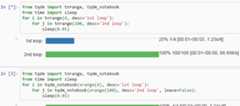
IPython/Jupyter is supported via thetqdm.notebook submodule:
fromtqdm.notebookimporttrange,tqdmfromtimeimportsleepforiintrange(3,desc='1st loop'):forjintqdm(range(100),desc='2nd loop'):sleep(0.01)
In addition totqdm features, the submodule provides a native Jupyterwidget (compatible with IPython v1-v4 and Jupyter), fully working nested barsand colour hints (blue: normal, green: completed, red: error/interrupt,light blue: no ETA); as demonstrated below.
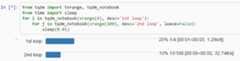
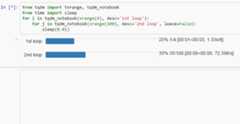
Thenotebook version supports percentage or pixels for overall width(e.g.:ncols='100%' orncols='480px').
It is also possible to lettqdm automatically choose betweenconsole or notebook versions by using theautonotebook submodule:
fromtqdm.autonotebookimporttqdmtqdm.pandas()
Note that this will issue aTqdmExperimentalWarning if run in a notebooksince it is not meant to be possible to distinguish betweenjupyter notebookandjupyter console. Useauto instead ofautonotebook to suppressthis warning.
Note that notebooks will display the bar in the cell where it was created.This may be a different cell from the one where it is used.If this is not desired, either
- delay the creation of the bar to the cell where it must be displayed, or
- create the bar with
display=False, and in a later cell calldisplay(bar.container):
fromtqdm.notebookimporttqdmpbar=tqdm(...,display=False)
# different celldisplay(pbar.container)
Thekeras callback has adisplay() method which can be used likewise:
fromtqdm.kerasimportTqdmCallbackcbk=TqdmCallback(display=False)
# different cellcbk.display()model.fit(...,verbose=0,callbacks=[cbk])
Another possibility is to have a single bar (near the top of the notebook)which is constantly re-used (usingreset() rather thanclose()).For this reason, the notebook version (unlike the CLI version) does notautomatically callclose() uponException.
fromtqdm.notebookimporttqdmpbar=tqdm()
# different celliterable=range(100)pbar.reset(total=len(iterable))# initialise with new `total`foriiniterable:pbar.update()pbar.refresh()# force print final status but don't `close()`
To change the default arguments (such as makingdynamic_ncols=True),simply use built-in Python magic:
fromfunctoolsimportpartialfromtqdmimporttqdmasstd_tqdmtqdm=partial(std_tqdm,dynamic_ncols=True)
For further customisation,tqdm may be inherited from to create custom callbacks (as with theTqdmUpTo exampleabove) or for custom frontends(e.g. GUIs such as notebook or plotting packages). In the latter case:
def __init__()to callsuper().__init__(..., gui=True)to disableterminalstatus_printercreation.- Redefine:
close(),clear(),display().
Consider overloadingdisplay() to use e.g.self.frontend(**self.format_dict) instead ofself.sp(repr(self)).
Some submodule examples of inheritance:
- tqdm/notebook.py
- tqdm/gui.py
- tqdm/tk.py
- tqdm/contrib/slack.py
- tqdm/contrib/discord.py
- tqdm/contrib/telegram.py
You can use atqdm as a meter which is not monotonically increasing.This could be becausen decreases (e.g. a CPU usage monitor) ortotalchanges.
One example would be recursively searching for files. Thetotal is thenumber of objects found so far, whilen is the number of those objects whichare files (rather than folders):
fromtqdmimporttqdmimportos.pathdeffind_files_recursively(path,show_progress=True):files= []# total=1 assumes `path` is a filet=tqdm(total=1,unit="file",disable=notshow_progress)ifnotos.path.exists(path):raiseIOError("Cannot find:"+path)defappend_found_file(f):files.append(f)t.update()deflist_found_dir(path):"""returns os.listdir(path) assuming os.path.isdir(path)"""listing=os.listdir(path)# subtract 1 since a "file" we found was actually this directoryt.total+=len(listing)-1# fancy way to give info without forcing a refresht.set_postfix(dir=path[-10:],refresh=False)t.update(0)# may trigger a refreshreturnlistingdefrecursively_search(path):ifos.path.isdir(path):forfinlist_found_dir(path):recursively_search(os.path.join(path,f))else:append_found_file(path)recursively_search(path)t.set_postfix(dir=path)t.close()returnfiles
Usingupdate(0) is a handy way to lettqdm decide when to trigger adisplay refresh to avoid console spamming.
This is a work in progress (see#737).
Sincetqdm uses a simple printing mechanism to display progress bars,you should not write any message in the terminal usingprint() whilea progressbar is open.
To write messages in the terminal without any collision withtqdm bardisplay, a.write() method is provided:
fromtqdm.autoimporttqdm,trangefromtimeimportsleepbar=trange(10)foriinbar:# Print using tqdm class method .write()sleep(0.1)ifnot (i%3):tqdm.write("Done task %i"%i)# Can also use bar.write()
By default, this will print to standard outputsys.stdout. but you canspecify any file-like object using thefile argument. For example, thiscan be used to redirect the messages writing to a log file or class.
If using a library that can print messages to the console, editing the libraryby replacingprint() withtqdm.write() may not be desirable.In that case, redirectingsys.stdout totqdm.write() is an option.
To redirectsys.stdout, create a file-like class that will writeany input string totqdm.write(), and supply the argumentsfile=sys.stdout, dynamic_ncols=True.
A reusable canonical example is given below:
fromtimeimportsleepimportcontextlibimportsysfromtqdmimporttqdmfromtqdm.contribimportDummyTqdmFile@contextlib.contextmanagerdefstd_out_err_redirect_tqdm():orig_out_err=sys.stdout,sys.stderrtry:sys.stdout,sys.stderr=map(DummyTqdmFile,orig_out_err)yieldorig_out_err[0]# Relay exceptionsexceptExceptionasexc:raiseexc# Always restore sys.stdout/err if necessaryfinally:sys.stdout,sys.stderr=orig_out_errdefsome_fun(i):print("Fee, fi, fo,".split()[i])# Redirect stdout to tqdm.write() (don't forget the `as save_stdout`)withstd_out_err_redirect_tqdm()asorig_stdout:# tqdm needs the original stdout# and dynamic_ncols=True to autodetect console widthforiintqdm(range(3),file=orig_stdout,dynamic_ncols=True):sleep(.5)some_fun(i)# After the `with`, printing is restoredprint("Done!")
Similar tosys.stdout/sys.stderr as detailed above, consoleloggingmay also be redirected totqdm.write().
Warning: if also redirectingsys.stdout/sys.stderr, make sure toredirectlogging first if needed.
Helper methods are available intqdm.contrib.logging. For example:
importloggingfromtqdmimporttrangefromtqdm.contrib.loggingimportlogging_redirect_tqdmLOG=logging.getLogger(__name__)if__name__=='__main__':logging.basicConfig(level=logging.INFO)withlogging_redirect_tqdm():foriintrange(9):ifi==4:LOG.info("console logging redirected to `tqdm.write()`")# logging restored
tqdm implements a few tricks to increase efficiency and reduce overhead.
- Avoid unnecessary frequent bar refreshing:
minintervaldefines how longto wait between each refresh.tqdmalways gets updated in the background,but it will display only everymininterval. - Reduce number of calls to check system clock/time.
minintervalis more intuitive to configure thanminiters.A clever adjustment systemdynamic_miniterswill automatically adjustminitersto the amount of iterations that fit into timemininterval.Essentially,tqdmwill check if it's time to print without actuallychecking time. This behaviour can be still be bypassed by manually settingminiters.
However, consider a case with a combination of fast and slow iterations.After a few fast iterations,dynamic_miniters will setminiters to alarge number. When iteration rate subsequently slows,miniters willremain large and thus reduce display update frequency. To address this:
maxintervaldefines the maximum time between display refreshes.A concurrent monitoring thread checks for overdue updates and forces onewhere necessary.
The monitoring thread should not have a noticeable overhead, and guaranteesupdates at least every 10 seconds by default.This value can be directly changed by setting themonitor_interval ofanytqdm instance (i.e.t = tqdm.tqdm(...); t.monitor_interval = 2).The monitor thread may be disabled application-wide by settingtqdm.tqdm.monitor_interval = 0 before instantiation of anytqdm bar.
You can buytqdm branded merch now!


All source code is hosted onGitHub.Contributions are welcome.
See theCONTRIBUTINGfile for more information.
Developers who have made significant contributions, ranked bySLoC(surviving lines of code,git fame-wMC --excl '\.(png|gif|jpg)$'),are:
| Name | ID | SLoC | Notes |
|---|---|---|---|
| Casper da Costa-Luis | casperdcl | ~80% | primary maintainer |
| Stephen Larroque | lrq3000 | ~9% | team member |
| Martin Zugnoni | martinzugnoni | ~3% | |
| Daniel Ecer | de-code | ~2% | |
| Richard Sheridan | richardsheridan | ~1% | |
| Guangshuo Chen | chengs | ~1% | |
| Helio Machado | 0x2b3bfa0 | ~1% | |
| Kyle Altendorf | altendky | <1% | |
| Noam Yorav-Raphael | noamraph | <1% | original author |
| Matthew Stevens | mjstevens777 | <1% | |
| Hadrien Mary | hadim | <1% | team member |
| Mikhail Korobov | kmike | <1% | team member |
A list is available onthis wiki page.
Open Source (OSI approved):
Citation information:

About
⚡ A Fast, Extensible Progress Bar for Python and CLI
Topics
Resources
License
Code of conduct
Contributing
Security policy
Uh oh!
There was an error while loading.Please reload this page.
Stars
Watchers
Forks
Sponsor this project
Uh oh!
There was an error while loading.Please reload this page.


Packages0
Uh oh!
There was an error while loading.Please reload this page.
Uh oh!
There was an error while loading.Please reload this page.