- Notifications
You must be signed in to change notification settings - Fork27
ProjectMan is a command line tool to easily save/open your favorite projects right from command line. `pm add` to add projects and `pm open` to open them from anywhere you want🦸
License
saurabhdaware/projectman
Folders and files
| Name | Name | Last commit message | Last commit date | |
|---|---|---|---|---|
Repository files navigation

ProjectMan is a CLI which lets you add projects to favorites using commandpm add and open them from anywhere you want using commandpm open.
Along with this there are also other commands likepm seteditor,pm remove,cd $(pm getpath) mentioned in documentation below.
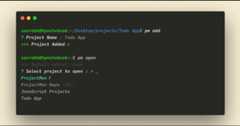
WithNodeJS installed in your machine,
npm install -g projectman
pm is an alias ofprojectman so you can usepm <command> orprojectman <command>
Opens project in your code editor (Check outpm seteditor command to set your preferred editor)
Usage :
pm open [projectName]
[projectName] is an optional parameter.
Alias:pm o,pm
Add project to favorites
cd /till/the/projectpm addYou can pass--url param to add a URL instead of a directory.
Use added projects as a template to create new project
pm create
Alias:pm c
pm seteditor
Sets default editor to open projects from.
To set a different editor for a specific project,
Flag:--for-project
pm seteditor --for-project
Sets different editor for a specific project.E.g You can use VSCode for other projects and Atom forCoolProject1
If your TextEditor/IDE is not listed, You can select optionOther from the list and give youreditorCommand.ReadeditorCommand ref for more information.
cd$(pm getpath [projectName])
[projectName] is an optional parameter.
Alias :cd $(pm gp)
(Note: This does not work in Windows cmd, You can use it in Windows Powershell)
pm remove
Removes project from favorites.
pm rmeditor
Shows list of project and removes the project specific editor from the project.
pm rmeditor --all
removes all project specific editors.
If you want to sort projects/change name of project/change path, You can typepm edit to open settings.json
{"commandToOpen":"code","projects": [ {"name":"Project1","path":"path/to/project1" }, {"name":"Project2","path":"path/to/project2","editor":"atom" }, {"name":"Project3","path":"path/to/project3" } ]}This will show three projects inpm open and project2 will be opened in Atom and other projects will be opened in Visual Studio Code
> commandToOpen :
- This is your editor's command, this command will be used to open the file in your editor.
- Default is
codewhich opens in vscode. - This is the command that you normally use to open directories in your editor.
| Editor | 'commandToOpen' value |
|---|---|
| VSCode | code |
| Atom | atom |
| Sublime | subl |
| Vim | vim |
| WebStorm | wstorm |
> projects.name :
- This is the name that will be visible when you type
projectman open
> projects.path :
- This should be the absolute path to your folder.
> projects.editor :
- This is optional key. In case it doesn't exist it will read value from
commandToOpen - You can use this to specify separate editor for a particular project.
- You can set it by adding
"editor": "<commandToOpen>"in projects array in settings.json (Example is shown above)
- Add
pm createcommand - Remove support for binaries
For More Changes readCHANGELOG.md
@hskang9 has made a pretty cool rust port for projectman. You can check it out at:https://github.com/hskang9/projectman-rust
I would be extremely happy to have people contribute to ProjectMan. You can read Contribution guidelines inCONTRIBUTING.md
Thank you for showing Interest! Do contribute and starProjectMan🦸 on GitHub
About
ProjectMan is a command line tool to easily save/open your favorite projects right from command line. `pm add` to add projects and `pm open` to open them from anywhere you want🦸
Topics
Resources
License
Contributing
Uh oh!
There was an error while loading.Please reload this page.
Stars
Watchers
Forks
Packages0
Uh oh!
There was an error while loading.Please reload this page.
Uh oh!
There was an error while loading.Please reload this page.
Contributors5
Uh oh!
There was an error while loading.Please reload this page.