- Notifications
You must be signed in to change notification settings - Fork129
An R-focused pipeline toolkit for reproducibility and high-performance computing
License
ropensci/drake
Folders and files
| Name | Name | Last commit message | Last commit date | |
|---|---|---|---|---|
Repository files navigation

| Usage | Release | Development |
|---|---|---|
 |  | |
 |  | |
 | ||
 | ||
 |  |
As of 2021-01-21,drake issuperseded. Thetargets R package is the long-term successor ofdrake, and it is more robust and easier to use. Please visithttps://books.ropensci.org/targets/drake.html for full context and advice on transitioning.

Data analysis can be slow. A round of scientific computation can takeseveral minutes, hours, or even days to complete. After it finishes, ifyou update your code or data, your hard-earned results may no longer bevalid. How much of that valuable output can you keep, and how much doyou need to update? How much runtime must you endure all over again?
For projects in R, thedrake package can help. Itanalyzes yourworkflow, skips steps withup-to-date results, and orchestrates the rest withoptional distributedcomputing. At the end,drake provides evidence that your results match the underlying codeand data, which increases your ability to trust your research.
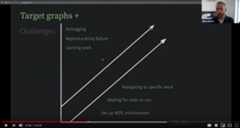
(ByMiles McBain;venue,resources)

Too many data science projects follow aSisypheanloop:
- Launch the code.
- Wait while it runs.
- Discover an issue.
- Rerun from scratch.
For projects with long runtimes, this process gets tedious. But withdrake, you can automatically
- Launch the parts that changed since last time.
- Skip the rest.
To set up a project, load your packages,
library(drake)library(dplyr)library(ggplot2)library(tidyr)#>#> Attaching package: 'tidyr'#> The following objects are masked from 'package:drake':#>#> expand, gather
load your custom functions,
create_plot<-function(data) { ggplot(data)+ geom_histogram(aes(x=Ozone))+ theme_gray(24)}
check any supporting files (optional),
# Get the files with drake_example("main").file.exists("raw_data.xlsx")#> [1] TRUEfile.exists("report.Rmd")#> [1] TRUE
and plan what you are going to do.
plan<- drake_plan(raw_data=readxl::read_excel(file_in("raw_data.xlsx")),data=raw_data %>% mutate(Ozone= replace_na(Ozone, mean(Ozone,na.rm=TRUE))),hist= create_plot(data),fit= lm(Ozone~Wind+Temp,data),report=rmarkdown::render( knitr_in("report.Rmd"),output_file= file_out("report.html"),quiet=TRUE ))plan#> # A tibble: 5 x 2#> target command#> <chr> <expr_lst>#> 1 raw_data readxl::read_excel(file_in("raw_data.xlsx")) …#> 2 data raw_data %>% mutate(Ozone = replace_na(Ozone, mean(Ozone, na.rm = TR…#> 3 hist create_plot(data) …#> 4 fit lm(Ozone ~ Wind + Temp, data) …#> 5 report rmarkdown::render(knitr_in("report.Rmd"), output_file = file_out("re…
So far, we have just been setting the stage. Usemake() orr_make()to do the real work. Targets are built in the correct order regardlessof the row order ofplan.
make(plan)# See also r_make().#> ▶ target raw_data#> ▶ target data#> ▶ target fit#> ▶ target hist#> ▶ target report
Except for files likereport.html, your output is stored in a hidden.drake/ folder. Reading it back is easy.
readd(data)# See also loadd().#> # A tibble: 153 x 6#> Ozone Solar.R Wind Temp Month Day#> <dbl> <dbl> <dbl> <dbl> <dbl> <dbl>#> 1 41 190 7.4 67 5 1#> 2 36 118 8 72 5 2#> 3 12 149 12.6 74 5 3#> 4 18 313 11.5 62 5 4#> 5 42.1 NA 14.3 56 5 5#> 6 28 NA 14.9 66 5 6#> 7 23 299 8.6 65 5 7#> 8 19 99 13.8 59 5 8#> 9 8 19 20.1 61 5 9#> 10 42.1 194 8.6 69 5 10#> # … with 143 more rows
You may look back on your work and see room for improvement, but it’sall good! The whole point ofdrake is to help you go back and changethings quickly and painlessly. For example, we forgot to give ourhistogram a bin width.
readd(hist)#> `stat_bin()` using `bins = 30`. Pick better value with `binwidth`.

So let’s fix the plotting function.
create_plot<-function(data) { ggplot(data)+ geom_histogram(aes(x=Ozone),binwidth=10)+ theme_gray(24)}
drake knows which results are affected.
vis_drake_graph(plan)# See also r_vis_drake_graph().
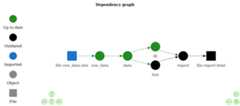
The nextmake() just buildshist andreport.html. No point inwasting time on the data or model.
make(plan)# See also r_make().#> ▶ target hist#> ▶ target report
loadd(hist)hist

The R community emphasizes reproducibility. Traditional themes includescientificreplicability,literate programming withknitr, andversion control withgit.But internal consistency is important too. Reproducibility carries thepromise that your output matches the code and data you say you used.With the exception ofnon-defaulttriggers andhastymode,drakestrives to keep this promise.
Suppose you are reviewing someone else’s data analysis project forreproducibility. You scrutinize it carefully, checking that the datasetsare available and the documentation is thorough. But could you re-createthe results without the help of the original author? Withdrake, it isquick and easy to find out.
make(plan)# See also r_make().#> ℹ unloading 1 targets from environment#> ✓ All targets are already up to date.outdated(plan)# See also r_outdated().#> character(0)
With everything already up to date, you havetangible evidence ofreproducibility. Even though you did not re-create the results, you knowthe results are recreatable. Theyfaithfully show what the code isproducing. Given the rightpackageenvironment andsystemconfiguration,you have everything you need to reproduce all the output by yourself.
When it comes time to actually rerun the entire project, you have muchmore confidence. Starting over from scratch is trivially easy.
clean()# Remove the original author's results.make(plan)# Independently re-create the results from the code and input data.#> ▶ target raw_data#> ▶ target data#> ▶ target fit#> ▶ target hist#> ▶ target report
Select specialized data formats to increase speed and reduce memoryconsumption. In version 7.5.2.9000 and above, the available formats are“fst” for data frames (examplebelow) and “keras” forKeras models(example here).
library(drake)n<-1e8# Each target is 1.6 GB in memory.plan<- drake_plan(data_fst= target(data.frame(x= runif(n),y= runif(n)),format="fst" ),data_old=data.frame(x= runif(n),y= runif(n)))make(plan)#> target data_fst#> target data_oldbuild_times(type="build")#> # A tibble: 2 x 4#> target elapsed user system#> <chr> <Duration> <Duration> <Duration>#> 1 data_fst 13.93s 37.562s 7.954s#> 2 data_old 184s (~3.07 minutes) 177s (~2.95 minutes) 4.157s
As of version 7.5.2,drake tracks the history and provenance of yourtargets: what you built, when you built it, how you built it, thearguments you used in your function calls, and how to get the data back.(Disable withmake(history = FALSE))
history<- drake_history(analyze=TRUE)history#> # A tibble: 12 x 11#> target current built exists hash command seed runtime na.rm quiet#> <chr> <lgl> <chr> <lgl> <chr> <chr> <int> <dbl> <lgl> <lgl>#> 1 data TRUE 2020… TRUE 11e2… "raw_d… 1.29e9 0.011 TRUE NA#> 2 data TRUE 2020… TRUE 11e2… "raw_d… 1.29e9 0.00400 TRUE NA#> 3 fit TRUE 2020… TRUE 3c87… "lm(Oz… 1.11e9 0.006 NA NA#> 4 fit TRUE 2020… TRUE 3c87… "lm(Oz… 1.11e9 0.002 NA NA#> 5 hist FALSE 2020… TRUE 88ae… "creat… 2.10e8 0.011 NA NA#> 6 hist TRUE 2020… TRUE 0304… "creat… 2.10e8 0.003 NA NA#> 7 hist TRUE 2020… TRUE 0304… "creat… 2.10e8 0.009 NA NA#> 8 raw_d… TRUE 2020… TRUE 855d… "readx… 1.20e9 0.02 NA NA#> 9 raw_d… TRUE 2020… TRUE 855d… "readx… 1.20e9 0.0330 NA NA#> 10 report TRUE 2020… TRUE 5504… "rmark… 1.30e9 1.31 NA TRUE#> 11 report TRUE 2020… TRUE 5504… "rmark… 1.30e9 0.413 NA TRUE#> 12 report TRUE 2020… TRUE 5504… "rmark… 1.30e9 0.475 NA TRUE#> # … with 1 more variable: output_file <chr>
Remarks:
- The
quietcolumn appears above because one of thedrake_plan()commands hasknit(quiet = TRUE). - The
hashcolumn identifies all the previous versions of yourtargets. As long asexistsisTRUE, you can recover old data. - Advanced: if you use
make(cache_log_file = TRUE)and put the cachelog file under version control, you can match the hashes fromdrake_history()with thegitcommit history of your code.
Let’s use the history to recover the oldest histogram.
hash<-history %>% filter(target=="hist") %>% pull(hash) %>% head(n=1)cache<- drake_cache()cache$get_value(hash)#> `stat_bin()` using `bins = 30`. Pick better value with `binwidth`.

With even more evidence and confidence, you can invest the time toindependently replicate the original code base if necessary. Up untilthis point, you relied on basicdrake functions such asmake(), soyou may not have needed to peek at any substantive author-defined codein advance. In that case, you can stay usefully ignorant as youreimplement the original author’s methodology. In other words,drakecould potentially improve the integrity of independent replication.
Ideally, independent observers should be able to read your code andunderstand it.drake helps in several ways.
- Thedrakeplanexplicitly outlines the steps of the analysis, and
vis_drake_graph()visualizes how those steps depend on each other. draketakes care of the parallel scheduling and high-performancecomputing (HPC) for you. That means the HPC code is no longertangled up with the code that actually expresses your ideas.- You cangenerate large collections oftargets withoutnecessarily changing your code base of imported functions, anothernice separation between the concepts and the execution of yourworkflow
Not every project can complete in a single R session on your laptop.Some projects need more speed or computing power. Some require a fewlocal processor cores, and some need large high-performance computingsystems. But parallel computing is hard. Your tables and figures dependon your analysis results, and your analyses depend on your datasets, sosome tasks must finish before others even begin.drake knows what todo. Parallelism is implicit and automatic. See thehigh-performancecomputing guide for all thedetails.
# Use the spare cores on your local machine.make(plan,jobs=4)# Or scale up to a supercomputer.drake_hpc_template_file("slurm_clustermq.tmpl")# https://slurm.schedmd.com/options(clustermq.scheduler="clustermq",clustermq.template="slurm_clustermq.tmpl")make(plan,parallelism="clustermq",jobs=4)
drake and Docker are compatible and complementary. Here are someexamples that rundrake inside a Docker image.
drake-gitlab-docker-example:A small pedagogical example workflow that leveragesdrake, Docker,GitLab, and continuous integration in a reproducible analysispipeline. Created byNoam Ross.pleurosoriopsis:The workflow that supportsEbiharaet al. 2019. “Growth Dynamicsof the Independent Gametophytes ofPleurorosiopsis makinoi(Polypodiaceae)”Bulletin of the National Science Museum Series B(Botany)45:77-86..Created byJoel Nitta.
Alternatively, it is possible to rundrake outside Docker and use thefuture package to sendtargets to a Docker image.drake’sDocker-psockexample demonstrates how. Download the code withdrake_example("Docker-psock").
You can choose among different versions ofdrake. The CRAN releaseoften lags behind theonline manualbut may have fewer bugs.
# Install the latest stable release from CRAN.install.packages("drake")# Alternatively, install the development version from GitHub.install.packages("devtools")library(devtools)install_github("ropensci/drake")
Thereferencesection lists allthe available functions. Here are the most important ones.
drake_plan(): create a workflow data frame (likemy_plan).make(): build your project.drake_history(): show what you built, when you built it, and thefunction arguments you used.r_make(): launch a freshcallr::r()process to build yourproject. Called from an interactive R session,r_make()is morereproducible thanmake().loadd(): load one or more built targets into your R session.readd(): read and return a built target.vis_drake_graph(): show an interactive visual networkrepresentation of your workflow.recoverable(): Which targets can we salvage usingmake(recover = TRUE)(experimental).outdated(): see which targets will be built in the nextmake().deps_code(): check the dependencies of a command or function.drake_failed(): list the targets that failed to build in the lastmake().diagnose(): return the full context of a build, including errors,warnings, and messages.
The following resources explain whatdrake can do and how it works.The workshop athttps://github.com/wlandau/learndrakedevotes particular attention todrake’s mental model.
- Theuser manual
drakeplanner, anR/Shiny app to help learndrakeand create new projects. Runlocally withdrakeplanner::drakeplanner()or access it athttps://wlandau.shinyapps.io/drakeplanner.- ``https://github.com/wlandau/learndrake`, an R packagefor teaching an extended
drakeworkshop. It contains notebooks,slides, Shiny apps, the latter two of which are publicly deployed.See `https://github.com/wlandau/learndrake/blob/main/README.md`for instructions and links.
- Miles McBain’sexcellent blogpost explains themotivating factors and practical issues {drake} solves for mostprojects, how to set up a project as quickly and painlessly aspossible, and how to overcome common obstacles.
- Miles’
dflowpackagegenerates the file structure for a boilerplatedrakeproject. Itis a more thorough alternative todrake::use_drake(). drakeis heavily function-oriented by design, and Miles’fnmatepackageautomatically generates boilerplate code and docstrings forfunctions you mention indrakeplans.
- Thereference website.
- Theofficial repository of examplecode. Download anexample workflow from here with
drake_example(). - Presentations and workshops byWillLandau,KirillMüller,AmandaDobbyn,KarthikRam,SinaRüeger,ChristineStawitz, and others. See specificlinks athttps://books.ropensci.org/drake/index.html#presentations
- TheFAQ page, whichlinks toappropriately-labeled issues onGitHub.
The officialrOpenSci usecases andassociateddiscussion threads describeapplications ofdrake in the real world. Many of these use cases arelinked from thedrake tag on the rOpenSci discussionforum.
Here are some additional applications ofdrake in real-world projects.
- efcaguab/demografia-del-voto
- efcaguab/great-white-shark-nsw
- IndianaCHE/Detailed-SSP-Reports
- joelnitta/pleurosoriopsis
- pat-s/pathogen-modeling
- sol-eng/tensorflow-w-r
- tiernanmartin/home-and-hope
Some folks like to structure theirdrake workflows as R packages.Examples are below. In your own analysis packages, be sure to calldrake::expose_imports(yourPackage) sodrake can watch you package’sfunctions for changes and rebuild downstream targets accordingly.
The following resources document many known issues and challenges.
- Frequently-askedquestions.
- Debugging and testing drakeprojects
- Other known issues(please search both open and closed ones).
If you are still having trouble, please submit anewissue with a bug reportor feature request, along with a minimal reproducible example whereappropriate.
The GitHub issue tracker is mainly intended for bug reports and featurerequests. While questions about usage etc. are also highly encouraged,you may alternatively wish to post toStackOverflow and use thedrake-r-packagetag.
Development is a community effort, and we encourage participation.Please readCONTRIBUTING.mdfor details.
drake enhances reproducibility and high-performance computing, but notin all respects.Literate programming,local library managers,containerization, andstrict sessionmanagers offer more robustsolutions in their respective domains. And for the problemsdrakedoes solve, it stands on the shoulders of the giants that came before.
The original idea of a time-saving reproducible build system extendsback at least as far asGNU Make,which still aids the work ofdatascientistsas well as the original user base of complied language programmers. Infact, the name “drake” stands for “Data Frames in R for Make”.Make is used widely in reproducibleresearch. Below are some examples fromKarl Broman’swebsite.
- Bostock, Mike (2013). “A map of flowlines from NHDPlus.”https://github.com/mbostock/us-rivers. Powered by the Makefile athttps://github.com/mbostock/us-rivers/blob/master/Makefile.
- Broman, Karl W (2012). “Halotype Probabilities in AdvancedIntercross Populations.”G3 2(2), 199-202.Powered by the
Makefileathttps://github.com/kbroman/ailProbPaper/blob/master/Makefile. - Broman, Karl W (2012). “Genotype Probabilities at IntermediateGenerations in the Construction of Recombinant Inbred Lines.”*Genetics 190(2), 403-412. Powered by the Makefile athttps://github.com/kbroman/preCCProbPaper/blob/master/Makefile.
- Broman, Karl W and Kim, Sungjin and Sen, Saunak and Ane, Cecile andPayseur, Bret A (2012). “Mapping Quantitative Trait Loci onto aPhylogenetic Tree.”Genetics 192(2), 267-279. Powered by the
Makefileathttps://github.com/kbroman/phyloQTLpaper/blob/master/Makefile.
WhereasGNU Make islanguage-agnostic,drake is fundamentally designed for R.
- Instead of aMakefile,
drakesupports an R-friendlydomain-specificlanguagefor declaring targets. - Targets inGNU Make are files,whereas targets in
drakeare arbitrary variables in memory.(drakedoes have opt-in support for files viafile_out(),file_in(), andknitr_in().)drakecaches these objects in itsownstorage system so R usersrarely have to think about output files.
remake itself is no longermaintained, but its founding design goals and principles live on throughdrake. In fact,drake is a direct re-imagining ofremake with enhanced scalability,reproducibility, high-performance computing, visualization, anddocumentation.
Factual’s Drake is similar inconcept, but the development effort is completely unrelated to thedrake R package.
There arecountless other successful pipelinetoolkits. Thedrakepackage distinguishes itself with its R-focused approach,Tidyverse-friendly interface, and athorough selection of parallelcomputing technologies and schedulingalgorithms.
Memoization is the strategic caching of the return values of functions.It is a lightweight approach to the core problem thatdrake and otherpipeline tools are trying to solve. Every time a memoized function iscalled with a new set of arguments, the return value is saved for futureuse. Later, whenever the same function is called with the samearguments, the previous return value is salvaged, and the function callis skipped to save time. Thememoise package is the primaryimplementation of memoization in R.
Memoization saves time for small projects, but it arguably does not gofar enough for large reproducible pipelines. In reality, the returnvalue of a function depends not only on the function body and thearguments, but also on any nested functions and global variables, thedependencies of those dependencies, and so on upstream.drake tracksthis deeper context, whilememoisedoes not.
Literate programming is the practiceof narrating code in plain vernacular. The goal is to communicate theresearch process clearly, transparently, and reproducibly. Whereascommented code is still mostly code, literateknitr /RMarkdown reports can become websites,presentation slides, lecture notes, serious scientific manuscripts, andeven books.
drake andknitr are symbiotic.drake’sjob is to manage large computation and orchestrate the demanding tasksof a complex data analysis pipeline.knitr’s job is to communicate thoseexpensive results afterdrake computes them.knitr /RMarkdown reports are small pieces of anoverarchingdrake pipeline. They should focus on communication, andthey should do as little computation as possible.
To insert aknitr report in adrakepipeline, use theknitr_in() function inside yourdrakeplan, and useloadd()andreadd() to refer to targets in the report itself. See anexamplehere.
drake is not a version control tool. However, it is fully compatiblewithgit,svn, and similarsoftware. In fact, it is good practice to usegit alongsidedrake for reproducibleworkflows.
However, data poses a challenge. The datasets created bymake() canget large and numerous, and it is not recommended to put the.drake/cache or the.drake_history/ logs under version control. Instead, itis recommended to use a data storage solution such asDropBox orOSF.
drake does not track R packages or system dependencies for changes.Instead, it defers to tools likeDocker,Singularity,renv, andpackrat, which createself-contained portable environments to reproducibly isolate and shipdata analysis projects.drake is fully compatible with these tools.
Theworkflowr package is aproject manager that focuses on literate programming, sharing over theweb, file organization, and version control. Its brand ofreproducibility is all about transparency, communication, anddiscoverability. For an example ofworkflowr anddrakeworking together, seethis machine learningproject byPatrickSchratz.
citation("drake")#>#> To cite drake in publications use:#>#> William Michael Landau, (2018). The drake R package: a pipeline#> toolkit for reproducibility and high-performance computing. Journal#> of Open Source Software, 3(21), 550,#> https://doi.org/10.21105/joss.00550#>#> A BibTeX entry for LaTeX users is#>#> @Article{,#> title = {The drake R package: a pipeline toolkit for reproducibility and high-performance computing},#> author = {William Michael Landau},#> journal = {Journal of Open Source Software},#> year = {2018},#> volume = {3},#> number = {21},#> url = {https://doi.org/10.21105/joss.00550},#> }
Special thanks toJarad Niemi, my advisor fromgraduate school, for first introducing meto the idea ofMakefiles forresearch. He originally set me down the path that led todrake.
Many thanks toJulia Lowndes,BenMarwick, andPeterSlaughter forreviewing drake forrOpenSci, and toMaëlle Salmon for such active involvementas the editor. Thanks also to the following people for contributingearly in development.
- Alex Axthelm
- Chan-Yub Park
- Daniel Falster
- Eric Nantz
- Henrik Bengtsson
- Ian Watson
- Jasper Clarkberg
- Kendon Bell
- Kirill Müller
- Michael Schubert
Credit for images isattributedhere.

About
An R-focused pipeline toolkit for reproducibility and high-performance computing
Topics
Resources
License
Code of conduct
Contributing
Uh oh!
There was an error while loading.Please reload this page.
Stars
Watchers
Forks
Packages0
Uh oh!
There was an error while loading.Please reload this page.