- Notifications
You must be signed in to change notification settings - Fork5
Access national high-quality and open-access datasets on movement patterns derived from mobile telephone datasets / Accede y usa datos nacionales abiertos sobre movimientos basados en teléfonos móviles.
License
Unknown, MIT licenses found
Licenses found
rOpenSpain/spanishoddata
Folders and files
| Name | Name | Last commit message | Last commit date | |
|---|---|---|---|---|
Repository files navigation


spanishoddata is an R package that provides functions fordownloading and formatting Spanish open mobility data released by theSpanish government (Ministerio de Transportes y Movilidad SostenibleMITMS 2024).
It supports the two versions of the Spanish mobility data.The firstversion (2020 to2021),covering the period of the COVID-19 pandemic, contains tables detailingtrip numbers and distances, broken down by origin, destination,activity, residence province, time interval, distance interval, anddate. It also provides tables of individual counts by location and tripfrequency.The second version (2022onwards)improves spatial resolution, adds trips to and from Portugal and France,and introduces new fields for study-related activities andsociodemographic factors (income, age, and sex) in theorigin-destination tables, along with additional tables showingindividual counts by overnight stay location, residence, and date. Seethepackage website andvignettes forv1andv2data for more details.
spanishoddata is designed to save time by providing the data inanalysis-ready formats. Automating the process of downloading, cleaning,and importing the data can also reduce the risk of errors in thelaborious process of data preparation. It also reduces computationalresources by using computationally efficient packages behind the scenes.To effectively work with multiple data files, it’s recommended you setup a data directory where the package can search for the data anddownload only the files that are not already present.

Figure 1: Example of the data available through the package: daily flowsin Barcelona on 7 April 2021
To create static maps like that see our vignettehere.
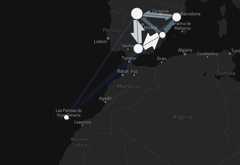
Figure 2: Example of the data available through the package: interactivedaily flows in Spain
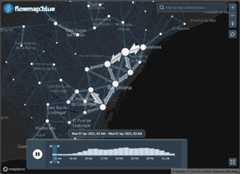
Figure 3: Example of the data available through the package: interactivedaily flows in Barcelona with time filter
To create interactive maps see our vignettehere.
Install from CRAN:
install.packages("spanishoddata")Alternative installation and developemnt
You can also install the latest development version of the package fromrOpenSpain R universe:
install.packages("spanishoddata",repos= c("https://ropenspain.r-universe.dev","https://cloud.r-project.org"))
Alternative way to install the development version from GitHub:
if (!require("remotes")) install.packages("remotes")remotes::install_github("rOpenSpain/spanishoddata",force=TRUE,dependencies=TRUE)
For Developers
To load the package locally, clone it and navigate to the root of thepackage in the terminal, e.g. with the following:
gh repo clone rOpenSpain/spanishoddatacode spanishoddata# with rstudio:rstudio spanishoddata/spanishoddata.RprojThen run the following command from the R console:
devtools::load_all()
You can also explore the package and the data in an interactive RStudiocontainer right in your web browser thanks to Binder, just clickthelinkor the button:
Load it as follows:
library(spanishoddata)Choose where{spanishoddata} should download (and convert) the data bysetting the data directory following command:
spod_set_data_dir(data_dir="~/spanish_od_data")
The function above will also ensure that the directory is created andthat you have sufficient permissions to write to it.
Setting data directory for advanced users
You can also set the data directory with an environment variable:
Sys.setenv(SPANISH_OD_DATA_DIR="~/spanish_od_data")
The package will create this directory if it does not exist on the firstrun of any function that downloads the data.
To permanently set the directory for all projects, you can specify thedata directory globally by setting theSPANISH_OD_DATA_DIR environmentvariable, e.g. with the following command:
usethis::edit_r_environ()# Then set the data directory globally, by typing this line in the file:
SPANISH_OD_DATA_DIR = "~/spanish_od_data"You can also set the data directory locally, just for the currentproject. Set the ‘envar’ in the working directory by editing.Renvironfile in the root of the project:
file.edit(".Renviron")If you only need flows data aggregated by day at municipal level, youcan use thespod_quick_get_od() function. This will download the datadirectly from the web API and let you analyse it in-memory. More on thisin theQuickly get dailydatavignette.
If you only want to analyse the data for a few days, you can use thespod_get() function. It will download the raw data in CSV format andlet you analyse it in-memory. This is what we cover in the steps on thispage.
If you need longer periods (several months or years), you should use thespod_convert() andspod_connect() functions, which will convert thedata into special format which is much faster for analysis, for this seetheDownload and convert ODdatasetsvignette.spod_get_zones() will give you spatial data with zones thatcan be matched with the origin-destination flows from the functionsabove using zones ’id’s. Please see a simple example below, and alsoconsult the vignettes with detailed data description and instructions inthe package vignettes withspod_codebook(ver = 1) andspod_codebook(ver = 2), or simply visit the package website athttps://ropenspain.github.io/spanishoddata/. TheFigure 4 presentsthe overall approach to accessing the data in thespanishoddatapackage.

Figure 4: The overview of package functions to get the data
To run the code in this README we will use the following setup:
library(tidyverse)theme_set(theme_minimal())sf::sf_use_s2(FALSE)
Get metadata for the datasets as follows (we are using version 2 datacovering years 2022 and onwards):
metadata<- spod_available_data(ver=2)# for version 2 of the datametadata
# A tibble: 9,442 × 6 target_url pub_ts file_extension data_ym data_ymd <chr> <dttm> <chr> <date> <date> 1 https://movilidad-o… 2024-07-30 10:54:08 gz NA 2022-10-23 2 https://movilidad-o… 2024-07-30 10:51:07 gz NA 2022-10-22 3 https://movilidad-o… 2024-07-30 10:47:52 gz NA 2022-10-20 4 https://movilidad-o… 2024-07-30 10:14:55 gz NA 2022-10-18 5 https://movilidad-o… 2024-07-30 10:11:58 gz NA 2022-10-17 6 https://movilidad-o… 2024-07-30 10:09:03 gz NA 2022-10-12 7 https://movilidad-o… 2024-07-30 10:05:57 gz NA 2022-10-07 8 https://movilidad-o… 2024-07-30 10:02:12 gz NA 2022-08-07 9 https://movilidad-o… 2024-07-30 09:58:34 gz NA 2022-08-0610 https://movilidad-o… 2024-07-30 09:54:30 gz NA 2022-08-05# ℹ 9,432 more rows# ℹ 1 more variable: local_path <chr>Zones can be downloaded as follows:
distritos<- spod_get_zones("distritos",ver=2)distritos_wgs84<-distritos|>sf::st_simplify(dTolerance=200)|>sf::st_transform(4326)plot(sf::st_geometry(distritos_wgs84),lwd=0.2)

od_db<- spod_get(type="origin-destination",zones="districts",dates= c(start="2024-03-01",end="2024-03-07"))class(od_db)
[1] "tbl_duckdb_connection" "tbl_dbi" "tbl_sql" [4] "tbl_lazy" "tbl"colnames(od_db) [1] "full_date" "hour" [3] "id_origin" "id_destination" [5] "distance" "activity_origin" [7] "activity_destination" "study_possible_origin" [9] "study_possible_destination" "residence_province_ine_code"[11] "residence_province" "income" [13] "age" "sex" [15] "n_trips" "trips_total_length_km" [17] "year" "month" [19] "day"The result is an R database interface object (tbl_dbi) that can beused with dplyr functions and SQL queries ‘lazily’, meaning that thedata is not loaded into memory until it is needed. Let’s do anaggregation to find the total number trips per hour over the 7 days:
n_per_hour<-od_db|> group_by(date,hour)|> summarise(n= n(),Trips= sum(n_trips))|> collect()|> mutate(Time=lubridate::ymd_h(paste0(date,hour,sep="")))|> mutate(Day=lubridate::wday(Time,label=TRUE))n_per_hour|> ggplot(aes(x=Time,y=Trips))+ geom_line(aes(colour=Day))+ labs(title="Number of trips per hour over 7 days")

The figure above summarises 925,874,012 trips over the 7 days associatedwith 135,866,524 records.
As we demonstrated above, you can perform very quick analysis using justa few lines of code.
To highlight the benefits of the package, here is how you would do thismanually:
download thexml filewith the download links
parse this xml to extract the download links
write a script to download the files and locate them on disk in alogical manner
figure out the data structure of the downloaded files, read thecodebook
translate the data (columns and values) into English, if you are notfamiliar with Spanish
write a script to load the data into the database or figure out a wayto claculate summaries on multiple files
and much more…
We did all of that for you and present you with a few simple functionsthat get you straight to the data in one line of code, and you are readyto run any analysis on it.
We’ll use the same input data to pick-out the most important flows inSpain, with a focus on longer trips for visualisation:
od_national_aggregated<-od_db|> group_by(id_origin,id_destination)|> summarise(Trips= sum(n_trips),.groups="drop")|> filter(Trips>500)|> collect()|> arrange(desc(Trips))od_national_aggregated
# A tibble: 96,404 × 3 id_origin id_destination Trips <fct> <fct> <dbl> 1 2807908 2807908 2441404. 2 0801910 0801910 2112188. 3 0801902 0801902 2013618. 4 2807916 2807916 1821504. 5 2807911 2807911 1785981. 6 04902 04902 1690606. 7 2807913 2807913 1504484. 8 2807910 2807910 1299586. 9 0704004 0704004 1287122.10 28106 28106 1286058.# ℹ 96,394 more rowsThe results show that the largest flows are intra-zonal. Let’s keep onlythe inter-zonal flows:
od_national_interzonal<-od_national_aggregated|> filter(id_origin!=id_destination)
We can convert these to geographic data with the {od} package (Lovelaceand Morgan 2024):
od_national_sf<-od::od_to_sf(od_national_interzonal,z=distritos_wgs84)distritos_wgs84|> ggplot()+ geom_sf(fill="grey")+ geom_sf(data=spData::world,fill=NA,colour="black")+ geom_sf(aes(linewidth=Trips),colour="blue",data=od_national_sf)+ coord_sf(xlim= c(-10,5),ylim= c(35,45))+ theme_void()+ scale_linewidth_continuous(range= c(0.2,3))

Let’s focus on trips in and around a particular area (Salamanca):
salamanca_zones<-zonebuilder::zb_zone("Salamanca")distritos_salamanca<-distritos_wgs84[salamanca_zones, ]plot(distritos_salamanca)

We will use this information to subset the rows, to capture all movementwithin the study area:
ids_salamanca<-distritos_salamanca$idod_salamanca<-od_national_sf|> filter(id_origin%in%ids_salamanca)|> filter(id_destination%in%ids_salamanca)|> arrange(Trips)
Let’s plot the results:
od_salamanca_sf<-od::od_to_sf(od_salamanca,z=distritos_salamanca)ggplot()+ geom_sf(fill="grey",data=distritos_salamanca)+ geom_sf(aes(colour=Trips),size=1,data=od_salamanca_sf)+ scale_colour_viridis_c()+ theme_void()

For more information on the package, see:
Thepkgdown site
- Functionsreference
- v1 data (2020-2021)codebook
- v2 data (2022 onwards) codebook (work inprogress)
- Download and convertdata
- TheOD disaggregationvignetteshowcases flows disaggregation
- Making staticflowmapsvignette shows how to create flowmaps using the data acquired with
{spanishoddata} - Making interactiveflowmapsshows how to create an interactive flowmap using the data acquiredwith
{spanishoddata} - Quickly getting daily aggregated 2022+ data at municipalitylevel
Teaching materials that use
spanishoddata:Tutorial/workshop“Analysing massive open human mobility data usingspanishoddata, duckdb andflowmaps” byEgorKotov (held atApplied Geoinformatics(AGIT) Conference 2025, Salzburg,Austria)
Tutorial“Mobility Flows and Accessibility Using R and Big OpenData”byEgor Kotov andJohannesMast (held atIC2S22025 (11th International Conference onComputational Social Science), Norrköping, Sweden)
Data Science for TransportPlanning course byRobinLovelace,Juan P.Fonseca-Zamora, andYuanxuanYang (held at theInstitute forTransport Studies, University ofLeeds)


To cite thespanishoddata R package use:
Kotov E, Lovelace R, Vidal-Tortosa E (2024).spanishoddata.doi:10.32614/CRAN.package.spanishoddatahttps://doi.org/10.32614/CRAN.package.spanishoddata,https://github.com/rOpenSpain/spanishoddata.
To cite the official website of the mobility study use:
Ministerio de Transportes y Movilidad Sostenible (MITMS) (2024).“Estudio de la movilidad con Big Data (Study of mobility with BigData).”https://www.transportes.gob.es/ministerio/proyectos-singulares/estudio-de-movilidad-con-big-data.
To cite the methodology for 2022 and onwards data use:
Ministerio de Transportes y Movilidad Sostenible (MITMS) (2024).Estudio de movilidad de viajeros de ámbito nacional aplicando latecnología Big Data. Informe metodológico (Study of National Travelermobility Using Big Data Technology. Methodological Report).https://www.transportes.gob.es/recursos_mfom/paginabasica/recursos/a3_informe_metodologico_estudio_movilidad_mitms_v8.pdf.
To cite the methodology for 2020-2021 data use:
Ministerio de Transportes, Movilidad y Agenda Urbana (MITMA) (2021).Análisis de la movilidad en España con tecnología Big Data durante elestado de alarma para la gestión de la crisis del COVID-19 (Analysis ofmobility in Spain with Big Data technology during the state of alarm forCOVID-19 crisis management).https://cdn.mitma.gob.es/portal-web-drupal/covid-19/bigdata/mitma_-_estudio_movilidad_covid-19_informe_metodologico_v3.pdf.
See package website for more details:https://ropenspain.github.io/spanishoddata/
BibTeX:
@Manual{r-spanishoddata, title = {spanishoddata}, author = {Egor Kotov and Robin Lovelace and Eugeni Vidal-Tortosa}, year = {2024}, url = {https://github.com/rOpenSpain/spanishoddata}, doi = {10.32614/CRAN.package.spanishoddata},}@Misc{mitms_mobility_web, title = {Estudio de la movilidad con Big Data (Study of mobility with Big Data)}, author = {{Ministerio de Transportes y Movilidad Sostenible (MITMS)}}, year = {2024}, url = {https://www.transportes.gob.es/ministerio/proyectos-singulares/estudio-de-movilidad-con-big-data},}@Manual{mitms_methodology_2022_v8, title = {Estudio de movilidad de viajeros de ámbito nacional aplicando la tecnología Big Data. Informe metodológico (Study of National Traveler mobility Using Big Data Technology. Methodological Report)}, author = {{Ministerio de Transportes y Movilidad Sostenible (MITMS)}}, year = {2024}, url = {https://www.transportes.gob.es/recursos_mfom/paginabasica/recursos/a3_informe_metodologico_estudio_movilidad_mitms_v8.pdf},}@Manual{mitma_methodology_2020_v3, title = {Análisis de la movilidad en España con tecnología Big Data durante el estado de alarma para la gestión de la crisis del COVID-19 (Analysis of mobility in Spain with Big Data technology during the state of alarm for COVID-19 crisis management)}, author = {{Ministerio de Transportes, Movilidad y Agenda Urbana (MITMA)}}, year = {2021}, url = {https://cdn.mitma.gob.es/portal-web-drupal/covid-19/bigdata/mitma_-_estudio_movilidad_covid-19_informe_metodologico_v3.pdf},}Try the new work-in-progress package:https://github.com/pySpainMobility/pySpainMobility.
Lovelace, Robin, and Malcolm Morgan. 2024. “Od: Manipulate and MapOrigin-Destination Data,” August.https://doi.org/10.32614/CRAN.package.od.
Ministerio de Transportes y Movilidad Sostenible MITMS. 2024. “Estudiode La Movilidad Con Big Data (Study of Mobility with Big Data).”https://www.transportes.gob.es/ministerio/proyectos-singulares/estudio-de-movilidad-con-big-data.
About
Access national high-quality and open-access datasets on movement patterns derived from mobile telephone datasets / Accede y usa datos nacionales abiertos sobre movimientos basados en teléfonos móviles.
Topics
Resources
License
Unknown, MIT licenses found
Licenses found
Uh oh!
There was an error while loading.Please reload this page.
Stars
Watchers
Forks
Uh oh!
There was an error while loading.Please reload this page.
Contributors8
Uh oh!
There was an error while loading.Please reload this page.