- Notifications
You must be signed in to change notification settings - Fork4
hyperSpec: Tools for Spectroscopy (R package)
License
r-hyperspec/hyperSpec
Folders and files
| Name | Name | Last commit message | Last commit date | |
|---|---|---|---|---|
Repository files navigation


Package `hyperSpec` is under overhaul now. So this website is still under construction and the contents as well as resources are not fully updated yet. The documentation of version
0.100.2 is not present here either.R packagehyperSpec is the main package in ther-hyperspec family of packages.The goal ofhyperSpec (and wholer-hyperspec) is to make the work with hyperspectral data sets, (i.e. spatially or time-resolved spectra, or spectra with any other kind of information associated with each of the spectra) more comfortable.The spectra can be data obtained duringXRF,UV/VIS,Fluorescence,AES,NIR,IR,Raman,NMR,MS,etc. spectroscopy measurements.More generally, any data that is recorded over a discretized variable, e.g.absorbance = f(wavelength), stored as a vector of absorbance values for discrete wavelengths is suitable.
There are two versions ofhyperSpec online documentation:
a. for thereleased version andb. for thein-development version ofhyperSpec.
The documentation of the otherr-hyperspec family packages can be found atr-hyperspec.github.io.
Issues, bug reports, and feature requests should gohere!
You can install thereleased version ofhyperSpec fromCRAN with:
install.packages("hyperSpec")Therecommended way to install the in-development version:
repos<- c("https://r-hyperspec.github.io/pkg-repo/", getOption("repos"))install.packages("hyperSpec",repos=repos)
Install from GitHub (details)
You can install the in-development version of the package fromGitHub too:
if (!require(remotes)) {install.packages("remotes")}remotes::install_github("r-hyperspec/hyperSpec")
NOTE 1:Usually, "Windows" users need to download, install, and properly configureRtools (seethese instructions) to make the code above work.
NOTE 2:This method willnot install package's documentation (help pages and vignettes) into your computer.So you can either use theonline documentation or build the package from source (see the next section).
Install from Source (details)
From thehyperSpec's GitHubrepository:
- If you use Git,
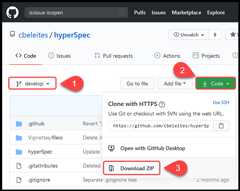
git clonethe branch of interest.You may need to fork it before cloning. - Or just choose the branch of interest (1 in Figure below), download a ZIP archive with the code (2, 3), and unzip it on your computer.
- If you use Git,
Open the downloaded directory in RStudio (preferably, as an RStudio project).
- The code below works correctly only if your current working directory coincides with the root of the repository, i.e., if it is in the directory that contains file
README.md. - If you open RStudio project correctly (e.g., by clicking
project.Rprojicon in the directory), then the working directory is set correctly by default.
- The code below works correctly only if your current working directory coincides with the root of the repository, i.e., if it is in the directory that contains file
In the RStudio 'Console' window, run the code (provided below) to:a. Install packagesremotes anddevtools.b. InstallhyperSpec's dependencies.c. CreatehyperSpec's documentation.d. Install packagehyperSpec.


# Do not abort installation even if some packages are not availableSys.setenv(R_REMOTES_NO_ERRORS_FROM_WARNINGS="true")# Install packages remotes and devtoolsinstall.packages(c("remotes","devtools"))# Install hyperSpec's dependenciesremotes::install_deps(dependencies=TRUE)# Create hyperSpec's documentationdevtools::document()# Install package hyperSpecdevtools::install(build_vignettes=TRUE)
NOTE 1:Usually, "Windows" users need to download, install, and properly configureRtools (seethese instructions) to make the code above work.
Developers can find information about automatic deployment from this repo topkg-repohere inCONTRIBUTING.md.
About
hyperSpec: Tools for Spectroscopy (R package)
Topics
Resources
License
Contributing
Uh oh!
There was an error while loading.Please reload this page.
Stars
Watchers
Forks
Uh oh!
There was an error while loading.Please reload this page.
Contributors6
Uh oh!
There was an error while loading.Please reload this page.