Uh oh!
There was an error while loading.Please reload this page.
- Notifications
You must be signed in to change notification settings - Fork3.7k
Drawing Text Using Web Fonts
Lets say we want to use a font you found online.One way to do this is to use web fonts.Web fonts are a way to load external font files via CSS, and all those typefaces will be available to use for your p5 project.One good source for this is Google fonts project.

Go to google fonts. There you will find hundreds of fonts for free.When you find a font that you like, click on the select font button on the top right of the screen.
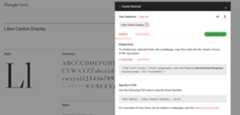
An additional window will come up and here you can scroll down and it will show you the link that you can include in your project.
Copy this link
Go back to your p5 editor.
Now you need to add this code to the html file that is a part of your project.

Go to sketch files on the left of the web editor window.click on the sketch files> index html

We can put this code anywhere but we would suggest putting it right underneath the title tag and above any scripts.
Now you can save this and go back to the sketch.
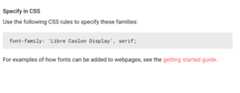
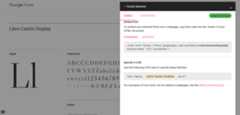
Because we have put this link tag to load this typeface via css, I can now use the name of that type in the textFont() command.In order to use the for the textFont() command you should go back to the google fonts page you can check the name of the font family. For instance, “Libre Caslon Display” with spaces between each letter.
You can now go back to the IDE and put the name of the new font.

If you would like to edit this wiki and don't already have edit access, please open an issue or comment on an existing one noting the wiki page you'd like to edit. You will then be added as a repository contributor with edit access.