- Notifications
You must be signed in to change notification settings - Fork102
Transparent subrequest-based caching layout for arbitrary nginx locations.
openresty/srcache-nginx-module
Folders and files
| Name | Name | Last commit message | Last commit date | |
|---|---|---|---|---|
Repository files navigation
ngx_srcache - Transparent subrequest-based caching layout for arbitrary nginx locations
This module is not distributed with the Nginx source. Seethe installation instructions.
- Name
- Status
- Version
- Synopsis
- Description
- Directives
- srcache_fetch
- srcache_fetch_skip
- srcache_store
- srcache_store_max_size
- srcache_store_skip
- srcache_store_statuses
- srcache_store_ranges
- srcache_header_buffer_size
- srcache_store_hide_header
- srcache_store_pass_header
- srcache_methods
- srcache_ignore_content_encoding
- srcache_request_cache_control
- srcache_response_cache_control
- srcache_store_no_store
- srcache_store_no_cache
- srcache_store_private
- srcache_default_expire
- srcache_max_expire
- Variables
- Known Issues
- Caveats
- Trouble Shooting
- Installation
- Compatibility
- Community
- Bugs and Patches
- Source Repository
- Test Suite
- TODO
- Getting involved
- Author
- Copyright & License
- See Also
This module is production ready.
This document describes srcache-nginx-modulev0.32 released on 2 July 2020.
upstream my_memcached{server10.62.136.7:11211;keepalive10;}location = /memc{internal; memc_connect_timeout100ms; memc_send_timeout100ms; memc_read_timeout100ms; memc_ignore_client_abort on;set$memc_key$query_string;set$memc_exptime300; memc_pass my_memcached;}location /foo{set$key$uri$args; srcache_fetch GET /memc$key; srcache_store PUT /memc$key; srcache_store_statuses200301302307308; # proxy_pass/fastcgi_pass/drizzle_pass/echo/etc... # or even static files on the disk}
location = /memc2{internal; memc_connect_timeout100ms; memc_send_timeout100ms; memc_read_timeout100ms; memc_ignore_client_abort on; set_unescape_uri$memc_key$arg_key;set$memc_exptime$arg_exptime; memc_pass unix:/tmp/memcached.sock;}location /bar{ set_escape_uri$key$uri$args; srcache_fetch GET /memc2 key=$key; srcache_store PUT /memc2 key=$key&exptime=$srcache_expire; # proxy_pass/fastcgi_pass/drizzle_pass/echo/etc... # or even static files on the disk}
map$request_method$skip_fetch{ default 0; POST 1; PUT 1;}server{listen8080;location /api/{set$key"$uri?$args"; srcache_fetch GET /memc$key; srcache_store PUT /memc$key; srcache_methods GET PUT POST; srcache_fetch_skip$skip_fetch; # proxy_pass/drizzle_pass/content_by_lua/echo/...}}
This module provides a transparent caching layer for arbitrary nginx locations (like those use an upstream or even serve static disk files). The caching behavior is mostly compatible withRFC 2616.
Usually,memc-nginx-module is used together with this module to provide a concrete caching storage backend. But technically, any modules that provide a REST interface can be used as the fetching and storage subrequests used by this module.
For main requests, thesrcache_fetch directive works at the end of the access phase, so thestandard access module'sallow anddeny direcives runbefore ours, which is usually the desired behavior for security reasons.
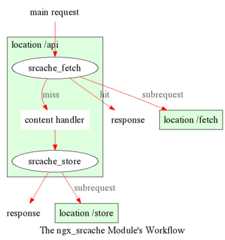
The workflow of this module looks like below:
Forsubrequests, we explicitlydisallow the use of this module because it's too difficult to get right. There used to be an implementation but it was buggy and I finally gave up fixing it and abandoned it.
However, if you're usinglua-nginx-module, it's easy to do subrequest caching in Lua all by yourself. That is, first issue a subrequest to anmemc-nginx-module location to do an explicit cache lookup, if cache hit, just use the cached data returned; otherwise, fall back to the true backend, and finally do a cache insertion to feed the data into the cache.
Using this module for main request caching and Lua for subrequest caching is the approach that we're taking in our business. This hybrid solution works great in production.
Here is a simple example demonstrating a distributed memcached caching mechanism built atop this module. Suppose we do have three different memcached nodes and we use simple modulo to hash our keys.
http{upstream moon{server10.62.136.54:11211;server unix:/tmp/memcached.sock backup;}upstream earth{server10.62.136.55:11211;}upstream sun{server10.62.136.56:11211;} upstream_list universe moon earth sun;server{ memc_connect_timeout100ms; memc_send_timeout100ms; memc_read_timeout100ms;location = /memc{internal;set$memc_key$query_string; set_hashed_upstream$backend universe$memc_key;set$memc_exptime3600; # in seconds memc_pass$backend;}location /{set$key$uri; srcache_fetch GET /memc$key; srcache_store PUT /memc$key; # proxy_pass/fastcgi_pass/content_by_lua/drizzle_pass/...}}}
Here's what is going on in the sample above:
- We first define three upstreams,
moon,earth, andsun. These are our three memcached servers. - And then we group them together as an upstream list entity named
universewith theupstream_listdirective provided byset-misc-nginx-module. - After that, we define an internal location named
/memcfor talking to the memcached cluster. - In this
/memclocation, we first set the$memc_keyvariable with the query string ($args), and then use theset_hashed_upstream directive to hash our$memc_key over the upsteam listuniverse, so as to obtain a concrete upstream name to be assigned to the variable$backend. - We pass this
$backendvariable into thememc_pass directive. The$backendvariable can hold a value amongmoon,earth, andsun. - Also, we define the memcached caching expiration time to be 3600 seconds (i.e., an hour) by overriding the$memc_exptime variable.
- In our main public location
/, we configure the$urivariable as our cache key, and then configuresrcache_fetch for cache lookups andsrcache_store for cache updates. We're using two subrequests to our/memclocation defined earlier in these two directives.
One can uselua-nginx-module'sset_by_lua orrewrite_by_lua directives to inject custom Lua code to compute the$backend and/or$key variables in the sample above.
One thing that should be taken care of is that memcached does have restriction on key lengths, i.e., 250 bytes, so for keys that may be very long, one could use theset_md5 directive or its friends to pre-hash the key to a fixed-length digest before assigning it to$memc_key in the/memc location or the like.
Further, one can utilize thesrcache_fetch_skip andsrcache_store_skip directives to control what to cache and what not on a per-request basis, and Lua can also be used here in a similar way. So the possibility is really unlimited.
To maximize speed, we often enable TCP (or Unix Domain Socket) connection pool for our memcached upstreams provided byHttpUpstreamKeepaliveModule, for example,
upstream moon{server10.62.136.54:11211;server unix:/tmp/memcached.sock backup;keepalive10;}
where we define a connection pool which holds up to 10 keep-alive connections (per nginx worker process) for ourmoon upstream (cluster).
Redis is an alternative key-value store with many additional features.
Here is a working example using the lua-resty-redis module:
location ~ '\.php$|^/update.php' { # cache setup set $key $request_uri; try_files $uri =404; srcache_fetch_skip $skip_cache; srcache_store_skip $skip_cache; srcache_response_cache_control off; srcache_store_statuses 200 201 301 302 307 308 404 503; set_escape_uri $escaped_key $key; srcache_fetch GET /redis-fetch $key; srcache_store PUT /redis-store key=$escaped_key; more_set_headers 'X-Cache-Fetch-Status $srcache_fetch_status'; more_set_headers 'X-Cache-Store-Status $srcache_store_status'; fastcgi_split_path_info ^(.+?\.php)(|/.*)$; # Security note: If you're running a version of PHP older than the # latest 5.3, you should have "cgi.fix_pathinfo = 0;" in php.ini. # See http://serverfault.com/q/627903/94922 for details. include fastcgi_params; # Block httproxy attacks. See https://httpoxy.org/. fastcgi_param HTTP_PROXY ""; fastcgi_param SCRIPT_FILENAME /var/www/html/$fastcgi_script_name; fastcgi_param PATH_INFO $fastcgi_path_info; fastcgi_param QUERY_STRING $query_string; fastcgi_intercept_errors on; fastcgi_pass upstream-name; } location /redis-fetch { internal; resolver 8.8.8.8 valid=300s; resolver_timeout 10s; content_by_lua_block { local key = assert(ngx.var.request_uri, "no key found") local redis = require "resty.redis" local red, err = redis:new() if not red then ngx.log(ngx.ERR, "Failed to create redis variable, error -> ", err) ngx.exit(500) end assert(red:connect("redis-master.default.svc.cluster.local", 6379)) if not red then ngx.log(ngx.ERR, "Failed to connect to redis, error -> ", err) ngx.exit(500) end local res, err = red:auth("redispassword") if not res then ngx.say("failed to authenticate, ", err) ngx.exit(500) end local data = assert(red:get(key)) assert(red:set_keepalive(10000, 100)) if res == ngx.null then return ngx.exit(404) end ngx.print(data) } } location /redis-store { internal; resolver 8.8.8.8 valid=300s; resolver_timeout 10s; content_by_lua_block { local value = assert(ngx.req.get_body_data(), "no value found") local key = assert(ngx.var.request_uri, "no key found") local redis = require "resty.redis" local red, err = redis:new() if not red then ngx.log(ngx.ERR, "Failed to create redis variable, error -> ", err) ngx.exit(500) end assert(red:connect("redis-master.default.svc.cluster.local", 6379)) if not red then ngx.log(ngx.ERR, "Failed to connect to redis, error -> ", err) ngx.exit(500) end local res, err = red:auth("redispassword") if not res then ngx.say("failed to authenticate, ", err) ngx.exit(500) end local data = assert(red:set(key, value)) assert(red:set_keepalive(10000, 100)) if res == ngx.null then return ngx.exit(404) end } }Here is a working example by using the HTTPRedis (fetch) and Redis2 (store) modules:
location /api{default_type text/css;set$key$uri; set_escape_uri$escaped_key$key; srcache_fetch GET /redis$key; srcache_store PUT /redis2 key=$escaped_key&exptime=120; # fastcgi_pass/proxy_pass/drizzle_pass/postgres_pass/echo/etc}location = /redis{internal; set_md5$redis_key$args; redis_pass127.0.0.1:6379;}location = /redis2{internal; set_unescape_uri$exptime$arg_exptime; set_unescape_uri$key$arg_key; set_md5$key; redis2_queryset$key$echo_request_body; redis2_query expire$key$exptime; redis2_pass127.0.0.1:6379;}
This example makes use of the$echo_request_body variable provided byecho-nginx-module. Note that you need the latest version ofecho-nginx-module,v0.38rc2 because earlier versions may not work reliably.
Also, you need bothHttpRedisModule andredis2-nginx-module. The former is used in thesrcache_fetch subrequest and the latter is used in thesrcache_store subrequest.
The Nginx core also has a bug that could preventredis2-nginx-module's pipelining support from working properly in certain extreme conditions. And the following patch fixes this:
http://mailman.nginx.org/pipermail/nginx-devel/2012-March/002040.html
Note that, however, if you are using theOpenResty 1.0.15.3 bundle or later, then you already have everything that you need here in the bundle.
It is often desired to preprocess the cache key to exclude random noises that may hurt the cache hit rate. For example, random session IDs in the URI arguments are usually desired to get removed.
Consider the following URI querystring
SID=BC3781C3-2E02-4A11-89CF-34E5CFE8B0EF&UID=44332&L=EN&M=1&H=1&UNC=0&SRC=LK&RT=62we want to remove theSID andUID arguments from it. It is easy to achieve if you uselua-nginx-module at the same time:
location = /t{ rewrite_by_lua ' local args = ngx.req.get_uri_args() args.SID = nil args.UID = nil ngx.req.set_uri_args(args) '; echo$args;}
Here we use theecho directive fromecho-nginx-module to dump outthe final value of$args in the end. You can replace it with yoursrcache-nginx-module configurations and upstream configurations instead foryour case. Let's test this /t interface with curl:
$ curl 'localhost:8081/t?RT=62&SID=BC3781C3-2E02-4A11-89CF-34E5CFE8B0EF&UID=44332&L=EN&M=1&H=1&UNC=0&SRC=LK'M=1&UNC=0&RT=62&H=1&L=EN&SRC=LKIt is worth mentioning that, if you want to retain the order of the URIarguments, then you can do string substitutions on the value of$argsdirectly, for example,
location = /t { rewrite_by_lua ' local args = ngx.var.args newargs, n, err = ngx.re.gsub(args, [[\b[SU]ID=[^&]*&?]], "", "jo") if n and n > 0 then ngx.var.args = newargs end '; echo $args;}Now test it with the original curl command again, we get exactly whatwe would expect:
RT=62&L=EN&M=1&H=1&UNC=0&SRC=LKBut for caching purposes, it's good to normalize the URI argumentorder so that you can increase the cache hit rate. And the hash tableentry order used by LuaJIT or Lua can be used to normalize the orderas a nice side effect.
syntax:srcache_fetch <method> <uri> <args>?
default:no
context:http, server, location, location if
phase:post-access
This directive registers an access phase handler that will issue an Nginx subrequest to lookup the cache.
When the subrequest returns status code other than200, than a cache miss is signaled and the control flow will continue to the later phases including the content phase configured byngx_http_proxy_module,ngx_http_fastcgi_module, and others. If the subrequest returns200 OK, then a cache hit is signaled and this module will send the subrequest's response as the current main request's response to the client directly.
This directive will always run at the end of the access phase, such thatngx_http_access_module'sallow anddeny will always runbefore this.
You can use thesrcache_fetch_skip directive to disable cache look-up selectively.
syntax:srcache_fetch_skip <flag>
default:srcache_fetch_skip 0
context:http, server, location, location if
phase:post-access
The<flag> argument supports nginx variables. When this argument's value is not emptyand not equal to0, then the fetching process will be unconditionally skipped.
For example, to skip caching requests which have a cookie namedfoo with the valuebar, we can write
location /{set$key ...; set_by_lua$skip 'if ngx.var.cookie_foo =="bar" thenreturn 1 endreturn 0 '; srcache_fetch_skip$skip; srcache_store_skip$skip; srcache_fetch GET /memc$key; srcache_store GET /memc$key; # proxy_pass/fastcgi_pass/content_by_lua/...}
wherelua-nginx-module is used to calculate the value of the$skip variable at the (earlier) rewrite phase. Similarly, the$key variable can be computed by Lua using theset_by_lua orrewrite_by_lua directive too.
The standardmap directive can also be used to compute the value of the$skip variable used in the sample above:
map$cookie_foo$skip{ default 0; bar 1;}
but yourmap statement should be put into thehttp config block in yournginx.conf file though.
syntax:srcache_store <method> <uri> <args>?
default:no
context:http, server, location, location if
phase:output-filter
This directive registers an output filter handler that will issue an Nginx subrequest to save the response of the current main request into a cache backend. The status code of the subrequest will be ignored.
You can use thesrcache_store_skip andsrcache_store_max_size directives to disable caching for certain requests in case of a cache miss.
Since thev0.12rc7 release, both the response status line, response headers, and response bodies will be put into the cache. By default, the following special response headers will not be cached:
- Connection
- Keep-Alive
- Proxy-Authenticate
- Proxy-Authorization
- TE
- Trailers
- Transfer-Encoding
- Upgrade
- Set-Cookie
You can use thesrcache_store_pass_header and/orsrcache_store_hide_header directives to control what headers to cache and what not.
The original response's data chunks get emitted as soon asthey arrive.srcache_store just copies and collects the data in an output filter without postponing them from being sent downstream.
But please note that even though all the response data will be sent immediately, the current Nginx request lifetime will not finish until the srcache_store subrequest completes. That means a delay in closing the TCP connection on the server side (when HTTP keepalive is disabled, but proper HTTP clients should close the connection actively on the client side, which adds no extra delay or other issues at all) or serving the next request sent on the same TCP connection (when HTTP keepalive is in action).
syntax:srcache_store_max_size <size>
default:srcache_store_max_size 0
context:http, server, location, location if
phase:output-header-filter
When the response body length is exceeding this size, this module will not try to store the response body into the cache using the subrequest template that is specified insrcache_store.
This is particular useful when using a cache storage backend that does have a hard upper limit on the input data. For example, the Memcached server has a default limit of1 MB by item.
When0 is specified (the default value), there's no limit check at all.
syntax:srcache_store_skip <flag>
default:srcache_store_skip 0
context:http, server, location, location if
phase:output-header-filter
The<flag> argument supports Nginx variables. When this argument's value is not emptyand not equal to0, then the storing process will be unconditionally skipped.
Starting from thev0.25 release, the<flag> expression (possibly containing Nginx variables) can be evaluated up to twice: the first time is right after the response header is being sent and when the<flag> expression is not evaluated to true values it will be evaluated again right after the end of the response body data stream is seen. Beforev0.25, only the first time evaluation is performed.
Here's an example using Lua to set $nocache to avoid storing URIs that contain the string "/tmp":
set_by_lua$nocache 'if string.match(ngx.var.uri,"/tmp") thenreturn 1 endreturn 0'; srcache_store_skip$nocache;
syntax:srcache_store_statuses <status1> <status2> ..
default:srcache_store_statuses 200 301 302 307 308
context:http, server, location, location if
phase:output-header-filter
This directive controls what responses to store to the cache according to their status code.
By default, only200,301,302,307 and308 responses will be stored to cache and any other responses will skipsrcache_store.
You can specify arbitrary positive numbers for the response status code that you'd like to cache, even including error code like404 and503. For example:
srcache_store_statuses200201301302307308404503;
At least one argument should be given to this directive.
This directive was first introduced in thev0.13rc2 release.
syntax:srcache_store_ranges on|off
default:srcache_store_ranges off
context:http, server, location, location if
phase:output-body-filter
When this directive is turned on (default tooff),srcache_store will also store 206 Partial Content responses generated by the standardngx_http_range_filter_module. If you turn this directive on, you MUST add$http_range to your cache keys. For example,
location /{set$key"$uri$args$http_range"; srcache_fetch GET /memc$key; srcache_store PUT /memc$key;}
This directive was first introduced in thev0.27 release.
syntax:srcache_header_buffer_size <size>
default:srcache_header_buffer_size 4k/8k
context:http, server, location, location if
phase:output-header-filter
This directive controles the header buffer when serializing response headers forsrcache_store. The default size is the page size, usually4k or8k depending on specific platforms.
Note that the buffer is not used to hold all the response headers, but just each individual header. So the buffer is merely needed to be big enough to hold the longest response header.
This directive was first introduced in thev0.12rc7 release.
syntax:srcache_store_hide_header <header>
default:no
context:http, server, location, location if
phase:output-header-filter
By default, this module caches all the response headers except the following ones:
- Connection
- Keep-Alive
- Proxy-Authenticate
- Proxy-Authorization
- TE
- Trailers
- Transfer-Encoding
- Upgrade
- Set-Cookie
You can hide even more response headers fromsrcache_store by listing their names (case-insensitive) by means of this directive. For examples,
srcache_store_hide_header X-Foo; srcache_store_hide_header Last-Modified;
Multiple occurrences of this directive are allowed in a single location.
This directive was first introduced in thev0.12rc7 release.
See alsosrcache_store_pass_header.
syntax:srcache_store_pass_header <header>
default:no
context:http, server, location, location if
phase:output-header-filter
By default, this module caches all the response headers except the following ones:
- Connection
- Keep-Alive
- Proxy-Authenticate
- Proxy-Authorization
- TE
- Trailers
- Transfer-Encoding
- Upgrade
- Set-Cookie
You can forcesrcache_store to store one or more of these response headers fromsrcache_store by listing their names (case-insensitive) by means of this directive. For examples,
srcache_store_pass_header Set-Cookie; srcache_store_pass_header Proxy-Autenticate;
Multiple occurrences of this directive are allowed in a single location.
This directive was first introduced in thev0.12rc7 release.
See alsosrcache_store_hide_header.
syntax:srcache_methods <method>...
default:srcache_methods GET HEAD
context:http, server, location
phase:post-access, output-header-filter
This directive specifies HTTP request methods that are considered by eithersrcache_fetch orsrcache_store. HTTP request methods not listed will be skipped completely from the cache.
The following HTTP methods are allowed:GET,HEAD,POST,PUT, andDELETE. TheGET andHEAD methods are always implicitly included in the list regardless of their presence in this directive.
Note that since thev0.17 releaseHEAD requests are always skipped bysrcache_store because their responses never carry a response body.
This directive was first introduced in thev0.12rc7 release.
syntax:srcache_ignore_content_encoding on|off
default:srcache_ignore_content_encoding off
context:http, server, location, location if
phase:output-header-filter
When this directive is turnedoff (which is the default), non-emptyContent-Encoding response header will causesrcache_store skip storing the whole response into the cache and issue a warning into nginx'serror.log file like this:
[warn] 12500#0: *1 srcache_store skipped due to response header "Content-Encoding: gzip" (maybe you forgot to disable compression on the backend?)Turning on this directive will ignore theContent-Encoding response header and store the response as usual (and also without warning).
It's recommended to always disable gzip/deflate compression on your backend server by specifying the following line in yournginx.conf file:
proxy_set_header Accept-Encoding"";
This directive was first introduced in thev0.12rc7 release.
syntax:srcache_request_cache_control on|off
default:srcache_request_cache_control off
context:http, server, location
phase:post-access, output-header-filter
When this directive is turnedon, the request headersCache-Control andPragma will be honored by this module in the following ways:
- srcache_fetch, i.e., the cache lookup operation, will be skipped when request headers
Cache-Control: no-cacheand/orPragma: no-cacheare present. - srcache_store, i.e., the cache store operation, will be skipped when the request header
Cache-Control: no-storeis specified.
Turning off this directive will disable this functionality and is considered safer for busy sites mainly relying on cache for speed.
This directive was first introduced in thev0.12rc7 release.
See alsosrcache_response_cache_control.
syntax:srcache_response_cache_control on|off
default:srcache_response_cache_control on
context:http, server, location
phase:output-header-filter
When this directive is turnedon, the response headersCache-Control andExpires will be honored by this module in the following ways:
Cache-Control: privateskipssrcache_store,Cache-Control: no-storeskipssrcache_store,Cache-Control: no-cacheskipssrcache_store,Cache-Control: max-age=0skipssrcache_store,- and
Expires: <date-no-more-recently-than-now>skipssrcache_store.
This directive takes priority over thesrcache_store_no_store,srcache_store_no_cache, andsrcache_store_private directives.
This directive was first introduced in thev0.12rc7 release.
See alsosrcache_request_cache_control.
syntax:srcache_store_no_store on|off
default:srcache_store_no_store off
context:http, server, location
phase:output-header-filter
Turning this directive on will force responses with the headerCache-Control: no-store to be stored into the cache whensrcache_response_cache_control is turnedonand other conditions are met. Default tooff.
This directive was first introduced in thev0.12rc7 release.
syntax:srcache_store_no_cache on|off
default:srcache_store_no_cache off
context:http, server, location
phase:output-header-filter
Turning this directive on will force responses with the headerCache-Control: no-cache to be stored into the cache whensrcache_response_cache_control is turnedonand other conditions are met. Default tooff.
This directive was first introduced in thev0.12rc7 release.
syntax:srcache_store_private on|off
default:srcache_store_private off
context:http, server, location
phase:output-header-filter
Turning this directive on will force responses with the headerCache-Control: private to be stored into the cache whensrcache_response_cache_control is turnedonand other conditions are met. Default tooff.
This directive was first introduced in thev0.12rc7 release.
syntax:srcache_default_expire <time>
default:srcache_default_expire 60s
context:http, server, location, location if
phase:output-header-filter
This directive controls the default expiration time period that is allowed for the$srcache_expire variable value when neitherCache-Control: max-age=N norExpires are specified in the response headers.
The<time> argument values are in seconds by default. But it's wise to always explicitly specify the time unit to avoid confusion. Time units supported are "s"(seconds), "ms"(milliseconds), "y"(years), "M"(months), "w"(weeks), "d"(days), "h"(hours), and "m"(minutes). For example,
srcache_default_expire30m; #30 minutes
This time must be less than 597 hours.
The semantics of a zero expiration time depends on the actual cache backend storage you are currently using, which is agnostic to thismodule. In the case of memcached, for example, zero expiration times mean that the item will never expire.
This directive was first introduced in thev0.12rc7 release.
syntax:srcache_max_expire <time>
default:srcache_max_expire 0
context:http, server, location, location if
phase:output-header-filter
This directive controls the maximal expiration time period that is allowed for the$srcache_expire variable value. This setting takes priority over other calculating methods.
The<time> argument values are in seconds by default. But it's wise to always explicitly specify the time unit to avoid confusion. Time units supported are "s"(seconds), "ms"(milliseconds), "y"(years), "M"(months), "w"(weeks), "d"(days), "h"(hours), and "m"(minutes). For example,
srcache_max_expire2h; # 2 hours
This time must be less than 597 hours.
When0 is specified, which is the default setting, then there will beno limit at all.
This directive was first introduced in thev0.12rc7 release.
type:integer
cacheable:no
writable:no
This Nginx variable gives the recommended expiration time period (in seconds) for the current response being stored into the cache. The algorithm of computing the value is as follows:
- When the response header
Cache-Control: max-age=Nis specified, thenNwill be used as the expiration time, - otherwise if the response header
Expiresis specified, then the expiration time will be obtained by subtracting the current time stamp from the time specified in theExpiresheader, - when neither
Cache-Control: max-age=NnorExpiresheaders are specified, use the value specified in thesrcache_default_expire directive.
The final value of this variable will be the value specified by thesrcache_max_expire directive if the value obtained in the algorithm above exceeds the maximal value (if any).
You don't have to use this variable for the expiration time.
This variable was first introduced in thev0.12rc7 release.
type:string
cacheable:no
writable:no
This Nginx variable is evaluated to the status of the "fetch" phase for the caching system. Three values are possible,HIT,MISS, andBYPASS.
When the "fetch" subrequest returns status code other than200 or its response data is not well-formed, then this variable is evaluated to the valueMISS.
The value of this variable is only meaningful after theaccess request processing phase, orBYPASS is always given.
This variable was first introduced in thev0.14 release.
type:string
cacheable:no
writable:no
This Nginx variable gives the current caching status for the "store" phase. Two possible values,STORE andBYPASS can be obtained.
Because the responses for the "store" subrequest are always discarded, so the value of this variable will always beSTORE as long as the "store" subrequest is actually issued.
The value of this variable is only meaningful at least when the request headers of the current (main) request are being sent. The final result can only be obtained after all the response body has been sent if theContent-Length response header is not specified for the main request.
This variable was first introduced in thev0.14 release.
- On certain systems, enabling aio and/or sendfile may stopsrcache_store from working. You can disable them in the locations configured bysrcache_store.
- Thesrcache_store directive can not be used to capture the responses generated byecho-nginx-module's subrequest directivees likeecho_subrequest_async andecho_location. You are recommended to use HttpLuaModule to initiate and capture subrequests, which should work withsrcache_store.
- It is recommended to disable your backend server's gzip compression and use nginx'sngx_http_gzip_module to do the job. In case ofngx_http_proxy_module, you can use the following configure setting to disable backend gzip compression:
proxy_set_header Accept-Encoding"";
- Donot usengx_http_rewrite_module'sif directive in the same location as this module's, because "if is evil". Instead, usengx_http_map_module orlua-nginx-module combined with this module'ssrcache_store_skip and/orsrcache_fetch_skip directives. For example:
map$request_method$skip_fetch{ default 0; POST 1; PUT 1;}server{listen8080;location /api/{set$key"$uri?$args"; srcache_fetch GET /memc$key; srcache_store PUT /memc$key; srcache_methods GET PUT POST; srcache_fetch_skip$skip_fetch; # proxy_pass/drizzle_pass/content_by_lua/echo/...}}
To debug issues, you should always check your Nginxerror.log file first. If no error messages are printed, you need to enable the Nginx debugging logs to get more details, as explained indebugging log.
Several common pitfalls for beginners:
- The original response carries a
Cache-Controlheader that explicitly disables caching and you do not configure directives likesrcache_response_cache_control. - The original response is already gzip compressed, which is not cached by default (seesrcache_ignore_content_encoding).
- Memcached might return
CLIENT_ERROR bad command line formatwhen using a too long key (250 chars as of version 1.4.25). It is thus safer to useset_md5 $key $uri$args;instead ofset $key $uri$args;. Theset_md5directive (and more) is available fromOpenResty's set-misc module. - Nginx might return
client intended to send too large bodywhen trying to store objects larger than 1m to the storage backend, in which case nginxclient_max_body_sizemust be set to a higher value. - Memcached might fail to store objects larger than 1m, causing errors like
srcache_store subrequest failed status=502. Since version 1.4.2, memcached supports a command-line-Ioption to override the default size of each slab page. Please read its manpage for more information.
It is recommended to install this module as well as the Nginx core and many other goodies via theOpenResty bundle. It is the easiest way and most safe way to set things up. See OpenResty'sinstallation instructions for details.
Alternatively, you can build Nginx with this module all by yourself:
- Grab the nginx source code fromnginx.org, for example, the version 1.9.15 (seeNginx Compatibility),
- and then apply the patch to your nginx source tree that fixes an important bug in the mainline Nginx core:https://raw.github.com/openresty/openresty/master/patches/nginx-1.4.3-upstream_truncation.patch (you do NOT need this patch if you are using nginx 1.5.3 and later versions.)
- after that, download the latest version of the release tarball of this module from srcache-nginx-modulefile list,
- and finally build the Nginx source with this module
wget'http://nginx.org/download/nginx-1.9.15.tar.gz' tar -xzvf nginx-1.9.15.tar.gzcd nginx-1.9.15/# Here we assume you would install you nginx under /opt/nginx/. ./configure --prefix=/opt/nginx \ --add-module=/path/to/srcache-nginx-module make -j2 make install
Starting from NGINX 1.9.11, you can also compile this module as a dynamic module, by using the--add-dynamic-module=PATH option instead of--add-module=PATH on the./configure command line above. And then you can explicitly load the module in yournginx.conf via theload_moduledirective, for example,
load_module /path/to/modules/ngx_http_srcache_filter_module.so;
The following versions of Nginx should work with this module:
- 1.9.x (last tested: 1.9.15)
- 1.8.x
- 1.7.x (last tested: 1.7.10)
- 1.5.x (last tested: 1.5.12)
- 1.4.x (last tested: 1.4.4)
- 1.3.x (last tested: 1.3.7)
- 1.2.x (last tested: 1.2.9)
- 1.1.x (last tested: 1.1.5)
- 1.0.x (last tested: 1.0.11)
- 0.9.x (last tested: 0.9.4)
- 0.8.x >= 0.8.54 (last tested: 0.8.54)
Earlier versions of Nginx like 0.7.x, 0.6.x and 0.5.x willnot work.
If you find that any particular version of Nginx above 0.7.44 does not work with this module, please consider reporting a bug.
Theopenresty-en mailing list is for English speakers.
Theopenresty mailing list is for Chinese speakers.
Please submit bug reports, wishlists, or patches by
- creating a ticket on theGitHub Issue Tracker,
- or posting to theOpenResty community.
Available on github atopenresty/srcache-nginx-module.
This module comes with a Perl-driven test suite. Thetest cases aredeclarative too. Thanks to theTest::Nginx module in the Perl world.
To run it on your side:
$ PATH=/path/to/your/nginx-with-srcache-module:$PATH prove -r tYou need to terminate any Nginx processes before running the test suite if you have changed the Nginx server binary.
Because a single nginx server (by default,localhost:1984) is used across all the test scripts (.t files), it's meaningless to run the test suite in parallel by specifying-jN when invoking theprove utility.
Some parts of the test suite requires modulesngx_http_rewrite_module,echo-nginx-module,rds-json-nginx-module, anddrizzle-nginx-module to be enabled as well when building Nginx.
- add gzip compression and decompression support.
- add new nginx variable
$srcache_keyand new directivessrcache_key_ignore_args,srcache_key_filter_args, andsrcache_key_sort_args.
You'll be very welcomed to submit patches to the author or just ask for a commit bit to the source repository on GitHub.
Yichun "agentzh" Zhang (章亦春)agentzh@gmail.com, CloudFlare Inc.
Copyright (c) 2010-2016, Yichun "agentzh" Zhang (章亦春)agentzh@gmail.com, CloudFlare Inc.
This module is licensed under the terms of the BSD license.
Redistribution and use in source and binary forms, with or without modification, are permitted provided that the following conditions are met:
- Redistributions of source code must retain the above copyright notice, this list of conditions and the following disclaimer.
- Redistributions in binary form must reproduce the above copyright notice, this list of conditions and the following disclaimer in the documentation and/or other materials provided with the distribution.
THIS SOFTWARE IS PROVIDED BY THE COPYRIGHT HOLDERS AND CONTRIBUTORS "AS IS" AND ANY EXPRESS OR IMPLIED WARRANTIES, INCLUDING, BUT NOT LIMITED TO, THE IMPLIED WARRANTIES OF MERCHANTABILITY AND FITNESS FOR A PARTICULAR PURPOSE ARE DISCLAIMED. IN NO EVENT SHALL THE COPYRIGHT HOLDER OR CONTRIBUTORS BE LIABLE FOR ANY DIRECT, INDIRECT, INCIDENTAL, SPECIAL, EXEMPLARY, OR CONSEQUENTIAL DAMAGES (INCLUDING, BUT NOT LIMITED TO, PROCUREMENT OF SUBSTITUTE GOODS OR SERVICES; LOSS OF USE, DATA, OR PROFITS; OR BUSINESS INTERRUPTION) HOWEVER CAUSED AND ON ANY THEORY OF LIABILITY, WHETHER IN CONTRACT, STRICT LIABILITY, OR TORT (INCLUDING NEGLIGENCE OR OTHERWISE) ARISING IN ANY WAY OUT OF THE USE OF THIS SOFTWARE, EVEN IF ADVISED OF THE POSSIBILITY OF SUCH DAMAGE.
About
Transparent subrequest-based caching layout for arbitrary nginx locations.
Resources
Uh oh!
There was an error while loading.Please reload this page.
Stars
Watchers
Forks
Packages0
Uh oh!
There was an error while loading.Please reload this page.
Contributors13
Uh oh!
There was an error while loading.Please reload this page.