Uh oh!
There was an error while loading.Please reload this page.
- Notifications
You must be signed in to change notification settings - Fork56.4k
DisplayManyImages
There is no inbuilt support to display more than one image in OpenCV. Here is a function illustrating how to display more than one image in a single window using Intel OpenCV. The method used is to set the ROIs of a Single Big image and then resizing and copying the input images on to the Single Big Image.
#include <opencv2/opencv.hpp>#include <stdio.h>#include <stdarg.h>using namespace cv;using namespace std;/*Function///////////////////////////////////////////////////////////////Name: ShowManyImagesPurpose:This is a function illustrating how to display more than oneimage in a single window using Intel OpenCVParameters:string title: Title of the window to be displayedint nArgs: Number of images to be displayedMat img1: First Mat, which contains the first image...Mat imgN: First Mat, which contains the Nth imageLanguage: C++The method used is to set the ROIs of a Single Big image and then resizingand copying the input images on to the Single Big Image.This function does not stretch the image...It resizes the image without modifying the width/height ratio..This function can be called like this:ShowManyImages("Images", 5, img2, img2, img3, img4, img5);This function can display upto 12 images in a single window.It does not check whether the arguments are of type Mat or not.The maximum window size is 700 by 660 pixels.Does not display anything if the number of arguments is less thanone or greater than 12.Idea was from [[BettySanchi]] of OpenCV Yahoo! Groups.If you have trouble compiling and/or executingthis code, I would like to hear about it.You could try posting on the OpenCV Yahoo! Groups[url]http://groups.yahoo.com/group/OpenCV/messages/ [/url]Parameswaran,Chennai, India.cegparamesh[at]gmail[dot]com...///////////////////////////////////////////////////////////////////////*/void ShowManyImages(string title, int nArgs, ...) {int size;int i;int m, n;int x, y;// w - Maximum number of images in a row// h - Maximum number of images in a columnint w, h;// scale - How much we have to resize the imagefloat scale;int max;// If the number of arguments is lesser than 0 or greater than 12// return without displayingif(nArgs <= 0) { printf("Number of arguments too small....\n"); return;}else if(nArgs > 14) { printf("Number of arguments too large, can only handle maximally 12 images at a time ...\n"); return;}// Determine the size of the image,// and the number of rows/cols// from number of argumentselse if (nArgs == 1) { w = h = 1; size = 300;}else if (nArgs == 2) { w = 2; h = 1; size = 300;}else if (nArgs == 3 || nArgs == 4) { w = 2; h = 2; size = 300;}else if (nArgs == 5 || nArgs == 6) { w = 3; h = 2; size = 200;}else if (nArgs == 7 || nArgs == 8) { w = 4; h = 2; size = 200;}else { w = 4; h = 3; size = 150;}// Create a new 3 channel imageMat DispImage = Mat::zeros(Size(100 + size*w, 60 + size*h), CV_8UC3);// Used to get the arguments passedva_list args;va_start(args, nArgs);// Loop for nArgs number of argumentsfor (i = 0, m = 20, n = 20; i < nArgs; i++, m += (20 + size)) { // Get the Pointer to the IplImage Mat img = va_arg(args, Mat); // Check whether it is NULL or not // If it is NULL, release the image, and return if(img.empty()) { printf("Invalid arguments"); return; } // Find the width and height of the image x = img.cols; y = img.rows; // Find whether height or width is greater in order to resize the image max = (x > y)? x: y; // Find the scaling factor to resize the image scale = (float) ( (float) max / size ); // Used to Align the images if( i % w == 0 && m!= 20) { m = 20; n+= 20 + size; } // Set the image ROI to display the current image // Resize the input image and copy the it to the Single Big Image Rect ROI(m, n, (int)( x/scale ), (int)( y/scale )); Mat temp; resize(img,temp, Size(ROI.width, ROI.height)); temp.copyTo(DispImage(ROI));}// Create a new window, and show the Single Big ImagenamedWindow( title, 1 );imshow( title, DispImage);waitKey();// End the number of argumentsva_end(args);}You can use this function as in this sample program:
int main() {Mat img1 = imread("image.png");Mat img2 = imread("image.png");Mat img3 = imread("image.png");Mat img4 = imread("image.png");Mat img5 = imread("image.png");Mat img6 = imread("image.png");ShowManyImages("Image", 6, img1, img2, img3, img4, img5, img6);return 0;}The method used is to set the ROIs of a Single Big image and then resizing and copying the input images on to the Single Big Image. This function does not stretch the image… It resizes the image without modifying the width/height ratio..
This function can be called like this:
ShowManyImages("Image", 2, img1, img2);or
ShowManyImages("Image", 6, img1, img2, img3, img4, img5, img6);upto 12 images.
This function can display upto 12 images in a single window. The maximum window size is 700 by 660 pixels. Does not display anything if the number of arguments is less than one or greater than 12.
If you pass a pointer that is not Mat, Error will occur. Take care of the number of arguments you pass, and the type of arguments, which should be of type MatONLY.
Idea was from BettySanchi of OpenCV Yahoo! Groups.
Adapted by @StevenPuttemans, moderator of OpenCV Q&A.
If you have trouble compiling and/or executing this code, I would like to hear about it.
Here is a sample ScreenShot:
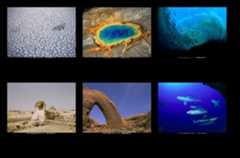
Regards :) Paramesh.
© Copyright 2019-2025, OpenCV team