- Notifications
You must be signed in to change notification settings - Fork10
Synchronous Vs Asynchronous Invocation with AWS Lambda
miztiik/serverless-async-lambda-api
Folders and files
| Name | Name | Last commit message | Last commit date | |
|---|---|---|---|---|
Repository files navigation
A common architectural pattern is to loosely couple microservices is to expose an API. REST APIs tend to be designed with synchronous communications, where a response is required. Synchronous functions are used when you need to know the result of an operation before moving on to the next one.
For example, if a user-facing API needs to perform a lot of time-consuming processing(from a few seconds to a minute), Your user has to wait for process to complete, which can lead to bad user experience.(Who likes to wait anyway?)

Sometimes, You dont have to process and return the ressponse immediately. It is good enough to inform the user that the message had been received and will be processed later. In the previous example, We can store the message in a queue or a topic and return the reponse immediately to the user. We can process the messages in the background without making the user to wait. For example for an asynchronous function is video encoding or image processing process, You can respond back informing the user that the processing had begun.

AWS Lambda functions can either be invoked synchronously or asynchronously. Functions invoked synchronously and asynchronously are handled in different ways when they fail, which can cause some unexpected side effects in your program logic.
Synchronously invoking application are responsible for all failure retries. Lambda functions that are invoked asynchronously do not rely on the invoking application for failure retries. The invocation will be retried twice with delays in-between. If it fails on both retries, the event is discarded.
With asynchronous invocations, you are able to set up aDead Letter Queue(DLQ) which can be used to keep the failed event from being discarded. The Dead Letter Queue allows you to send unprocessed events to an Amazon SQS or SNS queue for you to build logic to deal with.
In this article, we will build an messaging architecture to demonstrate synchronous and asynchronous invocation. The stacks are generated usingAWS Cloud Development Kit (CDK). The prerequisites to build this architecture are listed below
This demo, instructions, scripts and cloudformation template is designed to be run in
us-east-1. With few modifications you can try it out in other regions as well(Not covered here).- 🛠 AWS CLI Installed & Configured -Get help here
- 🛠 AWS CDK Installed & Configured -Get help here
- 🛠 Python Packages,Change the below commands to suit your OS, the following is written for amzn linux 2
- Python3 -
yum install -y python3 - Python Pip -
yum install -y python-pip - Virtualenv -
pip3 install virtualenv
- Python3 -
Get the application code
git clone https://github.com/miztiik/serverless-async-lambda-api.gitcd serverless-async-lambda-api
We will cdk to be installed to make our deployments easier. Lets go ahead and install the necessary components.
# If you DONT have cdk installednpm install -g aws-cdk# Make sure you in root directorypython3 -m venv .envsource .env/bin/activatepip3 install -r requirements.txt
The very first time you deploy an AWS CDK app into an environment(account/region), you’ll need to install a
bootstrap stack, Otherwise just go ahead and deploy usingcdk deploy.cdk bootstrapcdk ls# Follow on screen promptsYou should see an output of the available stacks,
serverless-async-lambda-api
Let us walk through each of the stacksserverless-async-lambda-api. This stack creates the following resources,
- A Lambda function that can compute thesquare of an given number
- For asynchronous request, the function will return an response with the square of the given number
- For anasynchronous request, the function will return a response as message received and the processed output will be stored in a AWS SQS Queue
- API Gateway to make it easier for us to trigger the lambda

Initiate the deployment with the following command,
cdk deploy serverless-async-lambda-api
Check the
Outputssection of the stack to access theGetSquareApiUrl.- A Lambda function that can compute thesquare of an given number
TheOutputs section of the
serverless-async-lambda-apistack has the required information on the urls.You can use the url in the browser or cli or tool like postman,
API_ENDPOINT_URL="https://7z5waloht5.execute-api.us-east-1.amazonaws.com/miztiik/square/2"# Synchromous requestcurl -X GET${API_ENDPOINT_URL}
Expected Output,
{"api_stage":"miztiik","api_request_id":"28e20dd-8f54-4cad-ae6d-4b1b2129bc77","api_resource_path":"/square/{number}","http_method":"GET","source_ip":"13.3.81.39","user-agent":"Mozilla/5.0 (Macintosh; Intel Mac OS X 10_14_6) AppleWebKit/537.36 (KHTML, like Gecko) Chrome/81.0.4103.116 Safari/537.36","synchronous_invocation":"true","square_of_your_number_is":4}
You can notice the function takes the input
{number}2 in this case and return ansynchronous response. I have added keysynchronous_invocation along with thesquare.The postman output will show you the response time as well,
Now lets try and do an asynchronous request. For this we need to add an custom header to the request1. We can use
curlto do that.# Asynchromous request - by setting header InvocationType to Eventcurl -X GET${API_ENDPOINT_URL} -H"InvocationType:Event"
Expected Output,
{"api_stage":"miztiik","api_request_id":"c72ce06-031d-4409-808a-ed56c74eb746","api_resource_path":"/square/{number}","http_method":"GET","source_ip":"13.3.81.39","user-agent":"curl/7.54.0","asynchronous_invocation":"true","message":"Event received. Check queue/logs for status"}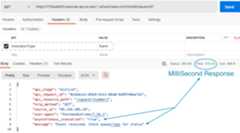
For the async response, the API GW receives the event and returns a templated response to requestor, while it invokes the Lambda function in the back-end.
If you want to check the output, you can retreive the message from SQS and inspect the message body for the payload.
# Get SQS MessagesDEST_QUEUE_NAME="async_get_square_fn_dest_queue"QUEUE_URL=$(aws sqs create-queue --queue-name${DEST_QUEUE_NAME}| jq -r'.QueueUrl')aws sqs receive-message --queue-url${QUEUE_URL}
Expected Output,
{"Messages": [ {"MessageId":"48ee86aba........6-79947b2649896","ReceiptHandle":"AQEpB........nccPpXU8tzQ+u8=","MD5OfBody":"a085a05da........cc09ca5dsad1874","Body":"{\"version\":\"1.0\",\"timestamp\":\"2020-17-12T21:22:30.275Z\",\"requestContext\":{\"requestId\":\"fae2d6a5........c24ce61ddd3f\",\"functionArn\":\"arn:aws:lambda:us-east-1:831303390:function:get_square_fn:$LATEST\",\"condition\":\"Success\",\"approximateInvokeCount\":1},\"requestPayload\":{\"number\":\"2\"},\"responseContext\":{\"statusCode\":200,\"executedVersion\":\"$LATEST\"},\"responsePayload\":{\"statusCode\": 200,\"square\": 4}}" } ]}You can check the logs in cloudwatch for more information or increase the logging level of the lambda functions by changing the environment variable from
INFOtoDEBUGIf you want to destroy all the resources created by the stack, Execute the below command to delete the stack, oryou can delete the stack from console as well
- Resources created duringdeployment
- Delete CloudWatch Lambda LogGroups
- Any other custom resources, you have created for this demo
# Delete from cdkcdk destroy# Follow any on-screen prompts# Delete the CF Stack, If you used cloudformation to deploy the stack.aws cloudformation delete-stack \ --stack-name"MiztiikAutomationStack" \ --region"${AWS_REGION}"
This is not an exhaustive list, please carry out other necessary steps as maybe applicable to your needs.


This repository teaches developers, Solution Architects & Ops Engineers how to build complete architecture in AWS. Based on that knowledge these Udemycourse #1,course #2 have been created to enhance your skills.
Thank you for your interest in contributing to our project. Whether it's a bug report, new feature, correction, or additional documentation or solutions, we greatly value feedback and contributions from our community.Start here

Set up asynchronous invocation of the backend Lambda function
Pass custom headers through API Gateway to a Lambda function
Level: 300
About
Synchronous Vs Asynchronous Invocation with AWS Lambda
Topics
Resources
Uh oh!
There was an error while loading.Please reload this page.
Stars
Watchers
Forks
Releases
Packages0
Uh oh!
There was an error while loading.Please reload this page.