Uh oh!
There was an error while loading.Please reload this page.
- Notifications
You must be signed in to change notification settings - Fork8.1k
Closed
Labels
Milestone
Description
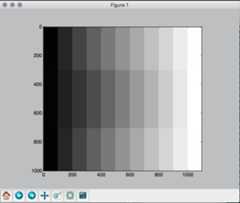
With the macosx backend, images and patches are shown on screen with different color rendering. The Qt backend does work fine. The following script displays an image of a grayscale (np.array) overlaid at the center with the same grayscale generated from matplotlib.patches.
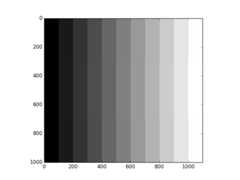
There is a difference of gamma between the image and the patches on what's displayed on screen but if I save this figure, then the resulting file is correct. Checking with some graphic software, the patches are displaying the correct color, not the image.
Snapshot:
Saving the figure from the figure window 'save' button gives this:
Here's the code to test:
import numpy as npimport matplotlib.pyplot as pltfrom matplotlib.patches import Rectanglecolor = np.zeros(3)f, ax = plt.subplots()im = np.zeros((1000, 1100,3))for i in range(11): im[:,i*100:(i+1)*100,:] = np.tile(np.array([[color]]), (1000, 100, 1)) ax.add_patch(Rectangle((i*100,300), 100, 400, linewidth=0, facecolor=color)) color = color + 0.1plt.imshow(im)plt.show()