- Notifications
You must be signed in to change notification settings - Fork61
Async completion framework made ease.
License
maralla/completor.vim
Folders and files
| Name | Name | Last commit message | Last commit date | |
|---|---|---|---|---|
Repository files navigation

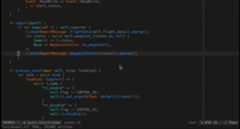
Completor is an asynchronous code completion framework for vim8. New featuresof vim8 are used to implement the fast completion engine with low overhead.For using semantic completion, external completion tools should be installed.
- vim8,
- compiled with
pythonorpython3
- vim8 builtin package manager:
$ mkdir -p~/.vim/pack/completor/start$cd~/.vim/pack/completor/start$ git clone https://github.com/maralla/completor.vim.git
$ pack install maralla/completor.vim
Plug'maralla/completor.vim'When the input matches a file path pattern the file name will be automaticallycompleted.
This is the fallback completer. When no semantic completer found the buffercompleter will be used and will complete based on the current buffers.
Ultisnips: is supported by default. Ifultisnips is installed,the snips candidates will show on the completion popup menu.
neosnippet: Need to installcompletor-neosnippet for neosnippet support.
vim-vsnip: Need to installcompletor-vsnip for vim-vsnip support.
Neoinclude is supported by default. Ifneoinclude is installed,the include candidates will show on the completion popup menu.
Dictionary completion is supported bycompletor-dictionary.
You can add some complete functions with shell command bycompletor-shell.
Completion from words in tmux panes is supported bycompletor-tmux.
Completion from syntax file is supported bycompletor-necosyntax.
Usejedi for completion. jedi should beinstalled for semantic completion. Install jedi to global environment or in virtualenv:
pip install jedi
The python executable can be specified using:
letg:completor_python_binary='/path/to/python/with/jedi/installed'
Use racer for completion.Install racerfirst. To specify the racer executable path:
letg:completor_racer_binary='/path/to/racer'
Usetern for completion. To install ternyou must have node and either npm or yarn installed. Then go to thecompletor.vim directory and run:
make js
The node executable path can be specified using:
letg:completor_node_binary='/path/to/node'
If you're using vim-plug, you can just use post install hook to do this for you.
Plug 'ternjs/tern_for_vim', { 'do': 'npm install' }Plug 'maralla/completor.vim', { 'do': 'make js' }Use clang for completion. Clang should be installed first. To specify clang path:
letg:completor_clang_binary='/path/to/clang'
To pass extra clang arguments, you can create a file named.clang_completeunder the project root directory or any parent directories. Every argumentshould be in a single line in the file. This is an example file:
-std=c++11-I/Users/maralla/Workspace/src/dji-sdk/Onboard-SDK/lib/inc-I/Users/maralla/Workspace/src/dji-sdk/Onboard-SDK/sample/Linux/incThe key mapping<Plug>CompletorCppJumpToPlaceholder can be definedto jump to placeholders:
map<tab><Plug>CompletorCppJumpToPlaceholderimap<tab><Plug>CompletorCppJumpToPlaceholder
Usegocode to provide omni completions.To specify the gocode executable path:
letg:completor_gocode_binary='/path/to/gocode'
Usecompletor-swift.
Usealchemist.vim.
For other omni completions completor not natively implemented, auto completioncan still be used if an omni function is defined for the file type. But an optionshould be defined to specify the trigger for triggering auto completion. Theoption name pattern:
letg:completor_{filetype}_omni_trigger='<python regex>'
For example to use css omnifunc:
letg:completor_css_omni_trigger='([\w-]+|@[\w-]*|[\w-]+:\s*[\w-]*)$'
This is simple.tern-project file:
{"plugins": {"node": {},"es_modules": {} },"libs": ["ecma5","ecma6" ],"ecmaVersion":6}inoremap<expr><Tab>pumvisible() ? "\<C-n>" : "\<Tab>"inoremap<expr><S-Tab>pumvisible() ? "\<C-p>" : "\<S-Tab>"inoremap<expr><cr>pumvisible() ? "\<C-y>" : "\<cr>"
letg:completor_auto_trigger=0inoremap<expr><Tab>pumvisible() ? "<C-N>" : "<C-R>=completor#do('complete')<CR>"
A better way:
" Use TAB to complete when typing words, else inserts TABs as usual. Uses" dictionary, source files, and completor to find matching words to complete." Note: usual completion is on <C-n> but more trouble to press all the time." Never type the same word twice and maybe learn a new spellings!" Use the Linux dictionary when spelling is in doubt.function!Tab_Or_Complete()abort" If completor is already open the `tab` cycles through suggested completions.ifpumvisible()return"\<C-N>"" If completor is not open and we are in the middle of typing a word then" `tab` opens completor menu.elseifcol('.')>1&&strpart(getline('.'),col('.')-2,3 )=~'^[[:keyword:][:ident:]]'return"\<C-R>=completor#do('complete')\<CR>"else" If we aren't typing a word and we press `tab` simply do the normal `tab`" action.return"\<Tab>"endifendfunction" Use `tab` key to select completions. Default is arrow keys.inoremap<expr><Tab>pumvisible() ? "\<C-n>" : "\<Tab>"inoremap<expr><S-Tab>pumvisible() ? "\<C-p>" : "\<S-Tab>"" Use tab to trigger auto completion. Default suggests completions as you type.letg:completor_auto_trigger=0inoremap<expr><Tab>Tab_Or_Complete()
Completor try its best to not overwrite the configcompleteopt, so the configg:completor_complete_options is introduced to be the complete option when completoris triggered.
letg:completor_complete_options='menuone,noselect,preview'
If you explicitly setcompleteopt completor willnot use this value for completeoptions.
- Jump to definition
completor#do('definition') - Show documentation
completor#do('doc') - Format code
completor#do('format') - Hover info (lsp hover)
completor#do('hover')
noremap<silent><leader>d:call completor#do('definition')<CR>noremap<silent><leader>c:call completor#do('doc')<CR>noremap<silent><leader>f:call completor#do('format')<CR>noremap<silent><leader>s:call completor#do('hover')<CR>
Useguru for jumping to definition:
letg:completor_go_guru_binary='guru'
Usegoimports to format code:
letg:completor_go_gofmt_binary='goimports'
Format file after write to buffer:
autocmdBufWritePost*.go :callcompletor#do('format')
Jump to completion placeholder:
map<c-\><Plug>CompletorCppJumpToPlaceholderimap<c-\><Plug>CompletorCppJumpToPlaceholder
Disable completion placeholder:
letg:completor_clang_disable_placeholders=1
letg:completor_filetype_map= {}" Enable lsp for go by using goplsletg:completor_filetype_map.go= {'ft':'lsp','cmd':'gopls'}" Enable lsp for rust by using rlsletg:completor_filetype_map.rust= {'ft':'lsp','cmd':'rls'}" Enable lsp for c by using clangdletg:completor_filetype_map.c= {'ft':'lsp','cmd':'clangd-7'}
To set format options:
letg:completor_filetype_map.rust= {\'ft':'lsp',\'cmd':'rust-analyzer',\'options': {\'format': {\'tabSize':4,\'insertSpaces':v:true\ }\ }\}
About
Async completion framework made ease.
Topics
Resources
License
Uh oh!
There was an error while loading.Please reload this page.
Stars
Watchers
Forks
Releases
Uh oh!
There was an error while loading.Please reload this page.