Uh oh!
There was an error while loading.Please reload this page.
- Notifications
You must be signed in to change notification settings - Fork83
Solve your DNS hosts from your docker containers, then from your local configuration, then from internet
License
mageddo/dns-proxy-server
Folders and files
| Name | Name | Last commit message | Last commit date | |
|---|---|---|---|---|
Repository files navigation


DPS is a lightweight end user (Developers, Server Administrators) DNS server toolwhich make it easy to develop in systems where one hostname can solve to different IPs basedon the configured environment, so you can:
- Solve hostnames from local configuration database
- Solve hostnames fromdocker containers
- Solve hostnames from a list of configured remote DNS servers(as a proxy) if no answer of two above
- Solve hostnames using wildcards
- Graphic interface to Create/List/Update/DeleteA/CNAME records
- Solve host machine IP using
host.dockerhostname
Checkout thefull list of features with examples
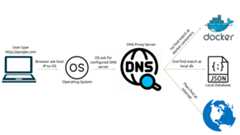
You can run DPS as native binary downloading the latestbinaries releasesor via docker looking atDockerhub images. Seecomplete running it documentation for running onMac, Windows, Docker, etc.
Basic running it on Linux or Mac
sudo ./dns-proxy-server --server-port 5555 --register-container-names
Solving docker containerfrom container name
$ docker run --rm --name nginx-app nginx$ nslookup -po=5555 nginx-app.docker 127.0.0.1172.17.0.3
Solving docker container from hostname
$ docker run --rm --hostname nginx.dev nginx$ nslookup -po=5555 nginx.dev 127.0.0.1172.17.0.3
Solving from pre-configured entries (conf/config.json):
$ nslookup -po=5555 dps-sample.dev 127.0.0.1192.168.0.254
Solving from Internet
$ nslookup -po=5555 google.com 127.0.0.1142.250.79.174
Solving stub hostnames like nip.io or sslip.io
$ nslookup -po=5555 machine-1.192.168.0.1.stub 127.0.0.1192.168.0.1
Solving host machine IP
$ nslookup -po=5555 host.docker 127.0.0.1172.22.230.67
Solving all subdomains to a specific docker container
$ docker run --rm --hostname .nginx.dev nginx$ nslookup -po=5555 site1.nginx.dev 127.0.0.1172.17.0.3
Check moresamples to learn by practice.
Please be aware ofhow DPS controls the releases so you can use the most recent features and updates orprefer to choose the more stable and old builds.
Help me to keep DPS up to date
Via PayPal
Or via QR code

About
Solve your DNS hosts from your docker containers, then from your local configuration, then from internet
Topics
Resources
License
Uh oh!
There was an error while loading.Please reload this page.
Stars
Watchers
Forks
Sponsor this project
Uh oh!
There was an error while loading.Please reload this page.

Packages0
Uh oh!
There was an error while loading.Please reload this page.