- Notifications
You must be signed in to change notification settings - Fork5.5k
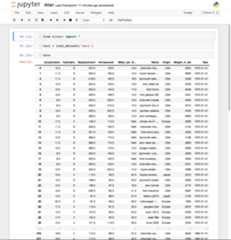
Update table styles to be consistent with JupyterLab#1776
New issue
Have a question about this project? Sign up for a free GitHub account to open an issue and contact its maintainers and the community.
By clicking “Sign up for GitHub”, you agree to ourterms of service andprivacy statement. We’ll occasionally send you account related emails.
Already on GitHub?Sign in to your account
Uh oh!
There was an error while loading.Please reload this page.
Conversation
gnestor commentedSep 20, 2016
By setting
@ellisonbg Thoughts? |


ellisonbg commentedSep 20, 2016
Looks great - two question?
|
| border-collapse:collapse; | ||
| margin:1em2em; | ||
| thead { | ||
| border-bottom:2pxsolid@rendered_html_border_color; |
There was a problem hiding this comment.
Choose a reason for hiding this comment
The reason will be displayed to describe this comment to others.Learn more.
We are using 1px here in JupyterLab
ellisonbg commentedSep 20, 2016
Also, in JupyterLab, we are using Material Design colors for everything (in particular the greys). Are we doing that here as well? |
gnestor commentedSep 20, 2016
|

ellisonbg commentedSep 21, 2016
Hmm, the 2 cols case in wonky. Unless there is a way to limit the width, let's use the fixed approach that we did in JupyterLab. |
ellisonbg commentedSep 21, 2016
Also being a pure style change, we could probably backport this to the next 4.x release... @Carreau ? |
Carreau commentedSep 21, 2016
-1 on backporting a big visual change to a minor release, even if the change is good. It's also, I think, a recipe to get questions during tutorials like "I don't have the same thing how do I get that". That's just a preference though. |
Carreau commentedSep 21, 2016 • edited
Loading Uh oh!
There was an error while loading.Please reload this page.
edited
Uh oh!
There was an error while loading.Please reload this page.
+1 for the change otherwise, I would alsostrongly recommend to readthis piece of news
|
ddb3733 toa0fd16cComparegnestor commentedSep 21, 2016
Ok, I will remove that last commit and I agree about backporting. |
gnestor commentedSep 21, 2016
@Carreau Sorry, I didn't see your comment! I understand your point about holding off until a major release... According to ourrelease policy, UI changes are reserved for major releases. However, I am comfortable releasing this with 4.3 as it changes a non-interactive UI (vs. something interactive, like the menu or toolbar). Given the Windows blog post, we should save the shiny new table for a rainy day 😋. Regarding I think it's a nice feature to have whether the table is very wide or not. @ellisonbg What are your thoughts about the hover and backporting given@Carreau's thoughts? |

ellisonbg commentedSep 26, 2016
My only concern about waiting for 5.0 is that release may take a while to get out. Two reasons: i) in the past we have planned on doing that at the same time as JupyterLab 1.0 and ii) there have been Ui changes in master that will require a lot of UI/UX/design review and testing. But in general, I do think that pushing major design changes in point releases isn't great. Would love to get@fperez take on that. In terms of a hover, I am open to it. But let's merge this PR without it and then play with different hover styles in JupyterLab to see what makes sense. |
Carreau commentedSep 26, 2016
And that's exactly the reason Idon't want to backport. There have been a number of things we said we wouldn't do (like make JupyterLab only an extension) exactly to push notebook 5.0forward. Backporting starts to become hard, and I'm in favor of saying that if you want things out, then some cycles of the developers of JupyterLab should be spent on making 5.0 a reality. I don't have much time to help@gnestor and I don't want to bother him more. PLus with 4.x growing and 5.0 on it's way + JupyterLab, the testing of each branch by developer is quasi-null. Which increase the risk of bugs. Also, for example 4.x doesnot have the ability to order file by date in the dashboard which is well beyond time to release. So while I can't prevent you from backporting things to 4.x, I'm exceptionally going to start putting the strongest -1 on backporting to 4.x until 5.0 is out, starting with this.
Agreed. |
Carreau commentedSep 28, 2016
Ok, merging this, if we decide to backport it we can still do it later. |
mgeier commentedDec 22, 2016
I like the new table style, but is the I havea notebook with an innocuous table in it: field name | contents-----------|---------left | impulse responses for the left earright | impulse responses for the right earfs | sampling rateapparent_azimuth | directions of sound incidence (in radians) For comparison, this is how it is rendered right here on Github:
With the new table style, it looks like this:
I don't see a reason for limiting the column width in this case. Without the
I don't think my cell contents are exceedingly wide. Should the width probably be limited in auto-generated tables (like |


ellisonbg commentedDec 22, 2016
@mgeier the issue is that in the wild it is very common to have tables that have dozens or even hundreds of columns. When that shows up, not having the However, you do make a really good point about tables in markdown. Those are handcrafted and would usually be smaller. I would be fine if we add some conditional CSS to remove the max-width on those. Can you submit a PR or at least open an issue targeted at the 5.0 milestone? Thanks! |
ellisonbg commentedDec 22, 2016
Issue on JupyterLab: |
mgeier commentedDec 22, 2016
@ellisonbg Done:#2008 I can't set a target milestone, I've just mentioned it in the text. Sorry I can't actually implement this, I have too much in my pipeline already. |
ellisonbg commentedDec 22, 2016 via email
Thanks, we will get this done! …On Thu, Dec 22, 2016 at 9:16 AM, Matthias Geier ***@***.***> wrote:@ellisonbg <https://github.com/ellisonbg> Done:#2008 <#2008> I can't set a target milestone, I've just mentioned it in the text. Sorry I can't actually implement this, I have too much in my pipeline already. — You are receiving this because you were mentioned. Reply to this email directly, view it on GitHub <#1776 (comment)>, or mute the thread <https://github.com/notifications/unsubscribe-auth/AABr0NZHzwIYYSMZrnF3lMnTyHIsTR66ks5rKqJlgaJpZM4KCOj1> . -- Brian E. GrangerAssociate Professor of Physics and Data ScienceCal Poly State University, San Luis Obispo@ellisonbg on Twitter and GitHubbgranger@calpoly.edu and ellisonbg@gmail.com |
PyAntony commentedJun 11, 2017
How can I display tables with the old style? There must be a way to do it... |
aakhmetz commentedJun 19, 2017
something has changed, the notebook just became slower for me and less convenient with this new style. |
gnestor commentedJun 22, 2017
The changes were all made tohttps://github.com/jupyter/notebook/blob/master/notebook/static/notebook/less/renderedhtml.less in#1776. To switch back to old styles, you can manually edit this file or if you're running from a clone of this repo, just revert the commit in#1776. We are open to suggestions as to how to improve the table style 👍 |
Uh oh!
There was an error while loading.Please reload this page.
Closes#1774 and#1182
Before:
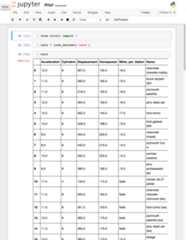
After: