- Notifications
You must be signed in to change notification settings - Fork151
Circular visualization in R
License
jokergoo/circlize
Folders and files
| Name | Name | Last commit message | Last commit date | |
|---|---|---|---|---|
Repository files navigation
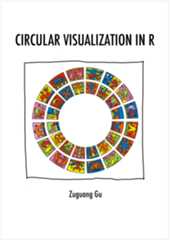


Circular layout is an efficient way for the visualization of hugeamounts of information. Here the circlize package provides an implementationof circular layout generation in R as well as an enhancement of availablesoftware. The flexibility of this package is based on the usage of low-levelgraphics functions such that self-defined high-level graphics can be easilyimplemented by users for specific purposes. Together with the seamlessconnection between the powerful computational and visual environment in R,circlize gives users more convenience and freedom to design figures forbetter understanding complex patterns behind multi-dimensional data.
Zuguang Gu, et al., circlize Implements and enhances circular visualization in R. Bioinformatics (Oxford, England) 2014.PubMed
The full documentations are available athttps://jokergoo.github.io/circlize_book/book/ and the online website is athttps://jokergoo.github.io/circlize/.
There are the following blog posts focusing on specific topics.
- Make circular heatmaps
- Multiple-group Chord diagram
- Changes in circlize 0.4.10
- Reverse x-axes in the circular plot
Seehttps://jokergoo.github.io/circlize_examples/.
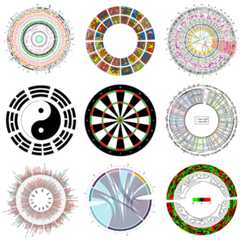
The package can be installed from CRAN:
install.packages("circlize")or directly from GitHub:
devtools::install_github("jokergoo/circlize")
Since most of the figures are composed of points, lines and polygons,we just need to implement functions for drawing points, lines and polygons,then the plots will not be restricted in any specific types.
Current there are following low-level graphic functions:
circos.points()circos.lines()circos.segments()circos.rect()circos.polygon()circos.text()circos.axis()circos.raster()circos.arrow()circos.raster()circos.barplot()circos.boxplot()circos.link(), This maybe the unique feature for circos layout to represent relationships between elements.
For drawing points, lines and text through the whole track (among several sectors), the followingfunctions are available:
circos.trackPoints()circos.trackLines()circos.trackText()
Draw circular heatmaps
circos.heatmap()
Functions to arrange the circular layout:
circos.track()circos.update()circos.nested()circos.par()circos.info()circos.clear()
Theoretically, you are able to draw most kinds of circular plots by the above functions.
For specific use in Genomics, we also implement functions which add graphics in genome scale.
Functions to initialize circular plot with genomic coordinates:
circos.initializeWithIdeogram()circos.genomicInitialize()
Functions to arrange genomic circular layout:
circos.genomicTrack()
Functions to add basic graphics in genomic scale:
circos.genomicPoints()circos.genomicLines()circos.genomicText()circos.genomicRect()circos.genomicLink()
Functions with specific purpose:
circos.genomicIdeogram()circos.genomicHeatmap()circos.genomicLabels()circos.genomicDensity()circos.genomicRainfall()
Finally, function that draws Chord diagram:
chordDiagram()
MIT @ Zuguang Gu
About
Circular visualization in R
Resources
License
Code of conduct
Uh oh!
There was an error while loading.Please reload this page.
Stars
Watchers
Forks
Uh oh!
There was an error while loading.Please reload this page.
Contributors5
Uh oh!
There was an error while loading.Please reload this page.