- Notifications
You must be signed in to change notification settings - Fork3
Vue module for lazy-loading images in your vue 3 applications.
License
jambonn/vue-lazyload
Folders and files
| Name | Name | Last commit message | Last commit date | |
|---|---|---|---|---|
Repository files navigation
Vue module for lazyloading images in your Vue 3 applications. This module is base on vue-lazyload. Vue 1.x or 2.x please usevue-lazyload. Some of goals of this project worth noting include:
- Be lightweight, powerful and easy to use
- Work on any image type
- Add loading class while image is loading
- Supports Vue 3
- Vue.js
3.x
$ npm i @jambonn/vue-lazyload
$ yarn add @jambonn/vue-lazyload
CDN:https://unpkg.com/@jambonn/vue-lazyload/dist/vue-lazyload.umd.js
<scriptsrc="https://unpkg.com/@jambonn/vue-lazyload/dist/vue-lazyload.umd.js"></script><script>varAttributeBindingApp={data(){return{message:'Vue Lazyload'}}}varapp=Vue.createApp(AttributeBindingApp)app.use(window['vue-lazyload'].default)app.mount('#bind-attribute')...</script>
main.js:
import{createApp}from'vue'importVueLazyloadfrom'@jambonn/vue-lazyload'importAppfrom'./App.vue'constapp=createApp(App)app.use(VueLazyload)// or with optionsconstloadimage=require('./assets/loading.gif')consterrorimage=require('./assets/error.gif')app.use(VueLazyload,{preLoad:1.3,error:errorimage,loading:loadimage,attempt:1})app.mount('#app')
template:
<ul><liv-for="img in list"><imgv-lazy="img.src"></li></ul>
usev-lazy-container work with raw HTML
<divv-lazy-container="{ selector: 'img' }"><imgdata-src="//domain.com/img1.jpg"><imgdata-src="//domain.com/img2.jpg"><imgdata-src="//domain.com/img3.jpg"></div>
customerror andloading placeholder image
<divv-lazy-container="{ selector: 'img', error: 'xxx.jpg', loading: 'xxx.jpg' }"><imgdata-src="//domain.com/img1.jpg"><imgdata-src="//domain.com/img2.jpg"><imgdata-src="//domain.com/img3.jpg"></div>
<divv-lazy-container="{ selector: 'img' }"><imgdata-src="//domain.com/img1.jpg"data-error="xxx.jpg"><imgdata-src="//domain.com/img2.jpg"data-loading="xxx.jpg"><imgdata-src="//domain.com/img3.jpg"></div>
| key | description | default | options |
|---|---|---|---|
preLoad | proportion of pre-loading height | 1.3 | Number |
error | src of the image upon load fail | 'data-src' | String |
loading | src of the image while loading | 'data-src' | String |
attempt | attempts count | 3 | Number |
listenEvents | events that you want vue listen for | ['scroll', 'wheel', 'mousewheel', 'resize', 'animationend', 'transitionend', 'touchmove'] | Desired Listen Events |
adapter | dynamically modify the attribute of element | { } | Element Adapter |
filter | the image's listener filter | { } | Image listener filter |
lazyComponent | lazyload component | false | Lazy Component |
dispatchEvent | trigger the dom event | false | Boolean |
throttleWait | throttle wait | 200 | Number |
observer | use IntersectionObserver | false | Boolean |
observerOptions | IntersectionObserver options | { rootMargin: '0px', threshold: 0.1 } | IntersectionObserver |
silent | do not print debug info | true | Boolean |
You can configure which events you want vue-lazyload by passing in an arrayof listener names.
constapp=createApp(AttributeBindingApp)app.use(VueLazyload,{preLoad:1.3,error:'dist/error.png',loading:'dist/loading.gif',attempt:1,// the default is ['scroll', 'wheel', 'mousewheel', 'resize', 'animationend', 'transitionend']listenEvents:['scroll']})
This is useful if you are having trouble with this plugin resetting itself to loadingwhen you have certain animations and transitions taking place
dynamically modify the src of image
constapp=createApp(AttributeBindingApp)app.use(VueLazyload,{filter:{progressive(listener,options){constisCDN=/qiniudn.com/if(isCDN.test(listener.src)){listener.el.setAttribute('lazy-progressive','true')listener.loading=listener.src+'?imageView2/1/w/10/h/10'}},webp(listener,options){if(!options.supportWebp)returnconstisCDN=/qiniudn.com/if(isCDN.test(listener.src)){listener.src+='?imageView2/2/format/webp'}}}})
constapp=createApp(AttributeBindingApp)app.use(VueLazyload,{adapter:{loaded({ bindType, el, naturalHeight, naturalWidth, $parent, src, loading, error, Init}){// do something here// example for call LoadedHandlerLoadedHandler(el)},loading(listender,Init){console.log('loading')},error(listender,Init){console.log('error')}}})
useIntersection Observer to to improve performance of a large number of nodes.
constapp=createApp(AttributeBindingApp)app.use(vueLazy,{// set observer to trueobserver:true,// optionalobserverOptions:{rootMargin:'0px',threshold:0.1}})
constapp=createApp(AttributeBindingApp)app.use(VueLazyload,{lazyComponent:true});
<lazy-component@show="handler"><imgclass="mini-cover":src="img.src"width="100%"height="400"></lazy-component><script>exportdefault{setup(){consthandler=()=>{console.log('this component is showing')}return{ handler}}}</script>
Use in list
<lazy-componentv-for="(item, index) in list":key="item.src"><imgclass="mini-cover":src="item.src"width="100%"height="400"></lazy-component>
vue-lazyload will set this img element'ssrc withimgUrl string
<template><div"><imgv-lazy="imgUrl"/><divv-lazy:background-image="imgUrl"></div><!-- with customer error and loading --><imgv-lazy="imgObj"/><divv-lazy:background-image="imgObj"></div><!-- Customer scrollable element --><imgv-lazy.container ="imgUrl"/><divv-lazy:background-image.container="img"></div><!-- srcset --><imgv-lazy="'img.400px.jpg'"data-srcset="img.400px.jpg 400w, img.800px.jpg 800w, img.1200px.jpg 1200w"><imgv-lazy="imgUrl":data-srcset="imgUrl' + '?size=400 400w, ' + imgUrl + ' ?size=800 800w, ' + imgUrl +'/1200.jpg 1200w'"/></div></template><script>import{ref,reactive}from'vue'exportdefault{setup(){constimgObj=reactive({src:'http://xx.com/logo.png',error:'http://xx.com/error.png',loading:'http://xx.com/loading-spin.svg'})constimgUrl=ref('http://xx.com/logo.png')// Stringreturn{ imgObj, imgUrl}}}</script>
There are three states while img loading
loadingloadederror
<imgsrc="imgUrl"lazy="loading"><imgsrc="imgUrl"lazy="loaded"><imgsrc="imgUrl"lazy="error">
<style>img[lazy=loading] {/*your style here*/ }img[lazy=error] {/*your style here*/ }img[lazy=loaded] {/*your style here*/ }/* or background-image */ .yourclass[lazy=loading] {/*your style here*/ } .yourclass[lazy=error] {/*your style here*/ } .yourclass[lazy=loaded] {/*your style here*/ }</style>
import{getCurrentInstance,inject}from'vue'exportdefault{setup(){constinternalInstance=getCurrentInstance().appContext.config.globalPropertiesconstLazyLoad=internalInstance.$Lazyload// orconstLazyload=inject('Lazyload')Lazyload.$on(event,callback)Lazyload.$off(event,callback)Lazyload.$once(event,callback)}}
$onListen for a custom eventsloading,loaded,error$onceListen for a custom event, but only once. The listener will be removed once it triggers for the first time.$offRemove event listener(s).
{string} event{Function} callback
Lazyload.$on('loaded',function({ bindType, el, naturalHeight, naturalWidth, $parent, src, loading, error},formCache){console.log(el,src)})
{string} event{Function} callback
Lazyload.$once('loaded',function({ el, src}){console.log(el,src)})
If only the event is provided, remove all listeners for that event
{string} event{Function} callback
import{getCurrentInstance,inject}from'vue'exportdefault{setup(){constinternalInstance=getCurrentInstance().appContext.config.globalPropertiesconstLazyLoad=internalInstance.$Lazyload// orconstLazyload=inject('Lazyload')consthandler=({ el, src},formCache)=>{console.log(el,src)}Lazyload.$on('loaded',handler)Lazyload.$off('loaded',handler)Lazyload.$off('loaded')}}
Lazyload.lazyLoadHandler
Manually trigger lazy loading position calculation
import{getCurrentInstance,inject}from'vue'exportdefault{setup(){constinternalInstance=getCurrentInstance().appContext.config.globalPropertiesconstLazyLoad=internalInstance.$Lazyload// orconstLazyload=inject('Lazyload')Lazyload.lazyLoadHandler()}}
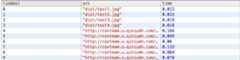
import{getCurrentInstance,inject}from'vue'exportdefault{setup(){constinternalInstance=getCurrentInstance().appContext.config.globalPropertiesconstLazyLoad=internalInstance.$Lazyload// orconstLazyload=inject('Lazyload')Lazyload.$on('loaded',function(listener){console.table(Lazyload.performance())})}}
<imgv-lazy="lazyImg" :key="lazyImg.src">
About
Vue module for lazy-loading images in your vue 3 applications.
Resources
License
Uh oh!
There was an error while loading.Please reload this page.
Stars
Watchers
Forks
Packages0
Uh oh!
There was an error while loading.Please reload this page.
Contributors2
Uh oh!
There was an error while loading.Please reload this page.