- Notifications
You must be signed in to change notification settings - Fork129
A firestack v3 react-native implementation
License
fullstackreact/react-native-firestack
Folders and files
| Name | Name | Last commit message | Last commit date | |
|---|---|---|---|---|
Repository files navigation
This library is no longer maintained, use at your own risk or pleaseseek alternatives on npm.
Firestack makes using the latestFirebase straight-forward.

Firestack is alight-weight layer sitting atop the native Firebase libraries for iOS and Android and mirrors the React Native JS api as closely as possible.
For a detailed discussion of how Firestack works as well as how to contribute, check out ourcontribution guide.
- Nearly automatic, rapid setup on Firebase
- Covers lots of awesome features of Firebase:
- authentication
- username and password
- social auth (implemented in conjunction withreact-native-oauth)
- Github
- storage handling
- upload files
- download urls
- download files
- real-time database
- presence out-of-the-box
- analytics
- Remote configuration
- FCM (in-progress)
- authentication
- Redux support built-in (but not required)
- Android and iOS support
- Community supported and professionally backed
- Intended on being as drop-dead simple as possible
- And so much more
We have a working application example available in atfullstackreact/FirestackApp. Check it out for more details about how to use Firestack.
Firebase is awesome and it's combination with the Google Cloud Platform makes it super awesome. Sadly, the latest version of Firebase requires thewindow object. That's where Firestack comes in! Firestack provides a really thin layer that sits on top of the native Firebase SDKs and attempts to use the JavaScript library as much as possible rather than reinventing the wheel.
Gettingreact-native-firestack up and running in your app should be a 2 step process + 1 for each platform.
- Install the
npmpackage - Link the project with
react-native link react-native-firestack - To ensure Android is setup, check your
MainApplication.javafor theFirestackPackage()line.
Those steps in more detail:
Install thenpm package with:
npm install react-native-firestack --save
To use Firestack, we'll need to have a development environment that includes the same prerequisites of Firebase.
Unfortunately, due to AppStore restrictions, we currently donot package Firebase libraries in with Firestack. However, the good news is we've automated the process (with many thanks to the Auth0 team for inspiration) of setting up with cocoapods. This will happen automatically upon linking the package withreact-native-cli.
Remember to use theios/[YOUR APP NAME].xcworkspace instead of theios/[YOUR APP NAME].xcproj file from now on.
We need to link the package with our development packaging. We have two options to handle linking:
React native ships with alink command that can be used to link the projects together, which can help automate the process of linking our package environments.
react-native link react-native-firestack
Update the newly installed pods once the linking is done:
cd ios&& pod update --verbose
If you prefer not to usernpm, we can manually link the package together with the following steps, afternpm install:
- In XCode, right click on
Librariesand find theAdd Files to [project name].
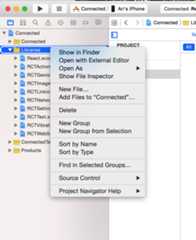
- Add the
node_modules/react-native-firestack/ios/Firestack.xcodeproj
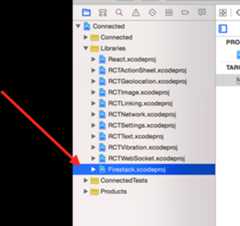
Ensure that the
Build Settingsof theFirestack.xcodeprojproject is ticked toAll and it'sHeader Search Pathsinclude both of the following pathsand are set torecursive:$(SRCROOT)/../../react-native/React$(SRCROOT)/../node_modules/react-native/React${PROJECT_DIR}/../../../ios/Pods
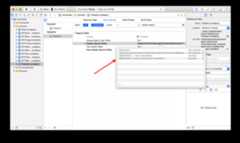
- Setting up cocoapods
Since we're dependent upon cocoapods (or at least the Firebase libraries being available at the root project -- i.e. your application), we have to make them available for Firestack to find them.
Using cocoapods is the easiest way to get started with this linking. Add or update aPodfile atios/Podfile in your app with the following:
source'https://github.com/CocoaPods/Specs.git'['Firebase/Core','Firebase/Auth','Firebase/Storage','Firebase/Database','Firebase/RemoteConfig','Firebase/Messaging'].eachdo |lib|podlibendtarget'[project name]'doend# target '[project test name]' do# end
Then you can run(cd ios && pod install) to get the pods opened. If you do use this route, remember to use the.xcworkspace file.
If you don't want to use cocoapods, you don't need to use it! Just make sure you link the Firebase libraries in your project manually. For more information, check out the relevant Firebase docs athttps://firebase.google.com/docs/ios/setup#frameworks.
Full Android support is coming soon, as it currently supports a smaller feature-set than the iOS version. Just as we do with iOS, we'll need to install the library usingnpm and calllink on the library:
react-native link react-native-firestack
Firestack includes the Firebase libraries and will link those directly into our project automatically.
To installreact-native-firestack manually in our project, we'll need to import the package fromio.fullstack.firestack in our project'sandroid/app/src/main/java/com/[app name]/MainApplication.java and list it as a package for ReactNative in thegetPackages() function:
packagecom.appName;// ...importio.fullstack.firestack.FirestackPackage;// ...publicclassMainApplicationextendsApplicationimplementsReactApplication {// ...@OverrideprotectedList<ReactPackage>getPackages() {returnArrays.<ReactPackage>asList(newMainReactPackage(),newFirestackPackage() ); } };// ...}
We'll also need to list it in ourandroid/app/build.gradle file as a dependency that we want React Native to compile. In thedependencies listing, add thecompile line:
dependencies {compileproject(':react-native-firestack')}
Add toAndroidManifest.xml file
<activity android:name="com.facebook.react.devsupport.DevSettingsActivity" />+ <service android:name="io.fullstack.firestack.FirestackMessagingService">+ <intent-filter>+ <action android:name="com.google.firebase.MESSAGING_EVENT"/>+ </intent-filter>+ </service>+ <service android:name="io.fullstack.firestack.FirestackInstanceIdService" android:exported="false">+ <intent-filter>+ <action android:name="com.google.firebase.INSTANCE_ID_EVENT"/>+ </intent-filter>+ </service>
The Firestack library is intended on making it easy to work withFirebase and provides a small native shim to the Firebase native code.
To add Firebase to your project, make sure to create a project in theFirebase console

Each platform uses a different setup method after creating the project.
After creating a Firebase project, click on theAdd Firebase to your iOS app and follow the steps from there to add the configuration file. You donot need to set up a cocoapods project (this is already done through firestack). Make sure not to forget theCopy Files phase in iOS.
Download the Firebase config file and place it in your app directory next to your app source code:
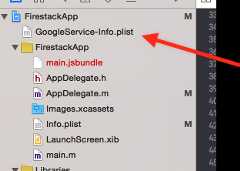
Once you download the configuration file, make sure you place it in the root of your Xcode project. Every different Bundle ID (aka, even different project variants needs their own configuration file).
Lastly, due to some dependencies requirements, Firestack supports iOS versions 8.0 and up. Make sure to update the minimum version of your iOS app to8.0.
There are several ways to setup Firebase on Android. Theeasiest way is to pass the configuration settings in JavaScript. In that way, there is no setup for the native platform.
If you prefer to include the default settings in the source of your app, download thegoogle-services.json file provided by Firebase in theAdd Firebase to Android platform menu in your Firebase configuration console.
Next you'll have to add the google-services gradle plugin in order to parse it.
Add the google-services gradle plugin as a dependency in theproject level build.gradleandroid/build.gradle
buildscript {// ...dependencies {// ...classpath'com.google.gms:google-services:3.0.0' }}
In your app build.gradle file, add the gradle plugin at the VERY BOTTOM of the file (below all dependencies)android/app/build.gradle
applyplugin:'com.google.gms.google-services'
After creating a Firebase project and installing the library, we can use it in our project by importing the library in our #"auto" data-snippet-clipboard-copy-content="import Firestack from 'react-native-firestack'">
importFirestackfrom'react-native-firestack'
We need to tell the Firebase library we want toconfigure the project. Firestack provides a way to configure both the native and the JavaScript side of the project at the same time with a single command:
constfirestack=newFirestack();
We can passcustom options by passing an object with configuration options. The configuration object will be generated first by the native configuration object, if set and then will be overridden if passed in JS. That is, all of the following key/value pairs are optional if the native configuration is set.
| option | type | Default Value | Description |
|---|---|---|---|
| debug | bool | false | When set to true, Firestack will log messages to the console and firedebug events we can listen to injs |
| bundleID | string | Default from app[NSBundle mainBundle] | The bundle ID for the app to be bundled with |
| googleAppID | string | "" | The Google App ID that is used to uniquely identify an instance of an app. |
| databaseURL | string | "" | The database root (i.e.https://my-app.firebaseio.com) |
| deepLinkURLScheme | string | "" | URL scheme to set up durable deep link service |
| storageBucket | string | "" | The Google Cloud storage bucket name |
| androidClientID | string | "" | The Android client ID used in Google AppInvite when an iOS app has it's android version |
| GCMSenderID | string | "" | The Project number from the Google Developer's console used to configure Google Cloud Messaging |
| trackingID | string | "" | The tracking ID for Google Analytics |
| clientID | string | "" | The OAuth2 client ID for iOS application used to authenticate Google Users for signing in with Google |
| APIKey | string | "" | The secret iOS API key used for authenticating requests from our app |
For instance:
constconfigurationOptions={debug:true};constfirestack=newFirestack(configurationOptions);firestack.on('debug',msg=>console.log('Received debug message',msg))
Firestack is broken up into multiple parts, based upon the different API features that Firebase provides.
All methods return a promise.
Firestack handles authentication for us out of the box, both with email/password-based authentication and through oauth providers (with a separate library to handle oauth providers).
Android requires the Google Play services to installed for authentication to function.
Firebase gives us a reactive method for listening for authentication. That is we can set up a listener to call a method when the user logs in and out. To set up the listener, call thelistenForAuth() method:
firestack.auth.listenForAuth(function(evt){// evt is the authentication event// it contains an `error` key for carrying the// error message in case of an error// and a `user` key upon successful authenticationif(!evt.authenticated){// There was an error or there is no userconsole.error(evt.error)}else{// evt.user contains the user detailsconsole.log('User details',evt.user);}}).then(()=>console.log('Listening for authentication changes'))
We can remove this listener by calling theunlistenForAuth() method. This is important to release resources from our app when we don't need to hold on to the listener any longer.
firestack.auth.unlistenForAuth()
We can create a user by calling thecreateUserWithEmail() function. ThecreateUserWithEmail() accepts two parameters, an email and a password.
firestack.auth.createUserWithEmail('ari@fullstack.io','123456').then((user)=>{console.log('user created',user)}).catch((err)=>{console.error('An error occurred',err);})
To sign a user in with their email and password, use thesignInWithEmail() function. It accepts two parameters, the user's email and password:
firestack.auth.signInWithEmail('ari@fullstack.io','123456').then((user)=>{console.log('User successfully logged in',user)}).catch((err)=>{console.error('User signin error',err);})
To sign a user using a self-signed custom token, use thesignInWithCustomToken() function. It accepts one parameter, the custom token:
firestack.auth.signInWithCustomToken(TOKEN).then((user)=>{console.log('User successfully logged in',user)}).catch((err)=>{console.error('User signin error',err);})
We can use an external authentication provider, such as twitter/facebook for authentication. In order to use an external provider, we need to include another library to handle authentication.
By using a separate library, we can keep our dependencies a little lower and the size of the application down.
[Currently undergoing updates]
If you don't want to usereact-native-oauth, you can use other library such asreact-native-facebook-login.
var{FBLogin, FBLoginManager}=require('react-native-facebook-login');varLogin=React.createClass({render:function(){return(<FBLoginonLogin={function(data){console.log("Logged in!");console.log(data);lettoken=data.credentials.tokenfirestack.auth.signInWithProvider('facebook',token,'')// facebook need only access token..then((user)=>{console.log(user)})}}/>);}});
If thesignInWithProvider() method resolves correct and we have already set up ourlistenForAuth() method properly, it will fire and we'll have a logged in user through Firebase.
When the auth token has expired, we can ask firebase to reauthenticate with the provider. This method accepts thesame arguments assignInWithProvider() accepts.
We can update the current user's email by using the command:updateUserEmail(). It accepts a single argument: the user's new email:
firestack.auth.updateUserEmail('ari+rocks@fullstack.io').then((res)=>console.log('Updated user email')).catch(err=>console.error('There was an error updating user email'))
We can update the current user's password using theupdateUserPassword() method. It accepts a single parameter: the new password for the current user
firestack.auth.updateUserPassword('somethingReallyS3cr3t733t').then(res=>console.log('Updated user password')).catch(err=>console.error('There was an error updating your password'))
To send a password reset for a user based upon their email, we can call thesendPasswordResetWithEmail() method. It accepts a single parameter: the email of the user to send a reset email.
firestack.auth.sendPasswordResetWithEmail('ari+rocks@fullstack.io').then(res=>console.log('Check your inbox for further instructions')).catch(err=>console.error('There was an error :('))
To update the current user's profile, we can call theupdateUserProfile() method.
It accepts a single parameter:
- object which contains updated key/values for the user's profile. Possible keys are listedhere.
firestack.auth.updateUserProfile({displayName:'Ari Lerner'}).then(res=>console.log('Your profile has been updated')).catch(err=>console.error('There was an error :('))
It's possible to delete a user completely from your account on Firebase. Calling thedeleteUser() method will take care of this for you.
firestack.auth.deleteUser().then(res=>console.log('Sad to see you go')).catch(err=>console.error('There was an error - Now you are trapped!'))
If you want user's token, usegetToken() method.
firestack.auth.getToken().then(res=>console.log(res.token)).catch(err=>console.error('error'))
To sign the current user out, use thesignOut() method. It accepts no parameters
firestack.auth.signOut().then(res=>console.log('You have been signed out')).catch(err=>console.error('Uh oh... something weird happened'))
Although youcan get the current user using thegetCurrentUser() method, it's better to use this from within the callback function provided bylistenForAuth(). However, if you need to get the current user, call thegetCurrentUser() method:
firestack.auth.getCurrentUser().then(user=>console.log('The currently logged in user',user)).catch(err=>console.error('An error occurred'))
Wouldn't it be nice to send analytics about your app usage from your users? Well, you totally can! The Firebase analytics console is incredibly useful and Firestack has a method for interacting with it. You can send any event with contextual information, which automatically includes the currently logged in user using thelogEventWithName() method. It accepts two parameters: the name of the event and an object containing any contextual information. The values should be serializable (i.e. no complex instance objects).
firestack.analytics.logEventWithName("launch",{'screen':'Main screen'}).then(res=>console.log('Sent event named launch')).catch(err=>console.error('You should never end up here'));
Firebase's integration with the Google platform expanded it's features to include hosting user-generated files, like photos. Firestack provides a thin layer to handle uploading files to Firebase's storage service.
In order to store anything on Firebase, we need to set the storage url provided by Firebase. This can be set by using thesetStorageUrl() method. Your storageUrl can be found on the firebase console.
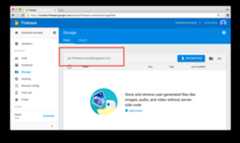

ThesetStorageUrl() method accepts a single parameter: your root storage url (without leading "gs://").
firestack.storage.setStorageUrl(`${config.firebase.storageBucket}`)
If thestorageBucket key is passed as a configuration option, this method is automatically called by default.
We can upload a file using theuploadFile() method. Using theuploadFile() method, we can set the name of the destination file, the path where we want to store it, as well as any metadata along with the file.
firestack.storage.uploadFile(`photos/${auth.user.uid}/${filename}`,path,{contentType:'image/jpeg',contentEncoding:'base64',}).then((res)=>console.log('The file has been uploaded')).catch(err=>console.error('There was an error uploading the file',err))
To upload camera photos, we can combine this method with thereact-native-camera plugin, for instance:
this.camera.capture().then(({path})=>{firestack.storage.uploadFile(`photos/${auth.user.uid}/${filename}`,path,{contentType:'image/jpeg',contentEncoding:'base64',})}).catch(err=>console.error(err));
To combine thereact-native-camera plugin with firestack, we recommend setting thecaptureTarget to thetemp storage path, like so:
<Cameraref={(cam)=>{this.camera=cam;}}captureTarget={Camera.constants.CaptureTarget.temp}style={styles.preview}aspect={Camera.constants.Aspect.fill}><Textstyle={styles.capture}onPress={this.takePicture.bind(this)}>[CAPTURE]</Text></Camera>
Firestack also gives you the ability to listen for database events on upload. The final parameter theuploadFile() function accepts is a callback that will be called anytime a storage event is fired.
The following events are supported:
- upload_progress
- upload_paused
- upload_resumed
For example, thetakePicture function from the example above might look something similar to:
takePicture(){this.camera.capture().then(({path})=>{constfilename='photo.jpg'firestack.storage.uploadFile(`photos/${filename}`,path,{contentType:'image/jpeg',contentEncoding:'base64',},(evt)=>{console.log('Got an event in JS',evt);}).then((res)=>{console.log('result from upload file: ',res);}).catch((err)=>{console.log('error happened with uploadFile',err);})}).catch(err=>console.error(err));}
ThedownloadUrl() method allows us to fetch the URL from the storage obejct in Firebase. It's defined on thestorageRef object and can be used like so:
conststorageRef=data.firestack.storage.ref('photos/photo.jpg');storageRef.downloadUrl().then(res=>{// res is an object that contains// the `url` as well as the path to the file in `path`})
It's possible to download remote files as well. Thedownload() method will take a remote file and download and save it to the user's device. It is implemented on thestorageRef:
conststorageRef=data.firestack.storage.ref('photos/photo.jpg');constlocalPath=`downloadedFile.jpg`;storageRef.download(localPath,(msg)=>{// downloading state callback}).then(res=>{// res contains details about the downloaded file}).catch(err=>{// error contains any errors in downloading});
The method accepts a callback that gets called with any download events:
- download_progress ({eventName: 'download_progress', progress: float });
- download_paused ({eventName: 'download_paused'})
- download_resumed ({eventName: 'download_resumed'})
As helpful constants, Firestack exports a few storage constants on thefirestack.constants getter:
- MAIN_BUNDLE_PATH
- CACHES_DIRECTORY_PATH
- DOCUMENT_DIRECTORY_PATH
- EXTERNAL_DIRECTORY_PATH
- EXTERNAL_STORAGE_DIRECTORY_PATH
- TEMP_DIRECTORY_PATH
- LIBRARY_DIRECTORY_PATH
And we also export the filetype constants as well:
- FILETYPE_REGULAR
- FILETYPE_DIRECTORY
Note: this idea comes almost directory fromreact-native-fs, so we don't claim credit for coming up with this fantastic idea.
The native Firebase JavaScript library provides a featureful realtime database that works out of the box. Firestack provides an attribute to interact with the database without needing to configure the JS library.
Ranking strategy
Add a new record with timestamp using this solution:
firebaseApp.database.ref('posts').push().then((res)=>{letnewPostKey=res.key;firebaseApp.ServerValue.then(map=>{constpostData={name:name,timestamp:map.TIMESTAMP,text:this.state.postText,title:this.state.postTitle,puid:newPostKey}letupdates={}updates['/posts/'+newPostKey]=postDatafirebaseApp.database.ref().update(updates).then(()=>{this.setState({postStatus:'Posted! Thank You.',postText:'',});}).catch(()=>{this.setState({postStatus:'Something went wrong!!!'});})})})
Then retrieve the feed using this:
firebaseApp.database.ref('posts').orderByChild('timestamp').limitToLast(30).once('value').then((snapshot)=>{this.props.savePosts(snapshot.val())constval=snapshot.val();console.log(val);})
Firestack attempts to provide the same API as the JS Firebase library for both Android and iOS platforms.Check out the firebase guide for more information on how to use the JS library.
functionhandleValueChange(snapshot){if(snapshot.val()){console.log('The list was updated');}}constLIST_KEY='path/to/data';firestack.database.ref(LIST_KEY).on('value',handleValueChange);// Calling `.off` with a reference to the callback function will only remove that specific listener.// This is useful if multiple components are listening and unlistening to the same ref path.firestack.database.ref(LIST_KEY).off('value',handleValueChange);// Calling `.off` without passing the callback function will remove *all* 'value' listeners for that reffirestack.database.ref(LIST_KEY).off('value');
// TODO: Finish documenting
For handling offline operations, you can enable persistence by using thesetPersistence() command. You can turn it on and off by passing the boolean oftrue orfalse.
firestack.database.setPersistence(true);
The database refs has akeepSynced() function to tell the firestack library to keep the data at theref in sync.
constref=firestack.database.ref('chat-messages').child('roomId');ref.keepSynced(true);
Firestack comes in with a built-in method for handling user connections. We just need to set the presence ref url and tell Firestack to keep track of the user by their child path.
firestack.presence// the presence api.on('users/connections')// set the users/connections as the// root for presence handling.setOnline('auser')// Set the child of auser as online
While thedevice is online (the connection), the value of the child object atusers/connections/auser will be:
{online:true,lastOnline:TIMESTAMP}
When the device is offline, the value will be updated withonline: false:
{online:false,lastOnline:TIMESTAMP}
To set up your own handlers on the presence object, you can callonConnect() and pass a callback. The method will be called with theconnectedDevice database reference and you can set up your own handlers:
constpresence=firestack.presence.on('users/connections');presence.onConnect((ref)=>{ref.onDisconnect().remove();// Remove the entry// orref.set({location:someLocation});// or whatever you want as it's called with the database// reference. All methods on the DatabaseRef object are// available here on the `ref`})
Firebase provides some static values based upon the server. We can use theServerValue constant to retrieve these. For instance, to grab the TIMESTAMP on the server, use theTIMESTAMP value:
consttimestamp=firestack.ServerValue.TIMESTAMP
Access the device registration token
firestack.cloudMessaging.getToken().then(function(token){console.log('device token',token);});
Monitor token generation
// add listenerfirestack.cloudMessaging.listenForTokenRefresh(function(token){console.log('refresh device token',token);});// remove listenerfirestack.cloudMessaging.unlistenForTokenRefresh();
Subscribe to topic
firestack.cloudMessaging.subscribeToTopic("topic_name").then(function(topic){console.log('Subscribe:'+topic);}).catch(function(err){console.error(err);});
Unsubscribe from topic
firestack.cloudMessaging.unsubscribeFromTopic("topic_name").then(function(topic){console.log('unsubscribe:'+topic);}).catch(function(err){console.error(err);});
Receive Messages
firestack.cloudMessaging.listenForReceiveNotification((msg)=>{console.log('Receive Messages:'+msg.data);console.log('Receive Messages:'+msg.notification);});
We can listen to arbitrary events fired by the Firebase library using theon() method. Theon() method accepts a name and a function callback:
firestack.on('listenForAuth',(evt)=>console.log('Got an event'));
To unsubscribe to events fired by Firebase, we can call theoff() method with the name of the event we want to unsubscribe.
firestack.off('listenForAuth');
Firestack provides a built-in way to connect your Redux app using theFirestackModule export from Firestack.
Most of our work is committed to the master branch. If you want to run the bleeding-edge version of Firestack, you'll need to follow these instructions.
Sincereact-native doesn't like symlinks, we need to clone the raw repository into ournode_modules/ manually. First, in order to tellreact-native we are using the packagereact-native-firestack, make sure to install thenpm version:
npm install --save react-native-firestack
After thenpm version is installed, you can either clone the repo directly into ournode_modules/ directory:
git clone https://github.com/fullstackreact/react-native-firestack.git ./node_modules/react-native-firestack
Alternatively, you can clone the repo somewhere else andrsync the directory over to thenode_modules/ directory.
This is the method I use as it allows me to separate the codebases:
git clone https://github.com/fullstackreact/react-native-firestack.git \~/Development/react-native/mine/react-native-firestack/## And rsyncrsync -avhW --delete \ --exclude='node_modules' \ --exclude='.git' \~/Development/react-native/mine/react-native-firestack/ \ ./node_modules/react-native-firestack/
This isopen-source software and we can make it rock for everyone through contributions.
How do you contribute? Check out our contribution guide atCONTRIBUTING.md
The following is left to be done:
- Complete FirebaseModule functionality
- Document FirebaseModule
- Add Android support
- auth/analytics/database/storage/presence are feature-complete. remoteconfig/messaging are mostly-there.
- Add Cloud Messaging
- Add JS api
- Move to use swift (cleaner syntax)
- TODO: Finish Facebook integration

This repo was written and is maintained by theFullstack React team.
If you're looking to learn React, there's no faster way than by spending a few hours with theFullstack React book.
About
A firestack v3 react-native implementation
Topics
Resources
License
Contributing
Uh oh!
There was an error while loading.Please reload this page.
Stars
Watchers
Forks
Packages0
Uh oh!
There was an error while loading.Please reload this page.