Uh oh!
There was an error while loading.Please reload this page.
- Notifications
You must be signed in to change notification settings - Fork401
🌊 Digital timing diagram rendering engine
License
wavedrom/wavedrom
Folders and files
| Name | Name | Last commit message | Last commit date | |
|---|---|---|---|---|
Repository files navigation


WaveDrom is a Free and Open Source online digital timing diagram (waveform) rendering engine that uses javascript, HTML5 and SVG to convert aWaveJSON input text description into SVG vector graphics.
WaveJSON is an application of theJSON format. The purpose of WaveJSON is to provide a compact exchange format for digital timing diagrams utilized by digital HW / IC engineers.
The engine is usingWaveDromSkin skin mechanism to render a complete picture.
svg.wavedrom.com
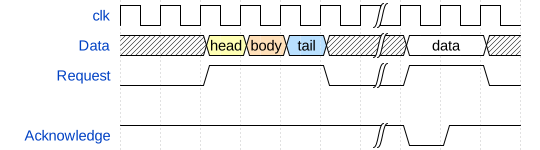

<img src="https://svg.wavedrom.com/{WAVEDROM SOURCE}/><imgsrc="https://svg.wavedrom.com/{signal:[{name:'clk',wave:'p......'},{name:'bus',wave:'x.34.5x',data:'head body tail'},{name:'wire',wave:'0.1..0.'}]}"/>
WaveDrom timing diagrams can be embedded into the web pages, blogs, and wikis to be rendered by the most of modern browsers.
There are three steps to insertWaveDrom diagrams directly into your page:
- Put the following line into your HTML page
<header>or<body>:
From a CDN:
<scriptsrc="https://cdnjs.cloudflare.com/ajax/libs/wavedrom/3.1.0/skins/default.js"type="text/javascript"></script><scriptsrc="https://cdnjs.cloudflare.com/ajax/libs/wavedrom/3.1.0/wavedrom.min.js"type="text/javascript"></script>
- Set the
onloadevent for the HTML body.
<bodyonload="WaveDrom.ProcessAll()">
- InsertWaveJSON source inside HTML
<body>wrapped with the<script>tag:
<scripttype="WaveDrom">{signal :[{name:"clk",wave:"p......"},{name:"bus",wave:"x.34.5x",data:"head body tail"},{name:"wire",wave:"0.1..0."},]}</script>
The script will find all<script type="WaveDrom"> instances and insert a timing diagram at that point.
(http://wavedrom.com/impress.html)
ObservableHQ examples: (https://observablehq.com/collection/@drom/wavedrom)
Blogger integration: (http://wavedrom.blogspot.com/2011/08/wavedrom-digital-timing-diagram-in-your.html)
MediaWiki integration: (https://github.com/Martoni/mediawiki_wavedrom)
WaveDromEditoris an online real-time editor of digital timing diagrams based on theWaveDrom engine andWaveJSON format.
- Download latest
wavedrom-editor-v2.4.2-win-{ia32|x64}.ziprelease from here:releases - Unzip it into a working directory.
- Run the editor:
wavedrom-editor.exe
- Download the latest
wavedrom-editor-v2.4.2-linux-{ia32|x64}.tar.gzrelease from here:releases - unzip-untar the package:
tar -xvzf wavedrom-editor-v2.3.2-linux-x64.tar.gz - Run the editor:
./WaveDromEditor/linux64/wavedrom-editor
- Download the latest
wavedrom-editor-v2.4.2-osx-x64.ziprelease from here:releases - Unzip
- Run
Please use theWaveDrom user group for discussions, questions, ideas, or whatever.
SeeLICENSE.
About
🌊 Digital timing diagram rendering engine
Topics
Resources
License
Contributing
Uh oh!
There was an error while loading.Please reload this page.
Stars
Watchers
Forks
Sponsor this project
Uh oh!
There was an error while loading.Please reload this page.

