- Notifications
You must be signed in to change notification settings - Fork32
A small kernel written in Nim
License
dom96/nimkernel
Folders and files
| Name | Name | Last commit message | Last commit date | |
|---|---|---|---|---|
Repository files navigation
This is a small 32bit (i686) kernel written using the Nim programming language.
I have been wanting to do this for a while but it wasn't until people in the #nim IRCchannel inquired about Nim OS dev and therustboot kernel inspired me that I finally did it.
It doesn't do much, but it doesn't need to. Its purpose is to provide a startingpoint for anyone wishing to write an OS in Nim.
It still manages to do a little more than fill a screen with a certain color.Nimkernel implements:
- A
writeStringfunction which shows a string on screen in a specifiedposition. - A
rainbowfunction which shows a string with a rainbow-like textforeground color differentiation in a specified position. - Some simple error handling by implementing Nim system.nim's
panicfunction. - Support for 16 colors with a brilliant type safe API!
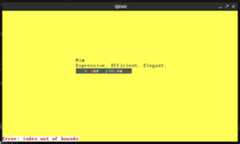
Note: The error at the bottom is intentional, it is used to show thatthe error handling works properly.
You are required to have:
- QEMU
- a C and asm cross-compiler for i686
- Nim 1.6.0 or higher
- nimble (*)
* You can always grab the nake library manually fromhere.
I have performed this setup on a Arch Linux machine, but all other distrosshould work too.
For more information take a look at theOSDev article.
You will need to download the source of binutils and gcc.
Firstcd into a suitable directory in which you would like to download, unzipand build the cross compiler. Then perform the following actions:
$ wget https://ftp.gnu.org/gnu/binutils/binutils-2.37.tar.xz$ tar -xJf binutils-2.37.tar.xz$cd binutils-2.37$ mkdir build&&cd build$ ../configure --target=i686-elf --prefix=$HOME/cross-tools/ --with-sysroot --disable-nls --disable-werror$ make -j$(nproc)$ make install
You may then grab the GCC source and build it:
$ wget https://ftp.gnu.org/gnu/gcc/gcc-11.2.0/gcc-11.2.0.tar.xz$ tar -xJf gcc-11.2.0.tar.xz$cd gcc-11.2.0$ mkdir build&&cd build$ ../configure --target=i686-elf --prefix=$HOME/cross-tools/ --disable-nls --enable-languages=c --without-headers$ make all-gcc -j$(nproc)$ make all-target-libgcc -j$(nproc)$ make install-gcc$ make install-target-libgcc
You should then have a i686-elf-gcc and i686-elf-as executable in $HOME/cross-tools/bin/ or somewhere thereabouts.You should then add it to your PATH permanently or temporarily by doing:
export PATH=$PATH:$HOME/cross-tools/bin
If for some reason you either can't or don't want to build your own toolchain you can grab binaries fromhttps://github.com/lordmilko/i686-elf-tools/releases
Please note that these are a bit outdated but they are confirmed to work.
Follow the instructions in theNim repo to bootstrap Nim and put it in your PATH.
Do the same fornimble and installnake by executingnimble install nake oralternatively just savenakeinto the root dir of this repo.
You can then compile the nakefile and therefore compile nimkernel:
$ nim c nakefile$ ./nakefile run
This will automatically build and run the kernel using QEMU.
Nimkernel is licensed under the MIT license.
About
A small kernel written in Nim
Topics
Resources
License
Uh oh!
There was an error while loading.Please reload this page.
Stars
Watchers
Forks
Releases
Packages0
Uh oh!
There was an error while loading.Please reload this page.
Contributors4
Uh oh!
There was an error while loading.Please reload this page.