- Notifications
You must be signed in to change notification settings - Fork713
Visual localization made easy with hloc
License
cvg/Hierarchical-Localization
Folders and files
| Name | Name | Last commit message | Last commit date | |
|---|---|---|---|---|
Repository files navigation
This ishloc, a modular toolbox for state-of-the-art 6-DoF visual localization. It implementsHierarchical Localization, leveraging image retrieval and feature matching, and is fast, accurate, and scalable. This codebase combines and makes easily accessible years of research on image matching and Structure-from-Motion.
Withhloc, you can:
- Reproduce state-of-the-art results on multiple indoor and outdoor visual localization benchmarks
- Run Structure-from-Motion with SuperPoint+SuperGlue to localize with your own datasets
- Evaluate your own local features or image retrieval for visual localization
- Implement new localization pipelines and debug them easily 🔥
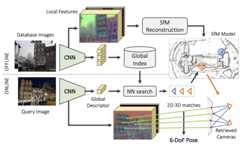
Hierachical Localization uses both image retrieval and feature matching

Build 3D maps with Structure-from-Motion and localize any Internet image right from your browser!You can now runhloc and COLMAP in Google Colab with GPU for free. The notebookdemo.ipynb shows how to run SfM and localization in just a few steps. Try it with your own data and let us know!
hloc requires Python >=3.7 and PyTorch >=1.1. Installing the package locally pulls the other dependencies:
git clone --recursive https://github.com/cvg/Hierarchical-Localization/cd Hierarchical-Localization/python -m pip install -e.
All dependencies are listed inrequirements.txt.Starting withhloc-v1.3, installing COLMAP is not required anymore. This repository includes external local features as git submodules – don't forget to pull submodules withgit submodule update --init --recursive.
We also provide a Docker image:
docker build -t hloc:latest.docker run -it --rm -p 8888:8888 hloc:latest# for GPU support, add `--runtime=nvidia`jupyter notebook --ip 0.0.0.0 --port 8888 --no-browser --allow-root
The toolbox is composed of scripts, which roughly perform the following steps:
- Extract local features, likeSuperPoint orDISK, for all database and query images
- Build a reference 3D SfM model
- Find database images relevant to each query, using retrieval
- Match the query images
- Run the localization
- Visualize and debug
The localization can then be evaluated onvisuallocalization.net for the supported datasets. When 3D Lidar scans are available, such as for the indoor dataset InLoc, step 2. can be skipped.
Strcture of the toolbox:
hloc/*.py: top-level scriptshloc/extractors/: interfaces for feature extractorshloc/matchers/: interfaces for feature matchershloc/pipelines/: entire pipelines for multiple datasets
hloc can be imported as an external package withimport hloc or called from the command line with:
python -m hloc.name_of_script --arg1 --arg2
We provide step-by-step guides to localize with Aachen, InLoc, and to generate reference poses for your own data using SfM. Just download the datasets and you're reading to go!
Have a look atpipeline_Aachen.ipynb for a step-by-step guide on localizing with Aachen. Play with the visualization, try new local features or matcher, and have fun! Don't like notebooks? You can also run all scripts from the command line.

The notebookpipeline_InLoc.ipynb shows the steps for localizing with InLoc. It's much simpler since a 3D SfM model is not needed.

We show inpipeline_SfM.ipynb how to run 3D reconstruction for an unordered set of images. This generates reference poses, and a nice sparse 3D model suitable for localization with the same pipeline as Aachen.
- Supported local feature extractors:SuperPoint,DISK,D2-Net,SIFT, andR2D2.
- Supported feature matchers:SuperGlue, its faster follow-upLightGlue, and nearest neighbor search with ratio test, distance test, and/or mutual check. hloc also supports dense matching withLoFTR.
- Supported image retrieval:NetVLAD,AP-GeM/DIR,OpenIBL, andMegaLoc.
Using NetVLAD for retrieval, we obtain the following best results:
| Methods | Aachen day | Aachen night | Retrieval |
|---|---|---|---|
| SuperPoint + SuperGlue | 89.6 / 95.4 / 98.8 | 86.7 / 93.9 / 100 | NetVLAD top 50 |
| SuperPoint + NN | 85.4 / 93.3 / 97.2 | 75.5 / 86.7 / 92.9 | NetVLAD top 30 |
| D2Net (SS) + NN | 84.6 / 91.4 / 97.1 | 83.7 / 90.8 / 100 | NetVLAD top 30 |
| Methods | InLoc DUC1 | InLoc DUC2 | Retrieval |
|---|---|---|---|
| SuperPoint + SuperGlue | 46.5 / 65.7 / 78.3 | 52.7 / 72.5 / 79.4 | NetVLAD top 40 |
| SuperPoint + SuperGlue (temporal) | 49.0 / 68.7 / 80.8 | 53.4 / 77.1 / 82.4 | NetVLAD top 40 |
| SuperPoint + NN | 39.9 / 55.6 / 67.2 | 37.4 / 57.3 / 70.2 | NetVLAD top 20 |
| D2Net (SS) + NN | 39.9 / 57.6 / 67.2 | 36.6 / 53.4 / 61.8 | NetVLAD top 20 |
Check outvisuallocalization.net/benchmark for more details and additional baselines.
We provide inhloc/pipelines/ scripts to run the reconstruction and the localization on the following datasets: Aachen Day-Night (v1.0 and v1.1), InLoc, Extended CMU Seasons, RobotCar Seasons, 4Seasons, Cambridge Landmarks, and 7-Scenes. For example, after downloading the datasetwith the instructions given here, we can run the Aachen Day-Night pipeline with SuperPoint+SuperGlue using the command:
python -m hloc.pipelines.Aachen.pipeline [--outputs ./outputs/aachen]
If you report any of the above results in a publication, or use any of the tools provided here, please consider citing bothHierarchical Localization andSuperGlue papers:
@inproceedings{sarlin2019coarse, title = {From Coarse to Fine: Robust Hierarchical Localization at Large Scale}, author = {Paul-Edouard Sarlin and Cesar Cadena and Roland Siegwart and Marcin Dymczyk}, booktitle = {CVPR}, year = {2019}}@inproceedings{sarlin2020superglue, title = {{SuperGlue}: Learning Feature Matching with Graph Neural Networks}, author = {Paul-Edouard Sarlin and Daniel DeTone and Tomasz Malisiewicz and Andrew Rabinovich}, booktitle = {CVPR}, year = {2020},}[Click to expand]
Each localization run generates a pickle log file. For each query, it contains the selected database images, their matches, and information from the pose solver, such as RANSAC inliers. It can thus be parsed to gather statistics and analyze failure modes or difficult scenarios.
We also provide some visualization tools inhloc/visualization.py to visualize some attributes of the 3D SfM model, such as visibility of the keypoints, their track length, or estimated sparse depth (like below).

[Click to expand]
If your code is based on PyTorch: simply add a new interface inhloc/extractors/ orhloc/matchers/. It needs to inherit fromhloc.utils.base_model.BaseModel, take as input a data dictionary, and output a prediction dictionary. Have a look athloc/extractors/superpoint.py for an example. You can additionally define a standard configuration inhloc/extract_features.py orhloc/match_features.py - it can then be called directly from the command line.
If your code is based on TensorFlow: you will need to either modifyhloc/extract_features.py andhloc/match_features.py, or export yourself the features and matches to HDF5 files, described below.
In a feature file, each key corresponds to the relative path of an image w.r.t. the dataset root (e.g.db/1.jpg for Aachen), and has one dataset per prediction (e.g.keypoints anddescriptors, with shape Nx2 and DxN).
In a match file, each key corresponds to the stringpath0.replace('/', '-')+'_'+path1.replace('/', '-') and has a datasetmatches0 with shape N. It indicates, for each keypoint in the first image, the index of the matching keypoint in the second image, or-1 if the keypoint is unmatched.
[Click to expand]
hloc also provides an interface for image retrieval viahloc/extract_features.py. As previously, simply add a new interface tohloc/extractors/. Alternatively, you will need to export the global descriptors into an HDF5 file, in which each key corresponds to the relative path of an image w.r.t. the dataset root, and contains a datasetglobal_descriptor with size D. You can then export the images pairs withhloc/pairs_from_retrieval.py.
[Click to expand]
If the calibration of the camera is known, for example from an external calibration system, you can tell hloc to use these parameters instead of estimating them from EXIF. The name of the camera models and their parameters aredefined by COLMAP. Python API:
opts=dict(camera_model='SIMPLE_RADIAL',camera_params=','.join(map(str, (f,cx,cy,k))))model=reconstruction.main(...,image_options=opts)
Command-line interface:
python -m hloc.reconstruction [...] --image_options camera_model='"SIMPLE_RADIAL"' camera_params='"256,256,256,0"'
By default, hloc refines the camera parameters during the reconstruction process. To prevent this, add:
reconstruction.main(...,mapper_options=dict(ba_refine_focal_length=False,ba_refine_extra_params=False))
python -m hloc.reconstruction [...] --mapper_options ba_refine_focal_length=False ba_refine_extra_params=False
v1.4 (July 2023)
- New front ends
- Triangulation: use known camera poses for two-view geometric verification (#178)
- Control over COLMAP import and reconstruction options (#210)
- Performance
- Add scalar detection uncertainty for LaMAR (#158)
- Documentation (#294)
- Updated requirements: tqdm>=4.36.0, pycolmap>=0.3.0, kornia>=0.6.11
v1.3 (January 2022)
- Demo notebook in Google Colab
- Use the new pycolmap Reconstruction objects and pipeline API
- Do not require an installation of COLMAP anymore - pycolmap is enough
- Faster model reading and writing
- Fine-grained control over camera sharing via the
camera_modeparameter - Localization with unknown or inaccurate focal length
- Modular localization API with control over all estimator parameters
- 3D visualizations or camera frustums and points with plotly
- Package-specific logging in the hloc namespace
- Store the extracted features by default as fp16 instead of fp32
- Optionally fix a long-standing bug in SuperPoint descriptor sampling
- Add script to compute exhaustive pairs for reconstruction or localization
- Require pycolmap>=0.1.0 and Python>=3.7
v1.2 (December 2021)
- Bug fixes and usability improvements.
- Support PIL backend for image resizing.
- Add
__version__attribute to check against future releases.
v1.1 (July 2021)
- Breaking: improved structure of the SfM folders (triangulation and reconstruction), see#76
- Support for image retrieval (NetVLAD, DIR) and more local features (SIFT, R2D2)
- Support for more datasets: Aachen v1.1, Extended CMU Seasons, RobotCar Seasons, Cambridge Landmarks, 7-Scenes
- Simplified pipeline and API
- Spatial matcher
v1.0 (July 2020)
Initial public version.
External contributions are very much welcome. Please follow thePEP8 style guidelines using a linter like flake8. This is a non-exhaustive list of features that might be valuable additions:
- support for GPS (extraction from EXIF + guided retrieval)
- covisibility clustering for InLoc
- visualization of the raw predictions (features and matches)
- other local features or image retrieval
Created and maintained byPaul-Edouard Sarlin with the help of many contributors.
About
Visual localization made easy with hloc
Topics
Resources
License
Uh oh!
There was an error while loading.Please reload this page.