- Notifications
You must be signed in to change notification settings - Fork8
An opinionated take on Design System Typography for iOS and tvOS.
License
codeandtheory/YMatterType
Folders and files
| Name | Name | Last commit message | Last commit date | |
|---|---|---|---|---|
Repository files navigation
An opinionated take on Design System Typography for iOS and tvOS.

This framework uses Figma's concept of Typography to create text-based UI elements (labels, buttons, text fields, and text views) that render themselves as described in Figma design files (especially sizing themselves according to line height) while also supporting Dynamic Type scaling and the Bold Text accessibility setting.
Y—MatterType is licensed under theApache 2.0 license.
TheNoto Sans font included in the test target is licensed under theOpen Font License
Documentation is automatically generated from source code comments and rendered as a static website hosted via GitHub Pages at:https://yml-org.github.io/YMatterType/
Y—MatterType is a framework that assists in getting typography done right when constructing iOS and tvOS user interfaces from Figma-based designs.
Y—MatterType aims to achieve the following goals:
- Support line height and other typographical properties (letter spacing, text decorations, text cases, and more) across labels, buttons, text fields, and text views
- Support Dynamic Type scaling and Accessibility Bold Text on custom fonts
- Accelerate accurate translation of Figma designs into code by having text-based elements with the exact same intrinsic size (based upon line height) as the corresponding elements in Figma
Typography represents type faces as they are typically presented in design files (whether that’s a full-blown design system or just a style guide). The aim is to define typography in our code exactly the same as it is defined by the designers, so that a label or a button in our application has the exact same dimensions and appearance (at default scaling) as the corresponding component in the design files. The crucial part of this (which is often overlooked when implementing user interfaces) is line height. It’s easy to use a 16 pt semibold San Francisco font, but to have it also have exactly a 24 pt line height requires extra engineering. Y—MatterType handles this for you.
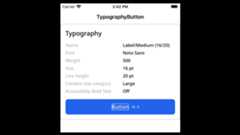
Font is the principal part of typography, but not the only one. There are many other properties that determine how text is rendered: line height, letter spacing, text decorations, text case, etc. To that end we adopt an approach of setting typography on labels, buttons, text fields, and text views instead of setting a font. The typography generates the correct font to use based on the current trait environment and considers both Dynamic Type and the Accessibility Bold Text setting. (For example, that 16/24 pt semibold San Francisco font might actually be a 16/24 ptbold font if the user has Bold Text enabled. Or it might be scaled up to a 32/48 pt font depending on the Dynamic Type setting.) The font and other typographical properties are then used to render the text via attributed strings.
Typography is simply astruct with properties for the font family, font weight, font size, line height, etc. It has many properties with sensible defaults, but at a minimum you need to specify the font family, font weight, font size, and line height.
// Avenir Next, Bold 16/24 ptslet typography = Typography( familyName: "AvenirNext", fontWeight: .bold, fontSize: 16, lineHeight: 24)Your exact typography definitions of course will depend upon your design system, but we recommend using semantic naming and declaring static properties on an extension to theTypography struct.
extension Typography { /// Noto Sans, Semibold 32/36 pts static let largeTitle = Typography( familyName: "NotoSans", fontWeight: .semibold, fontSize: 32, lineHeight: 36, // closest matching `UIFont.TextStyle` used for scaling textStyle: .largeTitle ) /// Noto Sans, Semibold 17/22 pts static let headline = Typography( familyName: "NotoSans", fontWeight: .semibold, fontSize: 17, lineHeight: 22, textStyle: .headline )}There are four classes (TypographyLabel,TypographyButton,TypographyTextField, andTypographyTextView) which subclass their corresponding UIKit classes (UILabel,UIButton,UITextField, andUITextView, respectively). They each have a required initializer that takes aTypography. This enables these controls to size themselves correctly to match the designs they are sourced from.
// using `Typography.largeTitle` as defined in the previous snippetlet label = TypographyLabel(typography: .largeTitle)let button = TypographyButton(typography: .largeTitle)You may also set the typography on any instance of these classes, similar to how you could set the font.
label.typography = .headlineWhat you shouldnot do, however, is set thefont property directly. Just set the typography and the class will take care of the font.
To make the Typography elements work within the SwiftUI framework, we usedUIViewRepresentable, a wrapper for a UIKit that integrates the view into your SwiftUI view hierarchy.
Rendering Single Line Label:TextStyleLabel is the first wrapper component we created, it renders a single lineTypographyLabel, and as such, has the propertynumberOfLines = 1. Setting this property to any other value is undefined behavior.
// using `TextStyleLabel` in SwiftUITextStyleLabel("Another sample headline", typography: .systemLabel)To add specific TypographyLabel configurations, use theconfiguration closure:
// using custom typography, the configuration closure and a View background modifierTextStyleLabel( "This is a long text string that will not fit", typography: .ParagraphUber.small.fontSize(28).lineHeight(45), configuration: { label in label.lineBreakMode = .byTruncatingMiddle }).background(Color.yellow.opacity(0.5))Any custom fonts need to be included as assets in your application and registered with the system. If you're building a simple app then you can just add them to your project and list them in your app's Info.plist file as you normally would. If, however, you want to build them into a separate Swift package, then that's fine too, and Y—MatterType has an extension onUIFont that makes it easier to register (and unregister) your font files. It throws an error if the font cannot be registered (and also if it has already been registered), so you'll know when you have a problem. Note that you will need to specifysubpath if you use.copy for the resources in your Swift package file (and probably won't need to specify it if you use.process).
// Register font file "NotoSans-Regular.otf"try UIFont.register( name: "NotoSans-Regular", fileExtension: "ttf", subpath: "Assets/Fonts", bundle: .module)BecauseBundle.module is only available from within your Swift package, we recommend that you expose a helper method from within your Swift package to register the fonts and that internally referencesBundle.module.
public struct NotoSansFontFamily: FontFamily { /// Font family root name let familyName: String = "NotoSans" // We've only bundled 3 weights for this font var supportedWeights: [Typography.FontWeight] = [.regular, .medium, .semibold] /// Register all 3 NotoSans fonts public static func registerFonts() throws { let names = makeFontNames() try names.forEach { try UIFont.register(name: $0, fileExtension: "ttf", bundle: .module) } } /// Unregister all 3 NotoSans fonts public static func unregisterFonts() throws { let names = makeFontNames() try names.forEach { try UIFont.unregister(name: $0, fileExtension: "ttf", bundle: .module) } } private static func makeFontNames() -> [String] { [ "NotoSans-Regular", "NotoSans-Medium", // Semibold is used for medium fonts when Accessibility Bold Text is enabled "NotoSans-SemiBold" ] }}Fonts can come in up to 9 different weights, ranging from ultralight (100) to black (900), but not all font families will support every weight. Also you might not wish to include fonts for weights which your design system does not use in order to keep your bundle size as small as possible. However, in order to support the Accessibility Bold Text feature (which allows users to request a heavier weight font), for each font weight in your design system, you should include the next heavier font weight as well. For example, if your design system only uses regular (400) and bold (700) weight fonts, if possible you should include (and register) font files for regular (400), medium (500), bold (700), and heavy (800) weight fonts.
When Accessibility Bold Text is enabled,FontFamily will use the next heavier font weight listed insupportedWeights (if any), and otherwise use the heaviest supported font weight.
Just want to use the default system fonts? Y—MatterType has you covered.
extension Typography { /// System font, Semibold 17/22 pts static let headline = Typography( fontFamily: Typography.systemFamily, fontWeight: .semibold, fontSize: 17, lineHeight: 22, textStyle: .headline )}Y—MatterType does its best to automatically map font family name, font style (regular or italic), and font weight (ultralight to black) into the registered name of the font so that it may be loaded usingUIFont(name:, size:). (This registered font name may differ from the name of the font file and from the display name for the font family.) However, some font families may require custom behavior in order to properly load the font (e.g. the semibold font weight might be named "DemiBold" instead of the more common "SemiBold"). Or your font family might not include all 9 possible font weights. To support this you can declare a class or struct that conforms to theFontFamily protocol and use that to initialize yourTypography instance. This protocol has four methods, each of which may be optionally overridden to customize how fonts of a given weight are loaded. ThesupportedWeights property that can be overridden. If your font family does not have access to all 9 font weights, then you should overridesupportedWeights and return the weights of all fonts bundled in your project.
The framework contains two different implementations ofFontFamily for you to consider (DefaultFontFamily andSystemFontFamily).
In the event that the requested font cannot be loaded (either the name is incorrect or it was not registered), Y—MatterType will fall back to loading a system font of the specified point size and weight.
struct AppleSDGothicNeoInfo: FontFamily { /// Font family root name let familyName: String = "AppleSDGothicNeo" // This font family doesn't support weights higher than Bold var supportedWeights: [Typography.FontWeight] = [.ultralight, .thin, .light, .regular, .medium, .semibold, .bold] /// Generates a weight name suffix as part of a full font name. Not all fonts support all 9 weights. /// - Parameter weight: desired font weight /// - Returns: The weight name to use func weightName(for weight: Typography.FontWeight) -> String { switch weight { case .ultralight: // most font familes use "ExtraLight" return "UltraLight" case .thin: return "Thin" case .light: return "Light" case .regular: return "Regular" case .medium: return "Medium" case .semibold: return "SemiBold" case .bold, .heavy, .black: // this font family doesn't support weights higher than Bold return "Bold" } }}All four of Y—MatterType's UI elements can be subclassed and include common override points:
adjustFonts: called when preferred content size category or legibility weight changesadjustColors: called when any trait that might affect color changesadjustBreakpoint: called when horizontal or vertical size class changes
(These three methods are also each called when the view is initialized.)
adjustColors can be useful when you need to updatecgColor values when the user switches between light and dark mode or when increased contrast mode has been enabled or disabled.
class BorderButton: TypographyButton { ... override func adjustColors() { super.adjustColors() layer.borderColor = UIColor.primaryBorder.cgColor }}Would you like to use different (larger) typographies for controls in full-screen tablet mode vs split-screen tablet or phone? The overridableadjustBreakpoints method is called when either the horizontal or vertical size class changes. This can be a good time to update your typography.
extension Typography { struct Label { /// Label / Large (18/24 pt, medium) static let large = Typography( familyName: "NotoSans", fontWeight: .medium, fontSize: 18, lineHeight: 24, textStyle: .body ) /// Label / Medium (16/20 pt, medium) static let medium = Typography( familyName: "NotoSans", fontWeight: .medium, fontSize: 16, lineHeight: 20, textStyle: .callout ) }}extension Typography.Label { /// Determines the typography to use based upon the current trait environment. /// - Parameter traitCollection: the trait collection to consider /// - Returns: `Label.large` when the horizontal size class is `.regular`, /// otherwise returns `Label.medium` static func current(traitCollection: UITraitCollection) -> Typography { switch traitCollection.horizontalSizeClass { case .regular: return large case .unspecified, .compact: fallthrough @unknown default: return medium } }}class BreakpointButton: TypographyButton { // adjust breakpoint if necessary override func adjustBreakpoint() { super.adjustBreakpoint() typography = .Label.current(traitCollection: traitCollection) // You might also wish to update the padding around the button's title. }}You can add Y-MatterType to an Xcode project by adding it as a package dependency.
- From theFile menu, selectAdd Packages...
- Enter "https://github.com/yml-org/YMatterType" into the package repository URL text field
- Click Add Package
brew install swiftlintsudo gem install jazzyClone the repo and openPackage.swift in Xcode.
We utilizesemantic versioning.
{major}.{minor}.{patch}e.g.
1.0.5We utilize a simplified branching strategy for our frameworks.
- main (and development) branch is
main - both feature (and bugfix) branches branch off of
main - feature (and bugfix) branches are merged back into
mainas they are completed and approved maingets tagged with an updated version # for each release
feature/{ticket-number}-{short-description}bugfix/{ticket-number}-{short-description}e.g.
feature/CM-44-buttonbugfix/CM-236-textview-colorPrior to submitting a pull request you should:
- Compile and ensure there are no warnings and no errors.
- Run all unit tests and confirm that everything passes.
- Check unit test coverage and confirm that all new / modified code is fully covered.
- Run
swiftlintfrom the command line and confirm that there are no violations. - Run
jazzyfrom the command line and confirm that you have 100% documentation coverage. - Consider using
git rebase -i HEAD~{commit-count}to squash your last {commit-count} commits together into functional chunks. - If HEAD of the parent branch (typically
main) has been updated since you created your branch, usegit rebase mainto rebase your branch.- Never merge the parent branch into your branch.
- Always rebase your branch off of the parent branch.
When submitting a pull request:
- Use theprovided pull request template and populate the Introduction, Purpose, and Scope fields at a minimum.
- If you're submitting before and after screenshots, movies, or GIF's, enter them in a two-column table so that they can be viewed side-by-side.
When merging a pull request:
- Make sure the branch is rebased (not merged) off of the latest HEAD from the parent branch. This keeps our git history easy to read and understand.
- Make sure the branch is deleted upon merge (should be automatic).
- Tag the corresponding commit with the new version (e.g.
1.0.5) - Push the local tag to remote
You can generate your own local set of documentation directly from the source code using the following command from Terminal:
jazzyThis generates a set of documentation under/docs. The default configuration is set in the default config file.jazzy.yaml file.
To view additional documentation options type:
jazzy --helpA GitHub Action automatically runs each time a commit is pushed tomain that runs Jazzy to generate the documentation for our GitHub page at:https://yml-org.github.io/YMatterType/
About
An opinionated take on Design System Typography for iOS and tvOS.
Topics
Resources
License
Uh oh!
There was an error while loading.Please reload this page.
Stars
Watchers
Forks
Packages0
Uh oh!
There was an error while loading.Please reload this page.
Contributors6
Uh oh!
There was an error while loading.Please reload this page.