- Notifications
You must be signed in to change notification settings - Fork591
🌸 Run LLMs at home, BitTorrent-style. Fine-tuning and inference up to 10x faster than offloading
License
bigscience-workshop/petals
Folders and files
| Name | Name | Last commit message | Last commit date | |
|---|---|---|---|---|
Repository files navigation
Run large language models at home, BitTorrent-style.
Fine-tuning and inferenceup to 10x faster than offloading


Generate text with distributedLlama 3.1 (up to 405B),Mixtral (8x22B),Falcon (40B+) orBLOOM (176B) and fine‑tune them for your own tasks — right from your desktop computer or Google Colab:
fromtransformersimportAutoTokenizerfrompetalsimportAutoDistributedModelForCausalLM# Choose any model available at https://health.petals.devmodel_name="meta-llama/Meta-Llama-3.1-405B-Instruct"# Connect to a distributed network hosting model layerstokenizer=AutoTokenizer.from_pretrained(model_name)model=AutoDistributedModelForCausalLM.from_pretrained(model_name)# Run the model as if it were on your computerinputs=tokenizer("A cat sat",return_tensors="pt")["input_ids"]outputs=model.generate(inputs,max_new_tokens=5)print(tokenizer.decode(outputs[0]))# A cat sat on a mat...
🦙Want to run Llama?Request access to its weights, then runhuggingface-cli login in the terminal before loading the model. Or just try it in ourchatbot app.
🔏Privacy. Your data will be processed with the help of other people in the public swarm. Learn more about privacyhere. For sensitive data, you can set up aprivate swarm among people you trust.
💬Any questions? Ping us inour Discord!
Petals is a community-run system — we rely on people sharing their GPUs. You can help serving one of theavailable models or host a new model from 🤗Model Hub!
As an example, here is how to host a part ofLlama 3.1 (405B) Instruct on your GPU:
🦙Want to host Llama?Request access to its weights, then runhuggingface-cli login in the terminal before loading the model.
🐧Linux + Anaconda. Run these commands for NVIDIA GPUs (or followthis for AMD):
conda install pytorch pytorch-cuda=11.7 -c pytorch -c nvidiapip install git+https://github.com/bigscience-workshop/petalspython -m petals.cli.run_server meta-llama/Meta-Llama-3.1-405B-Instruct
🪟Windows + WSL. Followthis guide on our Wiki.
🐋Docker. Run ourDocker image for NVIDIA GPUs (or followthis for AMD):
sudo docker run -p 31330:31330 --ipc host --gpus all --volume petals-cache:/cache --rm \ learningathome/petals:main \ python -m petals.cli.run_server --port 31330 meta-llama/Meta-Llama-3.1-405B-Instruct
🍏macOS + Apple M1/M2 GPU. InstallHomebrew, then run these commands:
brew install pythonpython3 -m pip install git+https://github.com/bigscience-workshop/petalspython3 -m petals.cli.run_server meta-llama/Meta-Llama-3.1-405B-Instruct
📚 Learn more (how to use multiple GPUs, start the server on boot, etc.)
🔒Security. Hosting a server does not allow others to run custom code on your computer. Learn morehere.
💬Any questions? Ping us inour Discord!
🏆Thank you! Once you load and host 10+ blocks, we can show your name or link on theswarm monitor as a way to say thanks. You can specify them with--public_name YOUR_NAME.
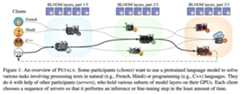
- You load a small part of the model, then join anetwork of people serving the other parts. Single‑batch inference runs at up to6 tokens/sec forLlama 2 (70B) and up to4 tokens/sec forFalcon (180B) — enough forchatbots and interactive apps.
- You can employ any fine-tuning and sampling methods, execute custom paths through the model, or see its hidden states. You get the comforts of an API with the flexibility ofPyTorch and🤗 Transformers.
📜 Read paper 📚 See FAQ
Basic tutorials:
- Getting started:tutorial
- Prompt-tune Llama-65B for text semantic classification:tutorial
- Prompt-tune BLOOM to create a personified chatbot:tutorial
Useful tools:
- Chatbot web app (connects to Petals via an HTTP/WebSocket endpoint):source code
- Monitor for the public swarm:source code
Advanced guides:
Please seeSection 3.3 of ourpaper.
Please see ourFAQ on contributing.
Alexander Borzunov, Dmitry Baranchuk, Tim Dettmers, Max Ryabinin, Younes Belkada, Artem Chumachenko, Pavel Samygin, and Colin Raffel.Petals: Collaborative Inference and Fine-tuning of Large Models.Proceedings of the 61st Annual Meeting of the Association for Computational Linguistics (Volume 3: System Demonstrations). 2023.
@inproceedings{borzunov2023petals,title ={Petals: Collaborative Inference and Fine-tuning of Large Models},author ={Borzunov, Alexander and Baranchuk, Dmitry and Dettmers, Tim and Riabinin, Maksim and Belkada, Younes and Chumachenko, Artem and Samygin, Pavel and Raffel, Colin},booktitle ={Proceedings of the 61st Annual Meeting of the Association for Computational Linguistics (Volume 3: System Demonstrations)},pages ={558--568},year ={2023},url ={https://arxiv.org/abs/2209.01188}}
Alexander Borzunov, Max Ryabinin, Artem Chumachenko, Dmitry Baranchuk, Tim Dettmers, Younes Belkada, Pavel Samygin, and Colin Raffel.Distributed inference and fine-tuning of large language models over the Internet.Advances in Neural Information Processing Systems 36 (2023).
@inproceedings{borzunov2023distributed,title ={Distributed inference and fine-tuning of large language models over the {I}nternet},author ={Borzunov, Alexander and Ryabinin, Max and Chumachenko, Artem and Baranchuk, Dmitry and Dettmers, Tim and Belkada, Younes and Samygin, Pavel and Raffel, Colin},booktitle ={Advances in Neural Information Processing Systems},volume ={36},pages ={12312--12331},year ={2023},url ={https://arxiv.org/abs/2312.08361}}
This project is a part of theBigScience research workshop.

About
🌸 Run LLMs at home, BitTorrent-style. Fine-tuning and inference up to 10x faster than offloading
Topics
Resources
License
Uh oh!
There was an error while loading.Please reload this page.
Stars
Watchers
Forks
Packages0
Uh oh!
There was an error while loading.Please reload this page.