- Notifications
You must be signed in to change notification settings - Fork75
[DEPRECATED] A wrapper of Lock to use with React Native (iOS & Android)
License
okta-graveyard/react-native-lock
Folders and files
| Name | Name | Last commit message | Last commit date | |
|---|---|---|---|---|
Repository files navigation
We recommend following ourreact-native quickstart and usinghttps://github.com/auth0/react-native-auth0.


Auth0 is an authentication broker that supports social identity providers as well as enterprise identity providers such as Active Directory, LDAP, Google Apps and Salesforce.
react-native-lock is a wrapper around Lock's implementations foriOS andAndroid ready to use for React Native
Starting 8th June 2017 Auth0 restricted some Auth flows for new Auth0 clients (Grant types), even if your account was created before that date, so this library won't work out of the box since it relies on legacy grants. If you were already using this libary before 8th June, you can go to your client's settings and enable the grants you neeed.
Legacy: RO(http://auth0.com/oauth/legacy/grant-type/ro): for database connectionsLegacy: RO jwt bearer(http://auth0.com/oauth/legacy/grant-type/ro/jwt-bearer): for TouchIDLegcy: Access Token(http://auth0.com/oauth/legacy/grant-type/access_token): for native social integrations
In our documentation you will find more information aboutGrant types.
We will continue fixing bugs for react-native-lock for the time being.
- iOS 7+
- CocoaPods
- Minimum SDK 16
Runnpm install --save react-native-lock to add the package to your app's dependencies.
Runreact-native link react-native-lock so your project is linked against your Xcode project & install Lock for iOS using CocoaPods and runreact-native run-ios
- In XCode, in the project navigator, right click
Libraries➜Add Files to [your project's name] - Go to
node_modules➜react-native-lockand addA0RNLock.xcodeproj - In XCode, in the project navigator, select your project. Add
libA0RNLock.ato your project'sBuild Phases➜Link Binary With Libraries - Click
A0RNLock.xcodeprojin the project navigator and go theBuild Settingstab. Make sure 'All' is toggled on (instead of 'Basic'). Look forHeader Search Pathsand make sure it contains$(SRCROOT)/../react-native/React,$(SRCROOT)/../../React,${SRCROOT}/../../ios/Pods/Headers/Publicand${SRCROOT}/../../ios/Pods/Headers/Public/Lock- all marked asrecursive. - Inside your
iosdirectory add a file namedPodfilewith the followingcontent - Run
pod install --project-directory=ios - Run
react-native run-ios
If you get the following warning.
[!] The `<YourAppName> [Debug]` target overrides the `OTHER_LDFLAGS` build setting defined in `Pods/Target Support Files/Pods/Pods.debug.xcconfig'. This can lead to problems with the CocoaPods installation - Use the `$(inherited)` flag, or - Remove the build settings from the target.[!] The `<YourAppName> [Release]` target overrides the `OTHER_LDFLAGS` build setting defined in `Pods/Target Support Files/Pods/Pods.release.xcconfig'. This can lead to problems with the CocoaPods installation - Use the `$(inherited)` flag, or - Remove the build settings from the target.Click<YourAppName>.xcodeproj in the project navigator and go theBuild Settings tab. Make sure 'All' is toggled on (instead of 'Basic'). Look forOther Linker Flags and replace the value-ObjC with the value$(inherited) for your Application's Target.
If you are using areact-native version>=0.26.0, you might encounter the following error while trying to run the project
"std::terminate()", referenced from: ___clang_call_terminate in libReact.a(RCTJSCExecutor.o)React Native introduced some C++ code so we need to tellXcode to include use those symbols for compile. First click<YourAppName>.xcodeproj in the Project Navigator to show your project's target (at least one for your app).Then for each of the targets do the following:
- Go the
Build Settingstab, and make sureAllis toggled on (instead ofBasic) - Look for
Other Linker Flagsand add the flag-lc++forall configurations
If your project was created using
react-native initcommand, you will have two targets (app & tests) so make sureBOTH of them has the correct flags
This more of a hack than an actual solution. We recommend to avoid including Lock as a dynamic framework unless you have a very good reason to do that.
After setting upreact-native-lock eitherManually or usingreact-native cli you need to open your iOS project with Xcode and follow these steps:
- Click
A0RNLock.xcodeprojin the project navigator and go theBuild Settingstab. Make sure 'All' is toggled on (instead of 'Basic'). Look forFramework Search Pathsand make sure it contains$BUILD_DIR/$CONFIGURATION$EFFECTIVE_PLATFORM_NAME/Lock - Change to the
A0RNLock.xcodeprojtarget tabBuild Phases, and in the sectionLink Binary with Librariesclick the+and addLock.frameworkand make sure it'sStatusis set tooptional - In the project navigator, select your project (should be the top one) and go the
Build Settingstab. Make sure 'All' is toggled on (instead of 'Basic') and look forOther Linker Flagsand make sure the value-ObjCis listed there
Runreact-native link react-native-lock so your project is linked against your Android project
In your fileandroid/app/build.gradle, inside theandroid section add the following
packagingOptions { exclude'META-INF/LICENSE' exclude'META-INF/NOTICE'}
Then in yourandroid/app/src/main/AndroidManifest.xml add the following inside<application> tag
<!--Auth0 Lock--><activityandroid:name="com.auth0.lock.LockActivity"android:theme="@style/Lock.Theme"android:screenOrientation="portrait"android:launchMode="singleTask"></activity><!--Auth0 Lock End--><!--Auth0 Lock Embedded WebView--><activityandroid:name="com.auth0.identity.web.WebViewActivity"android:theme="@style/Lock.Theme"></activity><!--Auth0 Lock Embedded WebView End--><!--Auth0 Lock Passwordless--><activityandroid:name="com.auth0.lock.passwordless.LockPasswordlessActivity"android:theme="@style/Lock.Theme"android:screenOrientation="portrait"android:launchMode="singleTask"></activity><activityandroid:name="com.auth0.lock.passwordless.CountryCodeActivity"android:theme="@style/Lock.Theme"></activity><!--Auth0 Lock Passwordless End-->
And finally runreact-native run-android
In your fileandroid/settings.gradle add the following
include':react-native-lock'project(':react-native-lock').projectDir=newFile(rootProject.projectDir,'../node_modules/react-native-lock/android')
In the fileandroid/app/build.gradle add a new dependency
dependencies {//Other gradle dependencies... compile project(':react-native-lock')}
And in the same file inside theandroid section
packagingOptions { exclude'META-INF/LICENSE' exclude'META-INF/NOTICE'}
This fixes the error `Error: duplicate files during packaging of APK
Then in the fileMainApplication.java add the following Java import
importcom.auth0.lock.react.LockReactPackage;
In react-native versions older than 0.29 you should add do this in
MainActivity.javainstead
and add Lock's React Native module
/** * A list of packages used by the app. If the app uses additional views * or modules besides the default ones, add more packages here. */@OverrideprotectedList<ReactPackage>getPackages() {returnArrays.<ReactPackage>asList(newMainReactPackage(),//Other RN modulesnewLockReactPackage() ); }
Then in yourandroid/app/src/main/AndroidManifest.xml add the following inside<application> tag
<!--Auth0 Lock--><activityandroid:name="com.auth0.lock.LockActivity"android:theme="@style/Lock.Theme"android:screenOrientation="portrait"android:launchMode="singleTask"></activity><!--Auth0 Lock End--><!--Auth0 Lock Embedded WebView--><activityandroid:name="com.auth0.identity.web.WebViewActivity"android:theme="@style/Lock.Theme"></activity><!--Auth0 Lock Embedded WebView End--><!--Auth0 Lock Passwordless--><activityandroid:name="com.auth0.lock.passwordless.LockPasswordlessActivity"android:theme="@style/Lock.Theme"android:screenOrientation="portrait"android:launchMode="singleTask"></activity><activityandroid:name="com.auth0.lock.passwordless.CountryCodeActivity"android:theme="@style/Lock.Theme"></activity><!--Auth0 Lock Passwordless End-->
For more information and configuration options you should see the Lock.Androiddocs
And finally runreact-native run-android
Let's requirereact-native-lock module:
varAuth0Lock=require('react-native-lock');
And initialize it with your Auth0 credentials that you can get fromour dashboard
varlock=newAuth0Lock({clientId:"YOUR_CLIENT_ID",domain:"YOUR_DOMAIN"});
lock.show({},(err,profile,token)=>{console.log('Logged in!');});
And you'll see our native login screen
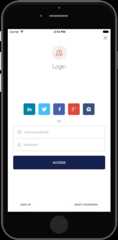
In order to make Lock use the OS browser to perform Web Auth you will need to pass the attributeuseBrowser when you build Lock like
varlock=newAuth0Lock({clientId:"YOUR_CLIENT_ID",domain:"YOUR_DOMAIN",useBrowser:true});
Then you need to configure both your iOS and Android project following the instructions detailed below.
IMPORTANT: This feature only works with iOS 9 or later.
In the fileAppDelegate.m add the following import on the top (next to the other imports of the file)
#import"A0LockReact.h"
and then inside theAppDelegate implementation add the following method
- (BOOL)application:(UIApplication *)app openURL:(NSURL *)url options:(NSDictionary<UIApplicationOpenURLOptionsKey,id> *)options {return [[A0LockReactsharedInstance]handleURL:urlsourceApplication:nil];}
And finally in the fileInfo.plist add the following entry
<key>CFBundleURLTypes</key><array> <dict> <key>CFBundleTypeRole</key> <string>Editor</string> <key>CFBundleURLName</key> <string>auth0</string> <key>CFBundleURLSchemes</key> <array> <string>{Bundle Identifier}</string> </array> </dict></array>
Where the Bundle identifier can be found in the same file under the keyCFBundleIdentifier like
<key>CFBundleIdentifier</key><string>org.reactjs.native.example.$(PRODUCT_NAME:rfc1034identifier)</string>
In the fileAndroidManifest find where theLockActivity is declared and insde theactivity tags add the following
<intent-filter> <actionandroid:name="android.intent.action.VIEW"/> <categoryandroid:name="android.intent.category.DEFAULT"/> <categoryandroid:name="android.intent.category.BROWSABLE"/> <dataandroid:scheme="a0{your lowercase auth0 client id}"android:host="{your auth0 domain}"/></intent-filter>
And make sure Lock's activity launch mode issingleTask
lock.show({connections:["touchid"]},(err,profile,token)=>{console.log('Logged in!');});
And you'll see TouchID login screen
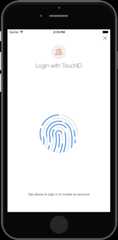
Because it uses a Database connection, the user can change it's password and authenticate using email/password whenever needed. For example when you change your device.
lock.show({connections:["sms"]},(err,profile,token)=>{console.log('Logged in!');});
And you'll see SMS Passwordless login screen
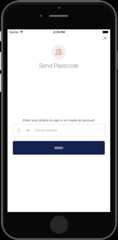
lock.show({connections:["email"]},(err,profile,token)=>{console.log('Logged in!');});
And you'll see Email Passwordless login screen
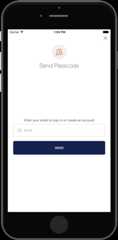
If you are upgrading yourreact-native version just runreact-native upgrade and overwrite all conflicts (optiona oroverwrite this and all others).
If you have custom code in any of the conflict files, like
AppDelegate.m, it's probably best to backup a copy to apply those changes later.
Then runreact-native link react-native-lock and follow the same steps like you did the first time you installed the library.
####.show(options, callback)Show Lock's authentication screen as a modal screen using the connections configured for your applications or the ones specified in theoptions parameter. This is the list of valid options:
- closable (
boolean): If Lock screen can be dismissed - disableSignUp (
boolean): default to false, if true will hide the signup button - disableResetPassword (
boolean): default to false, if true will hide the reset password button - connections (
[string]): List of enabled connections to use for authentication. Must be enabled in your app's dashboard first. - authParams (
object): Object with the parameters to be sent to the Authentication API, e.g.scope.
The callback will have the error if anything went wrong or after a successful authentication, it will yield the user's profile info and tokens.
####.authenticationAPI()Returns Auth0 Authentication API client that can be used to refresh user's token, obtain user information or call Auth0 delegation.
For more info checkreact-native-auth0
####.usersAPI(token)Returns Auth0 Users API client using a valid user's token forManagement API. With this client you can update user's metadata or link two user accounts.
For more info checkreact-native-auth0
If you have found a bug or if you have a feature request, please report them at this repository issues section. Please do not report security vulnerabilities on the public GitHub issue tracker. TheResponsible Disclosure Program details the procedure for disclosing security issues.
Auth0 helps you to:
- Add authentication withmultiple authentication sources, either social likeGoogle, Facebook, Microsoft Account, LinkedIn, GitHub, Twitter, Box, Salesforce, among others, or enterprise identity systems likeWindows Azure AD, Google Apps, Active Directory, ADFS or any SAML Identity Provider.
- Add authentication through more traditionalusername/password databases.
- Add support forlinking different user accounts with the same user.
- Support for generating signedJson Web Tokens to call your APIs andflow the user identity securely.
- Analytics of how, when and where users are logging in.
- Pull data from other sources and add it to the user profile, throughJavaScript rules.
- Go toAuth0 and click Sign Up.
- Use Google, GitHub or Microsoft Account to login.
react-native-lock-ios is available under the MIT license. See theLICENSE file for more info.
About
[DEPRECATED] A wrapper of Lock to use with React Native (iOS & Android)
Resources
License
Uh oh!
There was an error while loading.Please reload this page.
Stars
Watchers
Forks
Packages0
Uh oh!
There was an error while loading.Please reload this page.
Contributors13
Uh oh!
There was an error while loading.Please reload this page.