- Notifications
You must be signed in to change notification settings - Fork14
TypeScript Compiler
TypeScript IDE provides 2 means to compile ts files :
- with a launch
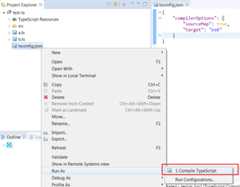
Run As -> Compile TypeScript. - compile/build on save when ts file is saved.
If you selecttsconfig.json, you can doRun As -> Compile TypeScript to executetsc with the given TypeScript project to compile ts files:
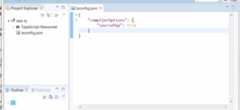
If you wish to usewatch mode withtsc, you can add watch property in the tsconfig.json:
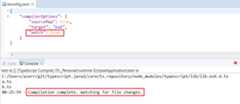
Please note thatwatch mode doesn't work if you add new ts file. You need to stop the process and restart it.
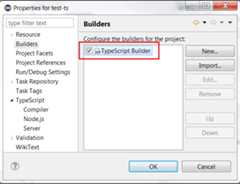
If your project is aTypeScript project, you must enableCompile on save? from the project propertiesTypeScript/Compiler:

This action adds theTypeScript Builder to your project:
After that you need to activateProject / Build Automatically:
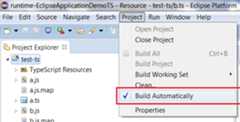
to executeTypeScript Builder when any ts files are saved.
Compile on save means compile ts file which is saved.
Here a demo with compile on save:
Build on save means compile the whole ts file of tsconfig.json when a ts file (which belongs to tsconfig.json) is saved. Pay attention, it can be slow, but if you use "outFile" inside your tsconfig.json, it can be helpful.
Here a demo with build on save:

- TypeScript IDE
- New and Noteworthy