- Notifications
You must be signed in to change notification settings - Fork14
TypeScript BuildPath
A lot of Eclipse plugins (JDT, JSDT, other TypeScript plugins) useEclipse Nature which is used for instance to show/hide some menus according the nature(s) of the Eclipse project.
TypeScript IDE doesn't useEclipse Nature because a TypeScript project can be created with other IDE likeVSCode,Atom,WebStorm, etc.
ForTypeScript IDE, an Eclipse project is a TypeScript project if it contains one or moretsconfig.json files. The problem is thattsconfig.json files can be hosted in any folders of the project. To avoid scanning each time the whole of files of project,TypeScript IDE uses the following rules:
it searches
tsconfig.jsonfile inside theroot projectand/srcfolder. If atsconfig.jsonfile exists in those locations, the project hasTypeScript Nature.if
tsconfig.jsonis not found in the default location, you can add one or several folders of your project by usingTypeScript Build Path.
When a project hasTypeScript Nature:
- it display
TypeScript Resourcesin the root of project inside theProject Explorer:
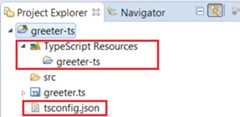
- the
TypeScriptmenu item of the project properties is shown:
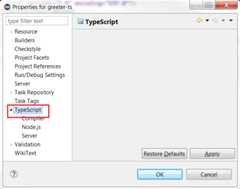
Please note thatTypeScript IDE doesn't needTypeScript Nature if you wish to use just completion, hover, search insideTypeScript Editor since it consummestsserver.
When a project is loaded,TypeScript IDE searchestsconfig.json inside theroot project and/src folder. If atsconfig.json file exists in those locations, the project hasTypeScript Nature but your project could not follow this rule.
If you are in this case, you must configureBuild Path by setting where your(s)tsconfig.json file(s) is(are) hosted. TypeScriptBuild Path is a list of folders which contains atsconfig.json file in the root folder.Build Path is used for:
Here a demo with add/removeBuild Path:
To addBuild Path, select your custom folder which contains yourtsconfig.json file, open contextual menu and selectAdd to TypeScript BuildPath...
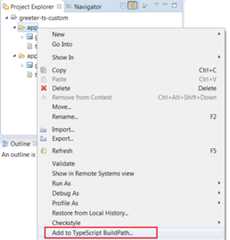
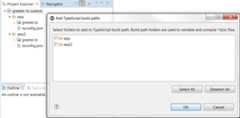
If your selected folder doesn't contains atsconfig.json file in the root, it opens a dialog which searches folders which containstsconfig.json files that you can select:
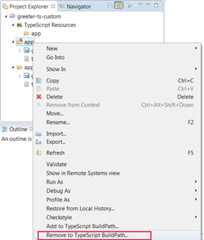
To removeBuild Path, select your custom folder which contains yourtsconfig.json file, open contextual menu and selectRemove to TypeScript BuildPath...
TODO : manage default build path with UI preferences to add other default folder (seeissue 55).
TODO: working on this issue.
- TypeScript IDE
- New and Noteworthy