- Notifications
You must be signed in to change notification settings - Fork20
Import commits from a private GitLab repository in an anonymized way.
License
alexandear/import-gitlab-commits
Folders and files
| Name | Name | Last commit message | Last commit date | |
|---|---|---|---|---|
Repository files navigation
This tool imports commits from a private GitLab repository to a separate repository.It can be used to showcase your programming activity for another company on GitHub.
Check out this informative blog post for a practical use case on how to import GitLab commitshere.
Contributions before runningimport-gitlab-commits:
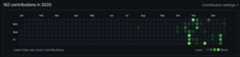
After:

You can run the tool with Docker or a native Go build.
Run the tool using Docker Compose:
Copy the environment variables template:
cp .env.example .env
Edit
.envand configure your credentials.Build and run withDocker Compose:
docker compose up
The imported repository will be created in theoutput/ directory.
Build:
docker build -t github.com/alexandear/import-gitlab-commits.Run:
docker run --rm \ -e GITLAB_BASE_URL="https://gitlab.com" \ -e GITLAB_TOKEN="<your_gitlab_token>" \ -e COMMITTER_NAME="John Doe" \ -e COMMITTER_EMAIL="john.doe@example.com" \ -v$(pwd)/output:/root \ github.com/alexandear/import-gitlab-commits
Download and installGo.
Install the program by running the following command in a shell:
go install github.com/alexandear/import-gitlab-commits@latest
Set environment variables and run
import-gitlab-commits:export GITLAB_BASE_URL=https://gitlab.comexport GITLAB_TOKEN=<your_gitlab_token>export COMMITTER_NAME="John Doe"export COMMITTER_EMAIL=john.doe@example.com$(go env GOPATH)/bin/import-gitlab-commits
Where$(go env GOPATH)/bin/ is the path whereimport-gitlab-commits is installed.
Configure the tool with these environment variables:
GITLAB_BASE_URL- a GitLabinstance URL,e.g.,https://gitlab.com,https://gitlab.gnome.org, or any GitLab server.GITLAB_TOKEN- a personalaccess token with these scopes:read_api,read_user,read_repository.COMMITTER_NAME- your GitHub name with surname, e.g.,John Doe(can be passed togit config user.name).COMMITTER_EMAIL- your GitHub email, e.g.,john.doe@example.com(valid forgit config user.email).
What the tool does:
- Retrieves current user info using
GITLAB_TOKEN. - Fetches projects from
GITLAB_BASE_URLthat the current user contributed to. - For all projects, fetches commits where the author's email matches the current user's email.
- Creates a new repository
repo.gitlab.yourcompany.com.currentusernameand commits all fetched commits with the message:Project: GITLAB_PROJECT_ID commit: GITLAB_COMMIT_HASH, commit dateGITLAB_COMMIT_DATE, and commit authorCOMMITTER_NAME <COMMITTER_EMAIL>.
To display the changes on GitHub, you need to:
- Create a new repository
yourcompany-contributionson GitHub. - Open the folder
repo.gitlab.yourcompany.com.currentusername. - Add the remote URL:
git remote add origin git@github.com:username/yourcompany-contributions.git. - Push the changes.
To run integration tests:
Set the
GITLAB_TOKENenvironment variable with the value obtained athttps://gitlab.com/-/user_settings/personal_access_tokens. Necessary scopes:read_apiread_userread_repository
Set
GITLAB_BASE_URLtohttps://gitlab.com.Run
make test-integration.
About
Import commits from a private GitLab repository in an anonymized way.
Topics
Resources
License
Contributing
Uh oh!
There was an error while loading.Please reload this page.
Stars
Watchers
Forks
Uh oh!
There was an error while loading.Please reload this page.
Contributors6
Uh oh!
There was an error while loading.Please reload this page.