Uh oh!
There was an error while loading.Please reload this page.
- Notifications
You must be signed in to change notification settings - Fork39
PHP Console Application made easy- build great console apps with ease. Comes with Zero Dependency and Autocompletion support. Think of it as extremely flexible and customizable PHP cli application framework.
License
adhocore/php-cli
Folders and files
| Name | Name | Last commit message | Last commit date | |
|---|---|---|---|---|
Repository files navigation
Framework agnostic Command Line Interface utilities and helpers for PHP. Build Console App with ease, fun and love.


- Command line application made easy
- Inspired by nodejscommander (thanks tj)
- Zero dependency.
- For PHP7, PHP8 and for good

Core:Argv parser ·Cli application ·Shell
IO:Colorizer ·Cursor manipulator ·Progress bar ·Stream writer ·Stream reader
Other:Autocompletion
# PHP8.0 and above v1.0.0composer require adhocore/cli:^v1.0.0# PHP 7.xcomposer require adhocore/cli:^v0.9.0
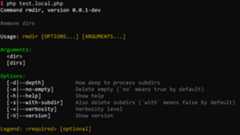
$command =newAhc\Cli\Input\Command('rmdir','Remove dirs');$command ->version('0.0.1-dev')// Arguments are separated by space// Format: `<name>` for required, `[name]` for optional// `[name:default]` for default value, `[name...]` for variadic (last argument) ->arguments('<dir> [dirs...]')// `-h --help`, `-V --version`, `-v --verbosity` options are already added by default.// Format: `<name>` for required, `[name]` for optional ->option('-s --with-subdir','Also delete subdirs (`with` means false by default)') ->option('-e,--no-empty','Delete empty (`no` means true by default)')// Specify santitizer/callback as 3rd param, default value as 4th param ->option('-d|--depth [nestlevel]','How deep to process subdirs','intval',5) ->parse(['thisfile.php','-sev','dir','dir1','dir2','-vv'])// `$_SERVER['argv']`;// Print all values:print_r($command->values());/*Array( [help] => [version] => 0.0.1 [verbosity] => 3 [dir] => dir [dirs] => Array ( [0] => dir1 [1] => dir2 ) [subdir] => true [empty] => false [depth] => 5)*/// To get values for options except the default ones (help, version, verbosity)print_r($command->values(false));// Pick a value by name$command->dir;// dir$command->dirs;// [dir1, dir2]$command->depth;// 5
It can be triggered manually with$command->showHelp() or automatic when-h or--help option is passed to$command->parse().
For above example, the output would be:
It can be triggered manually with$command->showVersion() or automatic when-V or--version option is passed to$command->parse().
For above example, the output would be:
0.0.1-devDefinitely checkadhocore/phint - a real world console application made usingadhocore/cli.
Here we simulate agit app with limited functionality ofadd, andcheckout.You will see how intuitive, fluent and cheese building a console app is!
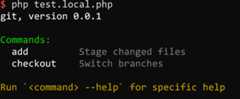
$app =newAhc\Cli\Application('git','0.0.1');$app// Register `add` command ->command('add','Stage changed files','a')// alias a// Set options and arguments for this command ->arguments('<path> [paths...]') ->option('-f --force','Force add ignored file','boolval',false) ->option('-N --intent-to-add','Add content later but index now','boolval',false)// Handler for this command: param names should match but order can be anything :) ->action(function ($path,$paths,$force,$intentToAdd) {array_unshift($paths,$path);echo ($intentToAdd ?'Intent to add' :'Add') .implode(',',$paths) . ($force ?' with force' :'');// If you return integer from here, that will be taken as exit error code })// Done setting up this command for now, tap() to retreat back so we can add another command ->tap() ->command('checkout','Switch branches','co')// alias co ->arguments('<branch>') ->option('-b --new-branch','Create a new branch and switch to it',false) ->option('-f --force','Checkout even if index differs','boolval',false) ->action(function ($branch,$newBranch,$force) {echo'Checkout to' . ($newBranch ?'new' .$branch :$branch) . ($force ?' with force' :''); });// Parse only parses input but doesnt invoke action$app->parse(['git','add','path1','path2','path3','-f']);// Handle will do both parse and invoke action.$app->handle(['git','add','path1','path2','path3','-f']);// Will produce: Add path1, path2, path3 with force$app->handle(['git','co','-b','master-2','-f']);// Will produce: Checkout to new master-2 with force
Instead of inline commands/actions, we define and add our own commands (havinginteract() andexecute()) to the app:
class InitCommandextendsAhc\Cli\Input\Command{publicfunction__construct() {parent::__construct('init','Init something');$help ='<cyan>Custom help screen</end>';$writer =newAhc\Cli\Output\Writer();$this ->argument('<arrg>','The Arrg') ->argument('[arg2]','The Arg2') ->option('-a --apple','The Apple') ->option('-b --ball','The ball') ->help($writer->colorizer()->colors($help))// Usage examples: ->usage(// append details or explanation of given example with ` ## ` so they will be uniformly aligned when shown'<bold> init</end> <comment>--apple applet --ball ballon <arggg></end> ## details 1<eol/>' .// $0 will be interpolated to actual command name'<bold> $0</end> <comment>-a applet -b ballon <arggg> [arg2]</end> ## details 2<eol/>' ) ->logo('Ascii art logo of your command'); }// This method is auto called before `self::execute()` and receives `Interactor $io` instancepublicfunctioninteract(Ahc\Cli\IO\Interactor$io) :void {// Collect missing opts/argsif (!$this->apple) {$this->set('apple',$io->prompt('Enter apple')); }if (!$this->ball) {$this->set('ball',$io->prompt('Enter ball')); }// ... }// When app->handle() locates `init` command it automatically calls `execute()`// with correct $ball and $apple valuespublicfunctionexecute($ball,$apple) {$io =$this->app()->io();$io->write('Apple' .$apple,true);$io->write('Ball' .$ball,true);// more codes ...// If you return integer from here, that will be taken as exit error code }}class OtherCommandextendsAhc\Cli\Input\Command{publicfunction__construct() {parent::__construct('other','Other something'); }publicfunctionexecute() {$io =$this->app()->io();$io->write('Other command');// more codes ...// If you return integer from here, that will be taken as exit error code }}// Init App with name and version$app =newAhc\Cli\Application('App','v0.0.1');// Add commands with optional aliases`$app->add(newInitCommand,'i');$app->add(newOtherCommand,'o');// Set logo$app->logo('Ascii art logo of your app');// Custom help screen$app->help('Custom help screen (if omitted one will be generated)');$app->handle($_SERVER['argv']);// if argv[1] is `i` or `init` it executes InitCommand
Grouped commands are listed together in commands list. Explicit grouping a command is optional.By default if a command name has a colon: then the part before it is taken as a group,else* is taken as a group.
Example: command name
app:envhas a default groupapp, command nameappenvhas group*.
// Add grouped commands:$app->group('Configuration',function ($app) {$app->add(newConfigSetCommand);$app->add(newConfigListCommand);});// Alternatively, set group one by one in each commands:$app->add((newConfigSetCommand)->inGroup('Config'));$app->add((newConfigListCommand)->inGroup('Config'));...
By default, running your CLI app without any arguments will show the help screen. However you can set the default action to run one of your commands either by setting the third parameter of theadd function totrue or by using thedefaultCommand function.
$app->add(newInitCommand,'i',true);// Alternatively$app->command('init','Init something','i');$app->defaultCommand('init');// Retrieve the name of the default command$default_command =$app->getDefaultCommand();
Set a custom exception handler as callback. The callback receives exception & exit code. The callback may rethrow exception or may exit the program or just log exception and do nothing else.
$app =newAhc\Cli\Application('App','v0.0.1');$app->add(...);$app->onException(function (Throwable$e,int$exitCode) {// send to sentry// write to logs// optionally, exit with exit code:exit($exitCode);// or optionally rethrow, a rethrown exception is propagated to top layer caller.throw$e;})->handle($argv);
It can be triggered manually with$app->showHelp() or automatic when-h or--help option is passed to$app->parse().Note If you pass something like['app', cmd', '-h'] to$app->parse() it will automatically and instantly show you help of thatcmd and not the$app.
For above example, the output would be:
Same version number is passed to all attached Commands. So you can trigger version on any of the commands.
Very thin shell wrapper that provides convenience methods aroundproc_open().
$shell =newAhc\Cli\Helper\Shell($command ='php -v',$rawInput =null);// Waits until proc finishes$shell->execute($async =false);// default falseecho$shell->getOutput();// PHP version string (often with zend/opcache info)
$shell =newAhc\Cli\Helper\Shell('php /some/long/running/scipt.php');// With async flag, doesnt wait for proc to finish!$shell->setOptions($workDir ='/home',$envVars = []) ->execute($async =true) ->isRunning();// true// Force stop anytime (please check php.net/proc_close)$shell->stop();// also closes pipes// Force kill anytime (please check php.net/proc_terminate)$shell->kill();
$shell =newAhc\Cli\Helper\Shell('php /some/long/running/scipt.php');// Wait for at most 10.5 seconds for proc to finish!// If it doesnt complete by then, throws exception$shell->setOptions($workDir,$envVars,$timeout =10.5)->execute();// And if it completes within timeout, you can access the stdout/stderrecho$shell->getOutput();echo$shell->getErrorOutput();
You can perform user interaction like printing colored output, reading user input programatically and moving the cursors around with providedAhc\Cli\IO\Interactor.
$interactor =newAhc\Cli\IO\Interactor;// For mocking io:$interactor =newAhc\Cli\IO\Interactor($inputPath,$outputPath);
$confirm =$interactor->confirm('Are you happy?','n');// Default: n (no)$confirm// is a boolean ?$interactor->greenBold('You are happy :)',true)// Output green bold text :$interactor->redBold('You are sad :(',true);// Output red bold text
$fruits = ['a' =>'apple','b' =>'banana'];$choice =$interactor->choice('Select a fruit',$fruits,'b');$interactor->greenBold("You selected:{$fruits[$choice]}",true);
$fruits = ['a' =>'apple','b' =>'banana','c' =>'cherry'];$choices =$interactor->choices('Select fruit(s)',$fruits, ['b','c']);$choices =\array_map(function ($c)use ($fruits) {return$fruits[$c]; },$choices);$interactor->greenBold('You selected:' .implode(',',$choices),true);
$any =$interactor->prompt('Anything',rand(1,100));// Random default$interactor->greenBold("Anything is:$any",true);
$nameValidator =function ($value) {if (\strlen($value) <5) {thrownew \InvalidArgumentException('Name should be atleast 5 chars'); }return$value;};// No default, Retry 5 more times$name =$interactor->prompt('Name',null,$nameValidator,5);$interactor->greenBold("The name is:$name",true);
On windows platform, it may change the fontface which can befixed.
$passValidator =function ($pass) {if (\strlen($pass) <6) {thrownew \InvalidArgumentException('Password too short'); }return$pass;};$pass =$interactor->promptHidden('Password',$passValidator,2);

The interactor is composed ofAhc\Cli\Input\Reader andAhc\Cli\Output\Writer while theWriter itself is composed ofAhc\Cli\Output\Color. All these components can be used standalone.
Color looks cool!
$color =newAhc\Cli\Output\Color;
echo$color->warn('This is warning');echo$color->info('This is info');echo$color->error('This is error');echo$color->comment('This is comment');echo$color->ok('This is ok msg');
Ahc\Cli\Output\Color::style('mystyle', ['bg' =>Ahc\Cli\Output\Color::CYAN,'fg' =>Ahc\Cli\Output\Color::fg256(57),// 256 colors can be used as well'bold' =>1,// You can experiment with 0, 1, 2, 3 ... as well]);echo$color->mystyle('My text');
There are a number of pre-defined built-in styles that allows you granular customization to different output conditions such as help and prompts:
- answer
- choice
- comment
- error
- help_category
- help_description_even
- help_description_odd
- help_example
- help_footer
- help_group
- help_header
- help_item_even
- help_item_odd
- help_summary
- help_text
- info
- logo
- ok
- question
- version
- warn
Overriding a built-in style works the same way as defining a new style:
Ahc\Cli\Output\Color::style('error', ['fg' =>Ahc\Cli\Output\Color::RED,'bold' =>1,]);
Ahc\Cli\Output\Color::$enabled =false;
Colors will be automatically disabled if theNO_COLOR environment variable is set to true.
Move cursor around, erase line up or down, clear screen.
$cursor =newAhc\Cli\Output\Cursor;echo$cursor->up(1) .$cursor->down(2) .$cursor->right(3) .$cursor->left(4) .$cursor->next(0) .$cursor->prev(2);.$cursor->eraseLine() .$cursor->clear() .$cursor->clearUp() .$cursor->clearDown() .$cursor->moveTo(5,8);// x, y
Easily add a progress bar to your output:
$progress =newAhc\Cli\Output\ProgressBar(100);for ($i =0;$i <=100;$i++) {$progress->current($i);// Simulate something happeningusleep(80000);}
You can also manually advance the bar:
$progress =newAhc\Cli\Output\ProgressBar(100);// Do something$progress->advance();// Adds 1 to the current progress// Do something$progress->advance(10);// Adds 10 to the current progress// Do something$progress->advance(5,'Still going.');// Adds 5, displays a label
You can override the progress bar options to customize it to your liking:
$progress =newAhc\Cli\Output\ProgressBar(100);$progress->option('pointer','>>');$progress->option('loader','▩');// You can set the progress fluently$progress->option('pointer','>>')->option('loader','▩');// You can also use an associative array to set many options in one time$progress->option(['pointer' =>'>>','loader' =>'▩']);// Available options+---------------+------------------------------------------------------+---------------+| Option | Description | Default value |+===============+======================================================+===============+| pointer | The progress bar head symbol | > || loader | The loader symbol | = || color | The color of progress bar | white || labelColor | The text color of the label | white || labelPosition | The position of thelabel (top, bottom, left, right) | bottom |+---------------+------------------------------------------------------+---------------+
Write anything in style.
$writer =newAhc\Cli\Output\Writer;// All writes are forwarded to STDOUT// But if you specify error, then to STDERR$writer->errorBold('This is error');
You can call methods composed of any combinations:'<colorName>', 'bold', 'bg', 'fg', 'warn', 'info', 'error', 'ok', 'comment'... in any order (eg:bgRedFgBlaock,boldRed,greenBold,commentBgPurple and so on ...)
$writer->bold->green->write('It is bold green');$writer->boldGreen('It is bold green');// Same as above$writer->comment('This is grayish comment',true);// True indicates append EOL character.$writer->bgPurpleBold('This is white on purple background');
Many colors with one single call: wrap text with tags<method> and</end>For NL/EOL just use<eol> or</eol> or<eol/>.
Great for writing long colorful texts for example command usage info.
$writer->colors('<red>This is red</end><eol><bgGreen>This has bg Green</end>');
$writer->raw('Enter name:');
Just pass array of assoc arrays. The keys of first array will be taken as heading.Heading is auto inflected to human readable capitalized words (ucwords).
$writer->table([ ['a' =>'apple','b-c' =>'ball','c_d' =>'cat'], ['a' =>'applet','b-c' =>'bee','c_d' =>'cute'],]);
Gives something like:
+--------+------+------+| A | B C | C D |+--------+------+------+| apple | ball | cat || applet | bee | cute |+--------+------+------+Designing table look and feel
Just pass 2nd param$styles:
$writer->table([ ['a' =>'apple','b-c' =>'ball','c_d' =>'cat'], ['a' =>'applet','b-c' =>'bee','c_d' =>'cute'],], [// for => styleName (anything that you would call in $writer instance)'head' =>'boldGreen',// For the table heading'odd' =>'bold',// For the odd rows (1st row is odd, then 3, 5 etc)'even' =>'comment',// For the even rows (2nd row is even, then 4, 6 etc)'1:1' =>'red',// For cell in row 1 col 1 (1 based count, 'apple' in this example)'2:*' =>'',// For all cells in row 2 (1 based count)'*:2' =>'',// For all cells in col 2 (1 based count)'b-c' =>'',// For all columns named 'b-c' (same as '*:2' in this example)'*:*' =>'blue',// For all cells in table (Set all cells to blue)]);
You can define the style of a cell dynamically using a callback. You could then apply one style or another depending on a value.
$rows = [ ['name' =>'John Doe','age' =>'30'], ['name' =>'Jane Smith','age' =>'25'], ['name' =>'Bob Johnson','age' =>'40'],];$styles = ['*:2' =>function ($val,$row) {return$row['age'] >=30 ?'boldRed' :''; },];$writer->table($rows,$styles);
The example above only processes the cells in the second column of the table. If you want to process any cell, you can use the*:* key. You could then customise each cell in the table
$rows = [ ['name' =>'John Doe','age' =>'30'], ['name' =>'Jane Smith','age' =>'25'], ['name' =>'Alice Bob','age' =>'10'], ['name' =>'Big Johnson','age' =>'40'], ['name' =>'Jane X','age' =>'50'], ['name' =>'John Smith','age' =>'20'], ['name' =>'Bob John','age' =>'28'],];$styles = ['*:*' =>function ($val,$row) {if ($val ==='Jane X') {return'yellow'; }if ($val ==10 ||$val ==20) {return'boldPurple'; }if (str_contains($val,'Bob')) {return'blue'; }return$row['age'] >=30 ?'boldRed' :''; },];$writer->table($rows,$styles);
Note: Priority in increasing order:
oddoreven2:*(row)*:2orb-c <-> column name(col)*:*any cell in table1:1(cell) =highest priority
If you want to display certain configurations (from your .env file for example) a bit like Laravel does (via thephp artisan about command) you can use thejustify method.
$writer->justify('Environment');$writer->justify('PHP Version',PHP_VERSION);$writer->justify('App Version','1.0.0');$writer->justify('Locale','en');
Gives something like:
Environment ........................................PHP Version .................................. 8.1.4App Version .................................. 1.0.0Locale .......................................... enYou can use thesep parameter to define the separator to use.
$writer->justify('Environment','', ['sep' =>'-']);$writer->justify('PHP Version',PHP_VERSION);
Gives something like:
Environment ----------------------------------------PHP Version .................................. 8.1.4In addition, the text color, the background color and the thickness of the two texts can be defined via the 3rd argument of this method.
$writer->justify('Cache Enable','true', ['first' => ['fg' =>Ahc\Cli\Output\Color::CYAN],// style of the key'second' => ['fg' =>Ahc\Cli\Output\Color::GREEN],// style of the value]);$writer->justify('Debug Mode','false', ['first' => ['fg' =>Ahc\Cli\Output\Color::CYAN],// style of the key'second' => ['fg' =>Ahc\Cli\Output\Color::RED],// style of the value]);
For more details regarding the different color options, seeCustom style
Read and pre process user input.
$reader =newAhc\Cli\Input\Reader;// No default, callback fn `ucwords()`$reader->read(null,'ucwords');// Default 'abc', callback `trim()`$reader->read('abc','trim');// Read at most first 5 chars// (if ENTER is pressed before 5 chars then further read is aborted)$reader->read('','trim',5);// Read but dont echo back the input$reader->readHidden($default,$callback);// Read from piped stream (or STDIN) if available without waiting$reader->readPiped();// Pass in a callback for if STDIN is empty// The callback recieves $reader instance and MUST return string$reader->readPiped(function ($reader) {// Wait to read a line!return$reader->read();// Wait to read multi lines (until Ctrl+D pressed)return$reader->readAll();});
Whenever an exception is caught byApplication::handle(), it will show a beautiful stack trace and exit with non 0 status code.

adhocore/cli also supports internationalisation. This is particularly useful if you are not very comfortable with English or if you are creating a framework or CLI application that could be used by people from a variety of backgrounds.
By default, all the texts generated by our system are in English. But you can easily modify them by defining your translations as follows
\Ahc\Application::addLocale('fr', ['Only last argument can be variadic' =>'Seul le dernier argument peut être variadique',],true);
You can also change the default English text to make the description more explicit if you wish.
\Ahc\Application::addLocale('en', ['Show help' =>'Shows helpful information about a command',]);
you can find all the translation keys supported by the package in this gist :https://gist.github.com/dimtrovich/1597c16d5c74334e68eef15a4e7ba3fd
Any console applications that are built on top ofadhocore/cli can entertain autocomplete of commands and options in zsh shell with oh-my-zsh.
All you have to do is add one line to the end of~/.oh-my-zsh/custom/plugins/ahccli/ahccli.plugin.zsh:
compdef _ahccli <appname>
Example:compdef _ahccli phint forphint.
That is cumbersome to perform manually, here's a complete command you can copy/paste/run:
mkdir -p~/.oh-my-zsh/custom/plugins/ahccli&&cd~/.oh-my-zsh/custom/plugins/ahccli[-f ./ahccli.plugin.zsh ]|| curl -sSLo ./ahccli.plugin.zsh https://raw.githubusercontent.com/adhocore/php-cli/master/ahccli.plugin.zshchmod 760 ./ahccli.plugin.zsh&&cd -
This is also one time setup.
# Open .zshrcnano~/.zshrc# locate plugins=(... ...) and add ahccliplugins=(git ... ... ahccli)# ... then save it (Ctrl + O)
# replace appname with real name eg: phintecho compdef _ahccli appname>>~/.oh-my-zsh/custom/plugins/ahccli/ahccli.plugin.zsh
Of course you can add multiple apps, just change appname in above command
Then either restart the shell or source the plugin like so:
source~/.oh-my-zsh/custom/plugins/ahccli/ahccli.plugin.zsh
appname<tab># autocompletes commands (phint <tab>)appname subcommand<tab># autocompletes options for subcommand (phint init <tab>)
- adhocore/phalcon-ext · Phalcon extension using
adhocore/cli - adhocore/phint · PHP project scaffolding app using
adhocore/cli - adhocore/type-hinter · Auto PHP7 typehinter tool using
adhocore/cli
© 2017-2020,Jitendra Adhikari |MIT
This project is release managed byplease.
About
PHP Console Application made easy- build great console apps with ease. Comes with Zero Dependency and Autocompletion support. Think of it as extremely flexible and customizable PHP cli application framework.
Topics
Resources
License
Uh oh!
There was an error while loading.Please reload this page.
Stars
Watchers
Forks
Sponsor this project
Uh oh!
There was an error while loading.Please reload this page.
Uh oh!
There was an error while loading.Please reload this page.
Contributors15
Uh oh!
There was an error while loading.Please reload this page.