- Notifications
You must be signed in to change notification settings - Fork8
Object-oriented java Excel library
License
Vatavuk/excel-io
Folders and files
| Name | Name | Last commit message | Last commit date | |
|---|---|---|---|---|
Repository files navigation


This is an object-oriented java library for reading and writing Microsoft Office Excel spreadsheets.It is a wrapper around Apache POI that provides elegant and user friendly interface for creating Excel documents.
How to use.Latest versionhere
<dependency> <groupId>hr.com.vgv</groupId> <artifactId>excel-io</artifactId></dependency>
Java version required: 1.8+.
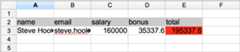
newXsWorkbook(newXsSheet(newXsRow() .with(newTextCells("name","email","salary","bonus","total")) .with(newXsStyle(newForegroundColor(IndexedColors.GREY_25_PERCENT.getIndex()),newFillPattern(FillPatternType.SOLID_FOREGROUND) ) ),newXsRow() .with(newTextCells("Steve Hook","steve.hook@gmail.com")) .with(newNumberCells(160000.0,35337.6)) .with(newFormulaCell("SUM(C3:D3)") .with(newXsStyle(newForegroundColor(IndexedColors.RED.getIndex()),newFillPattern(FillPatternType.SOLID_FOREGROUND) ) ) ) .with(newXsProps<>(newHeight((short)500))) )).saveTo("Test.xlsx");
This is how the result looks like:
Read from "Test.xlsx" file and modify cell int the second row/first column.
newXsWorkbook("Test.xlsx") .with(newXsSheet.ReadFrom(0) .with(newXsRow(2,newTextCell(1,"UPDATED") ) ) ).saveTo("Updated.xlsx");
You can create custom cells/rows/sheets:
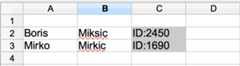
newXsWorkbook(newXsSheet(newMyCustomRow("Boris","Miksic","ID:2450"),newMyCustomRow("Mirko","Mirkic","ID:1690") )).saveTo("Test.xlsx");
Just extend appropriate template class and pass custom row/cell object to its constructor:
privatestaticclassMyCustomRowextendsRowTemplate {publicMyCustomRow(finalStringname,finalStringsurname,finalStringid) {super(newXsRow() .with(newTextCells(name,surname)) .with(newMyGreyCell(newTextCell(id))) ); }}privatestaticclassMyGreyCellextendsCellTemplate {publicMyGreyCell(finalECellcell) {super(cell.with(newXsStyle(newForegroundColor(IndexedColors.GREY_25_PERCENT.getIndex()),newFillPattern(FillPatternType.SOLID_FOREGROUND) ) )); }}
The result:
You can contribute by forking the repo and sending a pull request.Make sure your branch builds without any warnings/issues:
mvn clean install -PquliceAbout
Object-oriented java Excel library
Topics
Resources
License
Uh oh!
There was an error while loading.Please reload this page.
Stars
Watchers
Forks
Packages0
Uh oh!
There was an error while loading.Please reload this page.