Uh oh!
There was an error while loading.Please reload this page.
- Notifications
You must be signed in to change notification settings - Fork6k
How to Contribute
It's really excited that you are interested in contributing to SDWebImage. Before submitting your contribution, please make sure to take a moment and read through the following guidelines:
- Issue Reporting Guidelines
- Pull Request Guidelines
- Development Setup
- Project Structure
- Adding Files
- Unit Test
- Coding Style
- API and semversion
- If you have an issue, use GitHub'sNew Issue to submit issues.
- There is an issue template built in. You should always fill them as necessary as possible, Thus it is easy for us to reproduce issue and fix it.
If you have an issue, use GitHub'sNew PR to submit pull requests.
The
masterbranch is used for releasing the next mainstream version of SDWebImage.There are also some other branches used for maintain the legacy version. Because we followed theSemantic Versioning. Like5.1.x and4.x
New feature:
- Add accompanying test case (See more about Testing later)
- Provide a convincing reason to add this feature. You can add this in your Pull Request description.
- Ideally, you can open a feature request issue first before working on it. We will tag it withfeature request. Good example:#2743 and#2808
Fixing bug:
- If you are resolving a special issue, fill the issue
#xxxxyou want to fix in the pull request template. - Provide a detailed description of the bug in the PR. A demo or screenshot is better.
- Add appropriate test coverage if applicable.
- If you are resolving a special issue, fill the issue
You need the following toolchain setup to development SDWebImage all features.
- Xcode 11.0 above
- macOS 10.14 above (10.15 is required to debug Mac Catalyst features)
- CocoaPods 1.7 and above (or latest)
- Carthage 0.32 and above (or latest)
After cloning the repo, run:
$ pod install
This can make the example inSDWebImage.xcworkspace ready to run. Make it easy to debug and develop new features.
There are also oneSDWebImage.xcodeproj. This contains the framework target to build, used in non-CocoaPods users.
SDWebImage/Core: Contains SDWebImage's core feature's code, mostly you should only change. Any of these files should expose to public APISDWebImage/Private:Contains SDWebImage private API used internally in unit test. Any of these files should not expose to public APISDWebImage/MapKit:Contains SDWebImage MapKit integration code. For CocoaPods it produce theSDWebImage/MapKitsubspec. For Carthage and SwiftPM, it produceSDWebImageMapKitstandalone framework.WebImage:Contains the umbrella headers and Info.plistExamples:Contains the example code and Xcode Project. Now we have both iOS/tvOS/watchOS/macOS example.Tests:Contains the unit test code and Xcode Project. Now we have both iOS/macOS test target.Configs:Contains the Example and Test build setting configuration file. We don't use Xcode GUI build settings and prefers xcconfig to maintain it, to reduce the complexity across massive targets.Docs:Contains the documentation for SDWebImage. Some of them can also be found atSDWebImage Wiki
In most cases, if you just want to add a small patch with only modification. You don't need to read this at all.
But, if you decide to adding new source files for your feature. You should have a detailed look at this.
Since SDWebImage support 4 different install ways. This may be a challenge for most new contributors. Here are the steps to do:
- Open
SDWebImage.xcodeproj(not workspace) - Xcode -> New File... -> Cocoa Touch Class, add your class
- Click the target
SDWebImage staticandSDWebImage. (If you add feature to MapKit integration, only clickSDWebImageMapKit) - Save the file into folder
SDWebImage/Core. (If you add private APIs, chooseSDWebImage/Private) - Check the right side
Target Membershipfor new source file. Change toPublic(If you add private APIs, change toPrivate) - Click on the top
SDWebImage.xcodeproj. Goto theBuild Phasetab - Choose
SDWebImage statictarget'sCopy Headersbuild phase, add your new header into the file list - Run terminal from git root directory, tap
ln -s SDWebImage/Core/XXX.h SDWebImage/include/SDWebImage/XXX.h. This is used for SwiftPM support (If you add private APIs, don't do this) - Open
SDWebImage.h, add one new line#import <SDWebImage/XXX.h>with your class header name (If you add private APIs, don't do this)
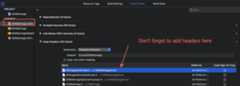
Then all things done for adding new source file. These source file is available in all 4 CocoaPods/Carthage/SwiftPM/Manual install ways.
Since our demo use CocoaPods's development Pod feature. After adding new source file, if you need to see it on our demo. remember to re-runpod install again, then openSDWebImage.xcworkspace.
For source file modification only changes, you don't need to re-runpod install.
Tips: Xcode 11's New Build System seems cause cache issue when using CocoaPods. If you find your code changes does not take effect, you can try clean build again. Or, you can try to switch to Legacy Build System.
SDWebImage provide unit test to ensure function. After you change all your code. You should run unit test to see if the test passed.
- Open
SDWebImage.xcworkspace - choose
Test(for iOS) orTest Mac(for macOS) target. - Click Test (Command + U)
- You can using Xcode to run single test case
SDWebImage is written in Objective-C. However, we provide both Objective-C and Swift support.
For Objective-C, we prefers to use thisObjective-C Style Guide. You should use the modern Objective-C 2.0 syntax and ARC for new features.
At the same time, SDWebImage provide a better Swift API adaptation, which means you should use modern syntax to make clang generate a better Swift API. Including the followings:
- Use property instead of
-(void)setXXX,-(id)XXXto make the property available in Swift - Use class property with the correct name instead of
+(instanceType)sharedInstancein singleton to make it more easy to use in Swift. The generated interface should be simpleopen class var shared { get } - Add all nullability annotation to avoid any
AnyObject!implicitly unwrapped optionals(Except thatnull_resettable) - Add all Core Foundation Ownership using
CF_RETURNS_RETAINEDforGet Rule andCF_RETURNS_NOT_RETAINEDfor Create Rule to avoid anyUnmanagedCF value - Change all key for Dictionary with
NS_STRING_ENUMto make it easy to use in Swift with dot syntax - Change all global value type which represent enum with
NS_TYPED_ENUMto make it easy to use in Swift with dot syntax
SDWebImage followsSemantic Versioning. Your pull request should take care of API stability as well.
API-break changes may be delayed to next major release. And our maintainers can also review the pull request and help you to found the accidental changes which break the API.
If possible, don't expose too much unnecessary public APIs for internal process logic of SDWebImage. Use Private API for this case. Which can make it easy to maintain and changes in the future development.
Thank you to all the people who have already contributed to SDWebImage.
