- Notifications
You must be signed in to change notification settings - Fork21
Sample code to demonstrate easy upload and filling of a custom ABAP table with data from the client side (JSON).
License
SAP-samples/abap-file-uploader
Folders and files
| Name | Name | Last commit message | Last commit date | |
|---|---|---|---|---|
Repository files navigation
The ABAP File Uploader is designed to allow an ABAP developer to upload data from a file directly into a target database table in SAP Business Technology Platform ABAP Environment instance. This utility expects a json file for the uploaded data with attributes that match the column names in the database table.
Video Introduction here:https://youtu.be/PpXNP3ciGOc
Make sure to fulfill the following requirements:
- You have access to an SAP Business Technology Platform ABAP Environment instance (seehere for additional information).
- Note: The XCO APIs are available automatically in trial systems and require no further steps. In productive accounts: "The XCO library is currently only available via feature toggle. If you are interested in using this new feature, please contact SAP."https://help.sap.com/doc/43b304f99a8145809c78f292bfc0bc58/Cloud/en-US/98bf747111574187a7c76f8ced51cfeb.htmlFor more general information on XCO:https://blogs.sap.com/2020/05/17/the-rap-generator
- You have downloaded and installed ABAP Development Tools (ADT). Make sure to use the most recent version as indicated on theinstallation page.
- You have created an ABAP Cloud Project in ADT that allows you to access your SAP Business Technology Platform ABAP Environment instance (seehere for additional information). Your log-on language is English.
- You have installed theabapGit plug-in for ADT from the update site
http://eclipse.abapgit.org/updatesite/.
Use the abapGit plug-in to install the ABAP File Uploader Examples by executing the following steps:
- In your ABAP cloud project, create an ABAP package for the demo content to be downloaded (leave the suggested values unchanged when following the steps in the package creation wizard).
- To add theabapGit Repositories view to theABAP perspective, click
Window>Show View>Other...from the menu bar and chooseabapGit Repositories. - In theabapGit Repositories view, click the
+icon to clone an abapGit repository. - Enter the following URL of this repository:
https://github.com/SAP-samples/abap-file-uploaderand chooseNext. - Create a new transport request that you only use for this demo content installation (recommendation) and chooseFinish to link the Git repository to your ABAP cloud project. The repository appears in the abapGit Repositories View with statusLinked.
- Right-click on the new ABAP repository and choose
pullto start the cloning of the repository contents. Note that this procedure may take a few minutes. - Once the cloning has finished, the status is set to
Pulled Successfully. Then refresh your project tree.
As a result of the installation procedure above, the ABAP system creates an inactive version of all artifacts from the demo content
To activate all development objects from this sample:
- Click the mass-activation icon (Activate Inactive ABAP Development Objects) in the toolbar.
- In the dialog that appears, select all development objects in the transport request (that you created for the demo content installation) and chooseActivate.
- Once the imported handler class is activated, you must then manually create an HTTP Service and attach this handler class to the service. Again, make sure the handler class is activated first!! Then in ADT, right-click on your package and choose
New>Other ABAP Repository Object.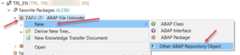
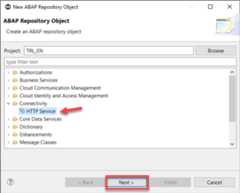
- In the dialog, click Connectivity, then chooseHTTP Service. ClickNext.
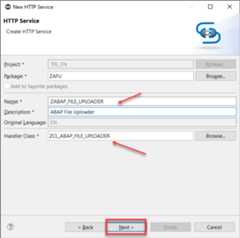
- Give the name of the HTTP Service as ZABAP_FILE_UPLOADER, the Handler Class should prepopulate with the correct name. ClickNext, thenFinish.
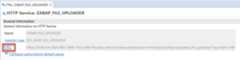
- After a couple minutes, the HTTP Service should be ready(Until all underlying objects are generated you could possiblly get a 403 error when launching the application). Click on the URL link in the service to launch the tool.


This project is provided "as-is": there is no guarantee that raised issues will be answered or addressed in future releases.
Copyright (c) 2024 SAP SE or an SAP affiliate company. All rights reserved.This project is licensed under the Apache Software License, version 2.0 except as noted otherwise in theLICENSE file.
About
Sample code to demonstrate easy upload and filling of a custom ABAP table with data from the client side (JSON).
Topics
Resources
License
Code of conduct
Security policy
Uh oh!
There was an error while loading.Please reload this page.
Stars
Watchers
Forks
Releases
Packages0
Uh oh!
There was an error while loading.Please reload this page.