- Notifications
You must be signed in to change notification settings - Fork45
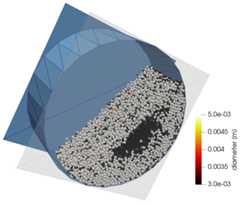
Rotating drum with binary particles
A rotating drum with two particle sizes is randomly filled and let it rotate to see the segregation of particles. The focus of this tutorial is to show how to use the pre-processing tool,particlesPhasicFlow, to create the initial mixture of small and large particles.
Note: It is supposed that you have reviewedsimulating a rotating drum tutorial before starting this tutorial.
PhasicFlow simulation case setup is based on the text-based files that we provide in two folders located in the simulation case folder:settings andcaseSetup. Here we will have a look at some important files and the rest can be found in the tutorial folder of this case setup.
Simulation case setup files can be found in tutorials/sphereGranFlow folder.
In filecaseSetup/sphereShape, two particle types with namessmallSphere andlargeSphere and diameters 3 and 5 mm are defined.
names (smallSphere largeSphere);// names of shapesdiameters (0.0030.005);// diameter of shapes (m)materials (prop1 prop1);// material names for shapes
In dictionarypositionParticles located in filesettings/particlesDict, 30000 particles are located in a cylindrical region. These particles are positioned in order alongz,x and theny axis with 0.005 m distance between their centers.
// positions particlespositionParticles{ method positionOrdered;// ordered positioning maxNumberOfParticles30001;// maximum number of particles in the simulation mortonSorting Yes;// perform initial sorting based on morton code? cylinder// cylinder region for positioning particles {p1 (0.00.00.003);// begin point of cylinder axis (m m m)p2 (0.00.00.097);// end point of cylinder axis (m m m) radius0.117;// radius of cylinder (m) } positionOrderedInfo { diameter0.005;// minimum space between centers of particles numPoints30000;// number of particles in the simulationaxisOrder (z x y);// axis order for filling the space with particles }}
In dictionarysetFields located in filesettings/particlesDict, you define the initialvelocity,acceleration,rotVelocity, andshapeName fields for all 30000 particles in the simulation. Inselectors dictionary, you can select subsets of particles and set the field value for these subsets. InshapeAssigne sub-dictionary, theselectRange selector is defined. It defines a range withbegin (begin index),end (end index) andstride to select particles. And infieldValue sub-dictionary, the fields values for selected particles are set (any number of field values can be set here).
Note: Other selectors are:selectBox that selects particles inside a box andrandomSelect that selects particles randomly from a given index range.
setFields{/* Default value for fields defined for particles These fields should always be defined for simulations with spherical particles.*/ defaultValue { velocityrealx3 (000);// linear velocity (m/s) accelerationrealx3 (000);// linear acceleration (m/s2) rotVelocityrealx3 (000);// rotational velocity (rad/s) shapeName word smallSphere;// name of the particle shape } selectors { shapeAssigne { selector selectRange;// type of point selector selectRangeInfo { begin0;// begin index of points end30000;// end index of points stride3;// stride for selector } fieldValue// fields that the selector is applied to {/* sets shapeName of the selected points to largeSphere*/ shapeName word largeSphere; } }}Enter the following command in terminal:
> geometryPhasicFlow
> particlesPhasicFlow
> sphereGranFlow
Each executable in PhasicFlow comes with some command line options that you can see them by using flag-h in front of that command.
> particlesPhasicFlow -h prints out the following output:
Usage: particlesPhasicFlow [OPTIONS]Options: -h,--help Help for using createParticles of phasicFlow v-0.1 -v,--version Program version information --discription What does this app do? --positionParticles-only Exectue the positionParticles part only and store the created pointStructure in the time folder. --setFields-only Exectue the setFields part only. Read the pointStructure from time folder and setFields and save the result in the same time folder.so, with flag--setFields-only, you can execute thesetFields part ofparticlesDict. Now suppose that you have a simulation case which proceeded up to 2 seconds and for any reason you want to change some field value at time 3 s and continue the simulation from 3 s. To this end, you need to changestartTime in settings dictionary to 3, executeparticlesPhasicFlow --setFields-only, and start the simulation.