- Notifications
You must be signed in to change notification settings - Fork37
Repository for the OpenMx Structural Equation Modeling package
OpenMx/OpenMx
Folders and files
| Name | Name | Last commit message | Last commit date | |
|---|---|---|---|---|
Repository files navigation


OpenMx is aStructural Equation Modelingpackage that encourages users to treat model specifications as something to be generatedand manipulated programmatically.
- Overview
- Installation
- Documentation
- Quick usage examples
- Related work
- Community and getting help
- Contributing
OpenMx is the next generation of the Mx structural equation modeling tool. It is an R package activelly maintained and supported with the work of developers around the globe. It is designed to allow the user the most freedom possible while specifying structural equation models, therefore providing minimal defaults. This helps the user know that each specification/optimization decision comes with their own assumptions and influences model interpretation.
The package is on CRAN and should be installed with:
install.packages("OpenMx")Developers commit to themaster branch. Intrepid users are encouraged to install themaster branch. In order to install locally clone this repo and run:
makecran-install# for the CRAN versionmakeinstall# for the version with the proprietary NPSOL optimizer
Thestable branch can be considered our current alpha release.
Thestable branch is updated automatically when allmodels/passingandmodels/nightly tests pass along withmake cran-check.
On macOS, this can be installed as a binary via travis:
install.packages("https://vipbg.vcu.edu/vipbg/OpenMx2/software/bin/macosx/travis/OpenMx_latest.tgz")OpenMx can fit everything from confirmatory factor analyses,through multiple group, mixture distribution, categorical threshold,modern test theory, differential equations, state space, and many others. Models may be specified as RAM or LISREL paths, or directly in matrix algebra. Fit functions include ML (summary and full information) and WLS.
The package manual can be accessed online in thelink, and as a pdf from thelink. The manual includes example models and scripts for the most common cases.
Path specifications are matematically complete and is often considered an easier approach to teaching and analysis. The path below represents a simple regression:
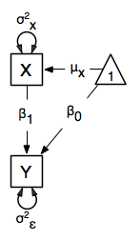
One can specify the above model using the following code:
require(OpenMx)data(myRegDataRaw)# load datanames(myRegDataRaw)# get namesSimpleDataRaw<-myRegDataRaw[,c("x","y")]# take only what is neededdataRaw<- mxData(observed=SimpleDataRaw,type="raw" )# variance pathsvarPaths<- mxPath(from=c("x","y"),arrows=2,free=TRUE,values= c(1,1),labels=c("varx","residual") )# regression weightsregPaths<- mxPath(from="x",to="y",arrows=1,free=TRUE,values=1,labels="beta1" )# means and interceptsmeans<- mxPath(from="one",to=c("x","y"),arrows=1,free=TRUE,values=c(1,1),labels=c("meanx","beta0") )uniRegModel<- mxModel(model="Simple Regression Path Specification",type="RAM",dataRaw,manifestVars=c("x","y"),varPaths,regPaths,means)uniRegFit<- mxRun(uniRegModel)# run itsummary(uniRegFit)
And the following output should appear in your R environment:
Summary of Simple Regression Path Specificationfree parameters: name matrix row col Estimate Std.Error A1 beta1 A y x 0.48311962 0.077576872 varx S x x 1.10531952 0.156316523 residual S y y 0.66520320 0.094074114 meanx M 1 x 0.05415975 0.105134285 beta0 M 1 y 2.54776414 0.08166814Model Statistics: | Parameters | Degrees of Freedom | Fit (-2lnL units) Model: 5 195 536.8226 Saturated: 5 195 NAIndependence: 4 196 NANumber of observations/statistics: 100/200Information Criteria: | df Penalty | Parameters Penalty | Sample-Size AdjustedAIC: 146.8226 546.8226 547.4609BIC: -361.1856 559.8484 544.0572CFI: NATLI: 1 (also known as NNFI)RMSEA: 0 [95% CI (NA, NA)]Prob(RMSEA <= 0.05): NATo get additional fit indices, see help(mxRefModels)timestamp: 2022-05-01 09:53:24Since OpenMx is considered the specialist tool, you are probably more interested in the flexibility provided by the fact that you can build your own formulas. So going back to the simple regression, now in the formula (equivalent to the path specified in previous section):

It can be implemented with the following code:
require(OpenMx)data(myRegDataRaw)# load dataSimpleDataRaw<-myRegDataRaw[,c("x","y")]# take only what is needed# create a data objectdataRaw<- mxData(observed=SimpleDataRaw,type="raw" )# A matrixmatrA<- mxMatrix(type="Full",nrow=2,ncol=2,free=c(F,F,T,F),values=c(0,0,1,0),labels=c(NA,NA,"beta1",NA),byrow=TRUE,name="A" )# S matrixmatrS<- mxMatrix(type="Symm",nrow=2,ncol=2,free=c(T,F,F,T),values=c(1,0,0,1),labels=c("varx",NA,NA,"residual"),byrow=TRUE,name="S" )# Filter matrixmatrF<- mxMatrix(type="Iden",nrow=2,ncol=2,name="F" )# M matrixmatrM<- mxMatrix(type="Full",nrow=1,ncol=2,free=c(T,T),values=c(0,0),labels=c("meanx","beta0"),name="M")# Which expectation? RAM in this caseexpRAM<- mxExpectationRAM("A","S","F","M",dimnames=c("x","y"))# Run a maximum likelihoodfunML<- mxFitFunctionML()# Name it, pass the objects on to a final model objectuniRegModel<- mxModel("Simple Regression Matrix Specification",dataRaw,matrA,matrS,matrF,matrM,expRAM,funML)# Run it!uniRegFit<- mxRun(uniRegModel)summary(uniRegFit)
Now the output looks like:
Running Simple Regression Matrix Specification with 5 parametersSummary of Simple Regression Matrix Specificationfree parameters: name matrix row col Estimate Std.Error A1 beta1 A 2 1 0.48311963 0.077576992 varx S 1 1 1.10531937 0.156314983 residual S 2 2 0.66520312 0.094073694 meanx M 1 x 0.05416001 0.105134005 beta0 M 1 y 2.54776424 0.08166812Model Statistics: | Parameters | Degrees of Freedom | Fit (-2 Model: 5 195 Saturated: 5 195Independence: 4 196Number of observations/statistics: 100/200Information Criteria: | df Penalty | Parameters Penalty | Sample-Size AdjuAIC: 146.8226 546.8226 547.BIC: -361.1856 559.8484 544.CFI: NATLI: 1 (also known as NNFI)RMSEA: 0 [95% CI (NA, NA)]Prob(RMSEA <= 0.05): NATo get additional fit indices, see help(mxRefModels)timestamp: 2022-05-01 10:04:52Wall clock time: 0.3507566 secsoptimizer: SLSQPOpenMx version number: 2.19.6.6Need help? See help(mxSummary)umx() is a sister R package that bridges the gap betweenlavaan and OpenMx. If you are coming from lavaan it is perhaps useful to check umx() too.Onyx is a software that allows you to design nice diagrams, and syncs (exports and imports) the diagrams with OpenMx code.
- The support communication is centered around the OpenMxforum
- Also, but less often, at the StackOverflow OpenMx tag.
We gather annually in beautifulBoulder, CO for the international workshop for traning in behavioral genetics applications of OpenMx.
How can I contribute to this project?
OpenMx is maintained by a small team and all help is appreciated.
First read the team's conduct policyhere. If you agree with it you can choose one of the below paths:
- Do you have a well documented script (from one of our several workshops) that would make a great vignette? Great, because you don't even need to know how to use git. Simply go to the vignette folder and click in add file. This will automate the forking and uploading.
- There are several issues that can be handled by new users. Go over to our oldest issueshere, browse until something you find an issue you feel you can contribute to, and announce that you are planning to tackle it in the issue thread.
- Have a completely new functionality that you want to discuss? Just create a PR and we will discuss whether it aligns with the package direction. In this case please add proper documentation for the new functionality. If you use RStudio there is a stub at File > New File > R Documentation. Also create a test unit in the tests/testthat folder, we currently usetestthat to manage this.
About
Repository for the OpenMx Structural Equation Modeling package
Topics
Resources
Contributing
Uh oh!
There was an error while loading.Please reload this page.
Stars
Watchers
Forks
Packages0
Uh oh!
There was an error while loading.Please reload this page.