- Notifications
You must be signed in to change notification settings - Fork152
Modelio is a modeling solution offering a wide range of functionalities based on the main standards of enterprise architecture, software development and systems engineering.
License
ModelioOpenSource/Modelio
Folders and files
| Name | Name | Last commit message | Last commit date | |
|---|---|---|---|---|
Repository files navigation

We are pleased to announce the release of Modelio 5.4.1
Modelio is a modeling solution offering a wide range of functionality based on commonly used standards for enterprise architecture, softwaredevelopment and systems engineering.
Written for developers, analysts and software and systems architects, Modelio is first and foremost a modeling environment, supporting a widerange of models and diagrams and providing many services facilitating the modeling of your architectures, such as as modelconsistency-checking. Support for modeling and business processes (BPMN) is integrated into Modelio. These BPMN models can be linked to otherstandards supported by the tool, for example UML, so as to integrate these business processes into a larger context such as an enterprisearchitecture.
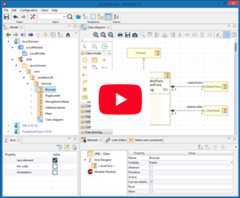
UML Modeler : Modelio is a first and foremost a modeling environment, supporting a wide range of models and diagrams, andproviding model assistance and consistency-checking features.
BPMN support integrated with UML : Modelio combines BPMN support and UML support in one tool, with dedicated diagrams to support businessprocess modeling.
Java code generator : The Java Designer module uses an RCP/Eclipse-style project file structure, and supports Java codegeneration and reverse, Javadoc generation and Java automation.
XMI import/export : Modelio provides an XMI import/export feature that enables you to exchange UML2 models between different tools.
HTML model publishing : With the HTML Publisher module, publish your models in HTML format.
Extension system : Modelio can be extended for any language, methodology or modeling technique just by adding modules to yourconfiguration. You can either use existing modules or else develop your own.
Scripting language support (Jython) : Modelio provides integrated support of the Jython scripting language, for online requests, smallscripts and macro definition.
UML2 : UML2 is a general-purpose modeling language from the OMG, used in the field of object-oriented software engineering.
BPMN2 : BPMN is a standard for business process modeling, providing a graphical notation for the specification of business processes.
Archimate : Archimate is an open and independent enterprise architecture modeling language to support the description, analysis andvisualization of architecture within and across business domains.
XMI :XMI is an OMG standard used in the exchange of metadata information via the XML language.
MDA : MDA is an OMG standard, which implements and uses model extensions in the development of software systems.
TOGAF :TOGAF is an enterprise architecture framework, providing a complete approach to enterprise information architecture design,planning, implementation and governance.
Here you will find a set of projects illustrating the main frameworks supported by Modelio.
To access example projects :
Download the desired project archive from the links below
In Modelio, use the "Import project from archive" function to load the project: File > Import Project …
Archimate : Discount Travel for ArchiMateThe 'Discount Travel' project is an example of how to model the enterprise architecture of a travel agency to manage their reservation system.
JavaDesigner : Java BrowserA simple HTML browser, based on a swing JEditorPane component.
SysML : The plantIn the Systems and Automation Department at Federal University of Santa Catarina (UFSC) there is an experimental unit of industrial automation that is used to demonstrate the operation of several control strategies using the same equipments and supervision tools.
UML : Shopping CartThis project contains the model for the Online Shopping Cart system, including all the models used to specify and realize the IT system.This model addresses the development of an online shopping cart system, that allows suppliers to sell their products directly online to customers. It is provided as a UML example covering the analysis of the business context and processes, and the design and deployment of a possible implementation.
To understand how to compile the Modelio Modeling tool from source,please refer to theBuildingModelio from Source Guide.
There are many ways to get involved in the Modelio community, onwhatever level you choose. For each type of contribution, we recommend acertain level of knowledge as a user (someone who has some knowledge ofthe Modelio tool, as well as modeling or standards such as UML, SOA,BPM, …) or a developer (someone with some knowledge of programming)
For more information, visit our community web page :https://www.modelio.org/community/get-involved.html
First you have to start Modelio by double-clicking on the Modelioshortcut. Once Modelio is started, go to 'File / Create a project…' orclick on the [ ] button.This will open a Project Creation dialog box:

Steps:
Enter a project name
Enter a description
You can choose whether to deploy the Java Designer module in yourproject by checking or not checking the Java project tickbox.
Click on "Create"

Key:
Model explorer (UML, BPMN, MDA, Requirements, …)
Diagram view
Diagrams explorer
Module view
Properties view
Symbol view

Key:
Save
Undo/Redo
Project Configurator: Project information, Work models, Libraries,Modules, Audit, URLs
Quick diagram creation
Diagram creation wizard
Advanced search tool
Perspectives: Change the layout of the views
Sort model elements

(Note: if you don’t see the Modelio layout above, but wish to continuewith this Quick Start, expand your project in the Model pane until yousee a folder icon with the same name as your project, and select "Creatediagram…" from the context menu, typically by right-clicking on thaticon.)
Key:
Choose the type of element you want to create from the diagram palette
Click in the diagram to position the new element. Click again on the element to rename it (or click on the F2 keyboard button)
From the UML model explorer
To create your first element, right-click on the root package and thenon 'Create element'. Choose the kind of UML/BPMN element you want tocreate:

Sibling creation
To create a series of elements, simply select the original element inthe model explorer, then click on sibling button as many times asnecessary. Each new element will be created empty and named with anincremental number. Sibling elements are created within the samecontainer.
Clone creation
To clone an element, simply select it in the UML/BPMN explorer, thenclick on clone button as many times as necessary. Each new element willbe created with the same sub-elements as the original one, and will benamed the same.
- Diagram creation
Click on the Diagram and matrix creation wizard icon in the main toolbar:
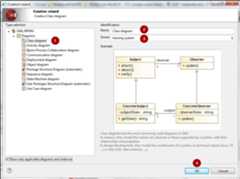
Steps:Select the kind of diagram you want to create
Enter a name
Select an owner for the diagram
Click on "OK" to create the diagram

Note: By default, the wizard shows the applicable diagrams for the selected model element. Click on the "Show only applicable diagrams andmatrices" to show all existing diagrams.
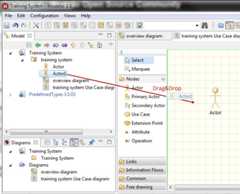
- Create elements in the diagram
To create elements in your diagram, you can either use the left hand side palette, or drag&drop existing elements from the UML explorer.
- Modify the graphic options
You can change the objects' graphic properties or the diagram’s properties itself. The symbol view offers several options to change thegraphic properties: color, font, line background, …
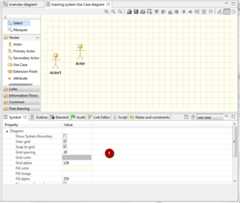
Key:Change the options in the Symbol view
- Change objects' graphic properties
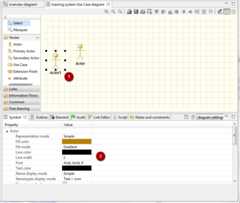
Key:Select a graphic element
Change the options in the Symbol view


About
Modelio is a modeling solution offering a wide range of functionalities based on the main standards of enterprise architecture, software development and systems engineering.
Topics
Resources
License
Uh oh!
There was an error while loading.Please reload this page.