- Notifications
You must be signed in to change notification settings - Fork3
Duoslow/zerotierIndicator
Folders and files
| Name | Name | Last commit message | Last commit date | |
|---|---|---|---|---|
Repository files navigation
I had to stop using Linux due to school and work. yes dual boot etc. I could continue to use Linux, but I don't have time to deal with it and using Linux is time-consuming and I don't have the time to spare for it right now. That's why I can't continue developing it, I want to write it from scratch in the future. because this code is really shitty. The more I look at the code, the more I want to delete it, so I can't continue developing it right now.
- Show online member count on icon
- Click to copy zerotier ip
- Updates members status on intervals
- Multiple network selection window
- Only show online members option
- Sorting system [WIP]
- Select all networks
- Context menu on icon
- Content auto windows height
- Change emojis to png (emoji system on kde is suck)
- Network selector theme fix
- Update interval 30s,1min+++
- Sometimes after reboot have duplicate list (idk why but it gets fixed when updates the list) (BUG)
- Managing (create-update network, member operations,etc,all available API features)
- Network specific icon color
- Notification (online-offline,copy)
There are three ways to install this widget in your KDE Plasma.
- Head over to the Plasma Add-On installer by going to:
Right click on Desktop,Dock or Panel -> Add Widgets -> Get New Widgets -> Search "Zerotier KDE Widget" and Install. - Download the
zerotier.plasmoidfile shared in this repo'srelease section or from the widget's KDE Storelink. After this, you can just do this:Right Click on Desktop -> Add Widgets -> Install from local file -> Point to the downloaded zerotier.plasmoid file. - Download the
zerotier.plasmoidfile shared in this repo'srelease section and run thiskpackagetool5 -t Plasma/Applet --install zerotier.plasmoid
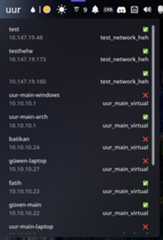
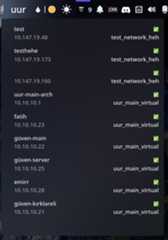
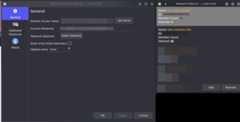

About
Zerotier KDE Widget
Topics
Resources
License
Uh oh!
There was an error while loading.Please reload this page.
Stars
Watchers
Forks
Packages0
No packages published