- Notifications
You must be signed in to change notification settings - Fork43
License
Azure-Samples/azure-ai-content-understanding-python
Folders and files
| Name | Name | Last commit message | Last commit date | |
|---|---|---|---|---|
Repository files navigation
Welcome! Content Understanding is a solution that analyzes and comprehends various media content—includingdocuments, images, audio, and video—and transforms it into structured, organized, and searchable data.
Content Understanding is now a Generally Available (GA) service with the release of the2025-11-01 API version.
- The samples in this repository default to the latest GA API version:
2025-11-01. - We will provide more samples for new functionalities in the GA API versions soon. For details on the updates in the current GA release, see theContent Understanding What's New Document page.
- As of November 2025, the
2025-11-01API version is now available in a broader range ofregions. - To access sample code for version
2025-05-01-preview, please check out the corresponding Git tag2025-05-01-previewor download it directly from therelease page. - To access sample code for version
2024-12-01-preview, please check out the corresponding Git tag2024-12-01-previewor download it directly from therelease page.
👉 If you are looking for.NET samples, check outthis repo.
You can run the samples in GitHub Codespaces or on your local machine. For a smoother, hassle-free experience, we recommend starting with Codespaces.
Run this repository virtually by using GitHub Codespaces, which opens a web-based VS Code directly in your browser.

After clicking the link above, follow these steps to set up the Codespace:
- Create a new Codespace by selecting the
mainbranch, your preferred Codespace region, and the 2-core machine type, as shown in the screenshot below.
- Once the Codespace is ready, open the terminal and follow the instructions in theConfigure Azure AI service resource section to set up a valid Content Understanding resource.

Ensure the following tools are installed:
Create a new directory named
azure-ai-content-understanding-pythonand clone this template into it using theazdCLI:azd init -t azure-ai-content-understanding-python
Alternatively, you can clone the repository using Git:
git clone https://github.com/Azure-Samples/azure-ai-content-understanding-python.gitcd azure-ai-content-understanding-pythonImportant: If you use
git clone, you must install Git LFS and rungit lfs pullto download sample files in thedatadirectory:git lfs installgit lfs pull
Set Up Dev Container Environment
Install the following tools that support development containers:
Visual Studio Code
Download and installVisual Studio Code.Dev Containers Extension
Install the "Dev Containers" extension from the VS Code Marketplace.
(Note: This extension was previously called "Remote - Containers" but has been renamed and integrated into Dev Containers.)Docker
InstallDocker Desktop for Windows, macOS, or Linux. Docker manages and runs the container environment.- Start Docker and ensure it is running in the background.
Open the project and start the Dev Container:
- Open the project folder in VS Code.
- Press
F1orCtrl+Shift+P, then type and select:Alternatively, click the green icon in the lower-left corner of VS Code and selectReopen in Container.Dev Containers: Reopen in Container - VS Code will detect the
.devcontainerfolder, build the development container, and install the necessary dependencies. 

First, create an Azure AI Foundry resource that will host both the Content Understanding service and the required model deployments.
- Follow the steps in theAzure Content Understanding documentation to create an Azure AI Foundry resource
- Get your Foundry resource's endpoint URL from Azure Portal:
- Go toAzure Portal
- Navigate to your Azure AI Foundry resource
- Go toResource Management >Keys and Endpoint
- Copy theEndpoint URL (typically
https://<your-resource-name>.services.ai.azure.com/)
After creating your Azure AI Foundry resource, you must grant yourself theCognitive Services User role to enable API calls for setting default GPT deployments:
- Go toAzure Portal
- Navigate to your Azure AI Foundry resource
- Go toAccess Control (IAM) in the left menu
- ClickAdd >Add role assignment
- Select theCognitive Services User role
- Assign it to yourself (or the user/service principal that will run the samples)
Note: This role assignment is required even if you are the owner of the resource. Without this role, you will not be able to call the Content Understanding API to configure model deployments for prebuilt analyzers.
prebuilt-documentSearch,prebuilt-audioSearch,prebuilt-videoSearchrequireGPT-4.1-mini andtext-embedding-3-large- Other prebuilt analyzers like
prebuilt-invoice,prebuilt-receiptrequireGPT-4.1 andtext-embedding-3-large
Deploy GPT-4.1:
- In Azure AI Foundry, go toDeployments >Deploy model >Deploy base model
- Search for and selectgpt-4.1
- Complete the deployment with your preferred settings
- Note the deployment name (by convention, use
gpt-4.1)
Deploy GPT-4.1-mini:
- In Azure AI Foundry, go toDeployments >Deploy model >Deploy base model
- Search for and selectgpt-4.1-mini
- Complete the deployment with your preferred settings
- Note the deployment name (by convention, use
gpt-4.1-mini)
Deploy text-embedding-3-large:
- In Azure AI Foundry, go toDeployments >Deploy model >Deploy base model
- Search for and selecttext-embedding-3-large
- Complete the deployment with your preferred settings
- Note the deployment name (by convention, use
text-embedding-3-large)
For more information on deploying models, seeDeploy models in Azure AI Foundry.
Choose one of the following options to configure your environment:
💡 Recommended: This approach uses Azure Active Directory (AAD) token authentication, which is safer and strongly recommended for production environments. You donot need to set
AZURE_AI_API_KEYin your.envfile when using this method.
Copy the sample environment file:
cp notebooks/.env.sample notebooks/.env
Open
notebooks/.envand fill in the required values. Replace<your-resource-name>with your actual resource name. If you used different deployment names in Step 2, update the deployment variables accordingly:AZURE_AI_ENDPOINT=https://<your-resource-name>.services.ai.azure.com/GPT_4_1_DEPLOYMENT=gpt-4.1GPT_4_1_MINI_DEPLOYMENT=gpt-4.1-miniTEXT_EMBEDDING_3_LARGE_DEPLOYMENT=text-embedding-3-large
Log in to Azure:
azd auth login
Copy the sample environment file:
cp notebooks/.env.sample notebooks/.env
Edit
notebooks/.envand set your credentials.
Replace
<your-resource-name>and<your-azure-ai-api-key>with your actual values. These can be found in your AI Services resource underResource Management >Keys and Endpoint.If you used different deployment names in Step 2, update the deployment variables accordingly:
AZURE_AI_ENDPOINT=https://<your-resource-name>.services.ai.azure.com/AZURE_AI_API_KEY=<your-azure-ai-api-key>GPT_4_1_DEPLOYMENT=gpt-4.1GPT_4_1_MINI_DEPLOYMENT=gpt-4.1-miniTEXT_EMBEDDING_3_LARGE_DEPLOYMENT=text-embedding-3-large
⚠️ Note: If you skip the token authentication step above, you must setAZURE_AI_API_KEYin your.envfile. Get your API key from Azure Portal by navigating to your Foundry resource >Resource Management >Keys and Endpoint.
Navigate to thenotebooks directory and open the sample notebook you want to explore. Since the Dev Container (either in Codespaces or your local environment) is pre-configured with the necessary dependencies, you can directly execute each step.
- Open any notebook from the
notebooks/directory. We recommend starting withcontent_extraction.ipynbto understand the basic concepts.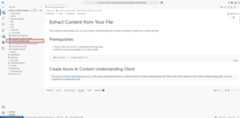
- Select the Kernel

- Select the Python Environment

- Run the notebook cells


Azure AI Content Understanding is a new Generative AI-basedAzure AI service designed to process and ingest content of any type—documents, images, audio, and video—into a user-defined output format. Content Understanding provides a streamlined way to analyze large volumes of unstructured data, accelerating time-to-value by generating output that can be integrated into automation and analytical workflows.
| File | Description |
|---|---|
| content_extraction.ipynb | Recommended starting point. Demonstrates how the Content Understanding API can extract semantic information from your files—for example, OCR with tables in documents, audio transcription, and face analysis in videos. |
| field_extraction.ipynb | Shows how to create an analyzer to extract fields from your files—e.g., invoice amounts in documents, counting people in images, names mentioned in audio, or summarizing videos. Customize fields by creating your own analyzer template. |
| classifier.ipynb | Demonstrates how to (1) create a classifier to categorize documents, (2) create a custom analyzer to extract specific fields, and (3) combine classifiers and analyzers to classify, optionally split, and analyze documents using a flexible processing pipeline. |
| analyzer_training.ipynb | Demonstrates how to improve field extraction performance by training the API with a few labeled samples.(Note: This feature is currently available only for document scenarios.) |
| management.ipynb | Demonstrates creating a minimal analyzer, listing all analyzers in your resource, and deleting analyzers you no longer need. |
Note: The following samples are currently targeting Preview.2 (API version
2025-05-01-preview) and will be updated to the GA API version (2025-11-01) soon.
Trademarks - This project may contain trademarks or logos for projects, products, or services. Authorized use of Microsoft trademarks or logos is subject to and must followMicrosoft's Trademark & Brand Guidelines. Use of Microsoft trademarks or logos in modified versions of this project must not cause confusion or imply Microsoft sponsorship. Any use of third-party trademarks or logos is subject to those third-party’s policies.
Data Collection - The software may collect information about you and your use of the software and send it to Microsoft. Microsoft may use this information to provide services and improve our products and services. You may turn off the telemetry as described in the repository. There are also some features in the software that may enable you and Microsoft to collect data from users of your applications. If you use these features, you must comply with applicable law, including providing appropriate notices to users of your applications together with a copy of Microsoft’s privacy statement. Our privacy statement is located athttps://go.microsoft.com/fwlink/?LinkID=824704. You can learn more about data collection and use in the help documentation and our privacy statement. Your use of the software operates as your consent to these practices.
About
Resources
License
Code of conduct
Contributing
Security policy
Uh oh!
There was an error while loading.Please reload this page.
Stars
Watchers
Forks
Packages0
Uh oh!
There was an error while loading.Please reload this page.