- Notifications
You must be signed in to change notification settings - Fork776
A Bootstrap table built with React.js
License
AllenFang/react-bootstrap-table
Folders and files
| Name | Name | Last commit message | Last commit date | |
|---|---|---|---|---|
Repository files navigation
react-bootstrap-table2 already released, this project will stop development after 2018Q2


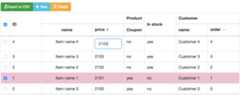
It's areact.js table for bootstrap, named react-bootstrap-table. It's a configurable, functional table component and make you build a Bootstrap Table more efficiency and easy in your React application, Howeverreact-bootstrap-table support these features:


- Striped, borderless, condensed table
- Column align, hidden, width, sort, title, styling, customization
- Table scrolling
- Cell format
- Pagination
- Row selection
- Table Search, Column filter
- Cell editor
- Insert & delete Row
- Export to CSV
- Rich function hooks
- Header column span
- Remote mode
- Row expand
- Key board navigation
Check theCHANGELOG for more detail release notes.
v4.0.0 released, this release mainly replacereact-toastr withreact-s-alert
- Replace
react-toastrbyreact-s-alert - Use
prop-types - Support
bootstrap@4andbootstrap@3both. If you use 4, please addversion='4'on<BootstrapTable> - No important features were implemented, most of bug fixes and improvement
Afterv2.4.4, we move the css files todist folder for allowing this repo can be hosted oncdnjs
react-bootstrap-table dependencies on react.js and Bootstrap 3, also written by ES6 and use gulp and browserify for building and bundling.
You can use the following commands to prepare development
$ git clone https://github.com/AllenFang/react-bootstrap-table.git$cd react-bootstrap-table$ npm installSee the examples forreact-bootstrap-table
$ npm start# see all examples, go to localhost:3004npm install react-bootstrap-table --save
To use react-bootstrap-table in your react app, you should import it first.You can do this in two ways:
With a module bundler likewebpack that supports either CommonJS or ES2015 modules, use as you would anything else.
You can include source maps on your build system to debug on development. Don't forget to Uglify on production.
// in ECMAScript 6import{BootstrapTable,TableHeaderColumn}from'react-bootstrap-table';// or in ECMAScript 5varReactBSTable=require('react-bootstrap-table');varBootstrapTable=ReactBSTable.BootstrapTable;varTableHeaderColumn=ReactBSTable.TableHeaderColumn;
In thedist folder you have a UMD bundle with source maps (react-bootstrap-table.js) as well as a minified version (react-bootstrap-table.min.js).
<scriptsrc="path/to/react-bootstrap-table/dist/react-bootstrap-table.min.js"/><script>varReactBsTable=window.BootstrapTable;//...</script>
The UMD build is also available onnpmcdn:
// source maps: https://npmcdn.com/react-bootstrap-table/dist/react-bootstrap-table.js.map<scriptsrc="https://npmcdn.com/react-bootstrap-table/dist/react-bootstrap-table.js"></script>// or use the min version<scriptsrc="https://npmcdn.com/react-bootstrap-table/dist/react-bootstrap-table.min.js"></script>
Finally, you need to import the css file to your app:
<!-- we still need bootstrap css --><linkrel="stylesheet"href="http://maxcdn.bootstrapcdn.com/bootstrap/3.3.2/css/bootstrap.min.css"><linkrel="stylesheet"href="./dist/react-bootstrap-table.min.css">
The CSS files you can find in the css folder.
// products will be presented by react-bootstrap-tablevarproducts=[{id:1,name:"Item name 1",price:100},{id:2,name:"Item name 2",price:100},........];// It's a data format example.functionpriceFormatter(cell,row){return'<i></i> '+cell;}React.render(<BootstrapTabledata={products}striped={true}hover={true}><TableHeaderColumndataField="id"isKey={true}dataAlign="center"dataSort={true}>Product ID</TableHeaderColumn><TableHeaderColumndataField="name"dataSort={true}>Product Name</TableHeaderColumn><TableHeaderColumndataField="price"dataFormat={priceFormatter}>Product Price</TableHeaderColumn></BootstrapTable>,document.getElementById("app"));
The example source codes are in theexamples folder folder. Run the following commands for a live demo.
$ git clone https://github.com/AllenFang/react-bootstrap-table.git$cd react-bootstrap-table$ npm install$ npm start# after start, open browser and go to http://localhost:3004
luqin
Help this project to integrate a better examples demo, add travis & badge, code formatting, give a lot of suggestions and bugs report.
Whien
Implement a lots of awesome new feature and also fix some bugs and enhancements.
Parth Prajapati
Help to check issues and give great and useful instructions.
khinlatt
Contribute export csv, multi-search and bug fixing.
dana
Contribute a new colum-filter design and great feedback given.
tbaeg
Bugs report and give some bootstrap and css suggestions actively.
bluedarker
Contribute the edit format & validation on cell editing and row insertion. Improve the custom styling.
Sofia Silva
Bug reports and fixing actively.
frontsideair
Fixing bugs and give improvement for functionality.
aaronhayes
Bugs report and enhance the cell formatting.
Reggino
Implement the TableDataSet component.
About
A Bootstrap table built with React.js
Topics
Resources
License
Contributing
Uh oh!
There was an error while loading.Please reload this page.
Stars
Watchers
Forks
Packages0
Uh oh!
There was an error while loading.Please reload this page.