- Notifications
You must be signed in to change notification settings - Fork0
EPI Judge - Preview Release
License
Algorithm-box/EPIJudge
Folders and files
| Name | Name | Last commit message | Last commit date | |
|---|---|---|---|---|
Repository files navigation
EPI Judge is meant to serve as a companion to our book Elements of Programming Interviews. Specifically, this project consists of the following:
- Stub programs for each problem in our book in Python, Java, and C++
- Test-cases that cover common corner-case and performance bugs
- Aframework for running these tests on your implementation on your machine
Here's how to download the judge:
$ git clone https://github.com/adnanaziz/EPIJudge.gitIf you do not havegit, here's a goodtutorial on installing git itself.
Check out these one minute videos to see how easy it is to get started with the judge.
$ python3 <program_name>.pyUse theMakefile.
Compile and run a specific program:
$ make <program_name>Example:
$ make AnagramsCompile and run the last program that you edited:
$ makeYou can manually compile and run all programs by directly invoking GCC and Clang.
$ g++ -pthread -std=c++14 -O3 -o anagrams anagrams.ccYou can also use the provided Makefile:make <program_name>. You can also use CMake with the provided CMakeLists.txt file.
$ makeThe default Makefile target is the last edited file.
$ make anagrams- How can I contact the authors?
Please feel free to send us questions and feedback -adnan.aziz@gmail.com andtsung.hsien.lee@gmail.com
- Help, my EPIJudge is not working, what should I do?
If you do have issues, e.g., with install or with buggy tests, feel free to reach out to us via email. Please be as detailed as you can: the ideal is if you can upload a screencast video of the issue to youtube; failing that, please upload screenshots. The more detailed the description of the problem and your environment (OS, language version, IDE and version), the easier it’ll be for us to help you.
- I'm new to programming, and don't have any kind of development environment, what should I do?
The IntelliJ Integrated Development environments described above are best-in-class, and have free versions that will work fine for the EPI Judge. They do not include the compilers. You can get the Java development environment fromOracle, and the Python development environment fromPython.org. For C++, you have multiple options. The simplest is to installVisualStudio, which includes both the IDE and the compiler. Google is a good resource for installation help.
What compilers are supported for judge?
- C++
- Linux
- GCC 5.4.1 and newer
- Clang 4.0 and newer
- OS X
- Apple LLVM Clang 9.0.0 and newer
- Windows
- Visual Studio 2017 and newer
- MinGW GCC 5.4.0 and newer
- LXSS (Windows Subsystem for Linux) GCC 5.4.0 and newer
- Linux
- Java
- Java 9 and newer
- Python
- Python 3.7 and newer
- C++
What compilers are supported for solutions?
- C++
- Linux
- GCC 7.0.0 and newer
- Clang 5.0 and newer
- OS X
- Apple LLVM Clang 9.0.0 and newer
- Windows
- Visual Studio 2017 and newer
- MinGW GCC 7.2.0 and newer
- LXSS (Windows Subsystem for Linux) GCC 7.2.0 and newer
- Java
- Java 9 and newer
- Python
- Python 3.6 and newer
- Linux
- C++
Let us know if you managed to compile with an older version.
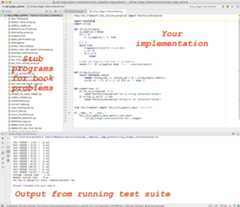
- What does the UI look like?
Take a look at this screenshot.
- How can I understand the test framework better?
The judge harness is fairly complex (but does not use nonstandard language features or libraries). You are welcome to study it, but we’d advise you against making changes to it (since it will lead to nasty merge conflicts when you update).
- How do I import the C++ project?
If you want to import the project into your favourite IDE, you probably need to create IDE project withCMake (no need to do it for CLion, it supports CMake out-of-the-box).
Here is an example recipe for generationg Visual Studio project (list of all CMake supported IDEs).After installing CMake, open your terminal, go toepi_judge_cpp folder and run following commands:
mkdir vscd vscmake -G "Visual Studio 15 2017" ..Then just openepi_judge_cpp/vs/epi_judge_cpp.sln solution with Visual Studio and it will load all EPI programs.
The fileindex.html in the root of this project tracks your progress through the problems. Specifically, there's an expanding tab for each chapter. Click on it, and you will see your progress, e.g., as below. This file gets updated each time you execute a program. You canuse this file to map book problems to stub programs.

A big shout-out to the hundreds of users who tried out the release over the past couple of months. As always, we never fail to be impressed by the enthusiasm and commitment our readers have; it has served to bring out the best in us.We all thankViacheslav Kroilov, for applying his exceptional software engineering skills to make EPI Judge a reality.
About
EPI Judge - Preview Release
Resources
License
Uh oh!
There was an error while loading.Please reload this page.
Stars
Watchers
Forks
Packages0
Languages
- C++41.9%
- Java18.7%
- Python18.1%
- JavaScript10.4%
- Makefile7.7%
- CSS2.7%
- Other0.5%