- Notifications
You must be signed in to change notification settings - Fork47
A concise stack-based golfing language
License
Adriandmen/05AB1E
Folders and files
| Name | Name | Last commit message | Last commit date | |
|---|---|---|---|---|
Repository files navigation
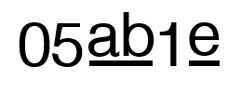

05AB1E is a golfing language. If the name05AB1E were interpreted as a hexadecimal number and converted to base64, it would result into "Base". I wanted to make a language which has an advantage in base conversion, but now it is more of an overall language.
You can try this language out yourself at:Try it online!. This interpreter is provided byDennisMitchell.
All existing commands can be found atInfo.txt or at theCommands Wiki page.
A golfing language is a language that specializes incode golf. That is a kind of programming competition where you strive to achieve the shortest byte count from all the participating languages.
A program in 05AB1E is just like any other program, it is stored in a file and then run withosabie.py. The python file will interpret the given file as 05AB1E code. A very easy to understand program is:
"Hello, World!"Which can be triedhere. This is a normalHello, World! program. Of course, the last quotation mark is a bit redundant, so we can actually leave that out. The interpreter willautomatically complete the string. That means that the following program:
"Hello, World!is also a validHello, World! program.
05AB1E uses a stack memory model. That means that everything will be operated using the stack. For example, if we want to multiply 2 different numbers, let's say4 and5, we can do the following in pseudo-stack language:
PUSH 4PUSH 5MULTIPLYAfter the firsttwo commands, the top two elements of the stack are4 and5. The multiply commandconsumes two elements and produces one in return. So, after the multiply command, the stack only contains the number20. So, how do we do this in 05AB1E?
To push an integer, just place any arbitrary integer in the progam. For example, if we want to push the number4, this would be our program:
405AB1E will scan the literal up till no more digits are found and pushes that onto the stack. To push a new number, just add another number after the first number, separated by a no-op (like a space). For example:
4 15This pushes the numbers4 and15. To multiply both numbers, just add the multiply command (or any other command fromInfo.txt):
4 15*You can try thathere. You can see that it outputs60.
We now have a basic understanding of the stack model, we can continue to what exactly gets printed. Normally, whennothing is printed, the top of the stack gets printed. In the following example:
1 2 3 4 5only the number5 gets printed. If something else gets printed before the program terminates, the top of the stack is not printed automatically anymore.
Now you have a basic understanding of how 05AB1E works! Tutorials will be added soon...
05AB1E is originally written inPython 3. That means that you need to have Python 3.4 or a later version in order to use this. 05AB1E doesn't make use of any external libraries outside the normal Python package, so Python 3.4 is theonly thing you need.
Create a new file where you want to store your program in (liketest.abe). Normally, an 05AB1E file ends with.abe, but any other file extension can also be used. To run it, do the following:
[path to Python 3] [path to osabie.py] [path to 05AB1E program]For example:
> python34.exe osabie.py test.abeOr a more official way (whereasinputs is a file with all inputs):
> python34.exe osabie.py test.abe < inputsIf run without the inputs file, the 05AB1E program reads the input from STDIN.
In addition, you can append the following arguments before running the 05AB1E file:
| Argument | Information |
|---|---|
-d or--debug | Activates thedebug flag. After each command is run, an update will be shown toSTDIN with the current stack, current command and additionally subprograms for loops, etc. |
-s or--safe | Activates thesafe mode. Web access, file access and commmands that can potentially harm a system will be restricted and skipped while executing the file. |
-c or--osabie | Reads the file as a file with a05AB1E encoding. If this flag is not activated, the file will be read as a normalUTF-8 file. |
-t or--time | Times the duration of executing the program. Given in seconds. |
-e or--eval | Evaluates the given string as 05AB1E code. |
About
A concise stack-based golfing language
Topics
Resources
License
Uh oh!
There was an error while loading.Please reload this page.
Stars
Watchers
Forks
Releases
Packages0
Uh oh!
There was an error while loading.Please reload this page.