Supercharging GitHub Actions with Job Summaries
You can now output and group custom Markdown content on the Actions run summary page.

The same familiar functionality that powers pull requests, issues, and README files has come to GitHub Actions! We’re thrilled to announce GitHub Actions Job Summaries, which allow for custom Markdown content on the run summary generated by each job. Custom Markdown content can be used for a variety of creative purposes, such as:
- Aggregating and displaying test results
- Generating reports
- Custom output independent of logs
Create summaries
Simply output Markdown content to a new environment variable we’ve introduced called$GITHUB_STEP_SUMMARY. Any Markdown content added to this file will then be displayed on the Actions run summary page. That’s it!
steps: - name: Adding markdown run: echo '### Hello world!🚀 ' >> $GITHUB_STEP_SUMMARY
The behavior for adding Job Summaries is very similar to how the$GITHUB_ENV variable is used to define environment variables.
To make it easier for Actions authors to generate Job Summaries, we’ve also added a new helper utility to the@actions/core npm package.
import * as core from '@actions/core' await core.summary .addHeading('Test Results') .addCodeBlock(generateTestResults(), "js") .addTable([ [{data: 'File', header: true}, {data: 'Result', header: true}], ['foo.js', 'Pass ✅'], ['bar.js', 'Fail ❌'], ['test.js', 'Pass ✅'] ]) .addLink('View staging deployment!', 'https://github.com') .write()With the new utility, authors can easily add individual lines or blocks of Markdown. We’ve also made it easy to generate tables, since we envision this being a very common scenario.
For more information, check out ourfull documentation for adding Job summaries.
Why these changes matter
Actions users have been asking for this type of functionality for a long time. User-generated content from Actions has previously been limited to logs and annotations. It can be difficult to aggregate and group lots of information. Annotations are important when it comes to highlighting things, like errors and warnings, and are not suited for rich output, like test summaries or build reports.
To get around these issues, we’ve even seen users manuallycreate check runs using our API using theGITHUB_TOKEN that is provided as part of a run, which leads to decreased productivity. It’s clear that there’s been a feature gap, forcing users to improvise with less than ideal solutions, which is why we’ve developed Job Summaries!

Endless possibilities with the power of Markdown
The same familiar functionality that powers pull requests, issues, and README files has come to Actions! Actions Job Summaries supportGitHub Flavored Markdown, which is incredibly powerful and allows users to create amazing workflows, as well as Actions to enhance their experience.
Below, are just a few examples of what we envision users doing with Job Summaries.
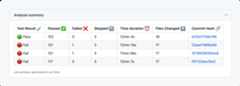
Running tests as part of CI is a very common scenario.
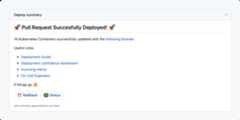
Good links and documentation can’t be understated.
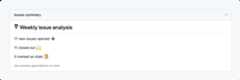
Raw HTML and emojis galore
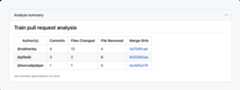
Markdown tables and hover cards with @mentions
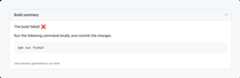
Code blocks with copy/paste functionality
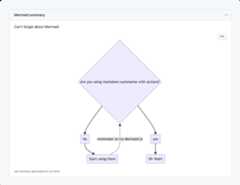
Mermaid, which hasrecently shipped, is very powerful!
We’d love to hear your thoughts!
At GitHub, we love to hear any feedback you have. Share your questions and comments with us in theGitHub Actions Community Forum.
We are excited about Job Summaries, and we can’t wait to see how the community will use them.
Thanks! ❤️
Tags:

More onGitHub Actions
Let’s talk about GitHub Actions
A look at how we rebuilt GitHub Actions’ core architecture and shipped long-requested upgrades to improve performance, workflow flexibility, reliability, and everyday developer experience.
What 986 million code pushes say about the developer workflow in 2025
Nearly a billion commits later, the way we ship code has changed for good. Here’s what the 2025 Octoverse data says about how devs really work now.
Related posts

The future of AI-powered software optimization (and how it can help your team)
We envision the future of AI-enabled tooling to look like near-effortless engineering for sustainability. We call it Continuous Efficiency.

Let’s talk about GitHub Actions
A look at how we rebuilt GitHub Actions’ core architecture and shipped long-requested upgrades to improve performance, workflow flexibility, reliability, and everyday developer experience.

GitHub Availability Report: November 2025
In November, we experienced three incidents that resulted in degraded performance across GitHub services.
Explore more from GitHub


We do newsletters, too
Discover tips, technical guides, and best practices in our biweekly newsletter just for devs.