
stat_summary() operates on uniquex ory;stat_summary_bin()operates on binnedx ory. They are more flexible versions ofstat_bin(): instead of just counting, they can compute anyaggregate.
Usage
stat_summary_bin( mapping=NULL, data=NULL, geom="pointrange", position="identity",..., fun.data=NULL, fun=NULL, fun.max=NULL, fun.min=NULL, fun.args=list(), bins=30, binwidth=NULL, breaks=NULL, na.rm=FALSE, orientation=NA, show.legend=NA, inherit.aes=TRUE, fun.y=deprecated(), fun.ymin=deprecated(), fun.ymax=deprecated())stat_summary( mapping=NULL, data=NULL, geom="pointrange", position="identity",..., fun.data=NULL, fun=NULL, fun.max=NULL, fun.min=NULL, fun.args=list(), na.rm=FALSE, orientation=NA, show.legend=NA, inherit.aes=TRUE, fun.y=deprecated(), fun.ymin=deprecated(), fun.ymax=deprecated())Arguments
- mapping
Set of aesthetic mappings created by
aes(). If specified andinherit.aes = TRUE(the default), it is combined with the default mappingat the top level of the plot. You must supplymappingif there is no plotmapping.- data
The data to be displayed in this layer. There are threeoptions:
If
NULL, the default, the data is inherited from the plotdata as specified in the call toggplot().A
data.frame, or other object, will override the plotdata. All objects will be fortified to produce a data frame. Seefortify()for which variables will be created.A
functionwill be called with a single argument,the plot data. The return value must be adata.frame, andwill be used as the layer data. Afunctioncan be createdfrom aformula(e.g.~ head(.x, 10)).- geom
The geometric object to use to display the data for this layer.When using a
stat_*()function to construct a layer, thegeomargumentcan be used to override the default coupling between stats and geoms. Thegeomargument accepts the following:A
Geomggproto subclass, for exampleGeomPoint.A string naming the geom. To give the geom as a string, strip thefunction name of the
geom_prefix. For example, to usegeom_point(),give the geom as"point".For more information and other ways to specify the geom, see thelayer geom documentation.
- position
A position adjustment to use on the data for this layer. Thiscan be used in various ways, including to prevent overplotting andimproving the display. The
positionargument accepts the following:The result of calling a position function, such as
position_jitter().This method allows for passing extra arguments to the position.A string naming the position adjustment. To give the position as astring, strip the function name of the
position_prefix. For example,to useposition_jitter(), give the position as"jitter".For more information and other ways to specify the position, see thelayer position documentation.
- ...
Other arguments passed on to
layer()'sparamsargument. Thesearguments broadly fall into one of 4 categories below. Notably, furtherarguments to thepositionargument, or aesthetics that are requiredcannot be passed through.... Unknown arguments that are not partof the 4 categories below are ignored.Static aesthetics that are not mapped to a scale, but are at a fixedvalue and apply to the layer as a whole. For example,
colour = "red"orlinewidth = 3. The geom's documentation has anAestheticssection that lists the available options. The 'required' aestheticscannot be passed on to theparams. Please note that while passingunmapped aesthetics as vectors is technically possible, the order andrequired length is not guaranteed to be parallel to the input data.When constructing a layer usinga
stat_*()function, the...argument can be used to pass onparameters to thegeompart of the layer. An example of this isstat_density(geom = "area", outline.type = "both"). The geom'sdocumentation lists which parameters it can accept.Inversely, when constructing a layer using a
geom_*()function, the...argument can be used to pass on parametersto thestatpart of the layer. An example of this isgeom_area(stat = "density", adjust = 0.5). The stat's documentationlists which parameters it can accept.The
key_glyphargument oflayer()may also be passed on through.... This can be one of the functions described askey glyphs, to change the display of the layer in the legend.
- fun.data
A function that is given the complete data and shouldreturn a data frame with variables
ymin,y, andymax.- fun.min, fun, fun.max
Alternatively, supply three individualfunctions that are each passed a vector of values and should return asingle number.
- fun.args
Optional additional arguments passed on to the functions.
- bins
Number of bins. Overridden by
binwidth. Defaults to 30.- binwidth
The width of the bins. Can be specified as a numeric valueor as a function that takes x after scale transformation as input andreturns a single numeric value. When specifying a function along with agrouping structure, the function will be called once per group.The default is to use the number of bins in
bins,covering the range of the data. You should always overridethis value, exploring multiple widths to find the best to illustrate thestories in your data.The bin width of a date variable is the number of days in each time; thebin width of a time variable is the number of seconds.
- breaks
Alternatively, you can supply a numeric vector giving the binboundaries. Overrides
binwidthandbins.- na.rm
If
FALSE, the default, missing values are removed witha warning. IfTRUE, missing values are silently removed.- orientation
The orientation of the layer. The default (
NA)automatically determines the orientation from the aesthetic mapping. In therare event that this fails it can be given explicitly by settingorientationto either"x"or"y". See theOrientation section for more detail.- show.legend
logical. Should this layer be included in the legends?
NA, the default, includes if any aesthetics are mapped.FALSEnever includes, andTRUEalways includes.It can also be a named logical vector to finely select the aesthetics todisplay. To include legend keys for all levels, evenwhen no data exists, useTRUE. IfNA, all levels are shown in legend,but unobserved levels are omitted.- inherit.aes
If
FALSE, overrides the default aesthetics,rather than combining with them. This is most useful for helper functionsthat define both data and aesthetics and shouldn't inherit behaviour fromthe default plot specification, e.g.annotation_borders().- fun.ymin, fun.y, fun.ymax
![[Deprecated]](/image.pl?url=https%3a%2f%2fggplot2.tidyverse.org%2freference%2f..%2freference%2ffigures%2flifecycle-deprecated.svg&f=jpg&w=240) Use theversions specified above instead.
Use theversions specified above instead.
Orientation
This geom treats each axis differently and, thus, can thus have two orientations. Often the orientation is easy to deduce from a combination of the given mappings and the types of positional scales in use. Thus, ggplot2 will by default try to guess which orientation the layer should have. Under rare circumstances, the orientation is ambiguous and guessing may fail. In that case the orientation can be specified directly using theorientation parameter, which can be either"x" or"y". The value gives the axis that the geom should run along,"x" being the default orientation you would expect for the geom.
Summary functions
You can either supply summary functions individually (fun,fun.max,fun.min), or as a single function (fun.data):
- fun.data
Complete summary function. Should take numeric vector asinput and return data frame as output
- fun.min
min summary function (should take numeric vector andreturn single number)
- fun
main summary function (should take numeric vector and returnsingle number)
- fun.max
max summary function (should take numeric vector andreturn single number)
A simple vector function is easiest to work with as you can return a singlenumber, but is somewhat less flexible. If your summary function computesmultiple values at once (e.g. min and max), usefun.data.
fun.data will receive data as if it was oriented along the x-axis andshould return a data.frame that corresponds to that orientation. The layerwill take care of flipping the input and output if it is oriented along they-axis.
If no aggregation functions are supplied, will default tomean_se().
See also
geom_errorbar(),geom_pointrange(),geom_linerange(),geom_crossbar() for geoms todisplay summarised data
Aesthetics
stat_summary() understands the following aesthetics. Required aesthetics are displayed in bold and defaults are displayed for optional aesthetics:
| • | x | |
| • | y | |
| • | group | → inferred |
Learn more about setting these aesthetics invignette("ggplot2-specs").
Examples
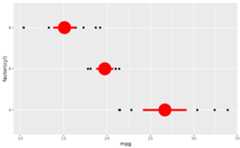
d<-ggplot(mtcars,aes(cyl,mpg))+geom_point()d+stat_summary(fun.data="mean_cl_boot", colour="red", linewidth=2, size=3)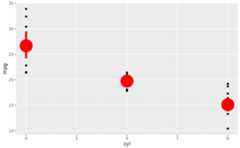 # Orientation follows the discrete axisggplot(mtcars,aes(mpg,factor(cyl)))+geom_point()+stat_summary(fun.data="mean_cl_boot", colour="red", linewidth=2, size=3)
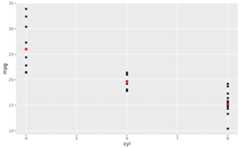
 # You can supply individual functions to summarise the value at# each x:d+stat_summary(fun="median", colour="red", size=2, geom="point")
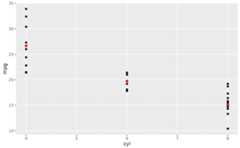
 d+stat_summary(fun="mean", colour="red", size=2, geom="point")
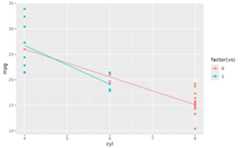
 d+aes(colour=factor(vs))+stat_summary(fun=mean, geom="line")
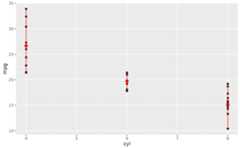
 d+stat_summary(fun=mean, fun.min=min, fun.max=max, colour="red")
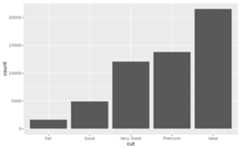
 d<-ggplot(diamonds,aes(cut))d+geom_bar()
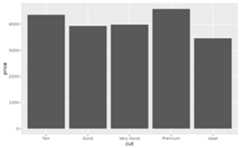
 d+stat_summary(aes(y=price), fun="mean", geom="bar")
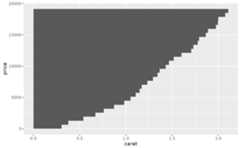
 # Orientation of stat_summary_bin is ambiguous and must be specified directlyggplot(diamonds,aes(carat,price))+stat_summary_bin(fun="mean", geom="bar", orientation='y')
 # \donttest{# Don't use ylim to zoom into a summary plot - this throws the# data awayp<-ggplot(mtcars,aes(cyl,mpg))+stat_summary(fun="mean", geom="point")p
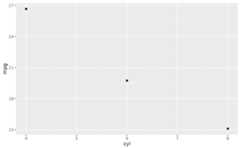 p+ylim(15,30)#>Warning:Removed 9 rows containing non-finite outside the scale range#> (`stat_summary()`).
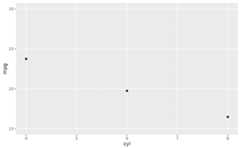 # Instead use coord_cartesianp+coord_cartesian(ylim=c(15,30))
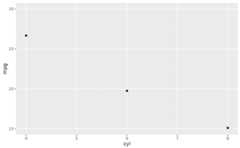 # A set of useful summary functions is provided from the Hmisc package:stat_sum_df<-function(fun,geom="crossbar",...){stat_summary(fun.data=fun, colour="red", geom=geom, width=0.2,...)}d<-ggplot(mtcars,aes(cyl,mpg))+geom_point()# The crossbar geom needs grouping to be specified when used with# a continuous x axis.d+stat_sum_df("mean_cl_boot", mapping=aes(group=cyl))
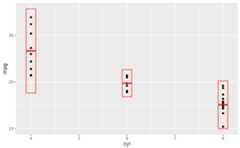
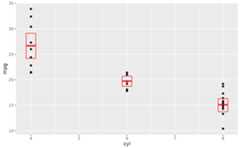 d+stat_sum_df("mean_sdl", mapping=aes(group=cyl))
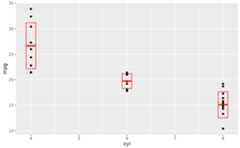
 d+stat_sum_df("mean_sdl", fun.args=list(mult=1), mapping=aes(group=cyl))
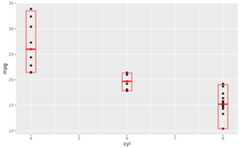
 d+stat_sum_df("median_hilow", mapping=aes(group=cyl))
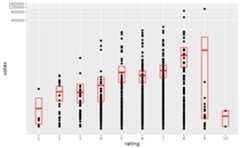
 # An example with highly skewed distributions:if(require("ggplot2movies")){set.seed(596)mov<-movies[sample(nrow(movies),1000),]m2<-ggplot(mov,aes(x=factor(round(rating)), y=votes))+geom_point()m2<-m2+stat_summary( fun.data="mean_cl_boot", geom="crossbar", colour="red", width=0.3)+xlab("rating")m2# Notice how the overplotting skews off visual perception of the mean# supplementing the raw data with summary statistics is _very_ important# Next, we'll look at votes on a log scale.# Transforming the scale means the data are transformed# first, after which statistics are computed:m2+scale_y_log10()# Transforming the coordinate system occurs after the# statistic has been computed. This means we're calculating the summary on the raw data# and stretching the geoms onto the log scale. Compare the widths of the# standard errors.m2+coord_transform(y="log10")}
 # }
# }