position_stack() stacks bars on top of each other;position_fill() stacks bars and standardises each stack to haveconstant height.
Arguments
- vjust
Vertical adjustment for geoms that have a position(like points or lines), not a dimension (like bars or areas). Set to
0to align with the bottom,0.5for the middle,and1(the default) for the top.- reverse
If
TRUE, will reverse the default stacking order.This is useful if you're rotating both the plot and legend.
Details
position_fill() andposition_stack() automatically stackvalues in reverse order of the group aesthetic, which for bar charts isusually defined by the fill aesthetic (the default group aesthetic is formedby the combination of all discrete aesthetics except for x and y). Thisdefault ensures that bar colours align with the default legend.
There are three ways to override the defaults depending on what you want:
Change the order of the levels in the underlying factor. Thiswill change the stacking order, and the order of keys in the legend.
Set the legend
breaksto change the order of the keyswithout affecting the stacking.Manually set the group aesthetic to change the stacking orderwithout affecting the legend.
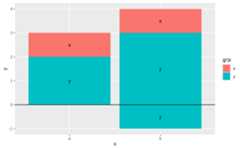
Stacking of positive and negative values are performed separately so thatpositive values stack upwards from the x-axis and negative values stackdownward.
Because stacking is performed after scale transformations, stacking withnon-linear scales gives distortions that easily lead to misinterpretations ofthe data. It is thereforediscouraged to use these position adjustments incombination with scale transformations, such as logarithmic or square rootscales.
See also
Seegeom_bar() andgeom_area() formore examples.
Other position adjustments:position_dodge(),position_identity(),position_jitter(),position_jitterdodge(),position_nudge()
Examples
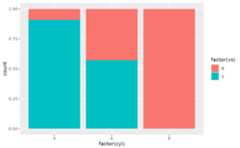
# Stacking and filling ------------------------------------------------------# Stacking is the default behaviour for most area plots.# Fill makes it easier to compare proportionsggplot(mtcars,aes(factor(cyl), fill=factor(vs)))+geom_bar()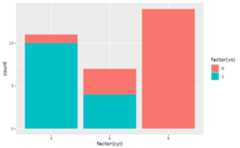 ggplot(mtcars,aes(factor(cyl), fill=factor(vs)))+geom_bar(position="fill")
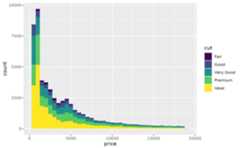
 ggplot(diamonds,aes(price, fill=cut))+geom_histogram(binwidth=500)
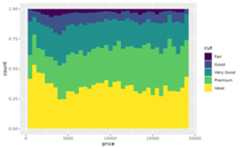
 ggplot(diamonds,aes(price, fill=cut))+geom_histogram(binwidth=500, position="fill")
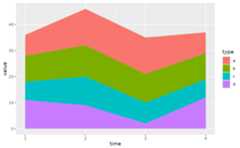
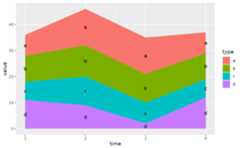
 # Stacking is also useful for time seriesset.seed(1)series<-data.frame( time=c(rep(1,4),rep(2,4),rep(3,4),rep(4,4)), type=rep(c('a','b','c','d'),4), value=rpois(16,10))ggplot(series,aes(time,value))+geom_area(aes(fill=type))
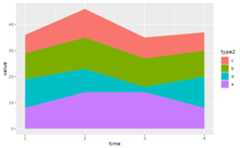
 # Stacking order ------------------------------------------------------------# The stacking order is carefully designed so that the plot matches# the legend.# You control the stacking order by setting the levels of the underlying# factor. See the forcats package for convenient helpers.series$type2<-factor(series$type, levels=c('c','b','d','a'))ggplot(series,aes(time,value))+geom_area(aes(fill=type2))
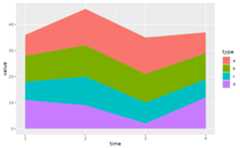
 # You can change the order of the levels in the legend using the scaleggplot(series,aes(time,value))+geom_area(aes(fill=type))+scale_fill_discrete(breaks=c('a','b','c','d'))
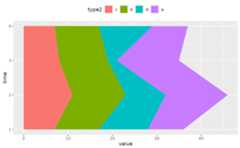
 # If you've flipped the plot, use reverse = TRUE so the levels# continue to matchggplot(series,aes(time,value))+geom_area(aes(fill=type2), position=position_stack(reverse=TRUE))+coord_flip()+theme(legend.position="top")
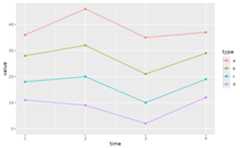
 # Non-area plots ------------------------------------------------------------# When stacking across multiple layers it's a good idea to always set# the `group` aesthetic in the ggplot() call. This ensures that all layers# are stacked in the same way.ggplot(series,aes(time,value, group=type))+geom_line(aes(colour=type), position="stack")+geom_point(aes(colour=type), position="stack")
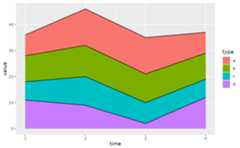
 ggplot(series,aes(time,value, group=type))+geom_area(aes(fill=type))+geom_line(aes(group=type), position="stack")
 # You can also stack labels, but the default position is suboptimal.ggplot(series,aes(time,value, group=type))+geom_area(aes(fill=type))+geom_text(aes(label=type), position="stack")
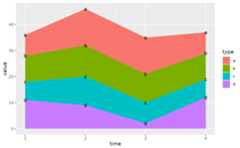 # You can override this with the vjust parameter. A vjust of 0.5# will center the labels inside the corresponding areaggplot(series,aes(time,value, group=type))+geom_area(aes(fill=type))+geom_text(aes(label=type), position=position_stack(vjust=0.5))
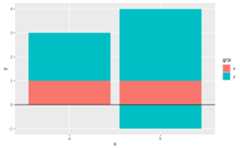
 # Negative values -----------------------------------------------------------df<-data.frame( x=rep(c("a","b"),2:3), y=c(1,2,1,3,-1), grp=c("x","y","x","y","y"))ggplot(data=df,aes(x,y, group=grp))+geom_col(aes(fill=grp), position=position_stack(reverse=TRUE))+geom_hline(yintercept=0)
 ggplot(data=df,aes(x,y, group=grp))+geom_col(aes(fill=grp))+geom_hline(yintercept=0)+geom_text(aes(label=grp), position=position_stack(vjust=0.5))