geom_segment() draws a straight line between points (x, y) and(xend, yend).geom_curve() draws a curved line. See the underlyingdrawing functiongrid::curveGrob() for the parameters thatcontrol the curve.
Usage
geom_segment( mapping=NULL, data=NULL, stat="identity", position="identity",..., arrow=NULL, arrow.fill=NULL, lineend="butt", linejoin="round", na.rm=FALSE, show.legend=NA, inherit.aes=TRUE)geom_curve( mapping=NULL, data=NULL, stat="identity", position="identity",..., curvature=0.5, angle=90, ncp=5, arrow=NULL, arrow.fill=NULL, lineend="butt", na.rm=FALSE, show.legend=NA, inherit.aes=TRUE)Arguments
- mapping
Set of aesthetic mappings created by
aes(). If specified andinherit.aes = TRUE(the default), it is combined with the default mappingat the top level of the plot. You must supplymappingif there is no plotmapping.- data
The data to be displayed in this layer. There are threeoptions:
If
NULL, the default, the data is inherited from the plotdata as specified in the call toggplot().A
data.frame, or other object, will override the plotdata. All objects will be fortified to produce a data frame. Seefortify()for which variables will be created.A
functionwill be called with a single argument,the plot data. The return value must be adata.frame, andwill be used as the layer data. Afunctioncan be createdfrom aformula(e.g.~ head(.x, 10)).- stat
The statistical transformation to use on the data for this layer.When using a
geom_*()function to construct a layer, thestatargument can be used to override the default coupling between geoms andstats. Thestatargument accepts the following:A
Statggproto subclass, for exampleStatCount.A string naming the stat. To give the stat as a string, strip thefunction name of the
stat_prefix. For example, to usestat_count(),give the stat as"count".For more information and other ways to specify the stat, see thelayer stat documentation.
- position
A position adjustment to use on the data for this layer. Thiscan be used in various ways, including to prevent overplotting andimproving the display. The
positionargument accepts the following:The result of calling a position function, such as
position_jitter().This method allows for passing extra arguments to the position.A string naming the position adjustment. To give the position as astring, strip the function name of the
position_prefix. For example,to useposition_jitter(), give the position as"jitter".For more information and other ways to specify the position, see thelayer position documentation.
- ...
Other arguments passed on to
layer()'sparamsargument. Thesearguments broadly fall into one of 4 categories below. Notably, furtherarguments to thepositionargument, or aesthetics that are requiredcannot be passed through.... Unknown arguments that are not partof the 4 categories below are ignored.Static aesthetics that are not mapped to a scale, but are at a fixedvalue and apply to the layer as a whole. For example,
colour = "red"orlinewidth = 3. The geom's documentation has anAestheticssection that lists the available options. The 'required' aestheticscannot be passed on to theparams. Please note that while passingunmapped aesthetics as vectors is technically possible, the order andrequired length is not guaranteed to be parallel to the input data.When constructing a layer usinga
stat_*()function, the...argument can be used to pass onparameters to thegeompart of the layer. An example of this isstat_density(geom = "area", outline.type = "both"). The geom'sdocumentation lists which parameters it can accept.Inversely, when constructing a layer using a
geom_*()function, the...argument can be used to pass on parametersto thestatpart of the layer. An example of this isgeom_area(stat = "density", adjust = 0.5). The stat's documentationlists which parameters it can accept.The
key_glyphargument oflayer()may also be passed on through.... This can be one of the functions described askey glyphs, to change the display of the layer in the legend.
- arrow
specification for arrow heads, as created by
grid::arrow().- arrow.fill
fill colour to use for the arrow head (if closed).
NULLmeans usecolouraesthetic.- lineend
Line end style (round, butt, square).
- linejoin
Line join style (round, mitre, bevel).
- na.rm
If
FALSE, the default, missing values are removed witha warning. IfTRUE, missing values are silently removed.- show.legend
logical. Should this layer be included in the legends?
NA, the default, includes if any aesthetics are mapped.FALSEnever includes, andTRUEalways includes.It can also be a named logical vector to finely select the aesthetics todisplay. To include legend keys for all levels, evenwhen no data exists, useTRUE. IfNA, all levels are shown in legend,but unobserved levels are omitted.- inherit.aes
If
FALSE, overrides the default aesthetics,rather than combining with them. This is most useful for helper functionsthat define both data and aesthetics and shouldn't inherit behaviour fromthe default plot specification, e.g.annotation_borders().- curvature
A numeric value giving the amount of curvature. Negative values produce left-hand curves, positive values produce right-hand curves, and zero produces a straight line.
- angle
A numeric value between 0 and 180, giving an amount to skew the control points of the curve. Values less than 90 skew the curve towards the start point and values greater than 90 skew the curve towards the end point.
- ncp
The number of control points used to draw the curve. More control points creates a smoother curve.
Details
Both geoms draw a single segment/curve per case. Seegeom_path() if youneed to connect points across multiple cases.
See also
geom_path() andgeom_line() for multi-segment lines and paths.
geom_spoke() for a segment parameterised by a location(x, y), and an angle and radius.
Aesthetics
geom_segment() understands the following aesthetics. Required aesthetics are displayed in bold and defaults are displayed for optional aesthetics:
| • | x | |
| • | y | |
| • | xendoryend | |
| • | alpha | →NA |
| • | colour | → viatheme() |
| • | group | → inferred |
| • | linetype | → viatheme() |
| • | linewidth | → viatheme() |
Learn more about setting these aesthetics invignette("ggplot2-specs").
Examples
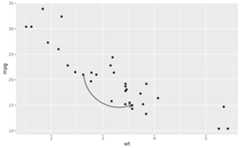
b<-ggplot(mtcars,aes(wt,mpg))+geom_point()df<-data.frame(x1=2.62, x2=3.57, y1=21.0, y2=15.0)b+geom_curve(aes(x=x1, y=y1, xend=x2, yend=y2, colour="curve"), data=df)+geom_segment(aes(x=x1, y=y1, xend=x2, yend=y2, colour="segment"), data=df)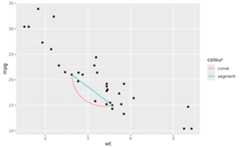 b+geom_curve(aes(x=x1, y=y1, xend=x2, yend=y2), data=df, curvature=-0.2)
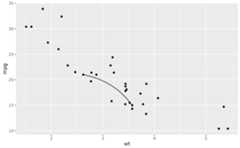 b+geom_curve(aes(x=x1, y=y1, xend=x2, yend=y2), data=df, curvature=1)
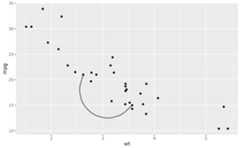 b+geom_curve(aes(x=x1, y=y1, xend=x2, yend=y2), data=df, arrow=arrow(length=unit(0.03,"npc")))
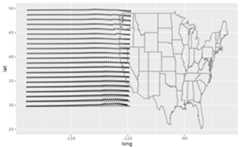
 if(requireNamespace('maps', quietly=TRUE)){ggplot(seals,aes(long,lat))+geom_segment(aes(xend=long+delta_long, yend=lat+delta_lat), arrow=arrow(length=unit(0.1,"cm")))+annotation_borders("state")}
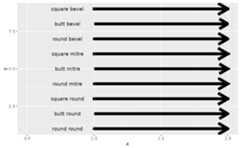
 # Use lineend and linejoin to change the style of the segmentsdf2<-expand.grid( lineend=c('round','butt','square'), linejoin=c('round','mitre','bevel'), stringsAsFactors=FALSE)df2<-data.frame(df2, y=1:9)ggplot(df2,aes(x=1, y=y, xend=2, yend=y, label=paste(lineend,linejoin)))+geom_segment( lineend=df2$lineend, linejoin=df2$linejoin, size=3, arrow=arrow(length=unit(0.3,"inches")))+geom_text(hjust='outside', nudge_x=-0.2)+xlim(0.5,2)
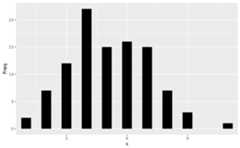
 # You can also use geom_segment to recreate plot(type = "h") :set.seed(1)counts<-as.data.frame(table(x=rpois(100,5)))counts$x<-as.numeric(as.character(counts$x))with(counts,plot(x,Freq, type="h", lwd=10))
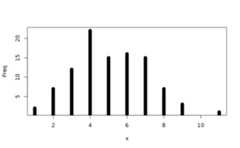 ggplot(counts,aes(x,Freq))+geom_segment(aes(xend=x, yend=0), linewidth=10, lineend="butt")