
Computes and draws kernel density estimate, which is a smoothed version ofthe histogram. This is a useful alternative to the histogram for continuousdata that comes from an underlying smooth distribution.
Usage
geom_density( mapping=NULL, data=NULL, stat="density", position="identity",..., outline.type="upper", lineend="butt", linejoin="round", linemitre=10, na.rm=FALSE, show.legend=NA, inherit.aes=TRUE)stat_density( mapping=NULL, data=NULL, geom="area", position="stack",..., orientation=NA, bw="nrd0", adjust=1, kernel="gaussian", n=512, trim=FALSE, bounds=c(-Inf,Inf), na.rm=FALSE, show.legend=NA, inherit.aes=TRUE)Arguments
- mapping
Set of aesthetic mappings created by
aes(). If specified andinherit.aes = TRUE(the default), it is combined with the default mappingat the top level of the plot. You must supplymappingif there is no plotmapping.- data
The data to be displayed in this layer. There are threeoptions:
If
NULL, the default, the data is inherited from the plotdata as specified in the call toggplot().A
data.frame, or other object, will override the plotdata. All objects will be fortified to produce a data frame. Seefortify()for which variables will be created.A
functionwill be called with a single argument,the plot data. The return value must be adata.frame, andwill be used as the layer data. Afunctioncan be createdfrom aformula(e.g.~ head(.x, 10)).- position
A position adjustment to use on the data for this layer. Thiscan be used in various ways, including to prevent overplotting andimproving the display. The
positionargument accepts the following:The result of calling a position function, such as
position_jitter().This method allows for passing extra arguments to the position.A string naming the position adjustment. To give the position as astring, strip the function name of the
position_prefix. For example,to useposition_jitter(), give the position as"jitter".For more information and other ways to specify the position, see thelayer position documentation.
- ...
Other arguments passed on to
layer()'sparamsargument. Thesearguments broadly fall into one of 4 categories below. Notably, furtherarguments to thepositionargument, or aesthetics that are requiredcannot be passed through.... Unknown arguments that are not partof the 4 categories below are ignored.Static aesthetics that are not mapped to a scale, but are at a fixedvalue and apply to the layer as a whole. For example,
colour = "red"orlinewidth = 3. The geom's documentation has anAestheticssection that lists the available options. The 'required' aestheticscannot be passed on to theparams. Please note that while passingunmapped aesthetics as vectors is technically possible, the order andrequired length is not guaranteed to be parallel to the input data.When constructing a layer usinga
stat_*()function, the...argument can be used to pass onparameters to thegeompart of the layer. An example of this isstat_density(geom = "area", outline.type = "both"). The geom'sdocumentation lists which parameters it can accept.Inversely, when constructing a layer using a
geom_*()function, the...argument can be used to pass on parametersto thestatpart of the layer. An example of this isgeom_area(stat = "density", adjust = 0.5). The stat's documentationlists which parameters it can accept.The
key_glyphargument oflayer()may also be passed on through.... This can be one of the functions described askey glyphs, to change the display of the layer in the legend.
- outline.type
Type of the outline of the area;
"both"draws both theupper and lower lines,"upper"/"lower"draws the respective lines only."full"draws a closed polygon around the area.- lineend
Line end style (round, butt, square).
- linejoin
Line join style (round, mitre, bevel).
- linemitre
Line mitre limit (number greater than 1).
- na.rm
If
FALSE, the default, missing values are removed witha warning. IfTRUE, missing values are silently removed.- show.legend
logical. Should this layer be included in the legends?
NA, the default, includes if any aesthetics are mapped.FALSEnever includes, andTRUEalways includes.It can also be a named logical vector to finely select the aesthetics todisplay. To include legend keys for all levels, evenwhen no data exists, useTRUE. IfNA, all levels are shown in legend,but unobserved levels are omitted.- inherit.aes
If
FALSE, overrides the default aesthetics,rather than combining with them. This is most useful for helper functionsthat define both data and aesthetics and shouldn't inherit behaviour fromthe default plot specification, e.g.annotation_borders().- geom, stat
Use to override the default connection between
geom_density()andstat_density(). For more information aboutoverriding these connections, see how thestat andgeom arguments work.- orientation
The orientation of the layer. The default (
NA)automatically determines the orientation from the aesthetic mapping. In therare event that this fails it can be given explicitly by settingorientationto either"x"or"y". See theOrientation section for more detail.- bw
The smoothing bandwidth to be used.If numeric, the standard deviation of the smoothing kernel.If character, a rule to choose the bandwidth, as listed in
stats::bw.nrd(). Note that automatic calculation of the bandwidth doesnot take weights into account.- adjust
A multiplicate bandwidth adjustment. This makes it possibleto adjust the bandwidth while still using the a bandwidth estimator.For example,
adjust = 1/2means use half of the default bandwidth.- kernel
Kernel. See list of available kernels in
density().- n
number of equally spaced points at which the density is to beestimated, should be a power of two, see
density()fordetails- trim
If
FALSE, the default, each density is computed on thefull range of the data. IfTRUE, each density is computed over therange of that group: this typically means the estimated x values willnot line-up, and hence you won't be able to stack density values.This parameter only matters if you are displaying multiple densities inone plot or if you are manually adjusting the scale limits.- bounds
Known lower and upper bounds for estimated data. Default
c(-Inf, Inf)means that there are no (finite) bounds. If any bound isfinite, boundary effect of default density estimation will be corrected byreflecting tails outsideboundsaround their closest edge. Data pointsoutside of bounds are removed with a warning.
Orientation
This geom treats each axis differently and, thus, can thus have two orientations. Often the orientation is easy to deduce from a combination of the given mappings and the types of positional scales in use. Thus, ggplot2 will by default try to guess which orientation the layer should have. Under rare circumstances, the orientation is ambiguous and guessing may fail. In that case the orientation can be specified directly using theorientation parameter, which can be either"x" or"y". The value gives the axis that the geom should run along,"x" being the default orientation you would expect for the geom.
Computed variables
These are calculated by the 'stat' part of layers and can be accessed withdelayed evaluation.
after_stat(density)
density estimate.after_stat(count)
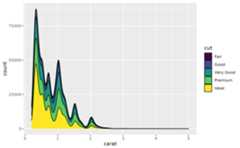
density * number of points - useful for stacked density plots.after_stat(wdensity)
density * sum of weights. In absence of weights, the same ascount.after_stat(scaled)
density estimate, scaled to maximum of 1.after_stat(n)
number of points.after_stat(ndensity)
alias forscaled, to mirror the syntax ofstat_bin().
See also
Seegeom_histogram(),geom_freqpoly() forother methods of displaying continuous distribution.Seegeom_violin() for a compact density display.
Aesthetics
geom_density() understands the following aesthetics. Required aesthetics are displayed in bold and defaults are displayed for optional aesthetics:
| • | x | |
| • | y | |
| • | alpha | →NA |
| • | colour | → viatheme() |
| • | fill | → viatheme() |
| • | group | → inferred |
| • | linetype | → viatheme() |
| • | linewidth | → viatheme() |
| • | weight | →1 |
Learn more about setting these aesthetics invignette("ggplot2-specs").
Examples
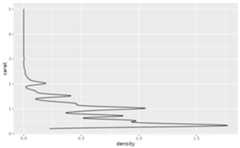
ggplot(diamonds,aes(carat))+geom_density()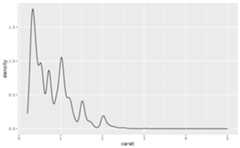 # Map the values to y to flip the orientationggplot(diamonds,aes(y=carat))+geom_density()
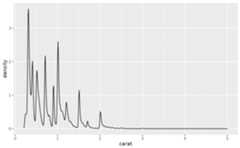
 ggplot(diamonds,aes(carat))+geom_density(adjust=1/5)
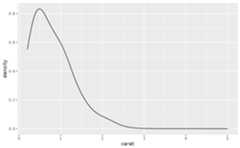
 ggplot(diamonds,aes(carat))+geom_density(adjust=5)
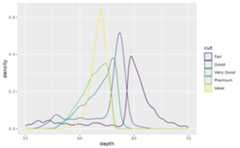
 ggplot(diamonds,aes(depth, colour=cut))+geom_density()+xlim(55,70)#>Warning:Removed 45 rows containing non-finite outside the scale range#> (`stat_density()`).
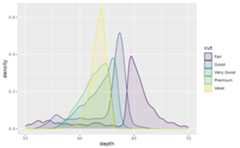
 ggplot(diamonds,aes(depth, fill=cut, colour=cut))+geom_density(alpha=0.1)+xlim(55,70)#>Warning:Removed 45 rows containing non-finite outside the scale range#> (`stat_density()`).
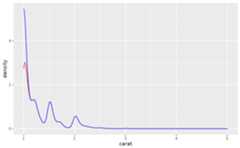
 # Use `bounds` to adjust computation for known data limitsbig_diamonds<-diamonds[diamonds$carat>=1,]ggplot(big_diamonds,aes(carat))+geom_density(color='red')+geom_density(bounds=c(1,Inf), color='blue')
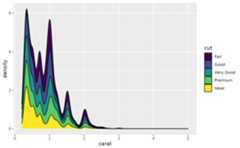
 # \donttest{# Stacked density plots: if you want to create a stacked density plot, you# probably want to 'count' (density * n) variable instead of the default# density# Loses marginal densitiesggplot(diamonds,aes(carat, fill=cut))+geom_density(position="stack")
 # Preserves marginal densitiesggplot(diamonds,aes(carat,after_stat(count), fill=cut))+geom_density(position="stack")
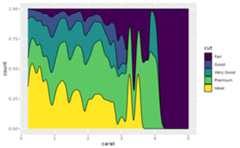
 # You can use position="fill" to produce a conditional density estimateggplot(diamonds,aes(carat,after_stat(count), fill=cut))+geom_density(position="fill")
 # }
# }