Mostaesthetics are mapped from variables found in the data.Sometimes, however, you want to delay the mapping until later in therendering process. ggplot2 has three stages of the data that you can mapaesthetics from, and three functions to control at which stage aestheticsshould be evaluated.
after_stat() replaces the old approaches of using eitherstat(), e.g.stat(density), or surrounding the variable names with.., e.g...density...
Usage
# These functions can be used inside the `aes()` function# used as the `mapping` argument in layers, for example:# geom_density(mapping = aes(y = after_stat(scaled)))after_stat(x)after_scale(x)from_theme(x)stage(start=NULL, after_stat=NULL, after_scale=NULL)Arguments
- x
<
data-masking> An aesthetic expressionusing variables calculated by the stat (after_stat()) or layer aesthetics(after_scale()).- start
<
data-masking> An aestheticexpression using variables from the layer data.- after_stat
<
data-masking> An aestheticexpression using variables calculated by the stat.- after_scale
<
data-masking> An aestheticexpression using layer aesthetics.
Staging
Below follows an overview of the three stages of evaluation and how aestheticevaluation can be controlled.
Stage 1: direct input at the start
The default is to map at the beginning, using the layer data provided bythe user. If you want to map directly from the layer data you should not doanything special. This is the only stage where the original layer data canbe accessed.
# 'x' and 'y' are mapped directlyggplot(mtcars)+geom_point(aes(x=mpg, y=disp))Stage 2: after stat transformation
The second stage is after the data has been transformed by the layerstat. The most common example of mapping from stat transformed data is theheight of bars ingeom_histogram(): the height does not come from avariable in the underlying data, but is instead mapped to thecountcomputed bystat_bin(). In order to map from stat transformed data youshould use theafter_stat() function to flag that evaluation of theaesthetic mapping should be postponed until after stat transformation.Evaluation after stat transformation will have access to the variablescalculated by the stat, not the original mapped values. The 'computedvariables' section in each stat lists which variables are available toaccess.
# The 'y' values for the histogram are computed by the statggplot(faithful,aes(x=waiting))+geom_histogram()# Choosing a different computed variable to display, matching up the# histogram with the density plotggplot(faithful,aes(x=waiting))+geom_histogram(aes(y=after_stat(density)))+geom_density()Stage 3: after scale transformation
The third and last stage is after the data has been transformed andmapped by the plot scales. An example of mapping from scaled data couldbe to use a desaturated version of the stroke colour for fill. You shoulduseafter_scale() to flag evaluation of mapping for after data has beenscaled. Evaluation after scaling will only have access to the finalaesthetics of the layer (including non-mapped, default aesthetics).
# The exact colour is known after scale transformationggplot(mpg,aes(cty, colour=factor(cyl)))+geom_density()# We re-use colour properties for the fill without a separate fill scaleggplot(mpg,aes(cty, colour=factor(cyl)))+geom_density(aes(fill=after_scale(alpha(colour,0.3))))Complex staging
Sometimes, you may want to map the same aesthetic multiple times, e.g. mapx to a data column at the start for the layer stat, but remap it later toa variable from the stat transformation for the layer geom. Thestage()function allows you to control multiple mappings for the same aestheticacross all three stages of evaluation.
# Use stage to modify the scaled fillggplot(mpg,aes(class,hwy))+geom_boxplot(aes(fill=stage(class, after_scale=alpha(fill,0.4))))# Using data for computing summary, but placing label elsewhere.# Also, we're making our own computed variables to use for the label.ggplot(mpg,aes(class,displ))+geom_violin()+stat_summary(aes( y=stage(displ, after_stat=8), label=after_stat(paste(mean,"±",sd))), geom="text", fun.data=~round(data.frame(mean=mean(.x), sd=sd(.x)),2))Conceptually,aes(x) is equivalent toaes(stage(start = x)), andaes(after_stat(count)) is equivalent toaes(stage(after_stat = count)),and so on.stage() is most useful when at least two of its arguments arespecified.
Theme access
Thefrom_theme() function can be used to acces theelement_geom()fields of thetheme(geom) argument. Usingaes(colour = from_theme(ink))andaes(colour = from_theme(accent)) allows swapping between foreground andaccent colours.
Examples
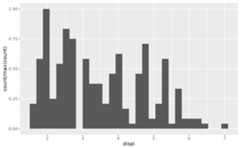
# Default histogram displayggplot(mpg,aes(displ))+geom_histogram(aes(y=after_stat(count)))#> `stat_bin()` using `bins = 30`. Pick better value `binwidth`.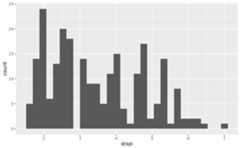 # Scale tallest bin to 1ggplot(mpg,aes(displ))+geom_histogram(aes(y=after_stat(count/max(count))))#> `stat_bin()` using `bins = 30`. Pick better value `binwidth`.
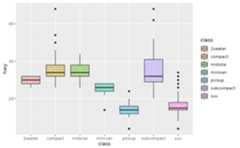
 # Use a transparent version of colour for fillggplot(mpg,aes(class,hwy))+geom_boxplot(aes(colour=class, fill=after_scale(alpha(colour,0.4))))
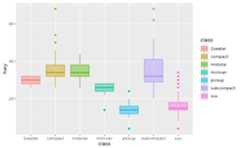 # Use stage to modify the scaled fillggplot(mpg,aes(class,hwy))+geom_boxplot(aes(fill=stage(class, after_scale=alpha(fill,0.4))))
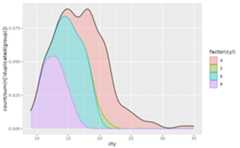
 # Making a proportional stacked density plotggplot(mpg,aes(cty))+geom_density(aes( colour=factor(cyl), fill=after_scale(alpha(colour,0.3)), y=after_stat(count/sum(n[!duplicated(group)]))), position="stack", bw=1)+geom_density(bw=1)
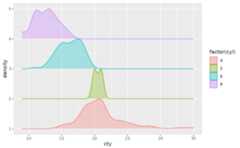
 # Imitating a ridgeline plotggplot(mpg,aes(cty, colour=factor(cyl)))+geom_ribbon( stat="density", outline.type="upper",aes( fill=after_scale(alpha(colour,0.3)), ymin=after_stat(group), ymax=after_stat(group+ndensity)))
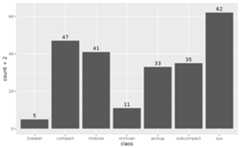
 # Labelling a bar plotggplot(mpg,aes(class))+geom_bar()+geom_text(aes( y=after_stat(count+2), label=after_stat(count)), stat="count")
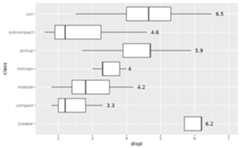
 # Labelling the upper hinge of a boxplot,# inspired by June Choeggplot(mpg,aes(displ,class))+geom_boxplot(outlier.shape=NA)+geom_text(aes( label=after_stat(xmax), x=stage(displ, after_stat=xmax)), stat="boxplot", hjust=-0.5)